From this post, learn how to improve website speed, performance, and security by optimizing images, enabling caching, and using strong security measures.
Website Speed, Performance, and Security Explained
Website speed is how quickly a web page loads and becomes usable. Google introduced Core Web Vitals in 2021 as a ranking signal, measuring Largest Contentful Paint (LCP), Interaction to Next Paint (INP), and Cumulative Layout Shift (CLS) to evaluate user experience. Faster websites improve visitor satisfaction, increase conversions, and reduce bounce rates.
Website performance is the overall efficiency of a site, including loading speed, responsiveness, stability, and server reliability. Performance depends on factors such as optimized images, clean code, browser caching, content delivery networks (CDNs), and fast web hosting.
Website security protects websites, users, and data from cyber threats such as hacking, malware, phishing, and data breaches. Common security measures include HTTPS encryption using SSL/TLS certificates, strong passwords, multi-factor authentication (MFA), regular software updates, firewalls, and routine backups. Google Chrome has labeled non-HTTPS websites as “Not Secure” since July 2018, encouraging website owners to adopt encrypted connections.
Core Elements and Problems That Affect Website Speed and Performance
Several core elements determine website speed. Web hosting is the foundation. A fast server with SSD or NVMe storage, HTTP/2 or HTTP/3 support, and the latest PHP version can significantly reduce loading time. Images are another major factor. Large, uncompressed images often account for over 50% of a webpage’s total size, making compression and modern formats like WebP or AVIF essential.
JavaScript and CSS files also affect performance. Unused code, large libraries, and render-blocking resources delay page loading. Minification, code splitting, and deferred loading improve performance. Browser caching and a Content Delivery Network (CDN) reduce latency by storing files closer to visitors in different regions and countries.
Database efficiency, plugins, third-party scripts, and excessive HTTP requests can also slow a website. On content management systems such as WordPress, poorly coded themes or too many plugins often become performance bottlenecks.
Google evaluates real-world page experience through three Core Web Vitals. A good page should load its main content within 2.5 seconds, respond to user interaction in under 200 milliseconds, and maintain a Cumulative Layout Shift score below 0.1.
1. Oversized and Unoptimized Images
Images are often the heaviest website resources. Uploading a 4 MB photograph when the page displays it at 600 pixels wastes bandwidth and increases loading time.
Weak code:
<img src="large-photo.jpg">Improved code:
<img
  src="photo.webp"
  width="600"
  height="400"
  loading="lazy"
  alt="Website performance dashboard">
WebP or AVIF images generally require fewer bytes than traditional formats. Adding width and height also reserves space before the image loads, reducing unexpected layout movement.
2. Render-Blocking JavaScript
A browser normally reads HTML from top to bottom. A large script placed inside the page header can stop HTML processing until the file is downloaded and executed.
Weak code:
<script src="large-script.js"></script>Improved code:
<script src="large-script.js" defer></script>The defer attribute allows HTML parsing to continue while the script downloads. Remove unused libraries, split large JavaScript bundles, and delay chat widgets, advertisements, trackers, and social-media embeds until necessary.
3. Missing Browser Caching
Without caching, returning visitors may download the same CSS, JavaScript, fonts, and images repeatedly.
Apache example:
<IfModule mod_expires.c>
  ExpiresActive On
  ExpiresByType image/webp "access plus 1 year"
  ExpiresByType text/css "access plus 1 month"
  ExpiresByType application/javascript "access plus 1 month"
</IfModule>
Use versioned filenames, such as style.v2.css, whenever cached resources change.
4. Uncompressed Files
HTML, CSS, JavaScript, SVG, and JSON are text-based resources that should be compressed before transmission.
Nginx example:
gzip on;
gzip_types text/css application/javascript application/json image/svg+xml;
Brotli may provide stronger compression when supported by the server and browser.
5. Poor Loading Priority
The page’s main image should load early, while below-the-fold images can wait.
<link rel="preload" as="image" href="/hero.webp">Do not preload every file. Excessive preloading competes for bandwidth and can delay more important resources.
6. Weak Connection and Security Configuration
Every production website should use HTTPS. OWASP explains that correctly configured security headers can reduce risks including cross-site scripting, clickjacking, and information disclosure.
add_header Strict-Transport-Security "max-age=31536000" always;
add_header X-Content-Type-Options "nosniff" always;
add_header Content-Security-Policy "default-src 'self'" always;
Test policies before enforcing them because an incorrect Content Security Policy can block legitimate scripts or images.
Modern servers can also support HTTP/2 or HTTP/3. HTTP/3 uses QUIC, provides independent streams and incorporates TLS 1.3, helping prevent one delayed stream from stopping unrelated streams.
Test mobile and desktop pages with PageSpeed Insights. It combines Lighthouse laboratory testing with Chrome User Experience Report data collected from real users over a rolling 28-day period.
Its speed, technical structure, mobile experience, security, and hosting quality determine how smoothly it works for visitors and search engines.
Google measures user experience through three Core Web Vitals. A good website should load its main content within 2.5 seconds using Largest Contentful Paint, respond to user actions within 200 milliseconds using Interaction to Next Paint, and maintain a Cumulative Layout Shift score of 0.1 or less. These results should be achieved for at least 75% of page visits on mobile and desktop devices.
Website speed mainly depends on image sizes, JavaScript, CSS, fonts, plugins, server response time, caching and content delivery networks. Heavy JavaScript is especially demanding because browsers must download, parse and execute it, which can slow lower-powered mobile devices.
Mobile usability is equally important. Google uses the mobile version of a website for indexing and ranking, making responsive design, readable text and easy navigation essential.
Security also affects performance and trust. Websites should use HTTPS with a valid TLS certificate, install security updates and configure headers such as Content-Security-Policy. OWASP says properly configured HTTP security headers can reduce risks including cross-site scripting, clickjacking and information disclosure.
2. Slow Server Response
Your hosting server must process a visitor’s request before the browser can display the page. Cheap hosting, overloaded servers, inefficient database queries, limited memory, or distant server locations can increase response time.
Use reliable hosting, server-side caching, database optimization, and a content delivery network. A CDN stores copies of website files in multiple geographic regions, allowing visitors to receive content from a nearby server.
3. Too Much JavaScript
Heavy JavaScript can block the browser’s main processing thread. This may cause menus, forms, search boxes, and purchase buttons to respond slowly.
Remove unused scripts, split large JavaScript files, defer non-critical code, and limit third-party tools such as advertising scripts, chat widgets, trackers, and social-media embeds.
4. Render-Blocking CSS and Fonts
Large stylesheets and external fonts can prevent visible content from appearing quickly. Loading many font families and weights also creates extra network requests.
Minify CSS, load critical styles first, remove unused rules, preload essential fonts, and use system fonts when appropriate.
5. Missing Browser and Server Caching
Without caching, repeat visitors may download the same logos, stylesheets, scripts, and images again. This wastes bandwidth and increases loading time.
Configure browser cache headers and use page, object, and database caching where supported.
6. Layout Shifts
A layout shift happens when visible content suddenly moves after the page begins loading. Common causes include images without dimensions, late-loading advertisements, cookie banners, web fonts, and dynamically inserted content.
Google measures this problem through Cumulative Layout Shift. A good CLS score is below 0.1.
7. Outdated Network Technology
Websites limited to older HTTP connections may handle multiple file requests less efficiently. HTTP/2 supports concurrent requests, while HTTP/3 uses independent QUIC streams so packet loss affecting one stream does not automatically stop others.
8. Security Misconfiguration
Default passwords, unnecessary services, exposed error messages, incorrect permissions, outdated components, and missing security headers can create serious risks.
In the OWASP Top 10:2025, security misconfiguration ranked second. OWASP reported that 3% of tested applications contained at least one related weakness.
Core Elements of Website Security
Website security is the combination of tools, settings, and daily practices used to protect a website, its visitors, and stored data from cyberattacks.
It is not only an issue for banks, governments, or large companies. Blogs, online stores, news websites, and small-business sites can also be targeted through outdated software, stolen passwords, insecure plugins, or incorrect server settings.
Verizon’s 2025 Data Breach Investigations Report examined 22,052 security incidents, including 12,195 confirmed data breaches. Vulnerability exploitation accounted for 20% of breaches, showing why regular updates and secure configurations matter.
1. HTTPS and Data Encryption
HTTPS protects information travelling between a visitor’s browser and the website server.
It uses Transport Layer Security, or TLS, to reduce the risk of eavesdropping, data tampering, and message forgery. TLS 1.3 was formally published as RFC 8446 in August 2018. Older TLS 1.0 and TLS 1.1 versions were officially deprecated in March 2021.
Every website should install a valid SSL/TLS certificate, redirect HTTP pages to HTTPS, and avoid mixed content such as insecure images or scripts.
HTTPS may also support search visibility. Google announced HTTPS as a lightweight ranking signal on August 7, 2014.
2. Strong Authentication and Access Control
Website administrators should use unique passwords and multifactor authentication, or MFA.
MFA requires an additional verification method beyond a password, making stolen login details less useful to attackers. CISA recommends MFA for protecting business accounts and sensitive data.
Access should also follow the principle of least privilege. Writers should not receive administrator permissions unless they genuinely need them.
Broken access control remains one of the most serious web application risks identified by OWASP. It can allow unauthorized users to view, change, or delete restricted information.
3. Regular Software Updates
Website owners must update the content management system, themes, plugins, server software, databases, and third-party libraries.
Security patches repair known weaknesses. Delaying updates gives attackers more time to exploit publicly documented vulnerabilities.
Remove unused plugins, themes, accounts, testing pages, and services. OWASP warns that unnecessary features, default passwords, exposed error messages, and improperly configured cloud permissions can create serious security weaknesses.
4. Secure Coding and Input Validation
Forms, search boxes, login pages, comment sections, and payment fields accept user input. That input must be validated, filtered, and safely processed.
Without these controls, attackers may attempt SQL injection, cross-site scripting, command injection, or malicious file uploads. OWASP’s 2025 Top 10 places injection among the major web application security risks.
Prepared database statements, secure frameworks, content security policies, and restricted upload formats can reduce these risks.
5. Backups, Monitoring, and Recovery
Maintain automatic backups of website files and databases. Keep at least one protected copy separate from the live server, and regularly test whether it can be restored.
Security monitoring should detect unusual logins, changed files, malware, failed authentication attempts, traffic spikes, and unexpected administrator accounts.
CISA recommends maintaining offline backups and a tested recovery plan, especially for ransomware protection.
Examples of Weak Website Security
1. Outdated Plugins, Themes, and Software
Using old website software is one of the clearest security weaknesses. Developers regularly release updates to fix known vulnerabilities. When updates are ignored, attackers can use publicly documented flaws to enter the website.
The 2017 Equifax breach is a major example. According to the U.S. Federal Trade Commission, Equifax failed to patch a critical Apache Struts vulnerability after receiving an alert in March 2017. The breach exposed the personal information of approximately 147 million people.
Website owners should update their content management system, plugins, themes, server software, and third-party libraries as soon as secure versions become available.
2. Weak or Reused Passwords
Passwords such as “admin123,” company names, birthdays, or repeated passwords are easy to guess or steal. A website is especially vulnerable when administrators do not use multi-factor authentication.
Weak login security may allow criminals to change content, steal customer records, install malware, or redirect visitors to fraudulent pages.
Use long, unique passwords, enable multi-factor authentication, limit failed login attempts, and remove inactive administrator accounts.
3. Broken Access Control
Broken access control happens when users can view or change information beyond their authorised permissions. For example, a normal customer might change a number in a page address and accidentally access another customer’s invoice or profile.
OWASP ranked broken access control as the number-one web application security risk in its 2025 Top 10. In OWASP’s contributed testing data, every tested application had some form of broken access-control weakness.
Websites must verify permissions on the server, not simply hide buttons or pages from unauthorised users.
4. Missing HTTPS and Weak Encryption
A website without properly configured HTTPS may expose login details, payment information, messages, and other sensitive data while it travels between the visitor and the server.
Weak encryption can also include expired certificates, reused cryptographic keys, hard-coded keys, or sensitive information stored as readable text. OWASP warns that cryptographic failures can lead to data exposure or complete system compromise.
5. SQL Injection and Unsafe Input Forms
SQL injection occurs when a website sends untrusted user input directly to a database query. An attacker may enter malicious commands through login boxes, search fields, contact forms, or URL parameters.
This weakness can allow criminals to read, modify, or delete database information. Secure websites use parameterised queries, input validation, restricted database permissions, and regular security testing.
6. Exposed Error Messages and Admin Pages
Detailed error messages may reveal database names, server paths, software versions, or configuration details. Publicly accessible admin panels, backup files, test pages, and directory listings also give attackers useful information.
A secure website should display simple public error messages while recording technical details privately in protected logs.
How to Improve Website Speed, Performance, and Security
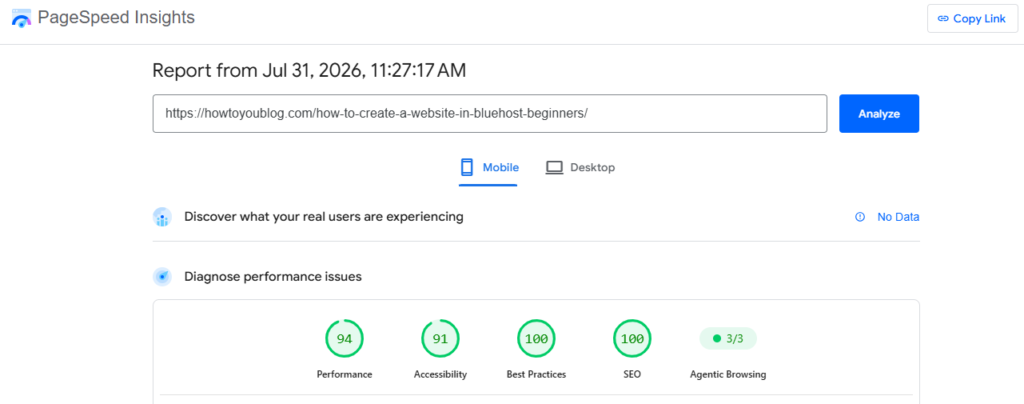
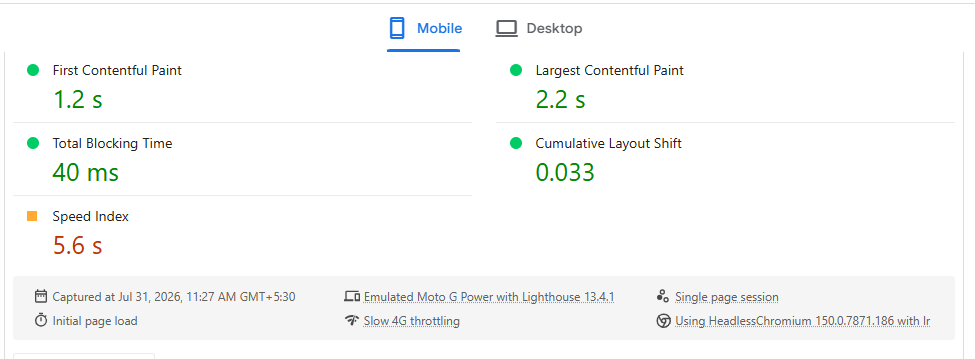
Before changing anything, test important pages using Google PageSpeed Insights and Chrome DevTools. Check the homepage, popular articles, product pages, and checkout or contact pages.
Google evaluates user experience through three Core Web Vitals:
- Largest Contentful Paint, or LCP: Aim for 2.5 seconds or less.
- Interaction to Next Paint, or INP: Aim for 200 milliseconds or less.
- Cumulative Layout Shift, or CLS: Keep the score at 0.1 or lower.
These measurements cover loading speed, responsiveness, and visual stability. Test both mobile and desktop versions because a website may perform well on a fast office connection but poorly on a mobile network.
Compress and Resize Large Images
Images are often among the heaviest resources on a webpage. Convert suitable JPEG and PNG files to WebP or AVIF, which generally provide better compression while maintaining visual quality.
Do not upload a 3,000-pixel image when the page displays it at only 800 pixels. Use responsive image settings, including srcset and sizes, so browsers can download an appropriately sized version.
Lazy-load images below the visible screen, but do not lazy-load the main hero image if it is responsible for LCP. Google’s Chrome guidance says reducing image-download time can improve perceived loading speed and LCP.
Remove Unnecessary Code and Plugins
Delete unused themes, scripts, tracking tags, fonts, widgets, and plugins. Every additional file may create another network request or increase browser processing.
Minify CSS and JavaScript, defer non-critical scripts, and load only the code required for the current page. WordPress owners should also replace poorly maintained plugins and avoid installing several plugins that perform the same function.
Activate Caching, Compression, and a CDN
Enable browser caching so returning visitors do not repeatedly download unchanged files. Turn on Brotli or Gzip compression for HTML, CSS, JavaScript, and other text-based resources.
A content delivery network, or CDN, stores website files across servers in multiple geographical regions. It can deliver content from a location closer to the visitor, reducing network delay. A CDN can also absorb some malicious traffic, although it does not replace proper website security.
Patch Vulnerabilities Immediately
Update the content management system, server software, themes, plugins, libraries, and dependencies. Remove unsupported components instead of leaving them disabled.
This is urgent because Verizon’s 2026 Data Breach Investigations Report, published on May 19, 2026, found that vulnerability exploitation caused 31% of breaches and overtook stolen credentials as the leading entry point for the first time in the report’s 19-year history.
Strengthen Access and Account Security
Require multi-factor authentication for administrators, hosting accounts, domain registrars, databases, email accounts, and CDN dashboards. Use unique passwords, restrict administrator privileges, remove inactive users, and never keep default usernames or credentials.
The OWASP Top 10:2025 lists broken access control as the number-one web-application security risk, followed by security misconfiguration and software supply-chain failures.
enable HTTPS, daily automated backups, uptime monitoring, security logging, malware scanning, and alerts for unusual login attempts. Store at least one backup outside the main hosting account and regularly test whether it can actually be restored.
Performance is more than loading speed. Check for broken links, database errors, mobile display problems, failed forms, redirect chains, missing pages, and server errors such as 500 or 503.
Update your content management system, plugins, themes, PHP version, database software, and server operating system. However, create a complete backup before every major update.
Google says page experience includes Core Web Vitals, secure delivery, mobile usability, limited intrusive pop-ups, and clearly visible main content. Google also confirms that no single page-experience score guarantees higher rankings.
Strengthen Website Security
Install a valid SSL certificate and redirect every HTTP page to HTTPS. HTTPS encrypts information exchanged between the visitor’s browser and your server.
Use strong, unique passwords and enable multifactor authentication for administrators, hosting accounts, domain registrars, email accounts, and cloud services. Remove unused administrator accounts and give each user only the permissions they require.
Install software updates promptly. The United States Cybersecurity and Infrastructure Security Agency explains that patches correct security vulnerabilities in software and operating systems.
Use a web application firewall, malware scanner, login-attempt limits, spam protection, and security monitoring. Review your website against the OWASP Top 10 2025, the latest released version of OWASP’s widely recognized list of critical web-application security risks.
maintain automatic daily backups and keep at least one encrypted copy away from your main server. Regularly test whether the backup can actually be restored.
Find WordPress Files and Code Logic
Is your WordPress website slow, showing errors, or behaving strangely? Finding the correct file behind a page, feature, or error is the first step toward fixing it safely.
1. Understand the WordPress folders
Open your website files through cPanel File Manager, FTP, SSH, or your hosting dashboard.
The main folders are:
- wp-admin: WordPress dashboard files
- wp-includes: Core WordPress functions
- wp-content/themes: Website design and template files
- wp-content/plugins: Plugin functionality
- wp-content/uploads: Images, PDFs, and media
WordPress officially confirms that wp-content normally stores themes, plugins, and uploads.
Never directly edit wp-admin or wp-includes, because WordPress updates may overwrite your changes.
2. Find the file controlling a page
For a theme page, check:
wp-content/themes/your-theme/Common files include functions.php, header.php, footer.php, single.php, and page.php.
For example, to find code displaying a copyright message, search all theme files for:
© 2026You can use your hosting file search or run:
grep -R "© 2026" wp-content/themes/3. Trace errors with debugging
Add these lines to wp-config.php on a staging or development website:
define('WP_DEBUG', true);
define('WP_DEBUG_LOG', true);
define('WP_DEBUG_DISPLAY', false);
Errors will normally be recorded in:
wp-content/debug.logWordPress documents WP_DEBUG, WP_DEBUG_LOG, and WP_DEBUG_DISPLAY as its built-in debugging controls.
Before editing anything, create a complete backup. Remove unused plugins, update WordPress regularly, sanitize user input, and test changes on staging to improve speed, stability, and security.
Best Sites for Testing Website Speed, Performance, and Security
1. Google PageSpeed Insights
PageSpeed Insights tests mobile and desktop pages using Lighthouse laboratory data and real-user Chrome data when available. It checks Core Web Vitals, accessibility, SEO, and performance. Google recommends an LCP of 2.5 seconds or less for at least 75% of visits.
2. GTmetrix
GTmetrix explains what is slowing your website and displays loading timelines, request waterfalls, page structure, and optimization opportunities. Its testing servers are available in multiple regions, helping website owners understand how location affects loading speed.
3. WebPageTest
WebPageTest runs tests through real browsers and supports device emulation, Lighthouse reports, repeated-run comparisons, connection settings, and detailed loading waterfalls. It is especially useful for finding slow images, scripts, fonts, and third-party resources.
4. Sucuri SiteCheck
Sucuri’s free remote scanner checks publicly visible website content for known malware, malicious code, blocklist warnings, outdated software, and website errors. However, because it scans remotely, it cannot inspect every private server file.
5. MDN HTTP Observatory
Originally launched by Mozilla in 2016, HTTP Observatory evaluates security headers and configurations such as CSP and HSTS. It has analyzed more than 6.9 million websites through 47 million scans and provides actionable recommendations with grades and scores.
Essentials, Elements, and Programming Languages
No programming language can guarantee 100% speed, performance, or security. Results depend on clean code, hosting, configuration, testing, and regular updates. However, these essentials can help build a faster and safer website:
- HTML
HTML creates the website’s structure. Use semantic, lightweight markup and remove unnecessary elements to help browsers render pages efficiently. - CSS
CSS controls design and layout. Minify files, remove unused styles, and load critical CSS first to reduce page-loading delays. - JavaScript and TypeScript
JavaScript adds interactive features, while TypeScript helps developers detect type-related errors before deployment. Compress scripts, split large bundles, and avoid blocking the main browser thread. - Fast Backend Languages
Rust, Go, Java, C#, PHP, Python, and Node.js are widely used for server-side development. Rust and Go are popular for performance-focused services, but architecture and coding quality usually matter more than language choice.
A truly high-performing website combines optimized code, secure protocols, reliable hosting, caching, a CDN, monitoring, and regular maintenance.




Leave a Reply