Blogging content clusters for beginners solve a common problem: you publish random posts, yet your blog still feels hard to grow. You also waste time asking, “What should I write next?”
A content cluster gives your blog a clear path. You choose one main pillar topic, add useful support posts, and connect them with simple internal links.
For example: instead of posting random gardening tips, build one “balcony gardening” hub. Then add posts about pots, soil, sunlight, watering, plants, pests, and costs.
This method does not promise fast Google rankings. Still, it helps readers find related answers and helps search engines understand your blog structure.
You can build your first cluster with free tools and a basic spreadsheet. This guide shows you how to plan blogging content clusters for beginners without costly SEO software.
What Is a Blogging Content Cluster?
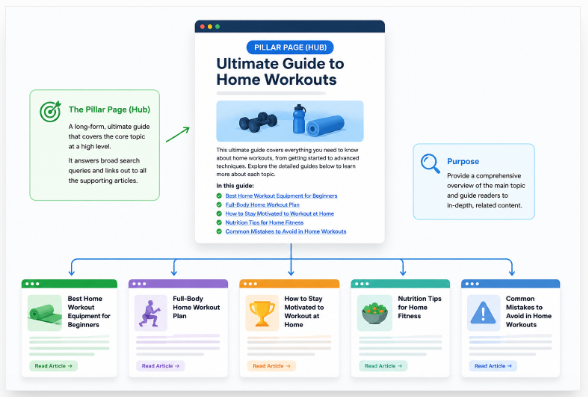
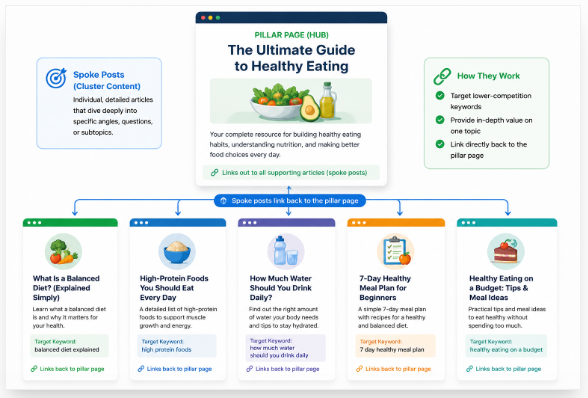
A blogging content cluster is a group of closely related blog posts built around one main topic. It helps you guide readers from a broad question to clear and useful answers.
A topic cluster has three main parts:
- Pillar page: A broad guide that explains the main topic.
- Cluster content: Focused posts that answer smaller questions.
- Contextual internal links: Useful links that connect the pillar page and supporting posts.
For example, you may create a pillar page about balcony gardening. Then, you can support it with practical posts that solve one problem at a time.
Pillar: Beginner’s Guide to Balcony Gardening
├── Best plants for small balconies
├── Balcony garden soil mix
├── Watering schedule
├── Container sizes
└── Common balcony pests
The pillar page gives readers the full picture; each cluster page gives them a deeper answer. Together, these pages form a content hub, also called a topic cluster or hub-and-spoke model.
A blog category is different: it mainly sorts posts under a common label. A content cluster is planned around connected reader needs, search questions, and natural internal links.
Use this simple formula: one broad problem + several clear subproblems + useful links between their solutions. When you build a blogging content cluster this way, your readers can find answers faster and move through your blog with less effort.
Content Clusters vs Keyword Clusters vs Blog Categories
Understanding topic clusters vs keyword clusters helps you avoid duplicate posts. Each method groups content, but each one solves a different problem.
| Concept | What gets grouped | Main purpose | Typical output |
|---|---|---|---|
| Keyword cluster | Similar search queries | Target one search intent | One page |
| Topic cluster | Related subtopics | Cover a broad subject | Several linked pages |
| Blog category | Published blog posts | Help readers browse content | Category archive page |
| Strict content silo | Pages inside one fixed section | Keep topics separate | Restricted page structure |
A keyword cluster joins phrases that mean almost the same thing. For example, “content cluster,” “topic cluster,” and “SEO topic cluster” can fit on one page because readers want the same answer.
A topic cluster covers several separate needs around one main subject. You may create one pillar page, then add different blog posts about finding keywords, writing cluster content, and building internal links.
A pillar page vs blog post also has a clear difference: the pillar gives a broad overview. A supporting blog post answers one smaller question in full.
A blog category only sorts your published posts; it does not create a planned content hub. Your “SEO” category may hold many posts that do not share one clear reader journey.
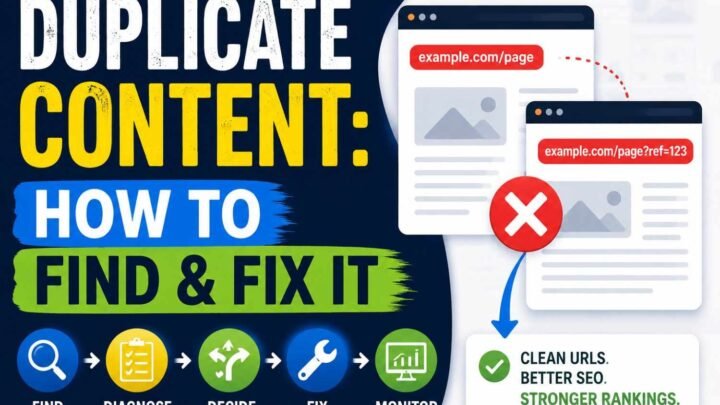
Do not publish a new article for every keyword change. Instead, create a new page only when the reader needs a different process, answer, or result.
Use topic clusters with natural links rather than a strict silo that blocks useful connections. Ahrefs also advises using clean site structure and flexible topic links instead of artificial walls between related sections.
Do Content Clusters Actually Help a Beginner’s Blog?
Yes, content clusters can help your beginner blog when you use them with care. They give you a clear publishing plan and connect each post to a larger reader need.
Instead of writing random posts, you build one main guide and several focused answers. This approach makes it easier to choose your next topic and update old content later.
Main Benefits of Content Clusters
Content clusters can help you:
- Plan a steady list of useful blog posts.
- Guide readers to the next helpful answer.
- Add natural internal links between related pages.
- Find and fix orphan pages with no internal links.
- Target clear long-tail searches with focused posts.
- Show readers the main subjects your blog covers.
- Review, update, merge, or remove content with less effort.
Internal linking for bloggers also helps search engines find connected pages. Google says it uses crawlable links to discover pages and understand their relevance.
However, topic clusters are not a direct Google ranking factor. Google still asks you to create helpful, reliable, people-first content instead of pages made only to gain rankings.
Limits You Should Know
Links cannot turn a weak article into a useful one. Competitive topics may still need strong experience, trusted sources, original examples, and quality backlinks.
You can also create keyword cannibalization when several posts answer the same search need. A poor pillar topic may lead you to spend months writing pages that few people want.
So, do topic clusters improve rankings? They may support better discovery, structure, and topical authority for new blogs, but they never promise traffic.
The real benefits of content clusters are simple: better planning, easier navigation, and stronger internal linking. Treat them as a useful blog system, not a ranking trick.
Who Should—and Should Not—Use Content Clusters?
Content clusters work best when you cover one topic through several useful posts. They are a good fit when your readers ask many linked questions about the same subject.
You Should Use Content Clusters If:
- You run a niche blog with many related reader problems.
- You sell a service and need to educate future customers.
- You manage an affiliate site that compares tools or choices.
- You create courses, coaching, or consulting content.
- You have old posts that do not link well together.
- You need a clear content plan for a new website.
For example, a home loan consultant can create one pillar page about home loans. Supporting posts can explain interest rates, documents, eligibility, fees, and repayment options.
You May Not Need Them If:
- Your site has only a few fixed pages.
- You mainly publish personal stories or daily news.
- Your topic cannot support four useful subtopics.
- You have no real advice, proof, or unique experience to add.
- A keyword tool created many phrases with the same meaning.
Use this simple rule: build a content cluster only when one main topic supports at least four different reader problems. It should also match your audience, blog goal, or business goal.
How Many Posts Should Be in a Content Cluster?
There is no fixed answer for how many posts should be in a topic cluster. Your ideal content cluster size depends on the topic, the reader’s needs, and the value each page adds.
For a new blog, start small:
- 1 pillar page
- 4 essential supporting posts
- 2 to 5 extra posts after you see search data
Yes, five posts can be enough for a topic cluster. A clear six-page cluster often works better than 25 weak posts written only to reach a number.
A large or complex topic may need 8 to 20 supporting resources. Still, you should add a page only when it answers a new search need.
Use these points to choose your cluster size:
- Number of different search intents
- Depth of the topic
- Your writing time
- Business value
- Existing blog posts
- Search competition
- First-hand examples you can share
- A clear purpose for each page
Do not start five unfinished clusters at once. As a beginner, finish one useful cluster, add internal links, track results in Google Search Console, and then build the next one.
The best answer to how many posts should be in a topic cluster is simple: publish enough pages to solve the full problem, but never add thin posts just to look complete.
How to Create Your First Blogging Content Cluster
Your first blogging content cluster should start with one clear reader problem. Do not begin with a huge topic or a long list of random keywords.
Step 1: Choose a Narrow, Useful Core Topic
Choose a pillar topic that fits your blog and solves a real problem. It should also give you room to write several useful supporting posts.
Ask these questions before you choose:
- Does this topic match my blog niche?
- Does my reader need help with it?
- Can I create at least five clear subtopics?
- Can I share real examples or results?
- Can the topic lead to a signup, sale, inquiry, or useful next step?
- Can a small blog cover it with trust?
Keep the topic focused. A broad topic may look strong, but it often leads to weak and mixed content.
For example:
| Topic choice | Example |
|---|---|
| Too broad | Blogging |
| Better | Starting a WordPress blog |
| More focused | Starting a low-cost WordPress blog in India |
The last topic gives you clear pillar page ideas. You can cover hosting costs, domain names, free themes, payment methods, plugins, and setup steps for Indian beginners.
Step 2: Collect Questions and Keyword Ideas
Now, collect the exact questions your readers ask. Start with free sources before you pay for any keyword tool.
Use these places:
- Google Autocomplete
- People Also Ask
- Related searches
- Google Trends
- Google Search Console
- Competitor headings
- Reddit threads
- YouTube titles and comments
- Blog comments
- Customer emails
- Sales calls
- Niche forums
Write each useful question in a simple sheet. Add the keyword, reader need, search intent, and possible page title beside it.
Paid tools such as Ahrefs, Semrush, LowFruits, Keyword Insights, and KeyClusters can speed up content cluster keyword research. However, they cannot fully understand your reader, your experience, or your business goal.
Do not turn every keyword phrase into a new article. Group phrases that ask for the same answer, and create separate posts only when the reader needs a different solution.
Your blogging content cluster becomes stronger when each page solves one clear problem. Good topic research gives you direction; careful human judgment gives the cluster value.
Step 3: Group Keywords by Search Intent
To build a useful blogging content cluster, group keywords by what the reader wants to do. Two phrases may look different, yet they may need the same page.
For each keyword, note these five points:
- The reader’s main goal.
- The type of page they expect.
- The exact problem they want to solve.
- Their stage: learning, comparing, or buying.
- The pages that already rank on Google.
Put keywords on one page when one clear answer can meet the same need. For example, “how to group keywords” and “how to cluster keywords manually” can often fit one guide.
Create separate pages when readers need different tutorials, tools, comparisons, actions, or page formats. A beginner guide and an advanced keyword tool review should not share one page.
Use a quick SERP check: search both terms and compare the top results. When many of the same pages rank for both, use one page; when the results differ, create separate pages.
This simple check supports keyword cannibalization prevention. It also helps you decide between one page or multiple pages for SEO.
Step 4: Select the Pillar and Supporting Pages
Your pillar page should cover the full topic at a broad level. It should answer the first questions and guide readers to deeper help.
A good pillar page should:
- Introduce the main subject.
- Answer key beginner questions.
- Explain the main steps.
- Link to every important supporting page.
- Avoid copying the full details from those pages.
For example, a pillar about starting a blog may explain hosting, niches, keywords, and writing. Separate cluster pages can then teach each subject in full.
Each supporting page should focus on one clear search intent. It should give a complete answer, show real examples, and link back to the pillar.
You can also turn an old post into a pillar page. Update it, remove weak parts, add missing links, and make its structure easy to scan.
Step 5: Create the Internal-Link Map Before Publishing
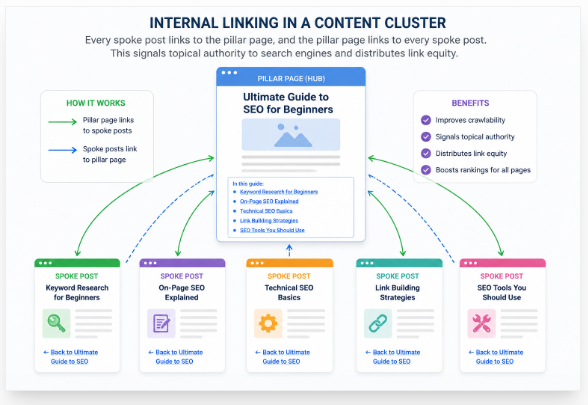
Plan your topic cluster internal linking before you write every page. This small step stops useful posts from becoming hidden or hard to find.
Build the cluster link structure like this:
- Link the pillar page to every key cluster page.
- Link each cluster page back to the pillar.
- Link supporting pages when one is the reader’s next step.
- Link useful older posts to new cluster pages.
- Link strong existing pages to important new content when it fits.
Use clear internal linking anchor text. Write phrases such as “group keywords by search intent,” “create your pillar-page outline,” or “audit existing internal links.”
Avoid vague words such as “click here” or “read more.” Also, do not repeat the same exact keyword in every link.
A good link should help the reader know what comes next. Never add links only to reach a made-up link count.
Step 6: Choose a Publishing Order
Start with a simple publishing order: map the full cluster, then publish the pillar page. Next, release the four supporting posts that solve the most urgent reader problems.
Use this order:
- Draft the full content cluster map.
- Publish the pillar page.
- Publish four high-priority cluster posts.
- Add internal links as each post goes live.
- Check discovery in Google Search Console.
- Add new posts from real search data.
You may publish a supporting page before the pillar page. That choice is fine as long as you connect every page once the cluster is ready.
Do not wait until all ten or twenty articles are complete. A small, useful cluster can start helping readers much sooner.
Step 7: Measure the Cluster as a Group
Track topic cluster performance as one connected set, not as random blog posts. A pillar page may grow slowly while one supporting page brings most of the first clicks.
Check these content cluster SEO metrics:
- Indexed pages.
- Search impressions.
- Organic clicks.
- Ranking queries.
- Average search position.
- Time and actions on the page.
- Internal-link clicks.
- Email signups.
- Affiliate or service sales.
- New backlinks.
- AI-search mentions when you can verify them.
Do not promise that a topic cluster will rank within a fixed number of days. Results depend on your niche, competition, site age, content quality, search demand, crawl rate, and links.
Check indexing after each page goes live, then study early query data in Search Console. Review content gaps every three months and update internal links each time you publish a related post.
Keep strong pages fresh and improve weak pages with clearer answers, better examples, or sharper search intent. This is how you grow a blogging content cluster from real results instead of guesswork.
Complete Content Cluster Example for a Beginner Blog
This content cluster example for bloggers shows how you can turn random post ideas into one clear learning path. Your main pillar page is How to Start a Blog for Beginners, and each supporting post answers the next question a new blogger may ask.
| Supporting page | Search intent | Natural next link |
|---|---|---|
| How to choose a profitable blog niche | Decision | Domain-name guide |
| How to choose a blog domain name | Decision | Hosting guide |
| Best blogging platforms for beginners | Comparison | WordPress setup |
| How to set up WordPress | Tutorial | Theme selection |
| How to plan your first 10 blog posts | Planning | Keyword research |
| Beginner keyword research | Tutorial | Blog-post outline |
| How to write an SEO blog post | Tutorial | On-page SEO checklist |
| Blogging costs for beginners | Budget | Free vs paid tools |
The pain is simple: you have ten useful ideas, but you do not know which post should come first. So, you use “start a blog” as the main topic and arrange each post around the reader’s real journey.
The path may look like this: niche → domain → platform → setup → content plan → keyword research → publishing. This order helps your reader make one small decision before moving to the next step.
You should also add natural internal links between these pages. For example, your niche guide can link to the domain-name guide, while your WordPress setup post can lead to theme selection.
Do not link every page to every other page. Link only when the next post helps the reader continue the same task.
This content cluster example for bloggers gives you two clear gains: readers move through your site with less confusion, and every post supports a larger topic instead of standing alone.
Free, Paid, Fast and Beginner-Friendly Ways to Build Clusters
You can build topic clusters for free with Google, Search Console, and a simple content cluster spreadsheet. This method takes more time, but it gives you full control over each keyword and page idea.
| Your need | Best approach | Main trade-off |
|---|---|---|
| Cheapest | Google + spreadsheet + Search Console | More manual work |
| Fastest | Paid keyword clustering tools | Cost and wrong groups |
| Beginner-friendly | Google results + simple template | Less keyword data |
| Safest | Tool results + manual intent check | Takes more time |
| Expert-level | Keyword data + SERP overlap + content audit | Needs skill and paid tools |
Paid topic cluster tools can group thousands of keywords in minutes. Still, they may place two keywords together even when searchers want different answers.
Semrush is useful, but you do not need it to start. A beginner can search each keyword on Google, compare the top results, and group terms that show the same search intent.
ChatGPT can suggest seed topics, subtopics, labels, and spreadsheet columns. However, you should check live search results before deciding whether two keywords belong on one page.
Use AI as a helper, not as the final judge. The safest way to build topic clusters is simple: let tools find ideas, then use your own judgment to check each group.
Do not add fixed software prices unless you verify them before publishing. Tool plans, limits, and offers can change at any time.
Common Content-Cluster Mistakes
Most content-cluster mistakes start with poor planning, not poor writing. You can avoid them by giving each page one clear job.
1. Choosing a Topic That Is Too Broad
A topic such as “digital marketing” is too large for your first pillar page. Pick a smaller topic that you can cover well, such as “local SEO for small shops.”
2. Creating One Page for Each Keyword
Do not create separate pages for keywords that share the same search goal. This can cause keyword cannibalization, as your pages may compete with each other.
3. Publishing Thin Supporting Posts
Each supporting post must solve one full problem. A short page with no useful steps will not become strong because it belongs to a cluster.
4. Writing to Fill Topic Gaps
More posts do not always mean more value. Remove any article idea that adds no new answer, example, or practical step.
5. Forcing Every Post Into a Cluster
Some posts can stand alone, such as news, opinions, case studies, or company updates. Link them to a cluster only when the connection helps your reader.
6. Making Internal Linking Too Rigid
You do not need to link every post to every other post. Add links when the next page gives the reader a useful next step.
Also, avoid common internal linking mistakes, such as repeating the same anchor text everywhere. Use clear and natural phrases that describe the linked page.
7. Ignoring Old Content
Review your existing posts before you publish new ones. Update, merge, redirect, or move pages that cover the same search need.
8. Building Too Many Clusters at Once
Finish one useful cluster before you start several more. Five complete posts are often better than twenty half-finished pages.
9. Tracking Only the Pillar Page
Measure the whole cluster: impressions, clicks, rankings, leads, sales, and weak pages. Also, remember that clusters do not replace strong content, useful backlinks, or regular updates.
The best way to avoid content-cluster mistakes is simple: keep each page useful, distinct, connected, and current. When every post solves a real need, your cluster becomes easier to use and easier to grow.
A 30-Minute Beginner Content Cluster Template
Use this topic cluster template to plan one clear content group in about 30 minutes. Open a blank content cluster spreadsheet, then fill in each line with short and direct answers.
Core audience:
Core problem:
Pillar topic:
Pillar keyword:
Primary business or reader goal:

Supporting page 1:
Search intent:
Primary query:
Unique value:
Link to pillar:
Next useful page:

Supporting page 2:
Search intent:
Primary query:
Unique value:
Link to pillar:
Next useful page:

Existing pages to update:
Overlapping pages to merge:
Missing expert evidence:
Screenshots/examples required:
Publishing priority:
Success metric:
Review date:
Start with your audience and the main problem they want to solve. Then choose one pillar topic and add supporting pages for separate questions.
Give each page one clear search intent, one main query, and one useful next link. This keeps your content planning template for bloggers simple and stops two pages from targeting the same need.
Write a one-sentence unique value for every planned page. For example: “This guide shows the real setup cost for a new Indian blogger using free and paid tools.”
Do not publish a page when you cannot explain why it is more useful, clearer, or more practical than existing results. A strong topic cluster template helps you remove weak ideas before they waste your writing time.
Frequently Asked Questions
Is a Pillar Page the Same as a Content Cluster?
No, a pillar page is only one main page that covers a broad topic. A content cluster includes that pillar page, several supporting posts, and useful internal links that connect all the pages.
How Many Articles Should a Beginner Include in One Cluster?
A good minimum topic cluster size is one pillar page plus four useful supporting articles. This is a simple starting point, not a Google ranking rule; add more posts only when readers have clear questions that need full answers.
Should Every Blog Post Belong to a Content Cluster?
No, you do not need to force every post into a topic cluster. News updates, personal views, brand stories, case studies, and timely posts can stay alone when they still help your readers.
Should Content Clusters Link to One Another?
Yes, interlinking topic clusters can help readers move from one related subject to the next. Add a link only when it fits the sentence and gives the reader a useful next step; do not build false walls between topics.
Can Content Clusters Rank Without Backlinks?
Yes, topic clusters without backlinks may rank for clear, low-competition searches when the content gives a strong answer. However, internal links do not remove the need for quality, trust, expertise, site authority, and backlinks in harder search results.
How Long Does a Content Cluster Take to Produce Results?
There is no fixed time because every site and topic is different. Results depend on your site age, keyword competition, indexing speed, content quality, publishing pace, internal links, and the number of trusted websites that link to your pages.
Should I Write One Long Pillar Page or Several Smaller Articles?
Use one long page when several keywords share the same search intent and need the same answer. Create separate articles when each subtopic solves a different problem, needs detailed steps, or helps the reader make a separate choice within the content cluster.
Conclusion: Build One Small Cluster, Then Expand From Evidence
Start your blogging content cluster with one focused pillar page and four useful supporting articles. Give each page a clear search goal, then connect them with natural two-way internal links.
Do not plan 50 articles before you know that people want the topic. Publish one small cluster first, then use Google Search Console to track clicks, views, search terms, and weak pages.
Improve the cluster with real data before you open many new blog categories. This keeps your work focused and stops you from wasting time on topics that bring no value.
Choose your audience’s main problem today; then list five clear questions they must answer to solve it. Those questions will form your first blogging content cluster.

Leave a Reply