An SEO-friendly URL is a web address people can read and understand without thinking too much. Search engines also get a small clue from it. Look at these two:
example.com/blog/seo-friendly-urls/
example.com/index.php?id=8274&cat=19
I know which one I would trust before clicking. You probably do too.
A good URL structure stays simple: short, descriptive, crawlable, and stable. Put the main topic naturally in the URL slug, use lowercase words and hyphens, then cut stuff that says nothing. This makes a clean URL easier for users to remember and search engines to crawl and index.
But URL optimization is not some ranking magic. Content, relevance, links, and many other SEO signals still matter.
My simple rule is this: describe the page in few useful words, then leave that URL alone unless you have a real migration reason.
What Is an SEO-Friendly URL?
A URL means Uniform Resource Locator. Simple words, it is the full web address you see in browser. Like https://example.com/seo/url-structure/. Here, https is protocol, example.com is domain, /seo/ works like directory, and url-structure is the URL slug. The slug is mostly last part. It tells what that page is about.
So, what is an SEO-friendly URL? It is a clean URL that a person can read and roughly understand before opening page.
Good one: https://example.com/seo/url-structure/
Poor one: https://example.com/page.php?id=4837&utm_source=x
I always prefer first type. You see it and already know page topic. No puzzle.
An SEO-friendly URL should not be stuffed with keywords. That becomes ugly fast. Better use few descriptive words, hyphens, simple path, and remove useless IDs or query parameters when they are not needed.
Sometimes a URL also has subdomain, query parameter, or fragment. Those have jobs. Still, for normal content pages, keep the main path clear. Think reader first. Search engine comes after.
Anatomy of a URL
A URL can look little confusing first. I used to see one long web address and think, okay, this is just website name. But no. Small parts inside it doing different jobs.
Take this URL:
https://www.example.com/seo/url-guide?sort=new#examples
Here is what actually happening:
| Part | Meaning |
|---|---|
https:// | Protocol. HTTPS tells browser to use secure connection. |
www | Subdomain. Some sites use it, some don’t. |
example | Main domain name. |
.com | Top-level domain, or TLD. |
/seo/ | Directory or part of the pathname. |
url-guide | Page slug. This is one area we often optimize for SEO. |
?sort=new | Query string or URL parameter. Often used for sorting, filters, tracking, and other functions. |
#examples | Fragment identifier. It can take you to a certain part of the same page. |
For SEO, I usually watch the path and URL slug first. A clean one like /seo/url-guide/ tells you something before you even open page. Google also recommends simple, descriptive URLs and says words should normally use hyphens rather than underscores.
But don’t think slug is everything. HTTPS, redirects, canonical URLs, parameters, and keeping one URL format also matter. Conductor describes a basic URL with protocol, domain, and file path, while Ahrefs also builds its SEO-friendly URL advice around cleaning and improving the slug.
When you see any URL now, split it slowly. Find domain. Find path. Find slug. Check parameters. That simple habit can stop many SEO mistakes before they become bigger.
Why Do SEO-Friendly URLs Matter?
SEO-friendly URLs looks like small thing, but it helps both people and search engines in quiet way. When I see a URL like example.com/seo-friendly-urls/, I already know where page taking me. But URL like example.com/page?id=4387&ref=22 gives nothing. Google also recommends simple, descriptive URL structures and says unnecessary parameters can create many unwanted URLs for crawling.
They Help Users Understand the Page
Your URL give small clue before visitor even open page. Clean words feel more clear, easy to copy, share, remember, and trust. In search results, this page context can also help people judge, “yes, this looks related to what I need.” Better understanding may support user experience and CTR, though URL alone never promise clicks.
They Give Search Engines Additional Context
Words inside URL can explain topical relevance little more. Google uses links for discovering pages and relevance signals, while URL naming is only one small part of bigger SEO system.
They Improve Crawl and Site Maintenance
Clean, stable URLs make internal linking, sitemaps, redirects, analytics, and canonicalization easier. Google recommends linking internally to the canonical URL and listing preferred canonical URLs inside sitemaps.
Still, perfect URL not mean top ranking. Good content, relevance, links, information architecture, page experience, crawling, and indexing matter much more together.
How to Create an SEO-Friendly URL in 7 Steps
Making an SEO-friendly URL look small work, but I seen many pages become messy just because URL was not thought before publishing. Once page goes live, changing it later can bring more work. So, better we make it clean from first time.
1. Start With the Page’s Main Topic
First look at what your page really talking about. Your title can give the starting words. Suppose title is “How to Create SEO-Friendly URLs: 12 Best Practices.” Raw URL may become:
/how-to-create-seo-friendly-urls-12-best-practices/
It works, but too much is sitting there.
2. Keep Only Words That Explain the Page
Cut words which not helping much. I usually ask myself, “If I see only this URL, will I understand page?”
Better:
/seo-friendly-urls/
Short does not mean removing everything. Meaning should stay.
3. Add Your Main Keyword Naturally
If your primary keyword is SEO-friendly URLs, using it once is enough. Do not build something like:
/seo-friendly-urls-seo-url-best-seo-urls/
Looks forced. Reader also feels it.
4. Use Lowercase Letters
Keep URL letters lowercase.
Use:
/seo-friendly-urls/
Not:
/SEO-Friendly-URLs/
Some servers can treat uppercase and lowercase paths differently, so one simple style saves trouble.
5. Use Hyphens Between Words
Hyphens make words easy to read.
Good: /seo-friendly-urls/
Avoid: /seo_friendly_urls/ or /seofriendlyurls/
When I scan URLs fast, hyphen version makes sense immediately.
6. Remove Extra Dates, IDs, and Parameters
Avoid things such as:
/seo-friendly-urls?id=492&date=2026
unless your website really needs them. Evergreen pages usually better with stable URL.
7. Check Before You Publish
Before clicking publish, read your URL once.
Ask two things: Can a person guess this page topic? Will this URL still make sense next year?
If answer is yes, you probably made a good SEO URL.
This simple process works when you want to make a URL SEO friendly, optimize a URL slug for SEO, write SEO-friendly URLs, or structure URLs for SEO without making the address complicated.
12 SEO URL Best Practices
When I make a new page, I check URL before publish. Small thing, but later it become big problem if we ignore. A good SEO-friendly URL should tell people what page is about, without making them decode strange numbers or long words.
Here are 12 rules I normally follow.
- Keep URL descriptive.
/seo-friendly-urls/tells more than/page?id=4582. Google also recommends simple and understandable URL structures. - Make the slug short, but not too short. Remove useless words, still keep meaning. There is no official Google rule saying URL must be 3–5 words or under 60/75 characters.
- Use the main topic naturally. If page is about SEO URL structure, using
seo-url-structuremakes sense. Don’t repeat keyword again and again. - Use lowercase letters. I prefer
/technical-seo/, not/Technical-SEO/. It keeps URL normalization cleaner. - Use hyphens between words. Google specifically recommends hyphens instead of underscores.
- Avoid keyword stuffing.
/seo-url-seo-friendly-url-best-seo-url/looks bad to reader also. - Remove unnecessary parameters. Session IDs, filters, tracking codes and dynamic URL combinations can create too many crawlable pages. Google warns about infinite URL spaces from filters, calendars and ordering systems.
- Avoid dates for evergreen content, unless date is important part of that page.
- Use HTTPS. Your permalink should use the secure version consistently.
- Keep directory structure logical. Something like
/seo/technical-seo/is easy to understand, but don’t add folders only for keywords. Google says it mainly understands site structure from links between pages, not URL folders alone. - Keep one preferred canonical URL. Canonicalization helps Google choose one representative URL when duplicate versions exist.
- Make URLs durable. I try to create a URL that can stay same for years. Changing a good, indexed URL only for small cosmetic reason can create more work than benefit.
Simple rule I keep in mind: descriptive, concise, clean, persistent, and easy to read.
Hyphens vs. Underscores in URLs
When I make a new URL, I use hyphens. Simple reason. Google itself recommends hyphens (-) instead of underscores (_) for separating words in URLs, because hyphens help users and search engines see the words as separate ideas.
So this is better:
/technical-seo-audit/
Not this:
/technical_seo_audit/
This small thing matters when you are thinking about hyphens vs underscores SEO, URL word separator, or dashes in URLs.
But one problem I see often. People find this rule, then want change hundreds or thousands old URLs. I would not do that only for making them look nicer. If those underscore URLs already indexed, getting traffic, backlinks, and ranking, changing them can create redirect work and new risk.
For new pages, use hyphens. During a proper site migration, also move toward hyphens where it makes sense. Google has kept this recommendation for many years, and its current URL guidance still says the same.
How Long Should an SEO-Friendly URL Be?
There is no fixed URL character length that Google say you must follow for SEO. No rule like “keep URL under 60 characters” or “only 5 words.” Google mainly asks site owners to make URLs simple, descriptive, and easy for people to understand.
From my side, I keep URL length SEO very simple. If I can remove a word and meaning still same, I remove it. But cutting too much also make problem. Your URL should tell what page is about.
Look this:
/blog/how-to-create-the-best-seo-friendly-url-for-your-new-website-in-2026/
Better:
/seo-friendly-urls/
Short URLs feel cleaner. Easy to type, share, check, and remember. Very long URLs, I seen them become messy when site grow.
So don’t chase number. Make a concise URL slug, but keep useful meaning inside. Short as possible, clear as needed. That is safer rule.
Should You Remove Stop Words From URLs?
I used to remove every small word from a URL. Words like the, a, of, and, for, to looked useless to me. But that rule can make a URL strange.
Take this:
/guide-to-seo-friendly-urls/
You can shorten it to:
/seo-friendly-urls/
That one is cleaner. Meaning is still clear.
But don’t delete stop words just because somebody said they are bad for SEO. Google does not give a rule saying function words must be removed. Its current URL guidance mainly asks for simple, descriptive URLs and recommends hyphens between words.
Sometimes a small word saves the meaning.
/how-to-file-taxes/ can read better than /how-file-taxes/.
So I use one small test: read your URL like a person. If removing filler words makes it shorter and still clear, remove them. If the URL starts sounding broken or confusing, keep them.
Your goal is not the shortest URL. Your goal is a clean URL people understand.
Static vs. Dynamic URLs
A static URL looks simple and stays mostly same, like /running-shoes/. You can read it and already know what page may contain. A dynamic URL often builds from database choices, filters, sorting, tracking, or user actions. It may look like /products?category=12&sort=price&session=8472.
Many site owners ask, are dynamic URLs bad for SEO? Not always. Google has clearly said it can crawl dynamic URLs and understand URL parameters.
The trouble starts when one page becomes many URLs.
You choose size. Then color. Then sort by price. Suddenly the site may create several parameter URLs showing almost same products. Faceted navigation can become a serious crawling problem when these combinations keep growing. Google published updated guidance on managing this problem in December 2025.
For important pages, I prefer clear and stable URLs. Keep parameters where they really do work. For duplicate or near-duplicate versions, use proper canonical URLs, clean internal navigation, and submit preferred URLs in your sitemap.
So in static vs dynamic URLs SEO, simple is useful, but correct setup matters more than appearance.
URL Parameters, Faceted Navigation, and Duplicate URLs
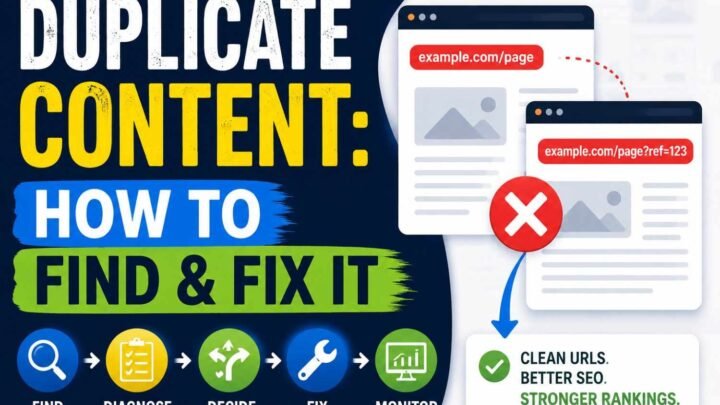
URL parameters look small, but they can make very big SEO mess. I seen this mostly on shopping sites. One category like /shoes/ can slowly become /shoes/?color=black, /shoes/?color=black&size=9, /shoes/?sort=price, and many more URLs. Filters, sorting, pagination, session IDs, tracking codes, and campaign parameters all can create these URL variants.
Now problem starts. Same or almost same products may appear through hundreds, sometimes thousands, of crawlable URLs. Google says faceted navigation and session parameters often create duplicate pages without giving much new content. This can make Googlebot spend crawl work on useless URL combinations instead of better pages.
But don’t remove every query parameter blindly. Some parameter pages are useful. A filter like ?brand=nike&gender=men may show a real product group which users need. Google can crawl dynamic URLs and understand parameters.
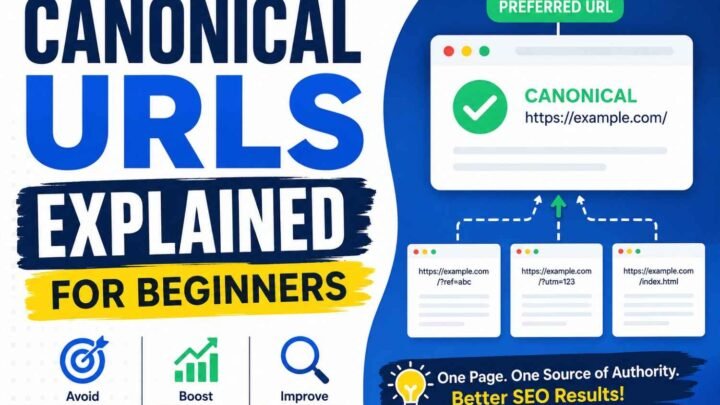
What I normally check first is simple: internal links should point to preferred URLs, XML sitemaps should contain canonical URLs, and duplicate versions should use proper canonicalization. Google defines canonicalization as choosing one representative URL from duplicate pages.
So control the crawl space. Don’t let faceted navigation create endless paths. Keep useful filters, block bad combinations where proper, and make one clear URL version easy for Google to trust.
URL Structure and Site Hierarchy
A clean URL structure makes your site easier to understand. For you, yes. Also for people coming from Google. I prefer folders only when they really tell something useful. Like /seo/technical-seo/url-structure/. Here you can guess where the page sits, what topic it belongs to, without even opening it.
But many site owners make one mistake. They keep adding subfolders thinking deeper URL hierarchy means stronger SEO. It does not work that simple.
Google says it generally understands an ecommerce site’s structure by looking at how pages link with each other, not just by reading URL folders. So your menu, category links, breadcrumbs, and internal linking matter a lot.
I have seen sites with neat URLs but poor navigation. Product pages stay three or four clicks away, sometimes almost hidden. Nice directory structure did not solve that.
Folders still have value. Google says grouping similar pages inside directories can help it learn how URLs in those directories change, especially on sites with more than a few thousand URLs.
So keep your website architecture simple. Use meaningful subfolders, not keyword-filled ones. Build a clear path from main page → category → subcategory → final page. Your URL should explain the place. Your internal links should prove that place.
SEO-Friendly URL Examples by Website Type
SEO-friendly URLs can look different from one website to another. A blog URL and an ecommerce product URL not need same structure. What matters more is this: your URL should tell people what page is about, without making them decode strange numbers or long junk text. Google also says simple and descriptive URLs can help users and search engines understand pages better.
Blog
I usually remove dates when post is evergreen. A URL like:
Bad: /blog/2026/08/12/how-to-create-the-best-seo-friendly-urls/
Better: /seo-friendly-urls/
The second one is easier to read, share, and keep for years. If you update that article in 2028, old date not sitting there making page feel old.
Ecommerce Category
Store URLs should show category meaning clearly.
Bad: /category.php?id=84&type=2
Better: /mens/running-shoes/
Google warns ecommerce sites can create many confusing or duplicate URLs when filtering and parameters not handled properly.
Product
Bad: /product?id=983729
Better: /running-shoes/nike-pegasus-41/
A human can understand second URL before clicking. That is simple advantage.
Service and Local Pages
For service business:
Bad: /page.php?id=seo01
Better: /services/technical-seo/
For a true local page, something like /plumber/hyderabad/ works when page really serves Hyderabad users. Don’t create city URLs only to stuff place names.
Multilingual Websites
Use a steady language structure such as /en/seo-guide/ and /de/seo-ratgeber/. Google says localized words in URLs are fine, and separate locale URLs with hreflang are recommended for multilingual sites.
Simple rule I follow: if you can understand page topic by seeing URL alone, structure is usually moving in right direction.
URLs for Ecommerce Sites
Ecommerce URLs can become messy very fast. I seen this many times. One product looks simple, then color, size, price filter, sort option and tracking code start making many URLs for same thing.
Keep your ecommerce URL structure easy where possible. A category URL like /mens/shoes/ and a product URL like /mens/shoes/running-shoe-123/ tells people what they may find. Stable product IDs can stay when your store system needs them. Do not remove useful IDs just because URL looks little ugly.
The bigger problem is filters and sorting. A faceted search may create URLs such as ?color=black&size=9&sort=price. Google warns that these parameter combinations can create large numbers of URLs, causing unnecessary crawling or making important pages harder to discover.
Product variants also need care. If several URLs show nearly same product, choose a canonical product URL. Google describes canonicalization as choosing one main URL from duplicate pages.
Shopify already creates canonical tags and fixed URL patterns. So, changing those URLs only to make them shorter may bring more trouble than benefit. Shopify itself warns against editing product handles too often.
International and Multilingual URL Best Practices
When your site speaks to people in many countries, your URL should also make sense to them. I seen many sites keep English URL for every language. It works, yes, but not always best for user. Google says you can use words from your audience language inside URL, even Japanese, German, or other local words.
For example, a German page can use /de/kaffee-maschine/ instead of forcing /de/coffee-machine/. This kind of localized URL feels more natural. But URL language alone not tell Google everything.
Use hreflang also. It tells Google which pages are language or regional versions of same content. Google also says it does not use hreflang to detect the page language itself; its systems detect language from page content.
One issue I often notice is non-English letters inside links. They can work fine, but technical systems may show them with percent encoding. Google recommends UTF-8 and proper escaping when links contain localized characters.
So for multilingual URLs SEO, keep it simple: use clear local words, stable language folders like /en/, /fr/, /de/, and connect matching pages with hreflang. Your international SEO URL structure should help both human and search engine, not only look translated.
Should Dates Be Included in URLs?
For most evergreen content, I usually keep date out from URL. It look simple, and later no trouble. See this one: /2024/03/seo-tips/. Nothing technically wrong here. But after two or three years, you update article, still URL showing 2024. Reader may think, “This is old one, why I open?”
So for guides, tutorials, reviews, and long-life posts, I prefer evergreen URL like /seo-tips/. Easy to keep for years.
But date have good use also. News story, event archive, government notice, daily report, or time-based data may need date because date itself tell what page is about.
One mistake I seen many site owners do: changing an old ranking dated URL only because it look ugly. Don’t do that quickly. If permalink already getting traffic and links, keep it unless real reason exist.
Should Categories Be Included in URLs?
Should categories be in URLs for SEO? Sometimes yes. Sometimes it only makes the URL longer, and gives you one more thing to worry later.
I usually look at the site first. A small blog with one clear topic can stay simple: /seo-friendly-urls/. No need to push /seo/technical-seo/seo-friendly-urls/ just because folders look more organized.
But on a big store, news site, docs website, or site covering many topics, categories can help people understand where they are. Google also says grouping similar pages inside directories can help it understand how sections of a large site change and should be crawled.
There is one trap here. Google says it generally understands ecommerce site structure more from links between pages than from URL folders alone. So don’t build deep folders only thinking Google will reward them.
I prefer minimum structure.
/laptops/gaming-laptops/ — useful.
/electronics/computers/laptops/gaming/best-gaming-laptops/ — now it feels heavy.
Also think about future you. If /news/ becomes /updates/, hundreds of child URLs may need redirects.
For flat URL structure vs folders, pick the one that stays clear, stable, and easy to manage.
What Happens When You Change an Existing URL?
Changing an old URL look small work. But SEO side, sometimes it become big mess.
I learned one simple thing here. If page already ranking and getting visitors, don’t change URL only because new one looks nicer. That old address may already have backlinks, internal links, Google signals, sitemap entry, analytics history, bookmarks, even links shared years before.
Say you change:
/how-to-create-good-seo-urls/
to:
/seo-friendly-urls/
Without proper 301 redirect, old visitors may land on broken page, and Google also need to discover new location again. Google says URL changes can cause ranking fluctuations while pages are crawled and indexed again. For a medium-size website, this process may take a few weeks, while larger sites can take longer.
When URL migration SEO really needed, I follow one rule: old page should point directly to its closest new page with permanent 301 or 308 redirect. Google treats these as permanent moves.
Then check the boring things too. They matter.
Update internal links, canonical URLs, hreflang links, and XML sitemap. Avoid old URL → another URL → final URL redirect chains. Test response codes using Search Console URL Inspection. Google itself recommends URL Inspection for checking moved-page response behavior.
After that, watch indexing and search traffic. A URL change should solve real problem, not just make address pretty.
Canonical URLs vs. Redirects
Canonical URL and redirect look little same at first. But they doing different job, and mixing them can make SEO mess fast.
A 301 redirect actually moves the visitor and search crawler from old URL to new URL. Like /old-seo-guide/ now changed to /seo-guide/. When somebody opens old page, browser takes them into new one. Google also recommends permanent server-side redirects such as 301 or 308 when a URL really moved.
A rel=”canonical” does not move your visitor. Page still opens normal. It only tells search engine, “this other URL is my preferred URL.” Google uses canonicalization when duplicate or very similar pages exist.
Think ecommerce filter pages. You may have:
/shoes//shoes/?color=black
Both may stay useful. Canonical can point filtered copy toward main page when content is substantially same.
But when /old-page/ is fully replaced, I would not hide mistake with canonical tag. Use proper 301 redirect. Bing guidance also says redirects should be used rather than canonical tags when moving URLs.
Simple rule I keep: duplicate stays available = canonical; old URL permanently gone = redirect.
Common SEO URL Mistakes to Avoid
A URL can look like small thing. But small mess here can stay for years.
I have seen pages where title was clean, content good, still URL looked like machine made it in hurry. Something like /SEO/seo-url-best-practices-seo-friendly-url-guide?id=283&utm_campaign=x. Too long. Keyword comes again and again. Capital letters mixed. Tracking code sitting inside. Reader sees it and already feels little doubt.
Better one is simple: /seo-friendly-urls/.
Google itself recommends using hyphens between words instead of underscores, because words become easier to identify for users and search systems.
Some mistakes I would avoid:
- repeating keywords like
seo-url-seo-guide-seo-tips - using
_or spaces when-works better - leaving session IDs and useless tracking parameters in internal links
- changing URL every time article title changes
- adding dates to evergreen blog posts when date gives no value
- keeping both HTTP and HTTPS, or www and non-www versions without clear redirects or canonical setup
- creating many filter URLs that show nearly same page
- making redirect after redirect until old URL passes through 2 or 3 pages
Duplicate URL versions can confuse signals. Google uses canonicalization to choose a main version from duplicate or very similar pages.
And one mistake hurts more than people expect: changing a ranking URL only because new one looks pretty. If URL already has traffic, backlinks and history, I would not touch it for beauty. Google has separate migration guidance because URL changes need careful redirects and updating.
For ecommerce sites, filters, sorting and session parameters can create many duplicate URL combinations. Google warns this can waste crawling and make discovery harder.
Simple rule I use: make URL clear before publishing, then keep it stable.
SEO-Friendly URL Checklist
Before I publish any page, I check the URL once. Small thing, yes, but later changing URL becomes headache.
- [ ] URL should tell what page is about.
/seo-friendly-urls/is clear./page?id=2874tells almost nothing. - [ ] Put the main keyword naturally. Do not push same keyword again and again.
- [ ] Keep only useful words in the URL slug.
- [ ] Use hyphens between words, like
seo-friendly-url. - [ ] Keep letters lowercase.
- [ ] Remove useless session IDs, tracking codes, and strange parameters when they are not needed.
- [ ] Choose a URL that can stay same even after you update article next year.
- [ ] Always use HTTPS.
- [ ] Keep one preferred canonical URL.
- [ ] Your internal links should point to that same preferred URL.
- [ ] Use folders only when they really explain site sections.
- [ ] Ecommerce filters should not create thousands of near-same URLs.
- [ ] If URL changed, send old one to new page with proper permanent redirect.
- [ ] XML sitemap should contain canonical URLs.
- [ ] Finally, read the URL yourself before clicking Publish.
I follow one simple test: Can you understand the page only by seeing its URL? If yes, mostly you are in good place.
Frequently Asked Questions About SEO-Friendly URLs
What is the best URL structure for SEO?
Best URL structure is simple one. Reader should see it and understand where page going. Something like /seo-friendly-urls/ works much better than random numbers and long query strings. Google also says URLs should be easy for people to understand, with descriptive words where possible.
Does putting a keyword in the URL help SEO?
Yes, keyword can give little topic meaning, but don’t force it. I normally keep main subject once. /seo-friendly-urls/ looks natural. /best-seo-friendly-url-seo-tips-seo/ looks like trying too hard. Google uses links and many other signals for relevance, so URL keyword alone not making page rank.
How many words should an SEO URL contain?
There is no official Google rule saying use 3 words, 5 words, or certain character number. Keep only words that really explain page. That’s enough.
Are short URLs better for SEO?
Short is nice, yes, mainly because human can read, type, share and remember it easy. But don’t cut useful meaning just to make URL tiny.
Are underscores bad in URLs?
For new URLs, use hyphens. Google specifically recommends hyphens instead of underscores because words become easier to identify. Example: /seo-friendly-urls/, not /seo_friendly_urls/.
Should I remove stop words from URLs?
Not always. Words like the, a, to, for can go when URL still makes sense. If removing word makes meaning odd, keep it.
Are URL parameters bad for SEO?
Not automatically. Problem comes when filters, sorting and other parameters create many similar URLs. Google warns this can waste crawling on ecommerce sites.
Should I change old URLs to make them shorter?
Usually, I would not touch a working URL just for beauty. Changing URL can mean redirects, old links, sitemap updates and possible mistakes.
Do folders improve rankings?
Folders help humans understand sections, but don’t expect /seo/technical/url/ itself to create ranking power. Google says it generally understands site structure more from links between pages than URL folder shape.
Final Takeaway
SEO-friendly URL not need big trick. I learned simple URL mostly save many problems later. Keep only few useful words, use hyphens, stay lowercase, and make one same style across your site. Something like /seo-friendly-urls/ tells enough. Changing old URL just for beauty can bring redirect work, broken links, and ranking trouble, so do it only when real reason there. Bigger websites also need watch URL parameters, canonical URLs, ecommerce filters, redirects, multilingual pages, internal links, and XML sitemaps. Still, URL alone cannot win Google. Your content must answer search intent well, earn trust, get links, and stay easy for Google to crawl.

Leave a Reply