You can build an email list from a new blog even when your site gets fewer than 100 visits a month. In fact, waiting for more traffic is a costly mistake because every visitor who leaves without joining your list may never return.
Search rankings change, and social platforms can cut your reach without warning. Your email list gives you a direct way to share new posts, build trust, and bring interested readers back to your blog.
Email still produces strong results in 2026: Litmus reports that 35% of companies earn at least $36 for every $1 spent on email marketing. However, your first goal should not be sales; it should be earning permission to help a small group of real people.
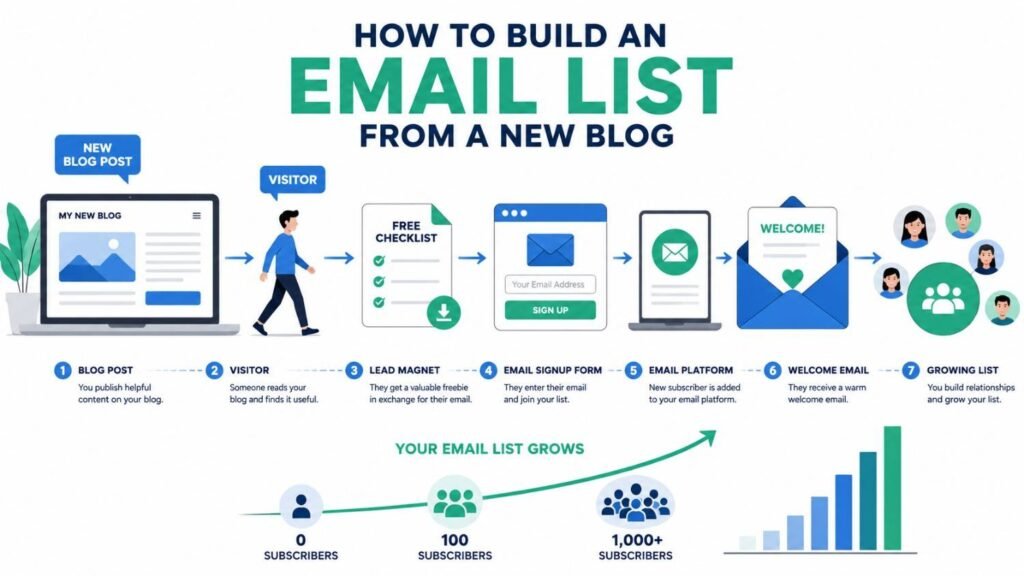
You do not need a costly setup to begin. You need an email marketing platform, a useful lead magnet, a clear signup form, and a short welcome email that gives subscribers what you promised.
Start with one simple offer that solves one small problem: a checklist, template, planner, or five-day email course often works better than a long ebook. For example, a food blogger could offer a “7-Day Indian Dinner Plan” instead of a broad guide about healthy eating.
This beginner’s guide will show you how to choose the right platform, create an offer, place signup forms, attract your first 100 subscribers, and avoid common mistakes. By the end, you will know how to build an email list from a new blog without buying contacts, chasing large traffic numbers, or depending only on social media.
Why Every New Blogger Needs an Email List
Every new blogger needs an email list because it gives you direct access to your readers. You do not need to wait for Google or a social app to show your work.
Your social followers are not truly yours. A new rule, lost account, or ranking change can cut your reach overnight.
An email list for bloggers works in a simple way: readers give you permission to contact them. You can then share new posts, useful tips, and updates straight to their inbox.
This direct link helps you turn one-time visitors into returning readers. For example, you can publish a post today and bring subscribers back with one short email.
Email also supports long-term trust and income. Even 100 active subscribers may bring more clicks and sales than thousands of silent followers.
You may later use your blog email list to share:
- Helpful new articles
- Ebooks and templates
- Affiliate recommendations
- Courses, coaching, or memberships
Email remains a strong marketing channel in 2026. Litmus reports that many marketing teams earn between $10 and $50 for each $1 spent, although results depend on the audience and strategy.
Still, do not treat each subscriber like a sales target. Send useful emails, respect consent, protect personal data, and make leaving your list easy.
Start collecting emails from your first day, even when your blog has little traffic. Each visitor who leaves without subscribing may never find your blog again.
SEO helps new people discover you, while email helps you keep the relationship. That mix is why every new blogger needs an email list: it creates a stable audience you can reach, serve, and grow over time.
Can You Build an Email List Without Traffic?
Yes, you can build an email list without traffic. You do not need thousands of blog visitors; you need a useful offer and a clear way to join.
Do not wait for Google traffic before setting up your list. Each early reader may leave forever when your new blog has no email signup form.
Start With One Useful Free Offer
Create a small lead magnet that solves one clear problem: a checklist, template, short guide, or five-day email course. A focused offer will often attract better leads than a weak message such as “Subscribe for updates.”
For example, a new food blogger could offer a “7-Day Indian Breakfast Plan.” This gives the reader a clear result, so the reason to join feels real.
Reach People Before Search Traffic Arrives
Build one simple landing page with a headline, short benefit, image, and signup button. Kit lists these as the four main parts of an effective newsletter landing page.
Share that page through places where you already speak with people:
- Your LinkedIn, Instagram, Pinterest, or YouTube profile
- Helpful posts in relevant Facebook, Reddit, or WhatsApp groups
- Guest posts, podcast talks, and online community replies
- Your personal email signature and existing contacts
Never add people without clear consent. Permission-based subscribers trust you more and keep your list safe.
Set Small, Real Goals
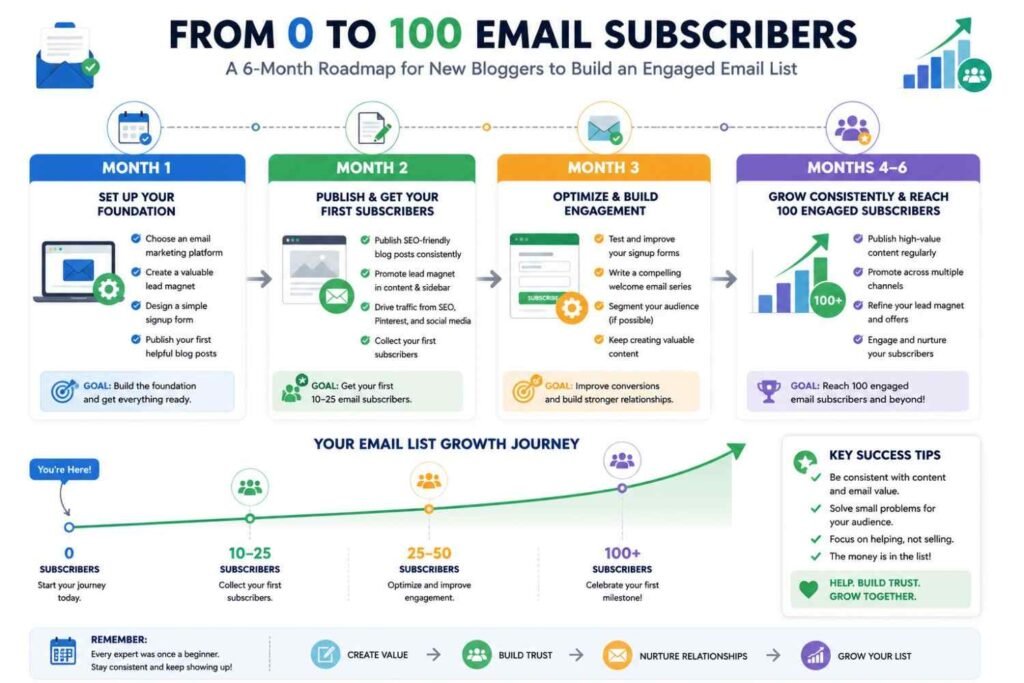
Aim for your first 10 subscribers, then 50, and finally 100. Measure progress each month because early email growth often takes weeks, not days.
Email is worth building early: Litmus reports an average return of about $36 for each $1 spent, though your result will depend on trust, relevance, and execution.
Your advantage is simple: a small, useful list belongs to you, while search and social reach can change overnight. Start with a lead magnet, one landing page, and one welcome email; that is enough to build an email list without traffic.
What You Need Before Collecting Emails
Before you build an email list from a new blog, set up four basics: a domain, an email platform, a privacy policy, and a lead magnet. These tools help you look trustworthy, protect subscriber data, and give readers a clear reason to join.
Domain
Use a custom domain such as yourblog.com instead of a free subdomain. Then create a branded email address, such as hello@yourblog.com, so your messages look real and professional.
Turn on HTTPS and set up SPF, DKIM, and DMARC through your domain or email provider. These checks help receiving services confirm that your emails truly come from you.
Email Marketing Platform
Do not collect subscribers in a personal Gmail account or send bulk emails by hand. Use an email marketing platform to store contacts, manage consent, create signup forms, send welcome emails, and track results.
Beginner-friendly choices include Kit, MailerLite, Beehiiv, Brevo, and Mailchimp; compare their current free plans before choosing. For example, Kit provides forms, landing pages, subscriber tags, and automated email sequences.
Privacy Policy
Email addresses are personal data, so tell readers what you collect, why you collect it, and how they can unsubscribe. Link your privacy policy near every signup form and use a clear consent message.
The EU’s GDPR has applied since May 25, 2018, and requires consent to be freely given, specific, informed, and clear when consent is your legal basis. In the United States, CAN-SPAM also requires honest sender details and a working way to opt out of commercial emails.
Lead Magnet
Most new visitors will not subscribe for “blog updates” alone, so offer one useful result. Choose a simple checklist, template, short guide, resource list, or mini-course that solves one urgent problem in your niche.
For example, a food blog could offer a “7-Day Budget Meal Plan,” while a blogging site could offer a “First Blog Post Checklist.” That clear value exchange completes what you need before collecting emails and helps turn casual readers into willing subscribers.
Step 1: Choose the Best Email Marketing Platform
The best email marketing platform for bloggers helps you collect subscribers, send newsletters, and automate emails from one place. Unlike Gmail or Excel, it also manages consent, unsubscribes, signup forms, segmentation, analytics, and spam rules.
Do not choose a tool only because it offers attractive templates. Choose one that lets you start quickly and grow from 100 subscribers to 10,000 without rebuilding your forms, lists, and welcome sequences.
Check These Features First
Look for the tools you will use from day one:
- Simple signup forms and landing pages
- An automated welcome email sequence
- Tags and subscriber segmentation
- Clear campaign and growth reports
- Mobile-friendly email templates
- GDPR and CAN-SPAM support
- Integrations with your blog platform
- Fair pricing after the free plan ends
Which Platform Should You Choose?
| Platform | Best suited to |
|---|---|
| Kit | Bloggers, creators, and automated content emails |
| MailerLite | Small lists and simple email design |
| Beehiiv | Newsletter-led blogs and audience growth |
| ActiveCampaign | Advanced automation and segmentation |
| Brevo | Blogs linked to a small business |
| Mailchimp | Beginners who prefer a familiar interface |
As of July 2026, Kit promotes a free newsletter plan for up to 10,000 subscribers, while Beehiiv supports up to 2,500 subscribers on its free Launch plan. MailerLite now limits its free plan to 250 active subscribers and 2,500 monthly emails, so always check current limits before joining.
My practical rule is simple: test the editor, build one form, and create one welcome email before committing. A confusing free tool often costs more later because moving platforms may mean rebuilding automations, forms, tags, and integrations.
Email can return an average of $36 for each $1 spent, according to Litmus, but software alone does not create that result.
The best email marketing platform for bloggers is the one you can use today, trust with subscriber data, and afford as your new blog grows.
Step 2: Create Your First Lead Magnet
To create your first lead magnet, choose one small problem your reader wants to solve now. A lead magnet is a free resource you give in return for an email address.
Do not begin with a long ebook. A useful checklist, template, cheat sheet, printable, or short PDF is faster to make and easier to use.
Choose One Clear Result
Your email lead magnet should help the reader get one quick result. Relevance matters more than length, fancy images, or costly design.
For example, a gardening blog could offer a “July Planting Checklist for Indian Home Gardens.” A personal finance blog could give a simple monthly budget sheet.
Use your Google Search Console queries, blog comments, social media questions, or related Google searches to find a real need. Then create the free resource around a question people already ask.
Create and Deliver It
Write the content in Google Docs, or design it in Canva or Adobe Express. You may use ChatGPT, Claude, or Gemini to organize ideas, but check every fact and add your own examples.
Connect the digital download to an email signup form in Kit, MailerLite, or Beehiiv. Set an automated welcome email so each new subscriber gets the promised resource at once.
Use clear consent language and explain what emails you will send. Never add people to your list without permission.
Keep It Useful
Learning-based lead magnets had a reported 27.4% average conversion rate in MailerLite’s March 2026 analysis, although your result will depend on your audience, offer, and traffic source.
Email can also produce strong long-term value: Litmus reports an average return of about $36 for every $1 spent.
Start with one focused blog lead magnet, track its signup rate, and improve it as you learn. The best way to create your first lead magnet is simple: solve one urgent problem and deliver the answer fast.
Step 3: Design a High-Converting Signup Form
To design a high-converting signup form, make the value clear and the action easy. Your reader should know what they will receive before they share an email address.
Keep Your Email Signup Form Simple
Ask only for an email address at first. Add a name field only when you plan to send personalized emails.
Every extra field creates more work for the reader. Nielsen Norman Group recommends reducing user effort, while Mailchimp advises collecting only the information you truly need.
Give Readers a Clear Reason to Join
Replace a weak heading like “Join Our Newsletter” with a clear benefit: “Get One Practical Blogging Tip Every Friday.” Offer a useful lead magnet, such as a checklist, template, short guide, email course, or resource list.
Your CTA button should also describe the reward. Use “Send Me the Checklist” or “Get My Free Guide” instead of “Submit.”
Build Trust and Remove Doubt
Use readable text, strong contrast, clear field labels, white space, and one bold CTA button. Add a short promise such as: “No spam; unsubscribe at any time.”
Make the form fast and easy to tap on a phone. Mailchimp recommends limiting fields, using relevant copy, optimizing for mobile, and testing the finished form before publishing it.
Place your email opt-in form inside relevant blog posts, near the end of articles, on your homepage, and on a focused landing page. Use popups carefully; a form should support the reading experience, not block it.
Finally, test one change at a time: the headline, lead magnet, CTA, form length, or placement. A high-converting signup form wins by offering timely value, reducing effort, and earning trust—not through flashy design.
Step 4: Add Signup Forms to Your Blog
Add signup forms to your blog where readers can see them at the right moment. Do not depend on one hidden form; match each form and lead magnet to the visitor’s reason for viewing that page.
Homepage
Place a clear email signup form near the top of your homepage. Tell new visitors what they will receive, such as weekly blogging tips, a free checklist, or a useful template.
Keep the form simple: ask for an email address and, only when needed, a first name. Use a benefit-led button such as “Get the Free Checklist” instead of the weak word “Submit.”
Sidebar
A sticky sidebar form can stay visible while desktop users read long posts. Use it for one short offer, such as “Get one practical blogging tip each Friday.”
Do not make the sidebar your main email capture method. Many mobile themes move it below the article, where fewer readers may notice it.
Footer
Add a newsletter signup form to the footer as a final invitation. It works well for readers who reach the end of a page and want more from you.
Use one promise, one field, and one clear call to action. Avoid filling the footer with several offers that compete for attention.
Within Blog Posts
Place an inline form after the introduction, near a useful tip, or before the conclusion. These blog signup forms reach readers while they are active and interested.
Match the offer to the post: add a blog-launch checklist to a startup guide or a headline template to a writing guide. This intent-based approach feels helpful, while a random popup often feels like an interruption.
About Page
Your About page is a strong place for a personal newsletter invitation. Readers visit it to learn who you are, what you know, and why they should trust your advice.
Connect the signup form to your story or mission. For example: “I share the lessons I wish I knew before starting my first blog.”
Keep Every Form Fast and Easy
Check every email subscription form on both desktop and mobile. Mobile produced about 52% of worldwide desktop-and-mobile web traffic in June 2026, so small fields, large buttons, and fast loading matter.
Track views, signups, and conversion rates with Google Analytics 4 or Microsoft Clarity. Test one change at a time because no signup location converts best for every blog.
Email can produce strong long-term value: Litmus reports that many marketers receive between $10 and $50 for every $1 spent, though results differ by business and measurement method.
Start with three placements: your homepage, your best blog posts, and your About page. Then add signup forms to your blog based on real reader actions, not guesses.
Step 5: Create a Landing Page
Create a landing page that gives each visitor one clear choice: join your email list. Unlike your homepage, an email signup landing page removes menus, sidebars, recent posts, and other links that may pull people away.
Build the Page Around One Offer
Start with a short headline that names the result your reader wants, such as: “Plan Your First Month of Blog Content.” Then add one brief line that explains your lead magnet, who it helps, and what the reader will receive.
Show the free resource with a clear image or mockup. Place a short opt-in form near the top, ask only for the details you need, and use a direct CTA such as “Send Me the Checklist” instead of “Submit.”
Unbounce recommends removing navigation and other distractions while keeping the main action easy to see. MailerLite also advises using fewer form fields because a shorter form makes signup faster and asks for less personal data.
Make It Fast, Mobile-Friendly, and Trustworthy
Check the page on your phone before you publish it. Mobile devices produced 51.51% of worldwide desktop, mobile, and tablet web traffic in June 2026, so your text, form, and signup button must work well on a small screen.
Compress large images and test the page with Google PageSpeed Insights. Google’s web performance guidance links faster pages with a better user experience, while a Renault study of 10 million landing-page visits found a strong link between loading performance and conversion rates.
Add a short privacy note below the form, and never use a fake subscriber count or made-up review. After signup, send the reader to a thank-you page and deliver the promised resource through your welcome email.
Finally, track visits, signups, and your conversion rate in Google Analytics 4 or your email platform. Even with fewer than 100 daily visitors, a focused landing page for your email list helps you learn which offer, headline, and CTA your readers value most.
Step 6: Write an Automated Welcome Email
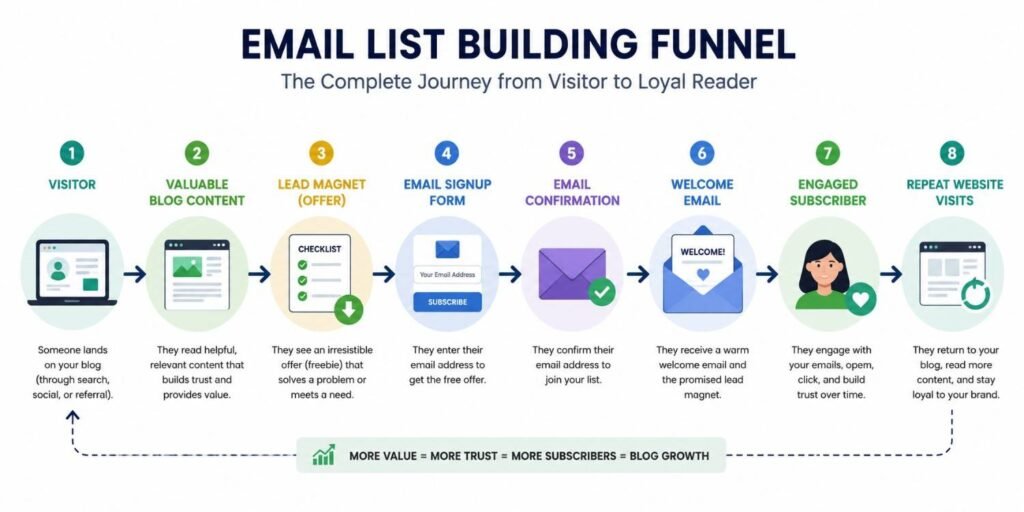
Your automated welcome email is the first real talk you have with a new subscriber. Set it to send at once after someone joins your email list, so they do not wait for the resource you promised.
A welcome email does more than deliver a free guide. It confirms the signup, builds subscriber trust, and shows readers what they can expect from you.
GetResponse’s email benchmark data reports an 83.63% average open rate and a 16.60% click-through rate for welcome emails, though privacy tools can make open-rate data less exact. This strong early interest makes your first email one of the best chances to connect with a new reader.
What to Include in Your Welcome Email
Keep your first email short and give it one clear goal:
- Thank the reader for joining.
- Share the lead magnet link.
- Introduce yourself in two or three lines.
- Explain what emails you will send.
- Ask them to add your address to their contacts.
- End with one simple call to action.
For example, ask: “What is your biggest blogging problem right now?” A real reply can help email engagement while giving you useful ideas for future blog posts.
Set Up the Automation
Tools such as Kit, MailerLite, Beehiiv, Mailchimp, Brevo, and ActiveCampaign can trigger an onboarding email after a form signup. Kit uses an email sequence and a visual automation to move each new subscriber into the correct welcome workflow.
Start with one email, then build a three-to-five-email welcome sequence over the next 7–10 days. Introduce your best content, share your story, solve one small problem, and guide the reader toward the next step.
Before you publish, join the list with your own email address. Test every link on both a phone and a computer, because a broken download link can damage trust before the relationship even starts.
Keep the design mobile-friendly, use short paragraphs, and avoid hard selling. A simple, useful automated welcome email will often nurture subscribers better than a complex email funnel that feels cold or forced.
Step 7: Get Your First 100 Subscribers
To get your first 100 subscribers, choose one long-term channel and one faster channel. Send each visitor to a useful lead magnet that solves the same problem as the page they are reading.
Do not chase all six channels at once. Track visits, form clicks, and new subscribers each week so you know what works.
SEO
Write helpful posts around specific long-tail keywords your ideal reader already searches for. Add a matching signup form inside each post instead of sending readers to a general newsletter page.
Use Google Search Console to find queries and improve weak pages. BrightEdge’s 2019 research found that organic search produced 53% of trackable website traffic, so SEO can support steady email list growth.
Create two or three clear vertical Pins for every useful blog post. Link each Pin to a page with a closely related lead magnet.
Pinterest describes itself as a visual discovery platform where people search and save ideas. Use Pinterest Trends for topics and Canva for simple Pin designs.
Facebook Groups
Join two active groups where your target readers ask real questions. Give useful answers first, and share your link only when the rules allow it.
A helpful comment builds more trust than a promotional post. Never copy the same sales message into several groups.
Quora
Find evergreen questions that closely match your blog topic. Answer the full question, then link to your guide only when it adds useful detail.
Your answer must help even when nobody clicks. This approach brings fewer visits, but those visitors often have clear intent.
Read each subreddit’s rules before you post. Build a history of useful comments before mentioning your blog, lead magnet, or newsletter.
Avoid dropping links without context in communities such as r/Blogging or r/SEO. One helpful answer is worth more than ten promotional posts.
Guest Posting
Pitch useful articles to trusted blogs with active readers in your niche. Link your author bio to a focused landing page, not your homepage.
Start with SEO plus one outreach channel, then review your results after four weeks. That focused plan gives you a clearer path to your first 100 subscribers than trying every platform at once.
Best Lead Magnet Ideas for New Bloggers
A lead magnet is a useful free resource you give readers in return for their email address. The best lead magnet ideas for new bloggers solve one small problem fast, rather than teaching a broad topic through a long ebook.
Start with one simple offer that matches the reason people visit your blog. Your reader should understand the benefit at once and use the resource in about 10 minutes.
Easy Lead Magnet Ideas That Readers Can Use
- Checklist: Turn a task into clear steps, such as a blog launch checklist.
- Cheat sheet: Put key tips, shortcuts, or facts on one page.
- Printable planner: Help readers plan meals, trips, budgets, workouts, or content.
- Google Sheets template: Make tracking money, goals, keywords, or projects easier.
- Canva or Notion template: Give readers a ready-made system they can copy.
- Swipe file: Share proven headlines, email subject lines, captions, or prompts.
- Short PDF guide: Explain one narrow task in three to five pages.
- Email mini-course: Teach one result through three to five short lessons.
- Toolkit: List trusted tools, websites, books, and resources for your niche.
- AI prompt pack: Provide focused prompts that produce a clear result.
Mailchimp also recommends useful resources such as checklists, templates, ebooks, and exclusive content for attracting subscribers.
How to Choose the Right Offer
Choose the problem your reader wants to fix today: not the problem they may face next year. For example, a food blogger could offer a “7-Day Indian Meal Planner,” while a blogging site could share a “First 10 Posts Content Calendar.”
Create the resource with Google Docs, Canva, Notion, or Google Sheets; then deliver it through Kit, MailerLite, Beehiiv, or Brevo. Test the title, signup form, and format because no lead magnet guarantees the same result for every audience.
Avoid generic ebooks, slow delivery, too many form fields, and files that are hard to read on a phone. Email remains valuable: Litmus reports that 35% of companies earn at least $36 for each $1 spent, so a focused lead magnet for new bloggers can become the first step toward a strong email relationship.
Best Places to Put Email Signup Forms
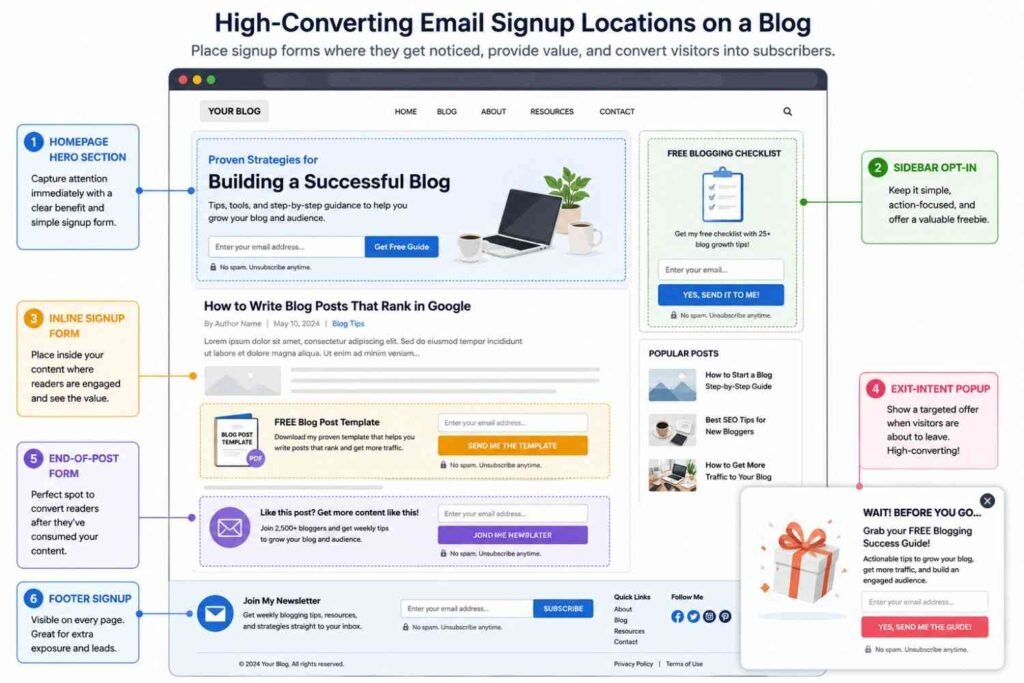
The best places to put email signup forms are the points where your reader has seen clear value and feels ready to hear from you again. Do not place forms everywhere; match each form to the reader’s level of interest.
Start With These Four Placements
For a new blog, use these locations first:
- Homepage hero: Show one clear benefit and one call to action. For example: “Get one simple blogging tip each Friday.”
- Inside each blog post: Add an inline form after a useful tip or near the middle of a long guide. Offer a lead magnet that fits the topic.
- End of the post: Your reader has finished the article and may want the next step. This is often the most natural place for a blog subscription form.
- Dedicated landing page: Use one page for one offer, such as a checklist, template, email course, or free guide.
You can also test a sticky bar, About page, Resources page, footer, thank-you page, and desktop sidebar. Sidebars are easy to ignore, so never make one your main email capture form.
Should You Use Popups?
Yes, but do not show a popup as soon as someone lands on your blog. Use a scroll-trigger form after 50% of the page or an exit-intent popup when the reader appears ready to leave.
OptinMonster reports that exit-triggered email popups may convert an extra 2%–4% of visitors, but results depend on the offer, audience, and page. Treat that figure as a testing guide, not a promise.
Keep Every Form Fast and Useful
Use a short headline, one email field, a clear benefit, and a simple button. Also, make every form mobile-friendly: mobile devices produced 51.51% of worldwide web traffic in June 2026.
Start with two or three useful placements, then track signups in your email platform and Google Analytics 4. Review scroll maps in Microsoft Clarity or Hotjar, and test one change at a time.
Good email signup form placement respects the reader’s journey: earn attention first, offer a useful next step, and ask for the email at the right moment.
Email List Building Mistakes Beginners Make
Email list building mistakes can slow your growth before traffic becomes a real problem. You need a clear offer, visible forms, and regular emails from the day you launch.
Waiting Too Long to Start
Do not wait until your blog gets thousands of visits. Your first readers can become loyal email subscribers and tell you what content they need next.
Giving People No Reason to Join
“Subscribe to my newsletter” is weak because it promises nothing useful. Offer one focused lead magnet: a checklist, template, short guide, quiz, or resource list that solves the reader’s next problem.
Making Signup Forms Hard to Use
Ask for an email address and, only when useful, a first name. In practical form tests, removing unneeded fields often reduces friction and makes the signup process feel faster.
Place email signup forms inside relevant posts, on your homepage, and on a focused landing page. Test every opt-in form on a real mobile phone; small buttons, slow popups, and crowded screens lose subscribers.
Choosing Tools Without Planning Ahead
Choose an email marketing platform that supports automation, tagging, analytics, and easy exports. Kit, MailerLite, Beehiiv, Mailchimp, and ActiveCampaign serve different needs, so compare features before moving your list later.
Ignoring New Subscribers
Send a welcome email as soon as someone joins. Deliver the promised free resource, introduce your blog, and explain what you will send and how often.
One Mailchimp customer’s welcome series reached a 58.7% open rate from October 2024 to March 2025, showing why early emails deserve care.
Buying Lists or Sending Without Permission
Never buy an email list; those people did not ask to hear from you. Bought contacts can cause spam complaints, poor email deliverability, and damage to your sender reputation.
The US CAN-SPAM Act gives recipients the right to stop commercial emails, while EU rules require clear consent for many direct-marketing emails.
Failing to Measure Results
Track your form conversion rate, open rate, click rate, bounce rate, and unsubscribes each month. Mailchimp reports a broad average email open-rate target of about 34.23%, though results vary by industry.
Avoiding these email list building mistakes matters more than chasing a large subscriber count. Build trust, send useful emails, study the numbers, and improve one small step at a time.
How Long Does It Take to Reach 1,000 Subscribers?
How long does it take to reach 1,000 email subscribers? Most new bloggers may need 6 to 12 months, while a well-planned blog may get there in 3 to 6 months.
This timeline is not a promise: your niche, traffic, lead magnet, signup forms, and publishing pace all change the result. A blog with weak traffic or irregular content may need 12 to 24 months.
Estimate Your Email List Growth
Start with your email opt-in rate: divide new subscribers by the number of visitors, then multiply by 100. Recent benchmark data puts the average signup rate near 1.95%, while the top 10% of sites reach about 6.5%.
| Monthly visitors | Opt-in rate | New subscribers |
|---|---|---|
| 1,000 | 2% | 20 |
| 5,000 | 2% | 100 |
| 5,000 | 5% | 250 |
At a 5% signup rate, you need about 20,000 total visits to gain 1,000 subscribers. This simple estimate assumes each visit comes from a new person and each subscriber signs up once.
What Helps You Reach 1,000 Faster?
- Offer a lead magnet made for one clear reader problem.
- Add targeted forms inside related blog posts.
- Build a focused landing page.
- test your headline, call to action, and mobile form.
- Track traffic and signups in GA4 or your email tool.
Kit notes that lead magnets attract the right audience and show readers what you can help them achieve. Google also warns that search improvements may take weeks or several months to show results, so organic subscriber growth often starts slowly.
Never buy an email list: inactive contacts will not build trust, clicks, or sales. Your first 1,000 subscribers matter only when they want your content.
So, how long does it take to reach 1,000 email subscribers? Focus on qualified traffic, a useful offer, and steady testing; 500 engaged readers can serve your blog better than 5,000 people who ignore every email.
Email List Growth Checklist
Use this email list growth checklist before you promote your new blog. It helps you find weak spots and build a full system, not just one signup form.
Set Up the Basics
- Choose an email marketing platform: Kit, MailerLite, Beehiiv, Mailchimp, or ActiveCampaign.
- Use a professional sender email linked to your domain.
- Add a clear privacy policy and consent text.
- Turn on double opt-in when list quality matters most.
- Test each email and form on both mobile and desktop.
Create a Strong Offer
- Make one useful lead magnet that solves one clear problem.
- Use Canva, Google Docs, or Adobe Express to create it.
- Build a simple landing page with one promise and one CTA.
- Ask only for the details you truly need; a name and email are often enough.
One strong offer often beats five weak downloads. Your reader should know what they will receive and why it will help them.
Add Signup Forms
Place opt-in forms on your:
- Homepage
- About page
- Blog posts
- Sidebar or footer
- Lead-magnet landing page
Use popups with care. A form that blocks the page too soon may drive readers away.
Automate the First Contact
- Deliver the lead magnet at once.
- Send a short welcome email.
- Introduce yourself in a natural way.
- Explain what emails the reader will get next.
Track and Improve
Use GA4, your email platform, or a heatmap tool to track visits, signups, and form conversion rates. Test your headline, CTA, form location, and offer one change at a time.
Litmus reports an average email return of about $36 for each $1 spent, though results differ by business and list quality.
Review this email list growth checklist every month. Focus on useful subscribers who open and read your emails, not a large number that never responds.
Frequently Asked Questions
When should you start building an email list?
Start as soon as your new blog goes live. Building an email list early lets you keep contact with readers who may not return on their own.
Can you build an email list without blog traffic?
Yes, but you still need a way to reach people. Share a useful landing page through social media, guest posts, online groups, or direct contacts.
Which email marketing platform is best for beginners?
MailerLite and Kit offer simple forms, landing pages, welcome emails, and free starter plans. Beehiiv, Brevo, and Mailchimp are also useful; choose the tool that fits your goals and budget.
What is a lead magnet?
A lead magnet is a free resource offered in return for an email signup. Use a short checklist, template, guide, workbook, or email course that solves one clear problem.
How often should you email subscribers?
Send one useful email each week or every two weeks. A steady schedule builds trust, while long gaps may cause readers to forget why they joined.
Do you need many subscribers to earn money?
No fixed number exists. A small list of 100 engaged email subscribers may produce better results than thousands of people who rarely open or click.
What is a good email open rate?
Mailchimp reports an overall benchmark near 34.23%, although results differ by topic and audience. Track clicks and replies too, since privacy tools can make open-rate data less exact.
Should you use double opt-in?
Double opt-in can produce a smaller but cleaner list. It confirms that each person owns the email address and truly wants your newsletter.
Should you buy an email list?
No; purchased contacts did not ask to hear from you. They can harm trust, engagement, and email delivery, while creating legal or platform problems.
What email rules should you follow?
Use clear consent, honest subject lines, your business details, and an easy unsubscribe link. EU consent must be informed and clear, while the US CAN-SPAM Act gives people the right to stop commercial emails.
Is email marketing still worth using?
Yes; Litmus reports an average return of about $36 for each $1 spent, though your results will vary. To build an email list from a new blog, focus on permission, useful content, and steady trust.
Final Thoughts
Learning how to build an email list from a new blog is not about chasing a large number fast. It is about finding the right readers and building trust with them over time.
Start now, even when your blog has little traffic. Pick a simple email platform, create one useful lead magnet, place clear signup forms on key pages, and send a warm welcome email.
Then, keep giving people a reason to stay. Share useful tips, solve real problems, and write emails that sound like they came from a person—not a sales machine.
Track a few clear numbers: new subscribers, open rates, clicks, replies, and sales. Use that data to test your lead magnet, form text, page location, and email topics.
Do not buy email addresses or add people without consent. Use clear forms, explain what subscribers will receive, and follow the privacy and email laws that apply in their country.
Email remains a strong channel: Litmus reports an average return of $36 for every $1 spent. Still, that result depends on permission, useful content, good delivery, and regular testing—not the size of your list alone.
AI tools can help you group readers or draft ideas, but they cannot replace your judgment and real voice. Google also recommends useful, reliable, people-first content with clear experience and expertise.
Your best next step is simple: publish one helpful free resource and add one signup form today. That is how to build an email list from a new blog that supports steady, long-term growth.


Leave a Reply