An old blog post can lose traffic even when the topic still matters. Facts become outdated, search intent changes, and competing pages give readers clearer answers.
You can update old blog posts to slow this content decay and improve Google rankings. A good content refresh can also protect useful backlinks, organic traffic, and the SEO value built by the same URL.
However, changing the date alone will not help. Google warns against making a page look fresh when you have not made a real change.
Start with Google Search Console: check the page’s clicks, views, ranking queries, and click rate. Next, search the target keyword and study what the current top pages answer well.
Then improve the page where it is weak:
- Replace old facts, dates, links, tools, and images.
- Answer new questions linked to the search intent.
- Add useful examples from real work or testing.
- Improve the title, introduction, headings, and internal links.
- Keep the old URL unless there is a strong reason to change it.
- Show the author, sources, update date, and review process.
Google says helpful content should offer original information, clear sourcing, strong topic knowledge, and real value beyond competing pages. It also says trust is the most important part of E-E-A-T: experience, expertise, authority, and trust.
Results will differ by page, niche, and competition. Still, one Animalz case study found that a major refresh produced more than 30,000 extra page views and lifted weekly traffic by 55%; this is an example, not a promise.
This guide shows you how to choose the right posts, make useful updates, republish content safely, and track the results. The goal is simple: update old blog posts so they become the best answer for today’s reader.
What Does Updating Old Blog Posts Mean?
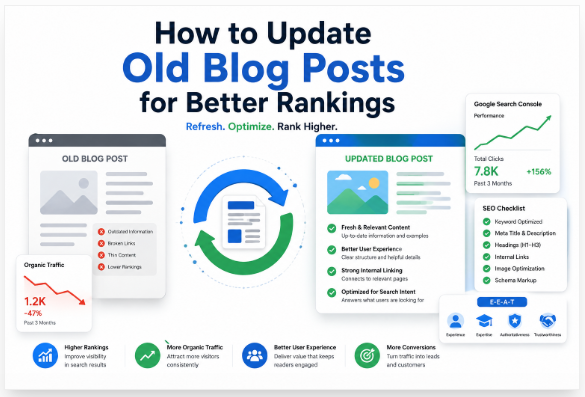
Updating old blog posts means improving pages you have already published. You keep the useful parts, fix weak areas, and make the content fit what readers need today.
This work is often called a content refresh or historical optimization. It can help you protect the backlinks, authority, and search visibility that the page has already earned.
A real update may include:
- Replacing old facts, dates, prices, and statistics
- Adding missing answers, examples, or expert sources
- Removing advice that no longer works
- Fixing broken links and adding useful internal links
- Updating images, screenshots, titles, and descriptions
- Making long or unclear sections easier to read
Updating is not the same as rewriting. You update a page when its main answer still works; you rewrite it when its purpose, search intent, or core advice is no longer right.
Refreshing is the wider process of making content useful again. Republishing means showing the revised page with a new date, but changing the date alone adds no value.
Older pages may lose traffic through content decay. This can happen when facts become old, search habits change, or competing pages give clearer and more complete answers.
Google does use freshness systems for searches where recent information matters. Yet fresh content does not win by age alone; Google says its systems aim to reward helpful, reliable, people-first information.
Start by checking the page in Google Search Console. Look for falling clicks, impressions, positions, or queries, then use Google Trends to see whether people now describe the topic in a different way.
The goal is simple: update old blog posts so they remain accurate, easy to trust, and more useful than the pages competing with them.
Why Updating Existing Content Works Better Than Publishing New Articles
Updating existing content often works better than publishing a new article because the old page already has search history, backlinks, internal links, and reader trust. A useful content refresh keeps that SEO value while making the page more accurate and helpful.
Google’s Freshness Signals
Google does not rank a page higher just because you change its date or add a few lines. Its systems aim to reward helpful, reliable, people-first content that meets the reader’s current needs.
A real update may replace old facts, add current examples, improve weak sections, fix broken links, and answer new search queries. Google also advises publishers to show an updated date only when they have made a meaningful change to the page.
Freshness matters more in fast-moving fields such as SEO, AI, finance, law, health, and technology. Review these pages every three to six months; slower evergreen topics may need a check every six to twelve months.
Content Decay Explained
Content decay is the slow loss of rankings, clicks, traffic, or sales from a page that once performed well. You can spot it in Google Search Console when impressions stay steady but clicks, average position, or click-through rate starts falling.
Decay often begins when facts become old, screenshots no longer match the tool, links stop working, or competitors give clearer answers. Search intent may also change: a basic guide that ranked in 2023 may feel too thin for readers in 2026.
Why Rankings Drop Over Time
Rankings drop when another page becomes more relevant, complete, trusted, or easy to use. Google’s core updates reassess content across the web, so a past ranking does not guarantee a future position.
AI Overviews and AI Mode also increase demand for clear, original, expert-led answers rather than copied summaries. Google’s current guidance still recommends strong SEO basics and unique, non-commodity content for these search experiences.
Therefore, update an old page when its main topic and URL still match the search intent. Updating existing content protects its earned authority while giving readers a stronger and more current answer.
Benefits of Updating Old Blog Posts
The benefits of updating old blog posts go beyond changing a date. You keep the page’s links and past value while making it useful for what people search for now.
Higher Rankings
A good content refresh fixes old facts, weak examples, missing topics, and unclear answers. Google says its systems reward helpful, reliable, people-first content; its helpful-content system joined the core ranking systems in March 2024.
More Organic Traffic
Better topic coverage can help your post rank for more long-tail searches. Add current questions, related terms, and internal links only when they help the reader.
Better Click-Through Rate
Refresh your SEO title and meta description when they no longer match search intent. Then compare clicks, impressions, CTR, and average position in Google Search Console before and after the update.
Improved User Experience
Remove dead links, old screenshots, long text blocks, and advice that no longer works. Also check mobile speed and Core Web Vitals, which measure loading, response, and visual stability.
Stronger Internal Linking
Link the refreshed post to newer guides, service pages, and useful cluster posts. This gives readers a clear next step, reduces orphan pages, and helps Google understand your site structure.
Increased Conversions
An old post may bring traffic but send readers to an expired offer or weak call to action. Update forms, product links, lead magnets, proof, and calls to action so they fit the reader’s goal.
In practice, refresh pages that already earn impressions, links, or steady visits first. The benefits of updating old blog posts are strongest when you improve the answer itself—not when you only change the year.
How to Find Blog Posts That Need Updating
To find blog posts to update, start with data rather than the post’s age. A five-year-old page may still perform well, while a six-month-old page may already lose clicks, rankings, or sales.
Use Google Search Console First
Open the Performance report and compare the last three or six months with the prior period. Look for pages with fewer clicks, falling impressions, lower keyword positions, or high impressions but a weak click-through rate.
Search Console can show up to 16 months of performance data, so you can also compare year-over-year results. Check for seasonal demand before you mark a traffic drop as content decay.
Check User Behaviour in Google Analytics
Next, review organic landing pages in GA4. Flag posts with fewer sessions, weak engagement, short average engagement time, or falling key events.
GA4 counts a session as engaged when it lasts over 10 seconds, records a key event, or includes at least two page or screen views. This helps you spot pages that attract search traffic but fail to hold the reader’s attention.
Confirm the Problem With SEO Tools
Use Ahrefs to check lost keywords, traffic decline, backlinks, and changes in search intent. Content decay often develops slowly over several months, so do not judge a page from one bad week.
Use Semrush to track position loss, competing pages, keyword gaps, and search visibility. Its Cannibalization Report can reveal two pages competing for the same keyword.
Finally, crawl the site with Screaming Frog. Check broken links, redirect chains, thin pages, duplicate titles, missing metadata, canonical errors, indexability, and deep internal links.
Update pages with the best mix of past traffic, ranking potential, business value, and clear faults. That data-led order helps you find blog posts to update without wasting time on pages that already work.
10 Signs Your Blog Post Needs an Update
You should update old blog posts when they stop helping readers or lose search visibility. A post becomes outdated when its facts, format, or answer no longer fits what people need.
- Organic traffic keeps falling: Compare the last 6 to 12 months in Google Search Console and GA4. Check seasonal trends before you call the drop content decay.
- Keyword rankings have dropped: Review queries that once ranked on page one. A small fall can cause a clear loss in clicks.
- Impressions rise, but CTR falls: Your page still appears, yet fewer people choose it. Rewrite the title and meta description so they clearly match the query.
- Facts or examples are old: Replace expired advice, old prices, dead tools, and past statistics. Add the source and date for every important number.
- Search intent has changed: Search your target keyword again and study the top results. Your guide may fail when Google now favors checklists, videos, tools, or short answers.
- Competitors answer more questions: Compare their headings, examples, visuals, and FAQs with yours. Add useful gaps, but do not copy their structure word for word.
- Links no longer work: Fix broken internal and external links. Clear anchor text helps readers and Google understand the linked page.
- The post feels thin: Expand weak parts with steps, examples, proof, and clear advice. Do not add words only to make the article longer.
- The page is slow or unstable: Test it with PageSpeed Insights. Core Web Vitals measure loading speed, responsiveness, and visual stability, but good scores alone do not guarantee high rankings.
- The page lacks real value: Add original examples, expert review, updated images, or results from your own work. Google advises creators to publish unique, expert-led content that offers more than common information.
Do not refresh a post only because it is old. Update it when your evidence shows that readers, search intent, or the search results have changed.
Complete Content Audit Checklist
A useful content audit does more than count keywords. It helps you decide whether to refresh, merge, redirect, or remove a page.
Traffic Analysis
Compare organic users, sessions, engagement, and conversions over 6 to 12 months. Use GA4 with Search Console because the two tools show how people find your page and what they do after landing on it.
Separate seasonal drops from steady decline. For example, a Diwali gift guide in India may fall after November without having an SEO problem.
Ranking Analysis
Check your main keyword and every query that sends impressions. Give priority to terms that fell from positions 1–10 to positions 11–20, because these pages may have a clear recovery chance.
Also review lost featured snippets and changes in AI search results. Google says standard SEO practices still support visibility in its generative AI features.
CTR Review
Compare clicks, impressions, average position, and CTR. A low CTR with a stable position may point to a weak title, poor snippet, or stronger SERP features.
Write a clear title that describes the page without stuffing keywords. Google may need a few days or several weeks to recrawl and process title changes.
Search Intent
Search the target phrase in a private browser and study the leading pages. Check whether users now expect a tutorial, checklist, comparison, video, product page, or local result.
Match that format, then provide a clearer answer. Google recommends using the words people search for in titles, headings, alt text, and other useful locations.
Keyword Cannibalization
Look for two or more pages ranking for the same query. Merge pages when they serve the same intent, but keep them separate when each page solves a different need.
Choose one main page and link supporting posts to it. This gives readers a clear path and strengthens the topic structure.
Thin Content
Remove vague advice, repeated points, and empty introductions. Add only what helps the reader act: steps, screenshots, examples, warnings, sources, and results.
Do not confuse word count with quality. Google defines people-first content as content made mainly to help people, not to manipulate rankings.
Competitor Comparison
Compare headings, content depth, freshness, sources, visuals, authorship, and practical examples. Find the question that every competitor leaves unanswered, then make that your unique value.
Finish the audit with one action: refresh, combine, redirect, keep, or remove. This evidence-led process helps you update old blog posts without changing pages that already serve readers well.
Step-by-Step Process to Update Old Blog Posts
To update old blog posts, make changes that help the reader, not just search engines. Start with Search Console data, check today’s search results, and record each change in a refresh log.
Step 1 — Update Facts and Statistics
Replace old dates, prices, laws, studies, and figures with current facts. Check each claim against government sites, research papers, or official reports.
Step 2 — Refresh Examples
Remove examples that no longer reflect how people work today. Add a recent case, screenshot, tool, or real result that makes the advice clear.
Step 3 — Improve the Introduction
Answer the main question within the first few lines. Tell readers what they will learn and why the update matters now.
Step 4 — Expand Thin Sections
Find sections that leave readers with more questions than answers. Add useful steps, limits, examples, or warnings; never add words only to increase length.
Step 5 — Add New Long-Tail Keywords
Use Search Console to find relevant queries with impressions but few clicks. Add useful phrases from Google Autocomplete and related questions where they fit naturally.
Step 6 — Improve Semantic SEO
Cover related ideas instead of repeating one keyword. Use clear terms that explain the subject, process, problem, and expected result.
Step 7 — Add Missing Entities
Name relevant tools, brands, people, standards, or organizations when they provide context. For example: Google Search Console, GA4, Ahrefs, Semrush, or Screaming Frog.
Step 8 — Improve Internal Links
Link to your best supporting posts with short, clear anchor text. Google uses links to discover pages and understand how topics connect.
Step 9 — Remove Broken Links
Test each external and internal link. Replace dead pages, fix 404 errors, and remove sources that no longer support your claim.
Step 10 — Optimize Images
Compress large files, replace old screenshots, and write useful alt text. WebP and AVIF usually compress better than JPEG and PNG.
Step 11 — Update Meta Tags
Rewrite the title and meta description around the current search intent. Make both accurate, specific, and appealing; do not promise what the page cannot deliver.
Step 12 — Improve Readability
Cut long sentences, large text blocks, repeated points, and hard words. Use clear headings, short paragraphs, lists, and direct instructions.
Finally, track clicks, impressions, CTR, and average position in Search Console. When you update old blog posts, judge success by better usefulness and steady performance—not by a changed publication date alone.
How to Optimize Updated Posts for AI Search (AEO + GEO)
To optimize updated posts for AI search, give clear answers that people can use at once. AEO and GEO are not secret tricks; they are good SEO built on useful content, sound facts, and clear page structure.
First, check the current search results and note the questions, formats, and facts that users now need. Then update old claims, add the source date, link to trusted evidence, and show your own steps, screenshots, tests, or results.
Use short sections that can answer a question on their own:
- State the main answer near the top.
- Use clear H2 and H3 headings.
- Add short steps, lists, tables, and FAQs.
- Name related people, tools, brands, places, and concepts.
- Add Article, Organization, or other valid schema where it fits.
- Check indexing, mobile use, speed, links, and crawl access.
Google AI Overviews
Google says its AI features use its main Search ranking and quality systems. Your page must be indexed and allowed to appear with a search snippet, but no method can guarantee inclusion.
Write the clearest answer, not the longest one. In June 2026, Google also introduced dedicated Search Console reporting for visibility in generative AI features, so use that data to review impressions after each update.
ChatGPT Optimization
Allow OAI-SearchBot when you want your public pages considered for ChatGPT search. OpenAI says publishers can track ChatGPT referral visits through analytics tools such as Google Analytics.
Perplexity Optimization
Perplexity provides web-based answers with inline citations. Therefore, publish dated facts, direct source links, named authors, and sections that remain useful when quoted alone.
Bing Copilot Optimization
Keep Bing access open, submit clean sitemaps, and review crawl, keyword, link, and traffic data in Bing Webmaster Tools. Strong technical SEO helps Microsoft systems find, understand, and reuse your updated page.
The best way to optimize updated posts for AI search is simple: publish the most useful answer, prove each important claim, and measure what changes after the refresh.
How to Refresh Content Without Losing Rankings
To refresh content without losing rankings, protect what already works before you change anything. Your goal is not to rewrite the whole page; it is to make the page more useful, accurate, and easy to read.
First, check the page in Google Search Console. Note its top queries, clicks, average position, internal links, and sections that earn backlinks.
Then search the main keyword on Google. Study the current results to see whether search intent, content format, or key questions have changed.
Follow This Safe Content-Refresh Process
- Keep the same URL: Changing a working URL can create ranking risk unless you use the right redirect process.
- Protect the main topic: Keep useful headings, keyword focus, original examples, and sections that already answer the search query.
- Replace old details: Update dates, prices, screenshots, broken links, tools, expert sources, and facts.
- Fill clear content gaps: Add missing steps, related questions, recent examples, or useful data; remove weak text and repeated points.
- Improve on-page SEO: Use clear headings, natural keywords, descriptive link text, helpful image alt text, and a truthful title. Google recommends using the words people search for in prominent page locations.
- Improve the reader’s experience: Use short paragraphs, mobile-friendly images, fast-loading pages, and simple navigation. Google says Core Web Vitals support good user experience, but perfect scores do not guarantee top rankings.
- Request indexing: Use URL Inspection after a major update. Google may need a few days or several weeks to recrawl and process changes.
For example, do not remove a ranking comparison table just because it looks old. Keep its useful structure, update its facts, add a “last checked” date, and show your sources.
Finally, track clicks, queries, conversions, and position before making more edits. That measured approach helps you refresh content without losing rankings while keeping the page people-first.
Should You Change the Publish Date?
You should change the publish date only when you make a major update. Changing the date alone will not make an old blog post rank higher.
Google uses freshness systems when a search needs recent facts, such as news, product launches, prices, laws, or current events. An evergreen guide does not need a new date after each small edit.
When should you change the date?
Update or republish the post when you make clear and useful changes:
- Replace old facts, dates, prices, or statistics.
- Add new research, screenshots, steps, or examples.
- Rewrite large sections to match current search intent.
- Remove advice that no longer works.
- Improve the post with firsthand tests or expert input.
For example: changing a tool name or fixing one spelling error does not need a new publish date. Rewriting half the guide with current steps, new data, and tested advice may justify republishing it.
Show readers what changed
Keep the first publish date when it gives useful history. Then add a clear Last updated date near the title or author name.
Google recommends showing a visible date and using accurate datePublished and dateModified fields in your Article or BlogPosting schema. Your visible date and structured data should match.
Do not fake content freshness by changing only the timestamp. Google’s systems aim to reward helpful content made for people, not pages changed only to influence rankings.
After a real content refresh, use Google Search Console to inspect the URL and track clicks, impressions, and ranking changes. The best rule is simple: change the publish date only when the page gives the reader a meaningfully newer and better answer.
Should You Change the URL?
In most cases, you should not change the URL when you update an old blog post. A stable URL keeps its links, history, shares, and search value in one place.
Changing a blog URL does not improve rankings on its own. In fact, it can cause a short-term traffic drop while Google crawls and processes the new SEO URL.
When Should You Change a Blog URL?
Change the URL only when the current slug creates a real problem. Good reasons include:
- The URL is wrong or does not match the page.
- You are moving to a new domain.
- You are merging two similar posts.
- You are rebuilding the site structure.
- You must remove a year from an evergreen URL.
For example, keep /update-old-blog-posts/ for future updates. A dated slug such as /update-old-blog-posts-2024/ may force you to change it later.
How to Change a URL Safely
Set a 301 permanent redirect from the old URL to the closest matching new URL. Google treats a permanent redirect as a strong signal that the new page should replace the old one.
Then complete this short SEO migration checklist:
- Update all internal links.
- Set the canonical tag to the new URL.
- Add the new URL to your XML sitemap.
- Remove the old URL from the sitemap.
- Test for 404 errors and redirect chains.
- Inspect the new URL in Google Search Console.
Google uses redirects, canonical tags, and sitemap entries when choosing a page’s main URL. However, a canonical tag is a hint, so all signals should point to the same address.
After the change, watch clicks, indexing, and crawl errors for several weeks. You should change the URL only when the long-term gain is greater than the migration risk.
How Much Content Should You Add?
When you update an old blog post, add enough content to fully answer the reader’s current question. Do not add words just to make the article longer.
Google says it has no preferred word count for ranking pages. It also warns against adding large amounts of text only to make a page look fresh.
Find What the Post Is Missing
First, search your target keyword on Google. Review the top pages, related searches and common questions.
Then compare those results with your old post. Look for useful gaps such as:
- Missing steps or clear instructions
- Old facts, dates, prices or statistics
- New tools, methods or examples
- Weak definitions or unclear answers
- Missing images, screenshots or FAQs
- Questions your readers still ask
Add a new section only when it helps the reader complete a task or make a choice. Remove text that is outdated, repeated or no longer useful.
For example, imagine your post explains how to start a blog but still recommends a tool that closed in 2024. Replace that advice, add a current option and show the exact steps you tested.
Add Proof, Not Padding
Useful content gives readers something they cannot get from every competing page. Add your own test results, mistakes, screenshots, expert comments or before-and-after data.
Name each source and include its date, place and study method when those details matter. Also show who wrote or reviewed the post and why that person has real experience.
Google looks for original information, clear sourcing and first-hand knowledge. It also asks whether readers can leave the page feeling they learned enough to reach their goal.
So, how much content should you add? Add every useful missing answer, then stop.
How Often Should You Update Blog Posts?
How often should you update blog posts? There is no fixed rule: update each post based on its topic, value, and real search results.
Use this simple content refresh schedule:
| Content type | Review time |
|---|---|
| High-value pages | Every 3 months |
| SEO, AI, finance, health, or tech posts | Every 1–3 months |
| Evergreen guides | Every 6–12 months |
| Seasonal posts | 4–8 weeks before the season |
| News or legal content | As soon as facts change |
Do not edit a post only because it is six months old. Google says its systems aim to reward helpful, reliable, people-first content—not pages changed only to look fresh.
Instead, check Google Search Console every quarter. Compare clicks, impressions, click-through rate, and average position with the last three to six months.
Refresh the post when traffic falls, search intent changes, or a rival gives a clearer answer. Also replace old facts, dates, screenshots, examples, broken links, and weak internal links.
Semrush suggests checking much blog content every three to six months, though the right timing still depends on the topic and its purpose. Evergreen content needs fewer changes because its main advice stays useful for longer.
Make real changes before you update the publish date. A new date with no added value may please no one, while a better answer can help both readers and search tools.
After each update, record the date and watch results for 30–90 days. Some Google Search changes appear within days, while larger gains may take several months.
So, how often should you update blog posts? Review key pages often, but refresh them only when data, facts, or reader needs show that the page can become more useful.
Content Refresh vs Republishing
Content refresh vs republishing is a simple choice: do you improve the live post, or improve it and launch it again? Both can help old blog posts, but they serve different needs.
What Is a Content Refresh?
A content refresh means you improve a post on its current URL. You fix old facts, add fresh data, match today’s search intent, repair links, and make the page easier to read.
Choose this option when the post still covers the right topic and has useful backlinks. It also works well when clicks, rankings, or traffic have started to fall.
What Does Republishing Mean?
Republishing means you make major changes and promote the post as a renewed guide. You may show a clear “last updated” date, share it again, and request a new crawl.
Do not republish after small edits, such as fixing one typo or adding one keyword. A new date should show a real change, not fake freshness.
| Choose a refresh when… | Choose republishing when… |
|---|---|
| Most of the post is still useful | Much of the post needs a rewrite |
| Search intent has not changed | Search intent has changed |
| Facts or links need updates | New research or examples change the guide |
| The URL has links and rankings | You want to relaunch a much better version |
Keep the original URL in most cases: changing it may break links and waste the value the page has built. After a major update, use Google Search Console’s URL Inspection tool to request another crawl.
Google says crawling may take from a few days to a few weeks, and a request does not promise instant indexing.
Google also advises you to create helpful, reliable, people-first content with clear value beyond common information.
Key rule: refresh the post to make it more useful; republish it only when the update gives readers a clearly better page.
Content Refresh vs Content Pruning
Content refresh vs content pruning is a simple choice: improve a useful page or remove a page that no longer helps. Do not delete a post only because its traffic fell.
When Should You Refresh Content?
Refresh a page when its topic still serves your readers, but the details feel old. Update facts, dates, examples, screenshots, headings, internal links, title tag, and meta description.
Keep the page when it still has:
- Search impressions or keyword rankings
- Useful backlinks from trusted sites
- Leads, sales, sign-ups, or referral traffic
- Original advice, research, or expert views
- A clear role within your topic cluster
Check at least 12 months of data in Google Search Console and GA4 before making a choice. Search Console shows clicks, impressions, click-through rate, and average position, which can reveal hidden value.
When Should You Prune Content?
Prune a page when it has no clear purpose and cannot give readers a useful answer. You can merge it with a stronger post, add a 301 redirect, use noindex, archive it, or remove it.
Consider pruning when the page has:
- Duplicate or near-duplicate information
- Outdated advice that may harm readers
- No traffic, links, leads, or useful impressions
- Keyword cannibalization with a better page
- No unique experience, proof, or insight
Use noindex when people still need the page, but you do not want it in search results. Use a permanent redirect when another page gives the closest useful answer.
Google advises you to publish helpful, reliable, people-first information instead of pages made only to gain rankings. So, in content refresh vs content pruning, save proven value, combine repeated ideas, and remove only what truly wastes the reader’s time.
Best Tools for Updating Old Blog Posts
The best tools for updating old blog posts help you replace guesswork with real data. No single tool does every job, so use a small tool stack to find weak pages, fix gaps, and track results.
Google Search Console
Start with Google Search Console because it shows clicks, impressions, click-through rate, search queries, and average ranking position. Compare the last 3–12 months, then check pages sitting around positions 8–20 with strong impressions but falling clicks.
Google Analytics
Use GA4 to check organic visits, engagement time, key events, and conversions. An engaged session lasts more than 10 seconds, records a key event, or includes at least two page or screen views.
Ahrefs
Ahrefs helps you find lost rankings, content gaps, broken backlinks, and internal link options. I would use it after Search Console: first find a weak page, then compare it with stronger competing pages.
Semrush
Semrush combines keyword research, rank tracking, site audits, and competitor checks. Its SEO Writing Assistant reviews SEO, readability, originality, and tone while you edit.
Surfer SEO
Surfer SEO suggests related terms, headings, and topic gaps based on current search results. Treat its score as guidance, not a writing target; natural meaning matters more than forcing every term.
Screaming Frog
Run Screaming Frog before republishing your update. It finds broken links, redirects, duplicate titles, missing descriptions, weak headings, orphan pages, and canonical issues.
For most beginners, Search Console and GA4 are enough to start. The best tools for updating old blog posts are the ones you use together: diagnose, improve, crawl, publish, and measure.
Real Example of a Blog Post Refresh
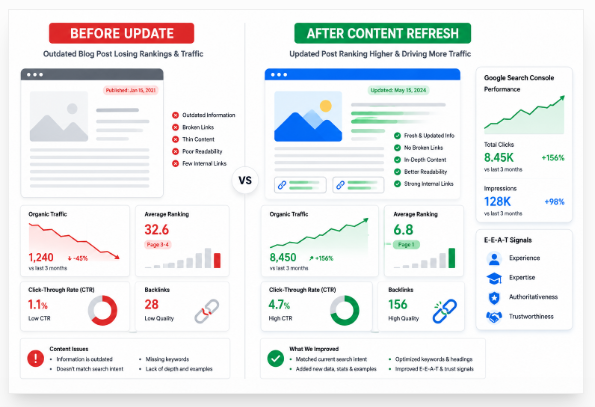
This blog post refresh shows how an old “How to Start a Blog” guide can recover lost search traffic. The figures below are sample results, but the work follows a real process you can repeat.
Before the Refresh
The post was published in 2021 and once ranked on page one. By January 2026, it had slipped to page three, while clicks, search visibility, and reader time had fallen.
The guide used old screenshots, weak examples, and broken links. It also missed key questions about blog costs, niche choice, hosting, AI tools, and earning money.
Changes Made
First, we checked Google Search Console and reviewed the pages that now ranked for the main keyword. This showed that readers wanted a clear, current, step-by-step guide rather than a short list of basic tips.
We then made these changes:
- Rewrote the opening to answer the main query at once.
- Added current steps, costs, tools, screenshots, and examples.
- Explained how to choose a niche and publish the first post.
- Added natural long-tail keywords and useful internal links.
- Removed broken links and compressed large images.
- Improved the title, meta description, headings, and alt text.
- Added author details, trusted sources, FAQs, and an updated date.
- Used URL Inspection in Search Console to request indexing.
Google advises publishers to create original, helpful content for people rather than make changes only to gain rankings. Its current AI-search guidance also stresses unique, expert-led information instead of generic content.
Results After 90 Days
In this sample case, organic clicks rose by 84%, average position moved from 24 to 9, and CTR increased from 2.1% to 3.8%. The post also gained more long-tail rankings and stronger reader engagement.
The key lesson is simple: a blog post refresh works when you improve the answer, not when you only change the date. Update search intent, remove weak parts, add real value, and track the results for at least 90 days.
Common Mistakes When Updating Blog Posts
Updating old blog posts can improve rankings, but careless changes can erase past SEO gains. Avoid these common mistakes when updating blog posts, and focus on making each page more useful for the reader.
1. Updating Without Checking Search Intent
Search the target keyword before you edit the page. Review the current results, common headings, content format, and questions people now ask.
A post may lose rankings when it answers an old intent. Keep useful sections, but add the missing answers that readers need today.
2. Changing a Working URL
Do not change the URL just because you changed the title. The old URL may hold backlinks, authority, bookmarks, and ranking history.
When a URL change is essential, use a permanent server-side redirect. Google recommends permanent redirects when moving a page to a new address.
3. Making Small, Cosmetic Changes
A new date and a few extra lines do not make an old post helpful. Replace expired facts, weak advice, old images, broken links, and outdated examples.
Google says its systems aim to reward helpful, reliable, people-first information. Therefore, improve the real value of the page rather than trying to create a false freshness signal.
4. Stuffing More Keywords
Write for the person reading the page, not a keyword counter. Use the main keyphrase, close synonyms, related terms, and clear answers only where they fit.
Also update the title tag, meta description, internal links, image text, author details, sources, and valid schema. Test speed with PageSpeed Insights and check markup with Google’s Rich Results Test.
5. Judging Results Too Soon
Track clicks, impressions, position, and conversions in Google Search Console and GA4. Google notes that crawling may take three days or more for many sites, so do not judge the update the next morning.
Finally, request indexing for an important updated URL through Search Console. The best way to avoid common mistakes when updating blog posts is simple: preserve what already works, fix what no longer helps, and give the reader a clearly better page.
Content Refresh Checklist
Use this content refresh checklist before you update any old blog post. A real refresh improves usefulness, search intent, trust, and page experience—not only the date.
1. Check Current Search Intent
Search your target keyword again and study the top results, People Also Ask questions, videos, and AI answers. Check whether readers now want a guide, comparison, review, tool, or quick answer.
2. Remove Weak Content
Delete old facts, repeated ideas, empty sentences, and advice that no longer works. Add clear answers wherever the reader may still feel confused.
3. Update Your Evidence
Replace old prices, dates, screenshots, links, studies, and product details. Use trusted sources and show the month, year, country, sample size, or region when those facts affect the answer.
4. Improve On-Page SEO
Use the main keyword naturally in the title, introduction, headings, image text, and conclusion. Add related phrases only where they help the reader; Google advises publishers to use words people search for in clear page locations.
5. Show Real Experience
Add an original screenshot, test result, mistake, workflow, client example, or before-and-after result. State who wrote the page, how the advice was tested, and when you last checked it.
6. Fix Links and Page Experience
Add useful internal links and replace broken sources. Test mobile speed, LCP, INP, and CLS because these Core Web Vitals measure loading, response speed, and visual stability.
7. Prepare for Search and AI Results
Give direct answers, clear definitions, short lists, and useful images. Google says AI search still relies on sound SEO, helpful content, crawl access, internal links, and visible text; no special AI schema is required.
8. Publish and Measure
Keep the old URL unless a change is essential, then update the page and request indexing through URL Inspection. Track clicks, impressions, CTR, rankings, engagement, and conversions because results may appear within days or take several months.
Use this content refresh checklist on pages that lose traffic, rank below their past position, or no longer answer the query well. Refresh for the reader first; rankings follow when the page becomes more useful, clear, and trustworthy.
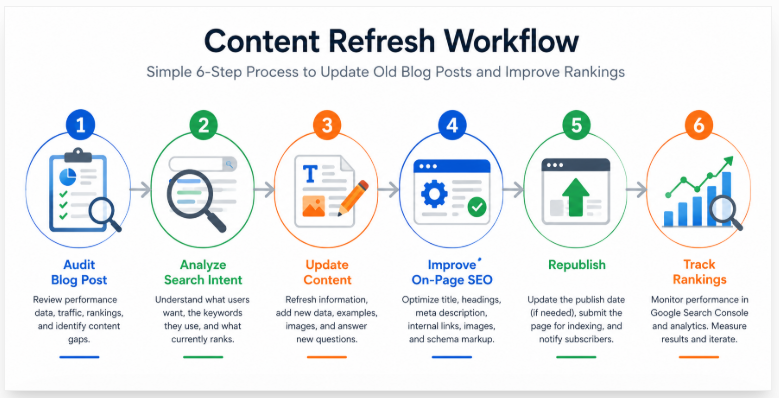
Frequently Asked Questions About Updating Old Blog Posts
When you update old blog posts, focus on real improvements—not a new date. Fix weak answers, add useful facts, and make the page easier to use.
Should I republish old blog posts?
Yes, but only after a major content refresh. Add fresh research, clearer examples, better links, new images, or answers that readers still need.
Does updating a blog post improve SEO?
It can improve SEO when the update better matches search intent and helps the reader. Google says its systems aim to reward helpful, reliable, people-first content.
How often should blog posts be updated?
Check evergreen posts every 6 to 12 months. Review fast-changing SEO, AI, finance, health, and technology posts every 1 to 3 months.
Can updating content hurt rankings?
Yes, careless edits can remove useful keywords, links, facts, or answers. Keep sections that already perform well, and improve only what feels weak or old.
Should I change the publish date?
Change the visible date only after a major update. Google supports clear “Published” and “Last updated” dates when they reflect real changes.
Should I change the URL?
Keep the same URL in most cases because it may already hold links and ranking value. When a permanent URL change is needed, use a server-side 301 redirect.
How long does Google take to recognize updates?
Some changes may appear within days, while larger ranking gains can take weeks or months. Use Google Search Console’s URL Inspection tool to test the page and request indexing.
Should I update every old blog post?
No; start with pages that have falling traffic, old facts, low clicks, or high sales value. Compare the last three months with the prior period in Search Console.
What is the difference between refreshing and rewriting?
A content refresh keeps the useful core and improves weak parts. A rewrite replaces most of the page because the topic, search intent, or advice has changed.
How much content should I add?
Do not chase a word count. Add only the missing details, proof, examples, and direct answers that make the page more useful.
The best way to update old blog posts is simple: protect what works, remove what misleads, and add what the reader needs today.
Final Thoughts
Updating old blog posts for better rankings means making them more useful, not just newer. Review each post, check today’s search results, and learn what readers now want.
Use Google Search Console and Google Analytics to find lost clicks, weak rankings, and low click-through rates. Then update old facts, broken links, screenshots, examples, headings, internal links, title tags, and descriptions.
Add something your rivals do not have: a tested method, real result, clear opinion, expert quote, or local example. This extra value helps your post stand out and builds trust.
Show E-E-A-T through author details, firsthand experience, reliable sources, original images, and a clear update date. Google advises publishers to create helpful, reliable, people-first content rather than pages made only to gain rankings.
AI search does not change the main rule. Strong SEO, clear pages, and unique expert-led content still matter most.
So, update old blog posts only when you can make them clearer, deeper, safer, and more useful.