You can check your EPF balance quickly using any of the following methods: the EPFO Member Passbook Portal, SMS service, missed call service, or the UMANG mobile app. To use these services, your Universal Account Number (UAN) must be activated and linked to your registered mobile number.
What is EPF (Employee Provident Fund)?
Your EPF (Employee Provident Fund) balance represents the total amount saved in your retirement account over the years. This balance grows through regular monthly contributions from both you and your employer, along with the interest credited by the EPFO.
Main Components of Your EPF Balance
When you check your EPF passbook, you’ll usually see your balance divided into three sections:
Employee Contribution
This is the 12% of your basic salary that is deducted from your salary every month and deposited into your EPF account.
Employer Contribution
A portion of your employer’s contribution is credited directly to your EPF account, helping your retirement savings grow faster.
Employee Pension Scheme (EPS) Contribution
Part of your employer’s contribution is transferred to the Employee Pension Scheme (EPS). This amount helps build your pension benefits and provides financial support after retirement.
This version is simpler, easier to read, and suitable for blog posts or informational guides.
1. EPFO Member Passbook Portal
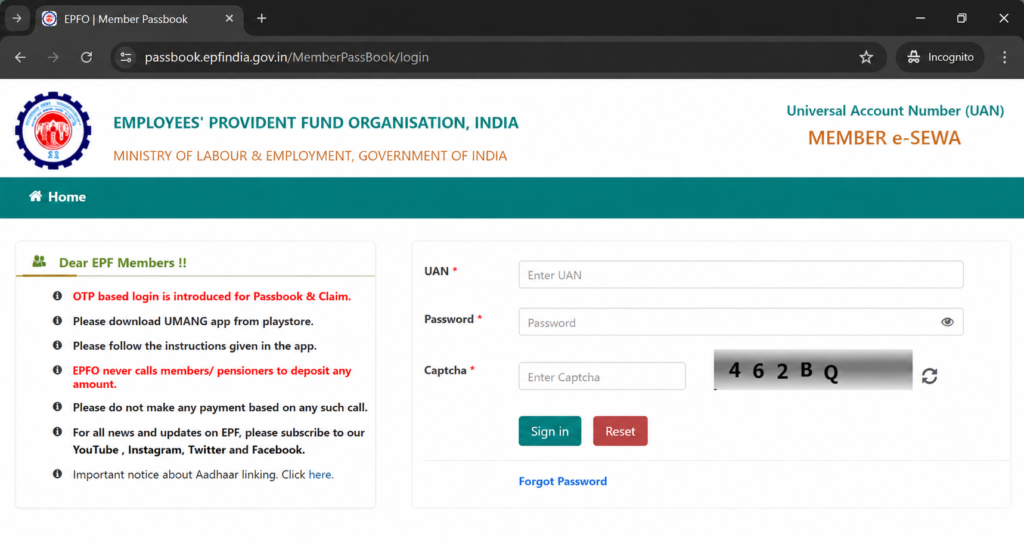
- Visit the official EPFO Member Passbook Portal.
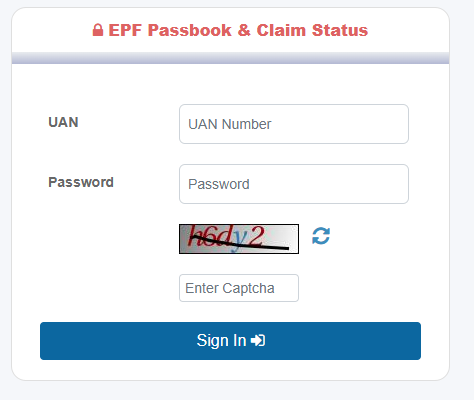
- Sign in using your UAN, password, and the security captcha.
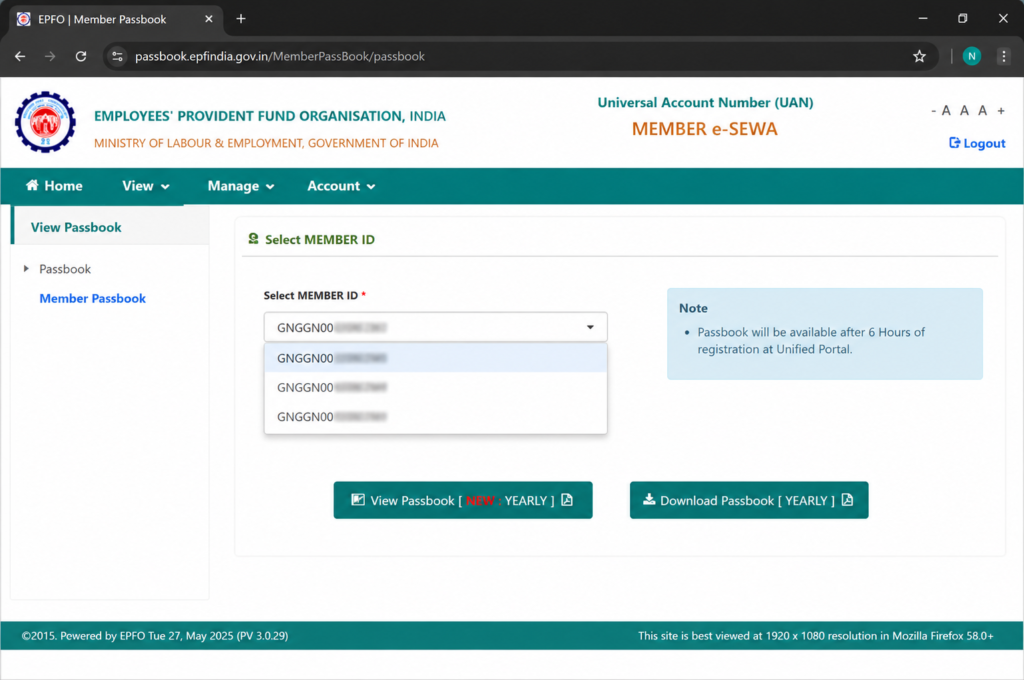
- Choose your Member ID to view or download your EPF passbook instantly.
2. Missed Call Service
- Give a missed call to 9966044425 from your UAN-linked mobile number.
- The call will disconnect automatically after a few rings.
- You will receive an SMS containing your latest EPF balance and contribution details.
- You can also use the alternate number 011-22901406.
Read More: How to Apply for Passport Online?
3. SMS Service
- Open your messaging app and send the following SMS from your registered mobile number: EPFOHO UAN LAN
- Send the message to 7738299899.
- Replace LAN with the first three letters of your preferred language.
- ENG for English
- HIN for Hindi
- Example: EPFOHO UAN ENG
4. UMANG Mobile App
- Install and open the UMANG app on your Android or iPhone.
- Search for EPFO and select it.
- Under Employee-Centric Services, tap View Passbook.
- Log in using your UAN and the OTP sent to your registered mobile number.
- Access your EPF passbook and account details instantly.
Read More: How to Download Your Voter ID Card?
FAQs
1. What is EPF?
EPF (Employee Provident Fund) is a retirement savings scheme managed by the Employees’ Provident Fund Organisation. Both employees and employers contribute a portion of the employee’s salary to build a retirement corpus.
2. How can I check my EPF balance?
You can check your EPF balance through:
- EPFO Member Passbook Portal
- UMANG App
- SMS service
- Missed call service
3. What is UAN?
UAN (Universal Account Number) is a unique 12-digit number assigned to every EPF member. It links all your PF accounts across different employers.
4. How much do employees contribute to EPF?
Employees contribute 12% of their basic salary and dearness allowance every month.
5. How much does the employer contribute to EPF?
The employer also contributes 12%, but this amount is divided between:
- EPF Account
- Employee Pension Scheme (EPS)
6. What is EPS in EPF?
EPS (Employee Pension Scheme) is a pension benefit provided through a portion of the employer’s contribution to support employees after retirement.
7. Can I withdraw my EPF before retirement?
Yes. Partial or full withdrawal is allowed under specific conditions such as:
- Unemployment
- Medical emergencies
- Marriage
- Higher education
- Home purchase or construction
8. How can I withdraw my PF amount online?
You can submit an online claim through the EPFO Unified Member Portal using your UAN and Aadhaar-linked account.
9. Is EPF withdrawal taxable?
EPF withdrawal may be taxable if withdrawn before completing 5 continuous years of service, subject to certain conditions.
10. What is the current EPF interest rate?
The EPF interest rate is announced annually by the EPFO and may change each financial year.
11. How can I download my EPF passbook?
Log in to the EPFO Member Passbook Portal using your UAN and password, select your Member ID, and download the passbook.
12. How do I activate my UAN?
Visit the EPFO Unified Member Portal, click “Activate UAN,” and verify your details using Aadhaar, PAN, or Member ID.
13. Can I have multiple PF accounts?
Yes, if you change jobs. However, all PF accounts can be linked under the same UAN.
14. How do I transfer PF when changing jobs?
You can initiate an online PF transfer request through the EPFO portal using your UAN.
15. What should I do if I forget my UAN password?
Use the “Forgot Password” option on the EPFO portal and verify your registered mobile number via OTP.
16. How long does PF withdrawal take?
Online PF claims are usually processed within 7–20 working days, depending on verification and documentation.
17. Can I update my KYC details in EPF?
Yes. You can update Aadhaar, PAN, bank account, and other KYC details through the EPFO member portal.
18. What happens to my PF account after I leave a job?
Your PF account remains active. You can transfer it to a new employer or withdraw it according to EPFO rules.
19. Can I check EPF balance without internet?
Yes. You can:
- Send an SMS from your registered mobile number.
- Give a missed call to the EPFO balance enquiry number.
20. What are the benefits of EPF?
- Retirement savings
- Tax benefits
- Pension benefits through EPS
- Interest earnings
- Financial support during emergencies
- Insurance coverage through EDLI (if applicable)
Disclaimer: The Information and infographics(Images) used in this blog post are just for educate the people only.




Leave a Reply