Creating a free Blogger (Blogspot) blog is one of the fastest ways to build a website without paying for hosting or learning web development. Owned by Google, Blogger includes free hosting, a Blogspot subdomain, HTTPS support, responsive themes, and built-in publishing tools. Whether you want to start a personal blog, share tutorials, build an online portfolio, or earn through ads and affiliate marketing, this guide shows you how to create, customize, and publish your Blogger website in 2026.
Quick Overview
| Feature | Details |
|---|---|
| Platform | Blogger (Blogspot) |
| Owner | |
| Originally Launched | 1999 |
| Acquired by Google | 2003 |
| Cost | Free |
| Hosting | Included |
| HTTPS | Free |
| Custom Domain | Supported |
| Monetization | Google AdSense, affiliate marketing, sponsored content |
| Best For | Beginners, hobby blogs, tutorials, niche websites |
Why Choose Blogger?
Blogger remains one of the easiest blogging platforms because Google manages the hosting, platform updates, and core security. You can focus on creating content instead of managing servers or installing software.
Blogger is a good choice if you want to:
- Start blogging for free
- Learn blogging without technical knowledge
- Publish articles quickly
- Connect a custom domain later
- Monetize through Google AdSense
- Use a reliable platform backed by Google
What You Need Before You Start
Prepare these before creating your blog:
- A Google account
- A computer or mobile browser
- A stable internet connection
- A blog name
- A clear topic or niche
Choosing one niche—such as technology, travel, recipes, finance, education, or health—helps both readers and search engines understand your website.
Step by Step tutorial for creating Blogger BlogSpot:
Step 1: Sign In to Blogger
Visit https://www.blogger.com and sign in with your Google account.
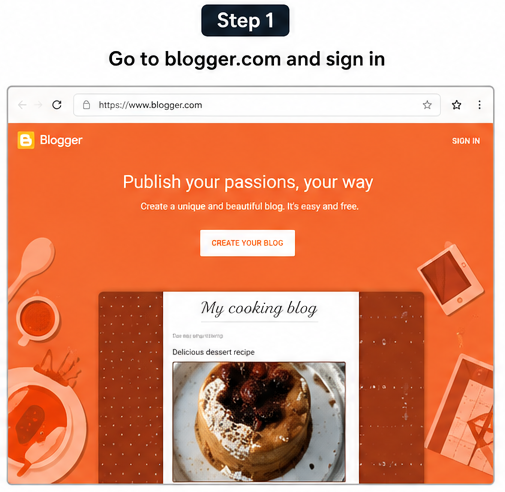
If this is your first time using Blogger, create a Blogger profile by choosing the display name that readers will see on your posts.
Step 2: Create Your Blog
Click Create New Blog.
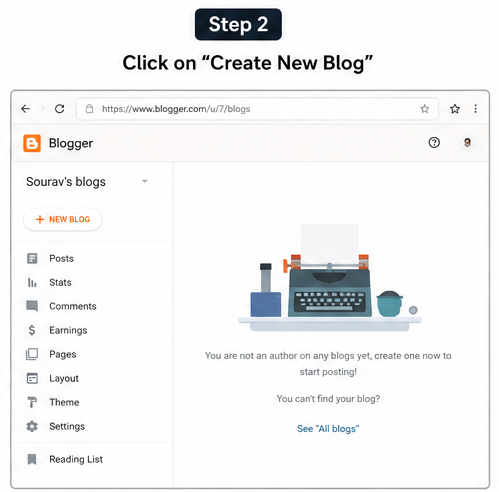
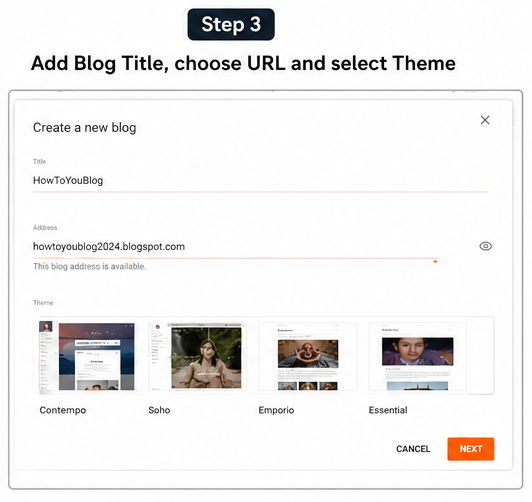
You’ll need to provide three details.
Blog Title
Your blog title is the public name of your website.
Examples:
- Tech Corner
- Daily Recipe Hub
- AI Learning Guide
- Travel Notes
Choose a short, memorable name that matches your niche.
Blog Address (URL)
Choose a unique Blogspot address.
Example:
mytechguide.blogspot.comIf your preferred address is unavailable, Blogger suggests alternatives.
You can later connect a custom domain such as:
www.mytechguide.comwithout losing your existing content.
Select a Theme
Blogger includes several responsive themes that you can customize with different layouts, fonts, colors, and background images. Google may update the available themes over time, so don’t worry about choosing the perfect one—you can change it later without affecting your posts.
Click Create Blog.
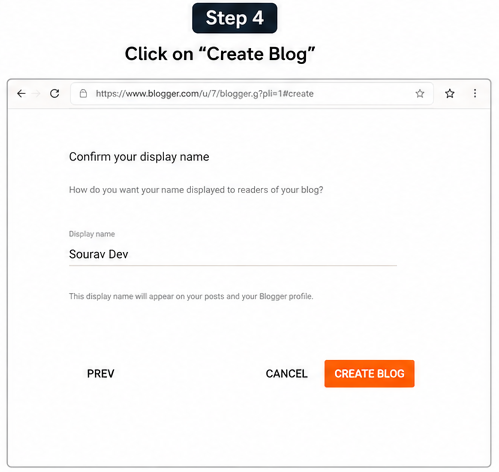
Your website is now live.
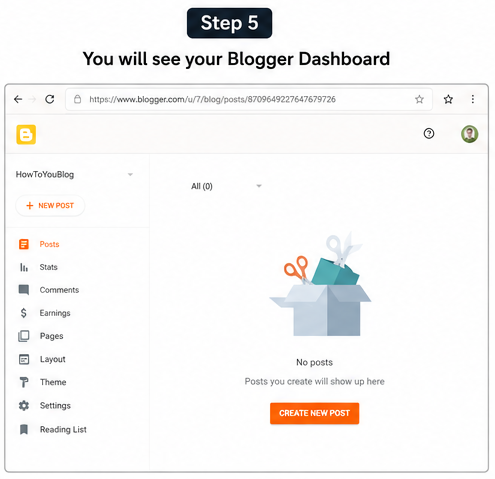
Step 3: Understand the Blogger Dashboard
The dashboard contains everything you need to manage your website.
| Menu | Purpose |
|---|---|
| Posts | Create and edit articles |
| Stats | View traffic and page views |
| Comments | Moderate reader comments |
| Earnings | Apply for Google AdSense (eligible blogs) |
| Pages | Create About, Contact, and Privacy Policy pages |
| Layout | Arrange gadgets and sections |
| Theme | Customize your blog design |
| Settings | Configure SEO, privacy, domain, and publishing options |
Spend a few minutes exploring these menus before writing your first article.
Step 4: Configure Essential Settings
Before publishing, configure a few important settings.
Blog Description
Write a short summary describing your blog.
Example:
Practical tutorials on blogging, SEO, AI tools, and technology for beginners.
HTTPS
Enable HTTPS to secure your website with SSL. Blogger provides HTTPS support at no additional cost.
Time Zone
Choose the correct time zone so scheduled posts are published at the intended time.
Privacy
Allow search engines to find and index your blog. If indexing is disabled, your posts may not appear in search results.
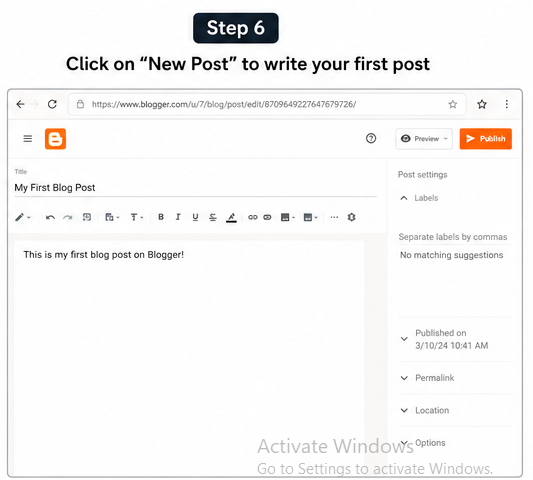
Step 5: Write Your First Blog Post
Click New Post and complete the following:
- Post title
- Article content
- Images (optional)
- Labels
- Custom permalink
- Search description
A good first article introduces your blog and explains what readers can expect from future content.
Keep paragraphs short, use headings, include bullet lists where appropriate, and add relevant images to improve readability.
Blogger Editor Features
The built-in editor includes:
- Heading styles
- Bold and italic formatting
- Numbered and bulleted lists
- Hyperlinks
- Images
- Videos
- Quote blocks
- Labels
- Scheduled publishing
- Custom permalinks
- Search descriptions
Always preview your article before publishing to ensure it looks good on both desktop and mobile devices.
Step 6: Publish Your Blog
When your article is ready:
- Click Publish.
- Confirm publication.
- Open your blog in a new browser tab.
- Verify that the page loads correctly.
Your Blogger website is now publicly accessible.
Quick Setup Timeline
| Time | Task |
|---|---|
| 2 minutes | Sign in with Google |
| 2 minutes | Create your blog |
| 3 minutes | Configure settings |
| 5–10 minutes | Write your first post |
| 1 minute | Publish your blog |
Most beginners can create a basic Blogger blog in 10–20 minutes, depending on how much they customize it.
Customize Your Blogger Blog
A clean design makes your blog easier to read and creates a more professional impression.
Go to Theme → Customize to personalize your website by changing:
- Fonts
- Colors
- Background
- Header image
- Sidebar layout
- Footer widgets
Avoid cluttered layouts with too many gadgets. Simple, fast-loading designs usually provide a better user experience.
Add Important Pages
Before promoting your blog, create these essential pages.
| Page | Purpose |
|---|---|
| About | Introduces you and your website |
| Contact | Lets readers and businesses contact you |
| Privacy Policy | Required for many advertising programs |
| Disclaimer | Explains affiliate links or informational content |
| Terms & Conditions | Defines website usage rules |
Display these pages in your main navigation or footer.
Connect a Custom Domain (Optional)
Your free blog uses a blogspot.com address by default. You can connect your own domain whenever you’re ready.
| Free URL | Custom Domain |
|---|---|
| myblog.blogspot.com | www.myblog.com |
Benefits include:
- Professional branding
- Easier sharing
- Greater credibility
- Flexibility if you move to another platform later
To connect your domain, open Settings → Publishing → Custom Domain and follow the DNS instructions provided by Blogger.
Submit Your Blog to Google Search
Publishing your blog doesn’t guarantee immediate appearance in Google Search.
After publishing your first post:
- Open Google Search Console.
- Add your Blogspot URL or custom domain.
- Verify ownership.
- Submit your sitemap:
https://yourblog.blogspot.com/sitemap.xml- Request indexing for important pages.
Google decides when pages are indexed, but Search Console helps you monitor indexing status, identify crawl issues, and improve your site’s visibility.
Blogger SEO Tips for 2026
Blogger includes useful SEO features such as customizable page titles, search descriptions, custom permalinks, HTTPS support, responsive themes, and automatic XML sitemaps. These features provide a solid foundation, but long-term rankings depend on publishing helpful, original content that satisfies search intent.
Follow these SEO best practices:
- Research keywords before writing.
- Focus on one primary topic per article.
- Include your main keyword naturally in the title, headings, and first paragraph.
- Write a unique search description for every post.
- Add descriptive alt text to every image.
- Link to related articles on your website.
- Update older posts with fresh information.
- Avoid duplicate, copied, or low-quality content.
- Keep pages fast and mobile-friendly.
- Publish consistently instead of posting many articles at once.
Can You Make Money with Blogger?
Yes. Blogger supports several monetization methods, making it suitable for both hobby bloggers and those building an online business.
Common ways to earn money include:
- Google AdSense
- Affiliate marketing
- Sponsored posts
- Selling digital products
- Online courses
- Freelance services
- Memberships and newsletters
Google AdSense is available for eligible blogs that comply with Google’s program policies. Approval depends on your website meeting AdSense requirements, including high-quality original content and policy compliance.
Blogger vs. WordPress
| Feature | Blogger | WordPress.org |
|---|---|---|
| Starting Cost | Free | Paid hosting and domain |
| Hosting | Included | Self-managed |
| Maintenance | Google manages platform updates | User manages updates |
| Ease of Use | Excellent for beginners | Moderate learning curve |
| Customization | Basic to moderate | Extensive |
| Plugins | Not supported | Thousands available |
| Performance | Fast by default | Depends on hosting |
| Best For | Personal blogs, tutorials, small websites | Businesses, large websites, advanced users |
If you’re new to blogging, Blogger offers one of the easiest learning experiences. As your website grows, you can export your content and migrate to WordPress if you need more customization.
Common Mistakes to Avoid
Many beginners slow their progress by making avoidable mistakes.
Avoid these common issues:
- Choosing a broad niche instead of a focused topic
- Publishing copied or AI-generated content without editing
- Ignoring grammar and proofreading
- Forgetting image optimization
- Using misleading clickbait titles
- Not submitting the blog to Google Search Console
- Adding too many gadgets that slow the website
- Publishing inconsistently
- Neglecting internal linking
Simple, high-quality content published consistently usually performs better than complicated SEO tricks.
After Publishing Your First Blog
Use this checklist to prepare your website for long-term growth.
- □ Create About, Contact, Privacy Policy, Disclaimer, and Terms & Conditions pages.
- □ Submit your sitemap to Google Search Console.
- □ Set up Google Analytics.
- □ Add a favicon.
- □ Create a navigation menu.
- □ Share your first article on social media.
- □ Publish new content regularly.
- □ Back up your Blogger content periodically.
- □ Monitor traffic using Blogger Stats or Google Analytics.
Frequently Asked Questions
Is Blogger completely free?
Yes. Blogger provides free hosting, a free Blogspot subdomain, HTTPS support, and all the core tools needed to create and manage a blog. You only pay if you purchase a custom domain.
Can I use my own domain?
Yes. Blogger allows you to connect a custom domain purchased from most domain registrars, giving your website a more professional appearance.
Is Blogger good for SEO?
Yes. Blogger includes several built-in SEO features, but rankings depend mainly on publishing useful content, following SEO best practices, and earning quality backlinks.
Can I use Google AdSense on Blogger?
Yes. Eligible Blogger blogs can apply for Google AdSense. Approval depends on compliance with Google’s content and program policies.
Do I need coding knowledge?
No. Blogger is designed for beginners. You can create, customize, and publish a complete website without writing code. HTML editing is available only if you want advanced customization.
Can I move from Blogger to WordPress later?
Yes. Blogger lets you export your content, which can then be imported into WordPress using the available import tools.
Key Takeaways
- Blogger is one of the easiest free blogging platforms available.
- You can create a basic blog in about 10–20 minutes.
- Google provides free hosting, HTTPS support, and platform maintenance.
- A focused niche and consistent publishing are more important than a complex design.
- Built-in SEO features help, but high-quality content remains the biggest ranking factor.
- You can monetize your blog through AdSense, affiliate marketing, digital products, and other methods.
- Google Search Console and Google Analytics are essential tools for monitoring your website’s performance.
Conclusion
Blogger remains an excellent platform for beginners who want to start a blog without investing in hosting or learning web development. Its free hosting, Google-backed infrastructure, built-in security, responsive themes, and simple publishing tools make it ideal for personal blogs, tutorials, niche websites, and small business content.
Creating your blog is only the first step. Publish helpful articles regularly, optimize each post for search engines, monitor your site’s performance with Google Search Console and Google Analytics, and continue improving your content based on reader needs. Consistency, originality, and usefulness will contribute far more to your blog’s long-term success than any single SEO technique.

Leave a Reply