You wrote the page, checked the keywords, and pressed publish. Yet you still ask, “Why is my content not ranking in 2026?”
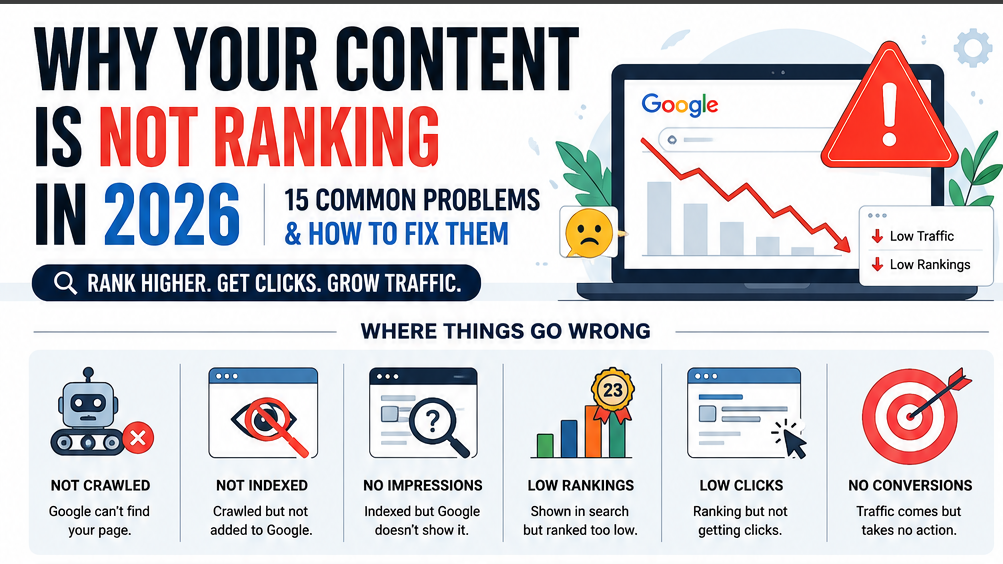
The cause may not be your writing. Your page may be:
- Not crawled by Google
- Crawled but not indexed
- Indexed for the wrong search intent
- Ranking too low to gain clicks
- Ranking well but losing clicks to AI answers
Do not rewrite the whole post yet. First, use Google Search Console to check crawling, indexing, search queries, impressions, position, and clicks. Google treats crawling, indexing, and ranking as separate stages.
Also, ranking and traffic no longer mean the same thing. A 2026 study of 55,393 searches found that AI Overviews appeared for 64.7% of question-based queries.
So, start with the real fault: access, relevance, authority, position, or clicks. This diagnosis will show what are the most common content ranking problems in 2026 and what you should fix first.
H2: First, Identify Which Ranking Problem You Actually Have
When your content is not ranking, do not start with a full rewrite. First, find the exact point where your page stops moving through Google Search.
Google must discover, crawl, index, rank, and show your page before it can earn clicks. Search Console helps you check impressions, clicks, click-through rate, and average position.
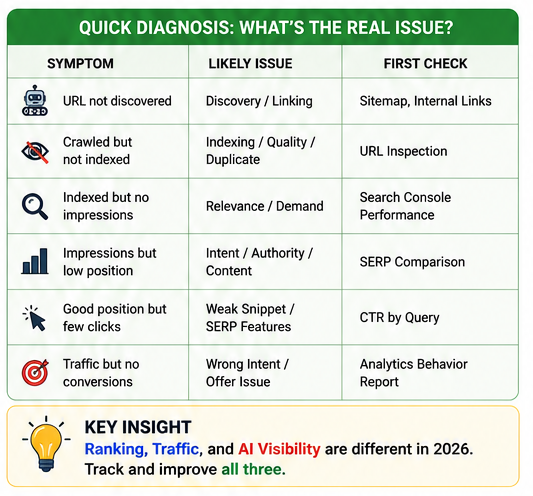
| Observed symptom | Likely issue | First check |
|---|---|---|
| URL not discovered | Weak discovery or internal links | Sitemap and internal links |
| Crawled but not indexed | Quality, duplicate, or canonical issue | URL Inspection |
| Indexed but no impressions | Low demand or weak relevance | Performance report |
| Impressions but low position | Wrong intent, weak content, or low authority | Compare the live SERP |
| Good position but few clicks | Weak title or crowded search results | CTR by query |
| Traffic but no conversions | Wrong search intent or weak offer | Landing-page behaviour |
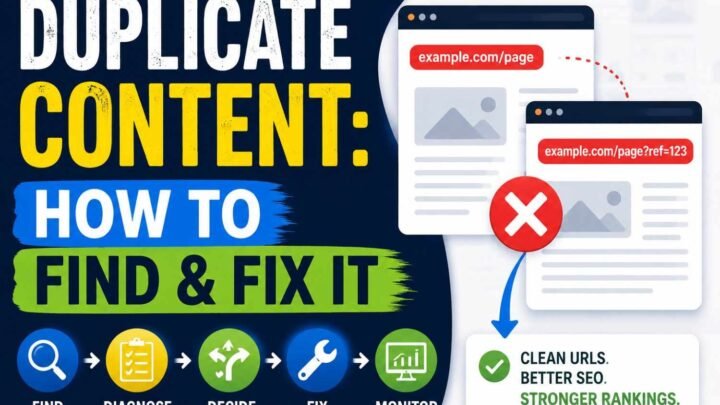
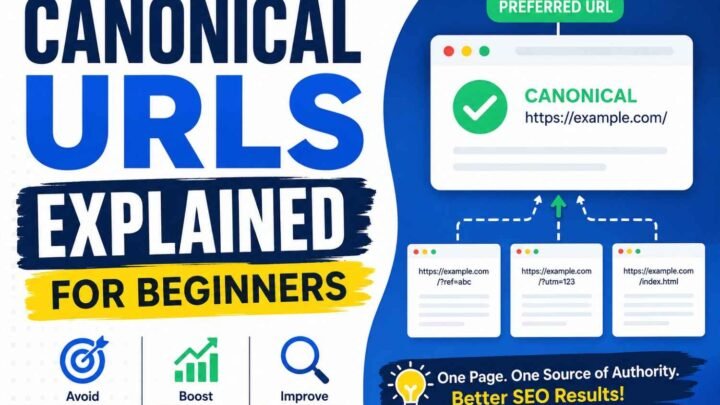
Start with URL Inspection: check whether Google indexed the page and chose the correct canonical URL. Google may select one main URL when it finds duplicate or very similar pages.
Next, open the Performance report and filter by the exact page. Review its search queries, impressions, clicks, CTR, and position instead of judging the whole website.
For example, zero impressions may mean that your topic has little demand or Google links the page with different searches. Impressions with no clicks often point to a low position, a weak title, or search features taking attention.
Do not rewrite the page until you know why your content is not ranking. Fix the first failed stage; then measure the result before changing anything else.
Problem 1: You Targeted a Phrase People Do Not Search
Your content may rank, yet still bring no traffic. This happens when you target a phrase that has little real search demand.
Ranking Does Not Always Mean Traffic
A top rank has no value when few people search for that topic. Ahrefs found that 96.55% of pages receive no Google search traffic, often due to weak demand, no links, or poor topic choice.
So, check the whole topic before you write. Do not judge the idea by one exact keyword.
For example, “the most content ranking problems” sounds forced. A real reader is more likely to ask, “Why is my content not ranking?”
How to Check Real Search Demand
Use these free sources before you choose a focus keyphrase:
- Google Autocomplete and related searches
- People Also Ask questions
- Google Search Console queries
- Reddit, Quora, YouTube, and customer chats
- Sales calls, support emails, and forum comments
Google advises you to use the words people use when they search. Place those natural words in your title, heading, links, and page copy.
Do not reject a useful topic only because a tool shows zero searches. Keyword tools may miss new, local, or long-tail queries; first-party questions can prove that real demand exists.
My rule is simple: target a zero-volume keyword only when you can show that real people ask it. That is how you validate blog topic demand before you spend hours writing.
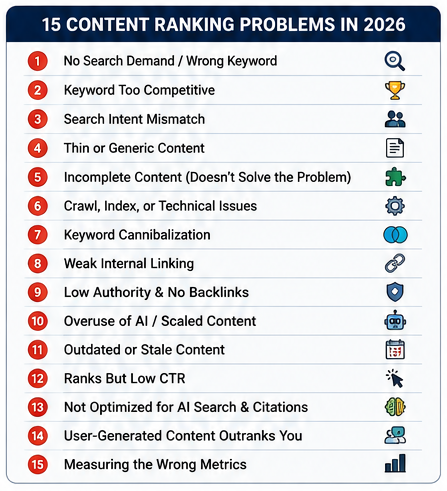
Problem 2: The Keyword Is Too Competitive for Your Current Authority
Your keyword may be too competitive for your site right now. A new blog may target “SEO,” while Google ranks sites with years of content, links, and trust.
Do Not Trust One Difficulty Score
A keyword difficulty score is only a guide; it is not a promise. Google uses many signals to choose useful and relevant pages, so a low score does not mean you will rank.
Check the first 10 results by hand. Compare their topic depth, site focus, page age, and links from other websites.
Ahrefs found that only 1.74% of new pages reached Google’s top 10 within one year. It also found that 72.9% of top-10 pages were over three years old.
Look for a Weak Door
Search for weaker results: small niche blogs, Reddit posts, old pages, thin guides, or pages that answer only part of the query. These gaps show that your site may have a fair chance.
For example, do not target “content marketing” first. Target “content marketing plan for a small dental clinic in Hyderabad” and solve that clear problem well.
Choose the Right Move
- Fastest: target a clear long-tail keyword.
- Cheapest: add useful internal links and related posts.
- Strongest: earn real links from trusted niche sites.
- Highest risk: buy bulk backlinks; Google treats ranking-focused link schemes as spam.
Start with a smaller search need, prove your value, and then move toward broad terms. This is the safest fix when your keyword is too competitive.
Problem 3: Your Page Does Not Match Search Intent
To match search intent, your page must give people the kind of result they expect. A useful page may still rank poorly when it gives the right facts in the wrong form.
Check the Four Parts of Search Intent
Start with the content type: Google may show articles, product pages, tools, videos, category pages, or forum posts. For example, a product page may struggle when most top results are simple how-to guides.
Next, check the content format: users may want a list, tutorial, comparison, template, case study, or short definition. A long guide will not help someone who needs a free tool or quick checklist.
Then, study the content angle: top results may focus on beginners, experts, low cost, speed, local needs, or fresh updates. Your angle must fit the clear pattern unless you have a stronger and more useful approach.
Last, find the underlying goal: does the user want to learn, compare, fix, buy, or confirm something? Google says its systems aim to show relevant and useful results that meet people’s needs.
Use the Top Ten as a Map
Imagine that you publish a 4,000-word guide about checking website errors. It may lose to short audit lists, videos, and free testing tools because those results solve the task faster.
Search your main keyword in a private browser and review the first ten organic results. Record their type, format, angle, and goal in a simple table.
Look for the dominant pattern instead of copying one competing page. This step helps you understand why better content sometimes ranks lower.
Then, change only the part that creates the mismatch: page type, layout, angle, or offer. You match search intent when your page helps users complete their real task with less effort.
Problem 4: Your Article Repeats What Is Already Online
Information gain in SEO means giving readers useful details that other pages lack. Google says its systems aim to show original reporting ahead of pages that merely repeat or cite it.
Use the “Receipt Test”
Read each key claim and ask: “Can I show proof for this?” Keep the claim when you can show a result, screenshot, record, quote, test, or clear example.
Add value through:
- Results from a test you ran
- Screenshots from a real content audit
- Data from your customers or readers
- Short comments from named experts
- Local examples from your city or country
- Before-and-after results
- A simple decision tree or checklist
- Failed steps and honest limits
For example, do not just say that updating old posts helps. Show the page date, changes made, Search Console results, and outcome after 30 or 60 days.
Do Not Fake Experience
Never invent a client, case study, interview, test, or number. Google added “Experience” to E-E-A-T because first-hand use can matter when people want advice from someone who has done the task.
AI can help you group notes or plan headings. However, Google warns that publishing many pages without adding user value may break its scaled content abuse policy.
Before publishing, remove any point readers can find on ten other pages. Strong information gain in SEO gives them proof, context, and a useful next step.
Problem 5: Your Content Is Broad but Does Not Help the Reader Decide
Content depth vs word count is simple: a long page is not always a complete page. Your content is complete only when it helps the reader understand the problem and choose the next step.
Check What the Reader Still Needs
A useful page should answer these points:
- What are the clear signs of the problem?
- What caused it?
- How can the reader check it?
- What should they fix first?
- How much will the fix cost?
- How long will it take?
- What could go wrong?
- What result can they expect?
- When should they choose another option?
For example, a 3,000-word guide may explain keyword research many times but never show how to pick one keyword. A focused 1,200-word guide can be more useful when it gives steps, costs, risks, examples, and a final choice.
Google does not set an ideal SEO word count; it asks creators to produce helpful, reliable content for people. It also advises you to use the words people search for in clear places, such as the title and main heading.
Cut Words That Do Not Help
Remove long history, repeated meanings, vague tips, and filler intros. Use that space for checks, real examples, trade-offs, and clear actions.
Do not ask, “How long should SEO content be?” Instead, use content depth vs word count to ask, “Can the reader make a safe choice after reading this page?”
Problem 6: Google Cannot Crawl, Render, or Index Your Page
A page not indexed by Google cannot rank, even when the writing is excellent. So, check access before you rewrite one word.
Run This Technical SEO Check
Open Google Search Console, use URL Inspection, and test the live page. Then check these points:
- The page returns a 200 OK status.
- The page has no
noindextag orX-Robots-Tag. - Your
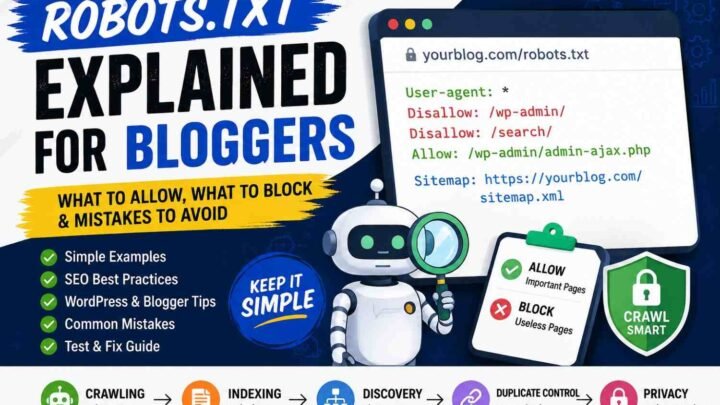
robots.txtfile allows Googlebot to crawl it. - The canonical tag points to the correct page.
- The URL appears in your XML sitemap.
- At least one crawlable internal link leads to it.
- Google can see the main text in the rendered HTML.
- The page does not act like a soft 404.
- The URL does not pass through a redirect chain.
- Filter or tracking parameters do not create duplicate pages.
- The mobile page contains the same main content.
- Your server does not fail or slow down during crawls.
Google uses the mobile version of your page for indexing and ranking. Therefore, hidden mobile text or broken JavaScript can keep key content out of Search.
Also, a sitemap only helps Google discover a URL; it does not promise indexing. Crawlable internal links still matter because Google uses links to find new pages.
Choose the Right Fix
| Search Console status | What it means | What you should do |
|---|---|---|
| Discovered, currently not indexed | Google knows the URL but has not crawled it | Add internal links, check the server, and remove duplicate URLs |
| Crawled, currently not indexed | Google visited but did not select the page | Improve unique value, check canonical tags, and remove duplication |
| Indexed but not ranking | Access is working | Check search intent, content quality, competition, and authority |
Do not block a page in robots.txt when you want Google to read its noindex tag. Google must crawl the page before it can see that instruction.
Finally, request indexing only after you fix the real fault. That is the fastest practical route for a page not indexed by Google.
Problem 7: Multiple Pages Compete for the Same Search Intent
Keyword cannibalization happens when two or more pages answer the same search need. Using the same keyword on several pages does not always cause a problem.
The real issue starts when Google keeps changing the page shown for one query. As a result, your clicks, links, and ranking strength may split across several URLs.
How to Find Keyword Cannibalization
Open Google Search Console, then go to Performance → Search results. Pick one query, open the Pages tab, and check whether two pages gain impressions for the same search need.
Next, compare both pages by intent, clicks, links, and conversions. Similar words are fine, but similar goals often need one clear page.
How to Fix Competing Pages
- Keep the strongest page as your main URL.
- Merge useful parts from the weaker page.
- Use a 301 redirect after a full merge.
- Give each page a separate search intent.
- Link to the main page with clear anchor text.
- Use a canonical tag only for duplicate or very similar pages.
Google treats a canonical URL as the main version within a group of duplicate or near-duplicate pages. Therefore, do not use canonical tags to hide two useful pages that serve different needs.
After each change, track both URLs for four to eight weeks. You have fixed keyword cannibalization when one clear page earns stable impressions, clicks, and rankings.
Your Internal Linking Does Not Show Importance or Context
Your internal linking strategy tells Google which pages matter most. It also helps readers move from one useful page to the next.
An orphan page has no internal link pointing to it. Google may still find it through your sitemap, but readers and search bots cannot reach it through your site.
Keep key pages within three clicks of your home page when possible. Deep pages can be harder for people and search bots to find.
Use clear anchor text such as “find orphan pages,” not weak words like “click here.” Google says link text helps people and Google understand the linked page.
Check these common problems:
- Link useful pages from related posts, category pages, and hub pages.
- Give your best pages more links than old or low-value pages.
- Build topic clusters that connect one main guide with useful support posts.
- Fix broken internal links or point them to the closest live page.
There is no perfect number of internal links for every blog post. Add a link only when it helps the reader take the next step.
Run a site crawl each month to find orphan pages, broken links, and deep pages. Ahrefs also advises adding useful orphan pages back into your site structure.
A clear internal linking strategy gives each page a role and a path. It helps Google find context, share page value, and see which content deserves more attention.
Problem 9: Your Page or Site Lacks Credible Authority Signals
Credible authority signals help Google and readers see why they should trust your page. Great writing alone may not rank when no trusted source, expert, or website supports your claims.
Know the Three Types of Authority
Page authority comes from useful links and mentions that point to one page. A link from a respected site in your field can show that your page has value; Google also uses links to judge relevance and find pages.
Topical authority grows when you cover one subject in a clear and connected way. For example, a DevOps site should link its Docker guide to related pages about containers, Kubernetes, security, and CI/CD.
Brand authority grows when people discuss your business outside your own site. These mentions may include expert interviews, reviews, news reports, podcasts, forum talks, and research citations.
Give People Clear Reasons to Trust You
Add the signals that fit your page:
- Name the writer and show real work experience.
- Add a clear author bio and About page.
- Cite trusted sources for facts and numbers.
- Explain how you tested or gathered the data.
- Show when you reviewed or updated the page.
- Publish a corrections policy.
- Add real reviews and outside references.
- Share original data that other writers can cite.
Google asks creators to make helpful, reliable, people-first content and show clear evidence of expertise. Its quality guidance also treats trust as the main part of E-E-A-T.
Do not choose between good content and backlinks; you need both when the search term is hard. Useful content gives people a reason to link, while relevant links and other credible authority signals help your work earn trust.
Problem 10: Generic or Scaled AI Content Has Diluted Site Quality
AI Content Is Not the Real Problem
Scaled AI content can hurt site quality, but using an AI tool does not cause an automatic Google penalty. The real risk starts when you publish many weak pages for search ranks, not for people.
Ahrefs studied 600,000 pages and found a correlation of only 0.011 between the amount of detected AI text and Google rank. It also found that 86.5% of top-ranking pages contained some AI-written text, so AI use alone did not stop pages from ranking.
Where AI Content Goes Wrong
Poor AI content often looks clean at first, yet it gives the same safe advice found on many other sites. It may also repeat phrases, invent sources, miss local facts, or make claims that no editor has checked.
Watch for these clear warning signs:
- The article gives facts with no trusted source.
- Each post uses the same opening and layout.
- Several pages answer the same search query.
- The advice sounds broad and has no real example.
- The writer cannot explain how a result was tested.
- The publishing speed leaves no time for fact checks.
What Google’s Rule Actually Says
Google defines scaled content abuse as making many pages mainly to change search rankings rather than help users. The rule applies whether a human, an AI tool, or both made the pages.
Use AI as an Assistant, Not the Author
Start with your own notes, tests, customer questions, screenshots, and clear views. Then use AI to sort ideas, find gaps, or improve a rough draft.
Check every fact, remove repeated lines, and add details that only a real person close to the topic would know. This simple review turns scaled AI content into useful, human-led work instead of empty search filler.
Problem 11: Your Content Is Old and No Longer Fits the Search Results
You may need to update old content for SEO when clicks and views keep falling. Your page may still rank, but it may no longer give people the fresh answer they need.
Signs Your Content Has Decayed
Check your page when its traffic drops for several weeks. Then look for these clear warning signs:
- Your facts, prices, tools, or product features have changed.
- Your links fail, while your images and screen shots look old.
- Your rivals use newer facts, examples, and expert views.
- Your page has lost links from other trusted sites.
- Google now ranks videos, tools, lists, or forum posts.
- Your title still shows an old year, such as 2024 or 2025.
How to Refresh the Page
Keep the parts that still help the reader. Next, check the current search results and learn what people now want.
Replace old facts, dead links, and weak examples. Add any key topic that the new top pages answer well.
Rewrite the first few lines so they give a fast and clear answer. Also, add new screen shots, dates, prices, and real use cases.
Show both the first publish date and the last update date. Google says you should change the visible date only after you make a major update.
Last, ask Google to index the page again through Search Console. Then wait a few weeks before you judge the result, since some search changes take time.
The rule is simple: do not fake freshness by changing the year. Update old content for SEO only when you can make the page more useful, correct, and current.
Your Page Ranks, but the Search Result Does Not Earn the Click
You may be ranking high but getting no traffic because a ranking only gives your page a chance to be seen. Your search result must still give the user a strong reason to click.
Your title may sound vague, show an old year, or miss the user’s main need. Google may also shorten or replace a title that is too long, repeated, or unclear.
The page around your result also matters. AI Overviews, videos, Reddit threads, maps, ads, and featured answers can push your link down the screen.
A 2026 Ahrefs study found that AI Overviews cut clicks to the top-ranking result by about 58% in its tested data. Another 2026 study tested 55,393 searches and found AI Overviews on 64.7% of question-based queries.
How to Improve Your Organic CTR
- State the exact result the reader will get.
- Match the title to the search query.
- Use a year only when fresh data matters.
- Avoid hype, fear, and false promises.
- Offer a tool, checklist, template, or new data.
- Give a clear answer at the top of the page.
- Check CTR by query, country, page, and device.
Use Google Search Console to compare impressions, clicks, CTR, and position. Google notes that these figures work together, so never judge a page by average position alone.
A better title may help, but it cannot fix weak search demand or a crowded results page. When you are ranking high but getting no traffic, improve both your search snippet and the value users receive after the click.
Problem 13: You Rank on Google but Miss AI Citation Visibility
AI citation visibility means an AI tool can find, check, and cite your page. A high Google rank helps, but it does not ensure a citation.
Traditional SEO asks: “Can this page rank for the search?” AI search also asks: “Can I pull a clear and trusted answer from this page?”
A 2026 study tested 55,393 Google searches across 19 topics. Almost 30% of pages cited in AI Overviews did not rank on the first page for the same query.
Use the Answer–Proof–Source Method
Give each key point three simple parts:
- Answer: State the answer under a clear heading.
- Proof: Add a fact, test, example, or number.
- Source: Name and link to the first source.
For example, do not write: “Internal links may help your site.” Write: “Internal links help Google find key pages; add links from three related posts and track impressions for 28 days.”
Use short definitions, steps, tables, dates, captions, and named sources. Keep your author name, company name, topic, and expert details the same across your site.
Google says you do not need special AI files or new schema to appear in AI Overviews. You still need crawlable pages, useful content, good page text, and normal SEO basics.
Also, allow the right search crawler. For example, OpenAI says sites that block OAI-SearchBot will not appear as cited sources in ChatGPT search answers.
Do Not Spam Reddit for Links
A Reddit link is not a trust badge. Forums gain value from real views, local detail, lived stories, and honest debate.
A May 2026 study found that Google AI Overviews raised daily comments in eligible Reddit groups by 12.0% and commenting users by 12.3%. Yet Google AI Mode later removed most of that gain for experience-led talks.
So, share real help instead of fake praise or link drops. Your best AI citation visibility plan is simple: answer clearly, prove each claim, name the source, and make every useful fact easy to extract.
Problem 14: User-Generated Content May Answer the Query Better
User-generated content SEO works well when people want real views, not a neat sales pitch. They may trust Reddit posts, YouTube comments, forums, reviews, and Q&A pages because real users share what worked, what failed, and what they wish they knew.
Why Forums Can Beat Brand Content
A brand page often gives one safe view, while a forum gives many views from people with different needs. Google also says first-hand life experience can add value, and its 2026 AI Search updates now show views from Reddit, social sites, and public forums.
For example, a buyer may search for a laptop review but care most about heat after four hours, fan noise at night, or service quality in Hyderabad. A normal review may skip these facts, while owners may discuss them in plain words.
How You Can Compete With Reddit
Speak with real users before you write, then add a short “What Users Report” section. Show good and bad views, name the source, and make it clear when a claim is one person’s story rather than proven fact.
Answer the same small questions that people ask again and again in community threads. Join useful talks, but do not post weak replies only to drop your link.
Key Takeaway
You do not beat forums by making your page longer; you win by making it more useful, clear, and fair. Strong user-generated content SEO turns real user views into checked facts, practical advice, and clear next steps.
Problem 15 — You Are Measuring the Wrong Outcome
To learn how to measure content performance, stop treating rank as the final goal. Rank does not show if your page earns clicks, leads, trust, or sales.
Track the Full Content Journey
First, check indexing, impressions, average position, and click-through rate. These SEO metrics show if Google lists your page, displays it, and sends visitors.
Next, track organic sessions, newsletter sign-ups, assisted conversions, direct conversions, and revenue per page. Also watch branded searches, referring domains, AI mentions, and AI citations.
Google says clicks and impressions matter more than your absolute position alone. In June 2026, Search Console also added separate visibility reports for AI Overviews and AI Mode.
Read the Numbers Together
Your page may move from position eight to four while traffic falls. Search demand may drop, or an AI answer may solve the user’s need before the click.
Now compare two pages: one gets 5,000 visits but no sales, while another gets 200 visits and 12 sales. The smaller page gives you more business value.
Use One Simple Scorecard
Check visibility, clicks, leads, sales, links, brand searches, and AI citations each month. That is how to measure content performance without letting one good ranking hide a weak result.
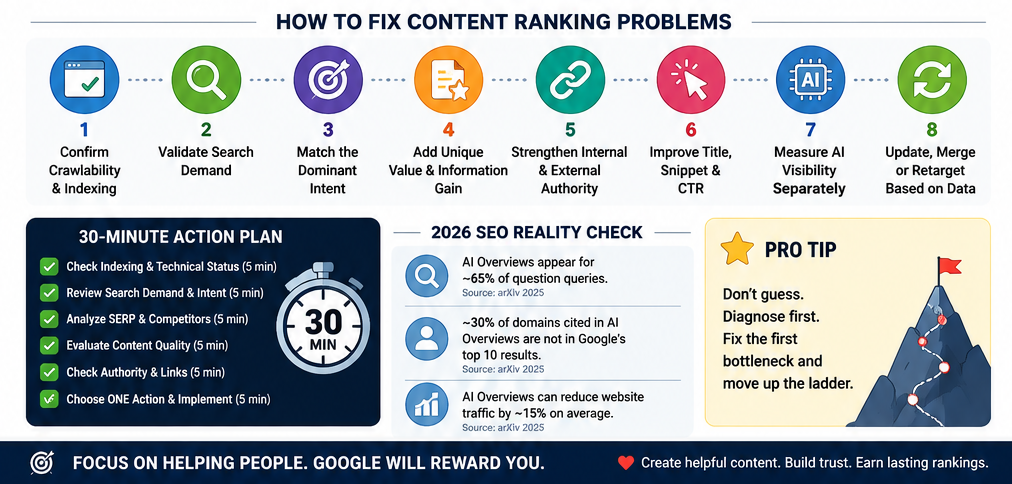
A 30-Minute Content-Ranking Audit
Run this 30-minute content-ranking audit before you rewrite a weak page. You need to find the first broken step, not change ten things at once.
1. Check Indexing: 5 Minutes
Open Google Search Console and inspect the page URL. Check the live page, index status, noindex tag, chosen canonical, HTTP status, and rendered text.
Next, confirm that your sitemap lists the right URL. Add at least one clear internal link because Google uses links to find pages and understand their context.
2. Check Search Demand: 5 Minutes
Open the Performance report and filter it by the page URL. Review its impressions, clicks, CTR, position, countries, and search queries.
Now compare those queries with your target keyword. Your wording may sound formal, while readers use a short and plain question.
3. Check the Live Search Results: 5 Minutes
Search the main query in a clean browser window. Note what Google shows: guides, lists, tools, videos, shops, forums, local results, or AI Overviews.
Match the winning page type, but do not copy its text. Also ask whether this search can still bring useful visits, leads, or sales.
4. Check Content Value: 5 Minutes
Read your page like a busy visitor. Mark every missing answer, weak example, old fact, repeated point, and vague claim.
Add proof where it helps: a test, screenshot, clear process, expert source, or real result. Google advises creators to publish useful, reliable, people-first content rather than content made mainly for rankings.
5. Check Page Authority: 5 Minutes
Count the useful internal links that point to the page. Then compare its trusted referring sites, author details, sources, and topic depth with the top results.
Look for something worth citing: original data, a free tool, a strong table, or a tested checklist. A plain rewrite rarely earns new links.
6. Pick One Clear Action: 5 Minutes
Use this rule:
- Wait: The new page gains impressions.
- Refresh: The facts or examples are old.
- Rewrite: The format or intent is wrong.
- Merge: Two pages solve the same need.
- Redirect: One page has no unique use.
- Retarget: The keyword is too broad.
- Support: The page needs related articles.
- Promote: The page is useful but unseen.
Finish your 30-minute content-ranking audit with one chosen action and one success measure. Track the change through impressions, clicks, rankings, leads, or sales.
What Should You Do With an Underperforming Page?
An underperforming page does not always need a full rewrite. First, check its age, impressions, ranking, clicks, search intent, links, and value to your readers.
Use Google Search Console to compare clicks, impressions, average position, and click-through rate. These numbers show whether you should wait, update, merge, delete, or improve the search result.
| Situation | Best action |
|---|---|
| New page gains impressions | Wait; add useful internal links |
| Page ranks from 11 to 30 | Update weak parts; build authority |
| Search results prefer another format | Rebuild it as a list, guide, tool, video, or product page |
| Two pages answer the same need | Merge them; redirect the weaker URL |
| Topic has low traffic but helps users | Keep it; measure leads or support value |
| Topic has no demand or purpose | Remove or combine it |
| Ranking is strong but CTR is low | Improve the title, angle, and description |
| AI answers reduce clicks | Add real experience, tools, data, or deeper advice |
| Old page has good backlinks | Keep the URL; refresh the full page |
| Page breaks Google spam rules | Fix or remove the harmful content |
Do not delete old blog posts only because they get little traffic. Google says deletion should be your last choice when useful content can still be improved.
When you merge SEO pages, send the old URL to the best matching page with a permanent redirect. Google uses permanent redirects as a strong signal for choosing the main URL.
Your final choice should solve the real problem: not hide it. Fix one clear weakness at a time, then track the underperforming page for four to eight weeks.
FAQs About Content Ranking Problems in 2026
These short answers will help you find and fix common content ranking problems in 2026. Start with the question that best matches what you see in Google Search Console.
How Long Does New Content Take to Rank?
There is no fixed wait time: a page may rank within weeks, while another may need several months. Your topic, competition, site history, internal links, backlinks, and crawl rate all affect the result.
Ahrefs studied 1.3 million US keywords and found that only 1.74% of new pages reached Google’s top 10 within one year. It also found that 72.9% of top-10 pages were more than three years old, but these figures do not predict your page’s result.
Can Content Rank Without Backlinks?
Yes, your content can rank without backlinks when it answers a narrow, low-competition search query very well. Strong internal links, clear search intent, useful examples, and topical depth may be enough.
However, backlinks matter more when trusted sites already control the search results. In that case, create original data, free tools, checklists, or expert insights that people have a real reason to cite.
Does Google Penalize AI-Written Content?
Google does not ban content just because you used an AI tool. The real risk starts when you publish many weak, copied, false, or unhelpful pages mainly to change search rankings.
Google calls this “scaled content abuse,” no matter whether a person or tool created the pages. Use AI for research or structure, but check every fact and add your own tests, views, examples, and advice.
Why Is My Page Indexed but Not in the Top 100?
Indexing only means Google can store and show your page; it does not mean the page deserves a high rank. Google may see weak search intent, heavy competition, duplicate content, low authority, or a better page on your own site.
Search the target query yourself and study the top results. Check their page type, angle, depth, freshness, links, and examples; then fix the largest gap first.
Should I Change the Target Keyword?
Change the keyword when it has little demand, sounds unnatural, serves the wrong intent, or is far too competitive for your site. Keep it when impressions are growing and your page already matches what searchers want.
For example, “the most content ranking problems” sounds forced. “Why is my content not ranking?” matches natural speech and shows a clear need for diagnosis and practical fixes.
Why Did Traffic Fall Even Though Rankings Did Not?
Your rank may stay stable while search demand, click-through rate, device use, or search-result layouts change. AI Overviews, videos, forums, maps, and other features can also push normal links farther down the screen.
Ahrefs reported in February 2026 that AI Overviews reduced the click-through rate for position-one pages by an estimated 58% in its December 2025 data. So, compare rankings, impressions, clicks, and conversions instead of judging success by position alone.
Does Content Length Affect Rankings?
There is no ideal word count that makes a page rank. Write enough to solve the reader’s problem, support key claims, explain trade-offs, and guide the next action.
A clear 1,200-word guide can beat a weak 4,000-word post. Remove long introductions, repeated tips, empty definitions, and any paragraph that gives the reader no new fact or useful step.
How Do I Optimize Content for AI Answers?
Give each section a clear heading, a direct answer, supporting proof, and a useful example. Cite original sources, name experts, show update dates, use simple tables, and make key facts easy to check.
Do not create separate pages for every small query variation; Google warns that this may become scaled content abuse when the goal is manipulation. The best way to solve content ranking problems in 2026 is to publish clear, trusted content that helps both people and search systems understand your answer.
Fix the Bottleneck, Not Everything at Once
When your content is not ranking, do not change every part at once. First, check if Google can crawl and index the page.
Next, confirm that people search for the topic. Then, match the page with the main search intent.
Add facts, examples, or steps that other pages miss. Also, build useful internal links and earn trusted outside links.
Improve your title and search snippet so more people click. Track Google rankings and AI search visibility as separate results.
Then, use the data to update, merge, redirect, or retarget the page. Open Search Console now, choose one weak URL, find its first real bottleneck, and fix only that content ranking problem.

Leave a Reply