Your Voter ID card is one of the most important documents for participating in India’s democratic process. The good news is that you no longer need to carry only the physical card. The Election Commission of India allows eligible voters to download a digital version called the Electronic Electoral Photo Identity Card (e-EPIC). This secure digital copy can be accessed online and stored on your smartphone, computer, or DigiLocker for easy use whenever needed. In this guide, you’ll learn how to download your Voter ID online step by step and discover the advantages of keeping an e-EPIC handy.
You can easily download your Voter ID card online through the e-EPIC service provided by the Election Commission of India. Simply visit the Voters’ Services Portal or use the Voter Helpline App, sign in to your account, enter your EPIC number or Form Reference Number, and complete OTP verification using your registered mobile number. Once verified, you can instantly download your digital Voter ID (e-EPIC) in PDF format.
What Is a Digital Voter ID (e-EPIC)?
A Digital Voter ID, also known as an e-EPIC, is the electronic version of your physical voter identity card that can be downloaded online. Launched by the Election Commission of India in January 2021, it is provided as a secure and non-editable PDF document that can be used as valid proof of identity and address.
The e-EPIC includes all the information available on a physical voter ID card, such as your name, photograph, father’s or husband’s name, date of birth, address, and EPIC number. It also contains a digitally signed QR code issued by the Election Commission, which helps verify the authenticity of the document and protects it from unauthorized changes or tampering.
Benefits of Downloading Voter ID Online
Having a digital copy of your Voter ID card offers several useful benefits:
1. Easy to Carry and Access
With an e-EPIC, you don’t need to carry your physical voter ID card all the time. You can save the PDF on your smartphone or store it in DigiLocker and access it whenever needed.
2. Accepted as a Valid Identity Proof
The e-EPIC is an officially recognised digital version of your voter ID card. It can be used for voting, identity verification, and various government and private services where valid ID proof is required.
3. Quick Availability
New voters can download their e-EPIC as soon as their information is updated in the electoral roll. This eliminates the need to wait for the physical card to be delivered.
4. Completely Free to Download
You can download your digital voter ID through the NVSP portal or the Voter Helpline app without paying any fee. The entire process is free of charge.
5. Environment-Friendly Option
Using a digital voter ID helps reduce paper usage and supports eco-friendly practices. It is a simple way to contribute to environmental conservation while enjoying the convenience of digital documents.
Step-by-Step Guide to Download Voter ID Card Online
Downloading your digital Voter ID (e-EPIC) is quick and simple. Follow these steps to get your Voter ID card online:
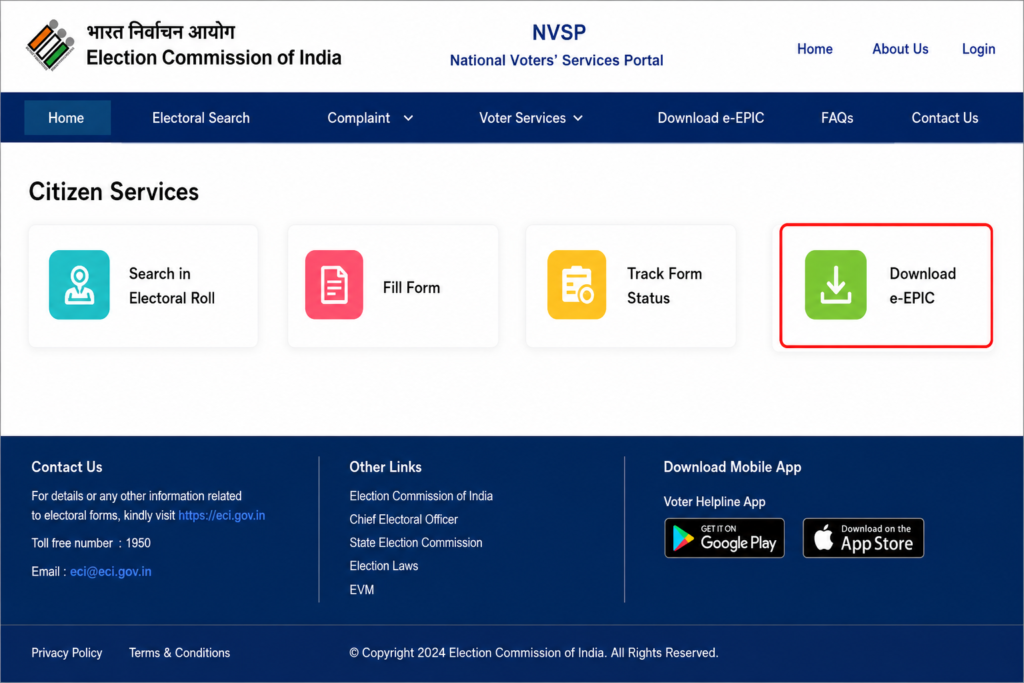
Step 1: Visit the NVSP Portal
Go to the official National Voters’ Services Portal (NVSP) website and select the “Download e-EPIC” option available under the Citizen Services section.
Step 2: Sign In to Your Account
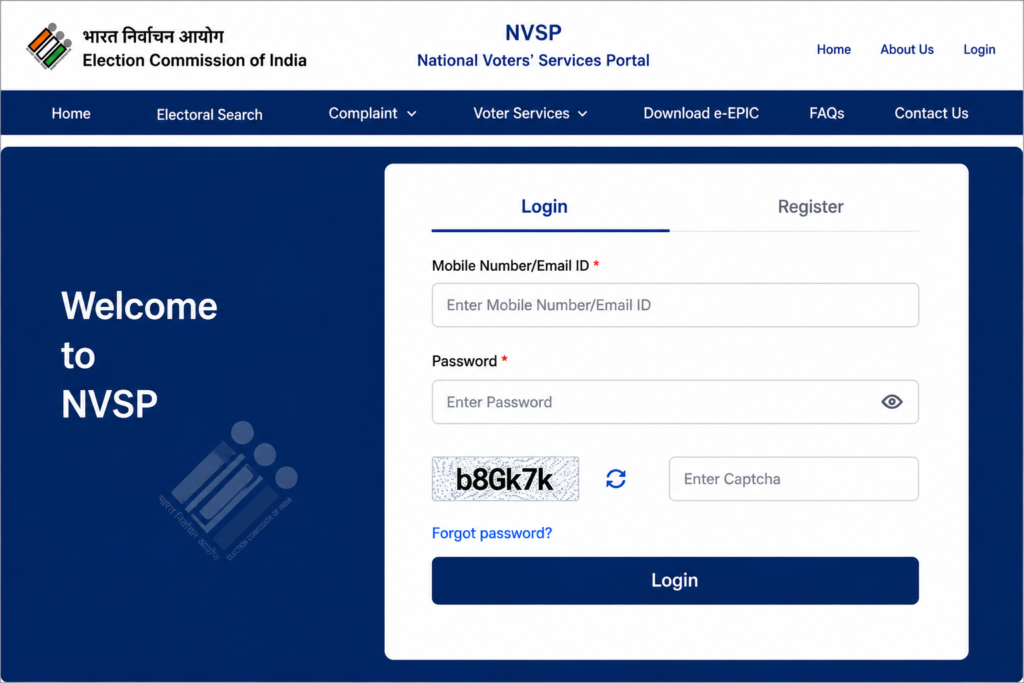
Log in using your registered mobile number or email address. If you are a new user, click on “Register” and complete the registration process.
Step 3: Choose the e-EPIC Download Option
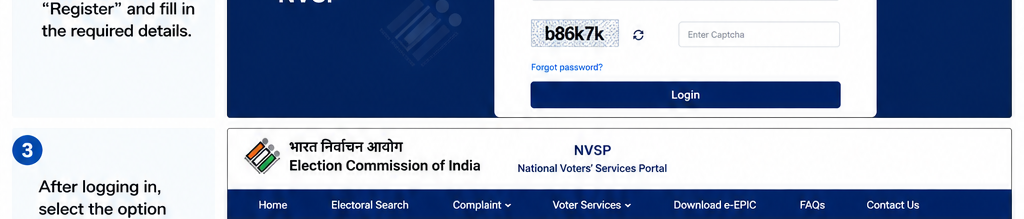
After signing in, select the option to download your e-EPIC using either your EPIC Number or Form Reference Number.
Step 4: Search for Your Voter Details
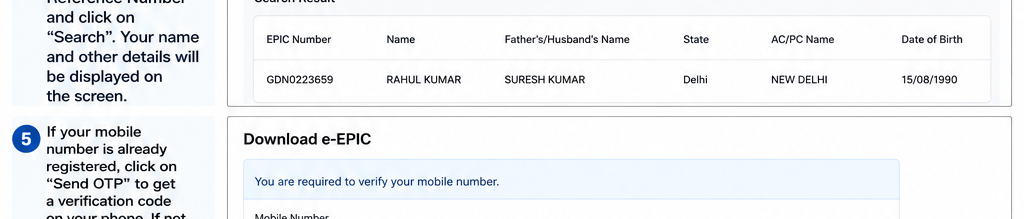
Enter your EPIC Number or Form Reference Number and click “Search”. Your voter information will appear on the screen.

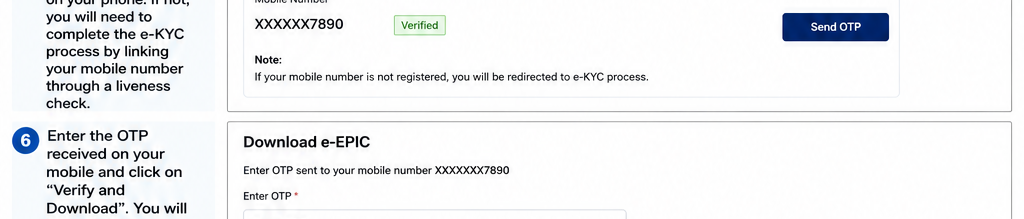
Step 5: Verify Your Mobile Number
If your mobile number is already linked with your voter record, click “Send OTP” to receive a verification code. If it is not linked, complete the e-KYC process and verify your identity through the required liveness check.
Step 6: Download Your e-EPIC
Enter the OTP received on your registered mobile number and click “Verify and Download”. Your e-EPIC will be downloaded instantly in PDF format.
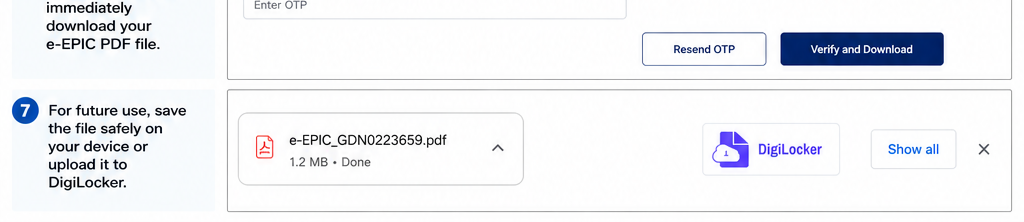
Step 7: Save the File Securely
Store the downloaded e-EPIC safely on your device for future use. You can also upload it to DigiLocker for easy access anytime, anywhere.
Alternative Ways to Access or Download Your Voter ID
You can also obtain your digital Voter ID through a few alternative methods besides the NVSP portal:
1. Voter Helpline App
Install the Voter Helpline app from the Google Play Store or Apple App Store. After signing in with your registered mobile number, select the “Download e-EPIC” option to quickly access and save your digital voter ID.
2. Voter Facilitation Centre (VFC)
If you face any issues while downloading your e-EPIC online, visit your nearest Voter Facilitation Centre with a valid identity document. The staff will guide you through the process and help you obtain your digital voter ID.
Common Issues While Downloading e-EPIC and Their Solutions
Although downloading your e-EPIC is usually quick and easy, you may occasionally face some challenges. Here are the most common issues and how to resolve them:
- e-KYC Verification Failed:
If your mobile number is not linked to your voter record or the e-KYC verification does not complete successfully, visit your nearest Electoral Registration Officer (ERO) office. Carry valid identity documents to update or verify your voter information. - Incorrect Information on e-EPIC:
If you find mistakes in your name, address, date of birth, or any other details on the downloaded e-EPIC, submit Form 8 either online through the NVSP portal or offline at the designated election office. You can also monitor the correction request status online. - Login or Technical Issues:
If you experience problems signing in, receiving OTPs, or accessing services on the NVSP portal or Voter Helpline App, contact the Election Commission’s voter assistance helpline by dialing 1950 for support.
Important Things to Remember When Downloading Voter ID
Before downloading your digital voter ID (e-EPIC), keep the following points in mind:
- Make sure your mobile number is linked to your voter ID. If it is not already registered, you can update it through Form 8 or complete the e-KYC process.
- Once downloaded, you can securely save the e-EPIC PDF on your device or store it in DigiLocker for easy access. Avoid posting or sharing the document publicly online.
- Your e-EPIC is valid only when your name appears in the latest electoral roll. It is a good idea to verify your voter registration details before downloading the digital card.
- Although the digital voter ID is widely accepted as proof of identity, some organizations may still request the original physical voter ID card. Therefore, keep your physical voter ID in a safe place even after obtaining the digital version.
Final Words
The e-EPIC, or digital Voter ID card, has made accessing and carrying your voter identification easier than ever. By following the simple steps mentioned above, you can download your e-EPIC within minutes and use it as a valid identity document whenever required. As digital services continue to expand across India, keeping your e-EPIC stored securely on your smartphone or in DigiLocker can help you access it quickly and conveniently.
The move toward digital voter identification reflects India’s broader push toward paperless and citizen-friendly services. Whether you need proof of identity, want to verify your voter details, or simply prefer carrying digital documents, the e-EPIC offers a secure and hassle-free solution. Downloading and saving your digital voter ID today can save you time and effort in the future.
Read More: How to Check EPF Balance?
FAQs
1. What is the difference between a physical Voter ID card and an e-EPIC?
A physical Voter ID card is the printed version issued by the Election Commission of India. An e-EPIC, on the other hand, is the digital version of the same voter card that can be downloaded online and stored on your smartphone, computer, or DigiLocker.
2. Can I download my Voter ID without an EPIC number?
Yes. If you do not remember or have access to your EPIC number, you can still download your e-EPIC by using the Form Reference Number (FRN) provided during voter registration or update requests.
3. How do I link my mobile number to my Voter ID?
You can associate your mobile number with your voter record by submitting Form 8 either online or offline. You may also complete the e-KYC verification process on the NVSP portal while downloading your e-EPIC.
4. Is the downloaded e-EPIC accepted as a valid identity proof?
Yes. The e-EPIC downloaded from the official NVSP portal or the Voter Helpline App is a legally valid document and can be used as proof of identity and address wherever accepted.
5. Can I download my e-EPIC on more than one device?
Yes. You can access and download your e-EPIC on multiple devices using your registered account. For security reasons, keep the file in a safe location and avoid sharing it with unauthorized persons.
Read More: How to create AI Images?




Leave a Reply