Picking the best themes ideas for your website feels hard because thousands of choices look almost the same. However, one wrong theme can slow your site, confuse visitors, and reduce trust.
A good website theme does much more than improve looks: it helps people find information faster and keeps pages easy to use. It also supports better mobile experience, stronger SEO, and healthy Core Web Vitals that Google recommends for real users.
In this guide, you will discover 35 modern website theme ideas that match different goals and budgets. Moreover, you will learn which design works best for blogs, business sites, online stores, portfolios, and personal brands.
You will also learn how to compare themes by speed, customization, SEO, accessibility, and long-term support before spending money. Besides that, you will see practical tips to avoid common mistakes that often hurt rankings and conversions.
Finally, you will understand why AI search and traditional SEO now work together instead of separately. Therefore, choosing a fast, well-structured, and trustworthy theme gives your content a better chance to appear in search results and AI-generated answers across the web.
Why Your Website Theme Matters More Than Ever
Your website theme shapes how people see your site within seconds. It also affects your SEO, user experience, and sales from the very first visit.
A good theme helps your pages load fast and stay easy to use. So, visitors enjoy browsing and spend more time on your website.
First Impressions Count
People judge your website almost instantly. Therefore, a clean and modern design helps them trust your business from the start.
A messy or old-looking theme can push visitors away. Even great content cannot fix a poor first impression.
Your Theme Can Help Your SEO
Many people ask, does website theme affect SEO. The answer is yes, because your theme controls page structure, code quality, and loading speed.
A lightweight theme makes it easier for search engines to crawl your pages. As a result, your content has a better chance to compete in search results.
Speed Matters for Every Visitor
Nobody likes waiting for a slow page. If your website feels slow, many visitors leave before reading anything.
Google still recommends passing Core Web Vitals for a better page experience. Good targets are LCP under 2.5 seconds, INP under 200 milliseconds, and CLS under 0.1.
Quick Fact: Around 53% of mobile users leave a website that takes more than 3 seconds to load.
Mobile Users Come First
Today, most people visit websites from their phones. Therefore, your theme must work perfectly on every screen size.
Buttons should stay easy to tap and text should stay easy to read. A mobile-friendly theme keeps visitors happy and supports better search visibility.
Trust Leads to More Conversions
A professional design makes your website look safe and reliable. Then, visitors feel comfortable reading, subscribing, or buying from you.
The table below shows how a good theme affects your website.
| Website Factor | Why It Matters |
|---|---|
| First impression | Builds trust quickly |
| SEO | Helps search engines understand pages |
| Speed | Reduces visitor drop-offs |
| Mobile design | Improves phone experience |
| User trust | Makes your brand look professional |
| Conversions | Increases clicks, sign-ups, and sales |
Choose your website theme carefully before adding content. A fast, mobile-friendly, and SEO-ready theme gives every page a stronger chance to rank, build trust, and turn visitors into customers.
How to Choose the Perfect Website Theme
How to Choose the Perfect Website Theme
Choosing the best website theme starts with one simple question: what do you want your website to achieve? Your answer helps you pick a layout that fits your goals instead of following design trends.
Start With Your Website Purpose
A business website needs trust and clear contact options. A blog needs easy reading, while an online store needs product pages and a smooth checkout.
Know Who Will Visit Your Website
Think about your visitors before you pick a website template. Your design should match their age, needs, device, and browsing habits.
Match Your Brand
Choose colors, fonts, and layouts that reflect your brand. A consistent design helps people remember and trust your website.
Set a Real Budget
Free themes work well for simple websites and small projects. Premium themes usually offer better support, more features, and regular updates.
Make Sure Editing Is Easy
Choose a theme that lets you edit pages without coding. This saves time whenever you add new content or update your website.
Check Support and Updates
Always choose a theme from an active developer. Regular updates improve security, fix bugs, and keep your site compatible with new software.
Focus on Speed
A beautiful website is useless if it loads slowly. Pick a lightweight theme because fast websites improve user experience and support better SEO.
In 2025, only 48% of mobile pages passed all three Google Core Web Vitals, so choosing a fast theme gives you an advantage.
Don’t Ignore Accessibility
Your website should be easy for everyone to use. Look for themes that follow WCAG guidelines with good color contrast, keyboard navigation, and readable fonts.
Think About Future Growth
Your website may grow with new pages, products, or services. Choose a flexible website layout that can expand without forcing you to change themes later.
Quick Decision Checklist
☐ Does the theme match your website purpose?
☐ Is it mobile-friendly?
☐ Does it load quickly?
☐ Is it easy to customize?
☐ Does it receive regular updates?
☐ Does it offer reliable support?
☐ Is it accessible to all users?
☐ Can it grow with your website?
If you can tick every box, you have a strong chance of choosing the best website theme for your website today and for the years ahead.
35 Best Website Theme Ideas
Choosing the best themes ideas for your website becomes much easier when you first know your website goal. Then you can pick a design that looks modern, loads fast, and helps visitors take action.
Business Website
A clean business website theme builds trust from the first visit. Use a simple homepage, clear service pages, customer reviews, and strong call-to-action buttons to turn visitors into customers.
Personal Brand
A personal website should help people know who you are quickly. Add your story, skills, achievements, and contact details with a modern one-page layout that feels professional.
Blog
A blog theme should keep readers focused on your articles instead of distractions. Choose large fonts, plenty of white space, and easy navigation so every post stays comfortable to read.
Ecommerce
An online store theme should help shoppers buy with fewer clicks. Keep product pages simple, display high-quality images, and place the Buy Now button where visitors notice it first.
Portfolio
A portfolio website should showcase your best work without making visitors search for it. Display projects with short descriptions, clear categories, and an easy contact form.
Photography
Photography themes should make your images the center of attention. Use fullscreen galleries, fast-loading photos, and minimal text so every picture stands out naturally.
Restaurant
Restaurant websites should help people decide where to eat within seconds. Show your menu, opening hours, location, reservation button, and food photos directly on the homepage.
Fitness
A fitness website should motivate visitors to start today instead of later. Highlight workout programs, trainer profiles, success stories, and membership plans with bold action buttons.
SaaS
A SaaS website should explain your software before asking people to sign up. Show product benefits, screenshots, pricing tables, and customer testimonials in a simple scrolling layout.
Startup
Startup websites should explain the problem before presenting the solution. Use a modern landing page, investor information, product roadmap, and email signup section for early users.
AI Tool Website
AI tool websites should help visitors understand the tool within seconds. Add live demos, feature cards, pricing, FAQs, and simple onboarding to increase free trial registrations.
Education
Education websites should make learning easy for every student. Organize courses, teachers, schedules, and enrollment options with a clean layout and readable typography.
Travel
Travel themes should inspire visitors to explore new destinations. Use large destination images, travel guides, booking links, maps, and reviews to build confidence before booking.
Healthcare
Healthcare websites should create trust through clear information and simple navigation. Display doctor profiles, appointment booking, clinic hours, and emergency contact details prominently.
Real Estate
Real estate websites should help buyers find properties faster. Add advanced search filters, property galleries, virtual tours, maps, and inquiry forms on every listing.
Agency
Agency websites should prove your experience with real results. Showcase services, case studies, client logos, testimonials, and project inquiry forms in a professional layout.
Fashion
Fashion websites should make products look stylish without slowing the page. Use clean product grids, seasonal collections, size guides, and fast checkout for better conversions.
Beauty
Beauty websites should create a premium shopping experience from the first visit. Feature product benefits, before-and-after images, customer reviews, and skincare routines with elegant colors.
Finance
Finance websites should look trustworthy rather than flashy. Use secure-looking layouts, transparent pricing, calculators, FAQs, and educational resources to help visitors make better decisions.
Law Firm
Law firm websites should answer common legal questions before visitors call. Include lawyer profiles, practice areas, consultation booking, and client testimonials in an organized layout.
Consulting
Consulting websites should explain how your advice solves business problems. Add success stories, service packages, booking forms, and industry expertise to build confidence.
Nonprofit
Nonprofit websites should encourage people to support your mission quickly. Make donations, volunteer registration, events, and impact stories easy to find from the homepage.
Podcast
Podcast websites should help visitors start listening immediately. Feature the latest episodes, streaming platforms, guest details, transcripts, and newsletter signup in one place.
Membership Website
Membership websites should show why joining is worthwhile before asking for payment. Compare membership plans, member benefits, exclusive resources, and community access clearly.
Online Course
Online course websites should help learners choose the right program confidently. Display course outlines, instructor details, student reviews, certificates, and enrollment deadlines together.
Community
Community websites should encourage members to interact every day. Include discussion forums, member profiles, events, announcements, and moderation tools that keep conversations organized.
Events
Event websites should answer every important question before registration. Show schedules, speakers, venue maps, ticket options, FAQs, and countdown timers on the main page.
Wedding
Wedding websites should help guests find everything in one place. Include ceremony details, RSVP forms, travel information, photo galleries, and gift registry links.
Food Recipe
Recipe websites should help readers cook without confusion. Use printable recipe cards, cooking times, ingredient lists, nutrition facts, and step-by-step images for every recipe.
News Magazine
News magazine themes should make recent stories easy to discover. Organize content with featured headlines, topic categories, trending articles, and powerful search functionality.
Landing Page
Landing pages should focus visitors on one goal instead of many choices. Remove unnecessary links and highlight one offer with a clear call-to-action button.
Directory Website
Directory websites should help users find businesses or services quickly. Add category filters, ratings, location search, maps, and verified listings for a better experience.
Job Board
Job board websites should connect employers and job seekers efficiently. Include smart search filters, company profiles, resume uploads, and instant application options.
Marketplace
Marketplace websites should build trust between buyers and sellers. Show verified seller profiles, secure payments, ratings, order tracking, and customer support on every page.
Gaming
Gaming websites should create excitement before visitors start playing. Use bold visuals, gameplay videos, community forums, download links, and event announcements with fast loading pages.
Technology
Technology websites should present complex ideas in a simple way. Organize tutorials, product reviews, comparisons, downloads, and technical documentation with a clean modern design.
The best themes ideas for your website always match your audience, business goals, and content style instead of simply following trends. A lightweight, mobile-friendly, SEO-ready theme with excellent user experience gives your website a stronger chance to rank well and convert more visitors in 2026.
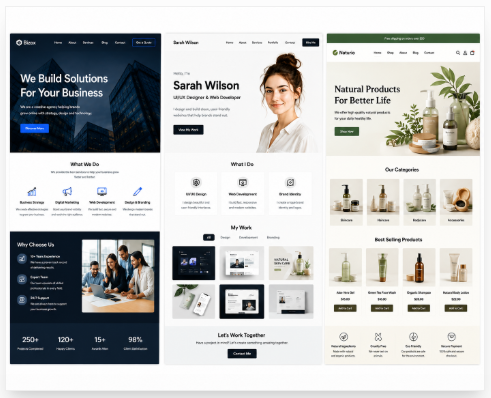
Minimalist vs Creative vs Corporate Themes
Choosing the best themes ideas for your website becomes much easier when you know your goal first. Each style works well for different people, so match the design with your brand instead of following trends.
A minimalist website keeps only the important parts on every page. As a result, visitors find information faster, pages load quickly, and your content stands out.
A creative website uses bold colors, unique layouts, and eye-catching effects. Therefore, it works best when your work depends on visuals and originality.
A corporate website focuses on trust, clarity, and professionalism. So, it is a smart choice for companies, consultants, banks, healthcare, and legal firms.
Recent web design trends in 2026 continue to favor faster, mobile-friendly, and accessibility-first websites instead of heavy visual effects. Many designers also combine clean layouts with AI features and subtle animations to improve user experience without slowing the site.
Quick Comparison
| Theme Style | Best for | SEO | Speed | Branding | Maintenance | Cost |
|---|---|---|---|---|---|---|
| Minimalist | Blogs, SaaS, portfolios, startups | Excellent | Excellent | Clean and modern | Low | Low to Medium |
| Creative | Designers, photographers, artists, agencies | Good | Medium | Very strong | Medium to High | Medium to High |
| Corporate | Businesses, finance, healthcare, law firms | Excellent | Good | Professional and trustworthy | Medium | Medium |
Which One Should You Choose?
- Choose Minimalist: if you want fast loading, better SEO, and easy maintenance.
- Choose Creative: if your website must impress visitors with visuals.
- Choose Corporate: if building trust and credibility is your highest priority.
The best professional website themes are not always the most beautiful ones. Instead, choose the style that helps your visitors find information quickly, trust your brand, and complete your main goal with less effort.
Best Website Theme Colors in 2026
Your best website colors should match your brand and help people read every page with ease. In 2026, simple color systems work better than random bright colors because they improve trust and make your website look more professional.
Modern websites now use a small group of colors instead of many shades. This keeps every page clean, fast, and easy to scan on both desktop and mobile devices.
| Website color combination | Best for | Practical tip |
|---|---|---|
| Dark mode + White text | SaaS, Tech, AI | Keep strong text contrast for easy reading. |
| Soft gradients + White | Startup, Landing pages | Use only one gradient in the hero section. |
| Earth tones + Cream | Food, Travel, Wellness | Build a warm and natural brand image. |
| Neutral palettes + Blue accent | Business, Finance | Make buttons and links stand out. |
| Glassmorphism + Light background | Apps, Dashboards | Use blur effects only on cards and menus. |
Follow Modern Color Trends
Dark mode remains a popular choice because it reduces visual strain and gives technology websites a premium look. However, always use enough contrast so every visitor can read your content comfortably.
Soft gradients continue to replace flat backgrounds because they add depth without making the page feel heavy. Designers now prefer smooth and natural blends instead of bright neon effects for most business websites.
Glassmorphism still works well for login screens, dashboards, and AI tools when used with care. Too many transparent panels can slow the design and distract your visitors.
Earth tones help health, travel, and lifestyle websites feel calm and trustworthy. Likewise, neutral palettes keep your content as the main focus while supporting every screen size.
AI-inspired interfaces now combine clean layouts, soft colors, modular sections, and readable typography. This simple approach improves usability and matches the leading website color combinations seen across modern websites in 2026.
Website Theme Trends for 2026
If you want your site to stay modern, follow the latest web design trends 2026 with a clear goal. Choose trends that improve your visitor’s experience instead of adding extra visual effects.
Website design is becoming smarter and simpler at the same time. Most successful websites now focus on speed, accessibility, and easy navigation before visual style.
| Trend | Why you should use it |
|---|---|
| AI personalization | Shows content based on visitor interests |
| Bento layouts | Makes information easy to scan |
| Motion UI | Guides users with useful movement |
| Accessibility | Helps everyone use your website |
| Voice interfaces | Supports voice search and navigation |
| Interactive scrolling | Tells your story step by step |
| Micro animations | Gives quick visual feedback |
| Minimal navigation | Helps visitors find pages faster |
| Performance-first design | Improves speed, SEO, and user experience |
AI Personalization
AI personalization shows products, articles, or offers that match each visitor. This keeps people engaged longer and improves conversions when used carefully.
Bento Layouts
Bento layouts divide your page into clean content blocks that are easy to read. They work especially well for SaaS, AI tools, portfolios, and business websites because visitors can find information quickly.
Motion UI and Micro Animations
Motion UI uses small movements to guide your visitor from one action to the next. Keep animations short because they should explain the page instead of slowing it down.
Accessibility
Accessibility helps every visitor use your website with confidence. Add high color contrast, keyboard navigation, screen reader support, and clear headings from the beginning instead of fixing them later.
Voice Interfaces
More people now search with their voice on phones and smart devices. Write clear headings, answer common questions directly, and use natural language to improve voice search results.
Interactive Scrolling
Interactive scrolling reveals content as your visitor moves down the page. Use it to tell a product story or explain a service, but avoid long effects that increase loading time.
Minimal Navigation
Simple navigation reduces confusion and helps visitors reach important pages faster. Keep your main menu short and place your primary call-to-action where people can see it immediately.
Performance-First Design
Performance-first design should always come before visual effects. Compress images, reduce scripts, and choose a lightweight website theme because a fast website supports better SEO, lower bounce rates, and happier visitors.
Quick takeaway: Community discussions among designers agree on one important lesson: storytelling layouts, scroll-based interactions, and modern visuals work best only when your website stays fast, mobile-friendly, and easy to use. That balance is the biggest web design trends 2026 lesson you should follow.
Mistakes to Avoid When Choosing a Theme
Choosing the best themes ideas for your website becomes easy when you avoid a few common website mistakes. A good theme should look nice, load fast, and stay reliable for years.
| Mistake | Why It Hurts | Better Choice |
|---|---|---|
| Buying only for looks | Slow pages and poor user experience | Choose a fast, lightweight theme |
| Ignoring speed | Higher bounce rate and lower conversions | Test with PageSpeed Insights |
| No mobile testing | Bad experience on phones | Check every page on different screen sizes |
| Too many plugins | Slower website and more conflicts | Install only essential plugins |
| Poor typography | Hard-to-read content | Use clear fonts and proper spacing |
| Unsupported themes | Security and compatibility problems | Buy themes with regular updates |
| Ignoring updates | Bugs and security risks | Update themes after backups |
Don’t Choose a Theme Only Because It Looks Beautiful
A beautiful demo does not always become a good website. Instead, check speed, mobile design, SEO features, and customization before buying.
Never Ignore Website Speed
A heavy theme can slow every page on your site. Google recommends good Core Web Vitals, including Largest Contentful Paint (LCP) within 2.5 seconds, Interaction to Next Paint (INP) under 200 milliseconds, and Cumulative Layout Shift (CLS) below 0.1 for a better user experience.
Always Test on Mobile Devices
More people now browse websites on phones than on desktop computers. Therefore, test your theme on Android, iPhone, tablet, and desktop before making it live.
Avoid Installing Too Many Plugins
Every plugin can add extra code, styles, or scripts to your website. So, keep only the plugins that provide real value and remove the rest.
Use Fonts That People Can Read Easily
Fancy fonts may look creative but often reduce readability. Instead, use simple fonts, good spacing, and enough contrast so visitors can read without effort.
Don’t Buy Abandoned Themes
Some themes stop receiving updates after a short time. Therefore, choose a theme with active developers, recent updates, good reviews, and reliable customer support.
Never Skip Theme Updates
Updates fix bugs, improve speed, and close security gaps. Before updating, create a complete backup so you can restore your website if something goes wrong.
Quick Checklist Before You Buy
- Check loading speed.
- Test on mobile devices.
- Read recent customer reviews.
- Confirm regular updates.
- Verify plugin compatibility.
- Choose clean typography.
- Buy only from trusted developers.
By avoiding these website mistakes, you can confidently choose the best themes ideas for your website that stay fast, secure, mobile-friendly, and easy to manage for many years.
Best Website Themes by Budget
Your best website themes by budget depend on your goals, skills, and future plans. So, compare the options below before you spend your money.
| Budget | Pros | Cons | Best For |
|---|---|---|---|
| Free Themes | No cost, easy to start, regular updates from trusted developers | Fewer design options, limited support | Beginners, students, hobby blogs |
| Premium Themes | More layouts, better support, frequent updates, extra features | One-time or yearly cost | Bloggers, small businesses, online stores |
| Custom Themes | Unique design, full control, built for your brand | Higher cost, longer development time | Growing brands, agencies, large businesses |
| Enterprise Themes | High security, advanced features, scalable for large traffic | Most expensive, needs expert management | Large companies, government, enterprise websites |
Free Website Themes
Free website themes help you launch quickly without spending money. However, choose one that receives regular updates and works well on mobile devices.
Who should choose it?
- New bloggers
- Students
- Personal websites
- Small portfolio websites
Premium Website Themes
Premium website themes save you time because they include ready-made layouts and professional support. Also, many lightweight premium themes help you meet Google’s Core Web Vitals for speed and user experience when properly optimized.
Who should choose it?
- Small business owners
- Freelancers
- Affiliate marketers
- Ecommerce store owners
Custom Website Themes
A custom website theme gives your business a unique look that no one else has. Still, you need a larger budget and an experienced developer to build and maintain it.
Who should choose it?
- Established brands
- SaaS companies
- Digital agencies
- Businesses with custom features
Enterprise Website Themes
Enterprise website themes support large websites that receive thousands or even millions of monthly visitors. Therefore, they focus on security, performance, accessibility, and long-term growth.
Who should choose it?
- Large companies
- Banks
- Universities
- Government organizations
Quick tip: If you are starting your first website in 2026, a lightweight premium theme usually gives the best value. It offers better design, faster setup, and easier SEO without the high cost of a custom solution.
Real-Life Examples: Best Themes Ideas for Your Website
Choosing the best themes ideas for your website becomes much easier when you see how other people solve real problems. These short examples help you match the right website theme with your own goal.
Small Business: Build Trust Faster
Your old website can make your business look inactive, even when your service is excellent. A modern, responsive business theme gives a clean look and helps visitors trust you within seconds.
Blogger: Keep Readers Reading
Your readers leave quickly if your blog looks messy or loads slowly. A simple blogging theme with clear fonts and easy navigation keeps people reading longer and improves your SEO.
Ecommerce Store: Sell More Products
A slow online store can lose customers before they reach the checkout page. A fast ecommerce theme with mobile-friendly product pages helps improve shopping and can increase conversions, because even a 100-millisecond speed improvement may lift conversion rates by up to 7%.
Freelancer: Win More Clients
Your portfolio should show your work without distractions or clutter. A clean portfolio theme highlights your projects first, so potential clients contact you with more confidence.
SaaS Company: Get More Free Trials
People want to understand your software within the first minute of visiting your site. A SaaS landing page theme with a clear headline, product screenshots, pricing, and strong call-to-action buttons helps visitors decide faster.
Agency: Show Professional Results
Clients compare several agencies before making a decision, so your website should stand out immediately. A premium agency theme with case studies, testimonials, service pages, and contact forms shows experience and builds credibility.
Quick Theme Selection Guide
| Website Type | Best Theme Style | Main Benefit |
|---|---|---|
| Small Business | Responsive Business | Builds customer trust |
| Blogger | Minimal Blog | Better reading experience |
| Ecommerce | Fast Online Store | More sales and lower bounce rate |
| Freelancer | Portfolio | More client inquiries |
| SaaS | Landing Page | More product sign-ups |
| Agency | Corporate Agency | Strong brand authority |
The best themes ideas for your website always match your purpose instead of following trends. Choose a lightweight, mobile-friendly, and regularly updated theme first, because more than 64% of global web traffic now comes from mobile devices.
Expert Recommendations: Choose a Website Theme That Lasts
Your best themes ideas for your website should focus on speed, usability, and long-term support first. A clean and lightweight theme helps your website load faster, rank better, and stay easier to manage for years.
WordPress users and web developers widely recommend lightweight themes instead of feature-heavy designs. Themes such as Astra, GeneratePress, Kadence, and Neve remain popular because they keep code clean and reduce unnecessary files.
Choose a Lightweight Theme
Heavy themes add extra scripts that most websites never use. Therefore, choose a theme that loads only the features you need and keeps your website fast.
Make Accessibility a Priority
Your visitors use different devices and abilities to browse your website. So, pick a theme with readable fonts, strong color contrast, keyboard navigation, and proper screen reader support.
Test with Real Users
Ask three to five people to browse your website before publishing it. Their feedback quickly shows confusing menus, slow pages, or difficult navigation that you may miss yourself.
Keep Animations Simple
Small hover effects improve your design without slowing the page. However, avoid large sliders, autoplay videos, and excessive animations because they often reduce page speed and affect user experience.
Keep Your Branding Consistent
Use the same colors, fonts, logo, and button styles on every page. This simple habit builds trust and makes your brand easier to remember.
Optimize Core Web Vitals
After installing your theme, test it with Google PageSpeed Insights every time you make major changes. Keep your Largest Contentful Paint (LCP), Interaction to Next Paint (INP), and Cumulative Layout Shift (CLS) in the recommended range for a smoother experience and better search performance.
| Expert Tip | Why It Matters |
|---|---|
| Choose a lightweight theme | Faster loading and better SEO |
| Prioritize accessibility | More people can use your website |
| Test with real users | Finds usability problems early |
| Avoid heavy animations | Improves speed and user experience |
| Keep branding consistent | Builds trust and recognition |
| Optimize Core Web Vitals | Supports better rankings and visitor satisfaction |
Finally, the best themes ideas for your website always balance design with performance. A simple, well-supported theme usually delivers better long-term results than a beautiful theme filled with features you never use.
Frequently Asked Questions
Which website theme is best?
The best website theme ideas for your website depend on your goal, not on popularity. Choose a lightweight, mobile-friendly, and regularly updated theme like Astra, GeneratePress, Kadence, or Blocksy because they work well for blogs, business sites, portfolios, and online stores.
Does a website theme affect SEO?
Yes; your website theme affects SEO because it controls speed, mobile responsiveness, clean code, and user experience. A slow or poorly coded theme can reduce your Core Web Vitals score, while a fast theme helps both visitors and search engines.
Free vs premium themes: Which should you choose?
A free theme works well when you are starting with a simple website and a small budget. A premium theme usually gives you more templates, better support, frequent updates, and advanced customization, so it becomes a better choice as your website grows.
| Choose | Best for |
|---|---|
| Free theme | Beginners, blogs, hobby websites |
| Premium theme | Business, ecommerce, agencies, growing websites |
Which website theme is the fastest?
GeneratePress, Hello Elementor, Astra, Neve, and Kadence are among the fastest WordPress themes tested in recent performance comparisons. However, your hosting, image optimization, caching, and plugins also affect loading speed.
Which theme is best for beginners?
Choose a theme with one-click starter templates and simple customization options. Astra, Neve, Kadence, and Blocksy let you build a professional website without writing code.
Which theme is easiest to customize?
Block-based themes and themes that support popular page builders are the easiest to edit. You can change colors, fonts, layouts, headers, and pages with simple drag-and-drop tools.
How often should you change your website theme?
Do not change your theme unless you have a clear reason such as poor performance, security issues, or an outdated design. Instead, update your existing theme whenever the developer releases a new version to keep your website secure and compatible.
Can AI build websites from themes?
Yes; AI website builders can create layouts, text, images, and basic pages from your prompts in just a few minutes. Even so, you should review the design, improve the content, and optimize the pages because human editing still delivers better quality, branding, and search performance.
Choosing the best website theme ideas for your website becomes much easier when you focus on speed, SEO, mobile experience, regular updates, and easy customization. Start with a lightweight theme today, then improve your design step by step as your website grows.
Final Thoughts
Choosing the best themes ideas for your website becomes much easier when you start with one simple question: what do you want your website to achieve? Then, pick a theme that helps your visitors finish that goal quickly and easily.
Next, match your website theme to your audience: a business website needs trust, while a portfolio needs creativity. Likewise, an online store should make buying simple, fast, and safe.
Before you publish, test your website speed on both mobile and desktop. Google recommends strong Core Web Vitals because they improve user experience, while many mobile visitors leave websites that take more than 3 seconds to load.
Also, think about the next three to five years instead of only today. A lightweight, responsive, and regularly updated theme saves you time, money, and future redesign work.
Finally, remember this simple checklist:
- Define your website goal first.
- Choose a theme for your target audience.
- Test speed before launch.
- Keep the design clean and easy to use.
- Put user experience before visual effects.
If you follow these steps, the best themes ideas for your website will not only look modern in 2026 but also help your visitors stay longer, trust your brand, and take action.


Leave a Reply