Publishing your blog doesn’t automatically make it appear in search results. Before readers can find your articles, search engines must discover, crawl, and index your pages. This guide explains how to submit your blog to Google, Bing, Yahoo, Yandex, and Baidu, monitor indexing, and avoid the common mistakes that prevent new content from appearing in search results.
Quick Facts
| Item | Details |
|---|---|
| Time Required | 15–30 minutes |
| Cost | Free |
| Skill Level | Beginner |
| Main Tools | Google Search Console, Bing Webmaster Tools |
| XML Sitemap | Recommended |
| Does submission guarantee indexing? | No |
| Does submission improve rankings? | No |
Why Submit Your Blog to Search Engines?
Search engines can discover websites naturally through links, but submitting your blog helps them find important pages faster and gives you access to valuable indexing reports.
Benefits include:
- Faster discovery of new blog posts
- Easier sitemap management
- Crawl and indexing reports
- Early detection of technical issues
- Better visibility into search performance
Remember: submission helps search engines discover your pages. High-quality content, backlinks, and technical SEO determine rankings.
Before You Submit Your Blog
Complete these checks first:
- Your website is publicly accessible over HTTPS.
- An XML sitemap is available.
- Important pages aren’t blocked by
robots.txt. - Published pages don’t contain a
noindextag. - URLs return an HTTP 200 OK status.
- Each page has a unique title and meta description.
- Internal links connect your important articles.
- Content is original, complete, and helpful.
Most CMS platforms automatically generate an XML sitemap.
Common sitemap URLs:
https://yourdomain.com/sitemap.xml
https://yourdomain.com/sitemap_index.xml
Search Engine Submission Comparison
| Search Engine | Submission Needed | Webmaster Tool | Best For |
|---|---|---|---|
| Yes | Google Search Console | Global audience | |
| Bing | Yes | Bing Webmaster Tools | Bing, Yahoo, Microsoft services |
| Yahoo | No | Uses Bing index | Global audience |
| Yandex | Optional | Yandex Webmaster | Russia & CIS countries |
| Baidu | Optional | Baidu Search Resource Platform | China |
How to Submit Your Blog to Google
Google is the largest search engine, making this your first priority.
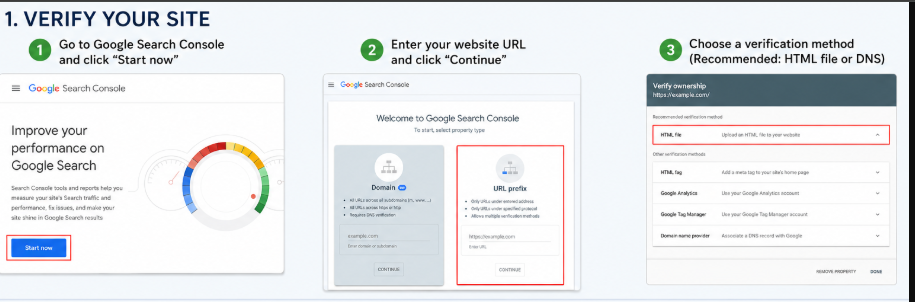
Step 1: Verify Your Website
Add your website to Google Search Console and verify ownership using one of these methods:
- DNS record (recommended)
- HTML file upload
- HTML meta tag
Step 2: Submit Your Sitemap
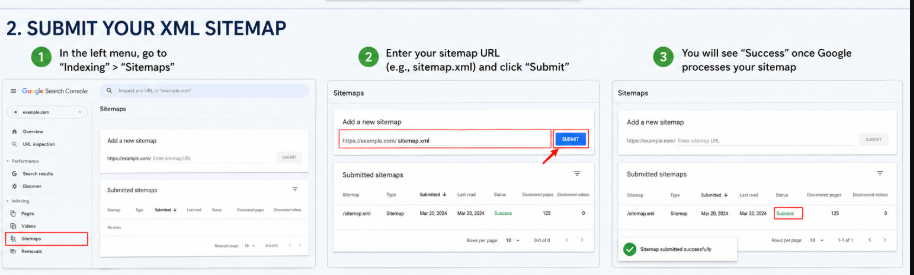
Open:
Indexing → Sitemaps
Enter xml sitemap:
https://yourdomain.com/sitemap.xmlClick Submit.
Step 3: Request Indexing
For important new or updated articles:
- Open URL Inspection.
- Enter the page URL.
- Click Request Indexing.
Google may discover pages without manual submission, but submitting a sitemap and requesting indexing can speed up discovery.
How to Submit Your Blog to Bing
Bing powers Microsoft Search and also supplies results for Yahoo Search.
Steps
- Open Bing Webmaster Tools.
- Add your website.
- Verify ownership.
- Submit your XML sitemap.
- Use URL Submission for important pages.
If you’ve already verified your site in Google Search Console, Bing can import your property and sitemap automatically.
Submit Your Blog to Yahoo Search
Yahoo Search uses Bing’s search index, so you don’t need a separate submission process.
Simply:
- Verify your website in Bing Webmaster Tools.
- Submit your sitemap.
- Publish quality content regularly.
Once Bing indexes your pages, they can also appear in Yahoo Search.
Submit Your Blog to Yandex
If you target visitors from Russia or nearby countries, use Yandex Webmaster.
Steps
- Create a Yandex account.
- Add your website.
- Verify ownership.
- Submit your XML sitemap.
- Monitor crawl and indexing reports.
Yandex also provides URL inspection and indexing diagnostics.
Submit Your Blog to Baidu
If your audience is in China, submit your website to the Baidu Search Resource Platform.
Steps
- Create a Baidu account.
- Add your website.
- Verify ownership.
- Submit your sitemap or individual URLs.
- Review crawl and indexing reports.
Tip: Websites serving Chinese users benefit from fast hosting and Simplified Chinese content.
What Happens After Submission?
| Stage | What Happens |
|---|---|
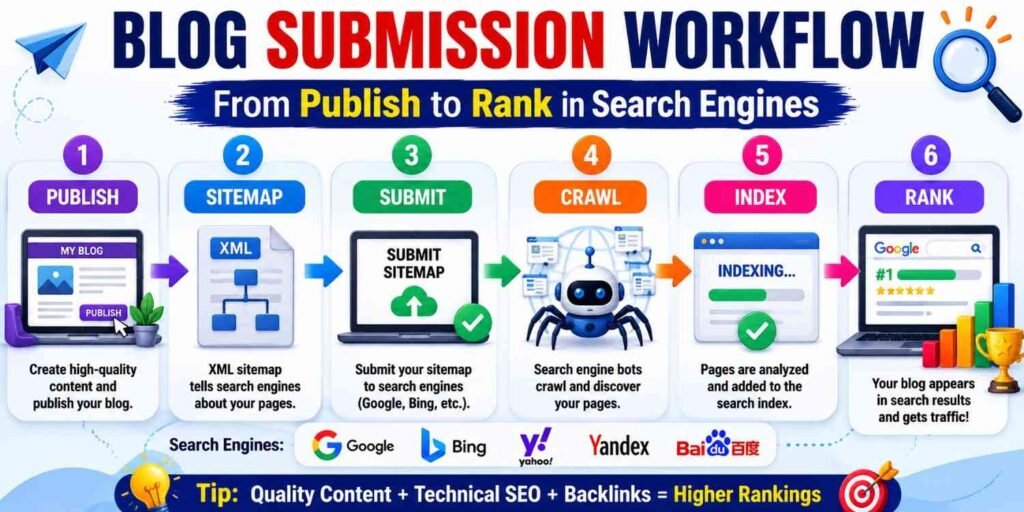
| 1 | Search engine receives your sitemap or URL. |
| 2 | Crawlers visit your website. |
| 3 | Pages are analyzed for quality and technical issues. |
| 4 | Eligible pages are added to the search index. |
| 5 | Rankings improve over time based on SEO signals. |
For established websites, indexing may take hours or days. New websites often require several days or even weeks.
How to Check If Your Blog Is Indexed
Search Google or Bing using:
site:yourdomain.comOr check a specific page:
site:yourdomain.com/post-nameYou can also use URL Inspection in Google Search Console or the inspection tools in Bing Webmaster Tools for detailed indexing information.
Why Your Blog Isn’t Indexed
| Problem | Solution |
|---|---|
| New website | Wait and request indexing |
| Thin or duplicate content | Improve originality and depth |
| Blocked by robots.txt | Remove crawl restrictions |
noindex tag | Remove the tag |
| Server errors | Fix hosting or page issues |
| Weak internal linking | Link from existing articles |
Common Submission Mistakes
Avoid these common errors:
- Submitting broken sitemap URLs
- Blocking important pages
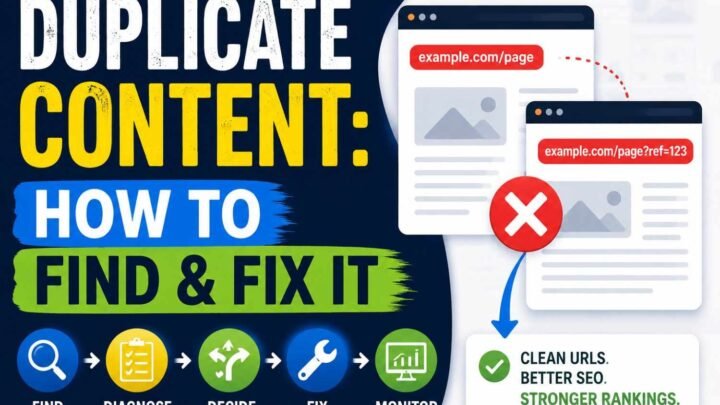
- Publishing duplicate content
- Expecting instant rankings
- Ignoring Search Console reports
- Forgetting to update internal links
Most indexing problems come from technical settings or low-value content—not from failing to submit a sitemap.
Best Practices for Faster Indexing
- Publish original, helpful content.
- Keep your XML sitemap updated.
- Build strong internal links.
- Improve page speed and Core Web Vitals.
- Use HTTPS.
- Fix crawl errors promptly.
- Earn backlinks from trusted websites.
- Refresh older articles with updated information.
Do You Need to Submit Your Blog Again?
Usually, no.
Submit your sitemap once and let it update automatically. Request indexing only when you:
- Publish an important article
- Update a popular post
- Recover from technical issues
- Launch a redesigned website
Repeatedly submitting the same URLs provides little benefit.
Myths vs. Reality
| Myth | Reality |
|---|---|
| Submission guarantees rankings. | Rankings depend on content quality, authority, relevance, and user experience. |
| Every new post must be submitted manually. | Automatic sitemaps are usually enough. |
| Google is the only search engine that matters. | Bing also powers Yahoo Search and several Microsoft search experiences. |
| Indexed pages always rank well. | Indexing only means a page can appear in search results. |
Frequently Asked Questions
Can I submit my website without a sitemap?
Yes. Search engines can discover pages through links, but an XML sitemap helps them find content more efficiently.
How long does indexing take?
It varies from a few hours to several weeks, depending on your website’s authority, crawl frequency, and content quality.
Is Google Search Console free?
Yes. Google Search Console and Bing Webmaster Tools are free.
Should I submit every blog post manually?
No. Automatic sitemaps are usually sufficient. Manual URL submission is best for important or newly updated pages.
Key Takeaways
- Verify your website in Google Search Console and Bing Webmaster Tools.
- Submit an XML sitemap once.
- Yahoo Search uses Bing’s index.
- Use Yandex Webmaster for Russia and Baidu Search Resource Platform for China.
- Monitor crawl and indexing reports regularly.
- Focus on high-quality content, technical SEO, and backlinks for long-term rankings.
Conclusion
Submitting your blog to search engines takes only a few minutes but lays the foundation for long-term organic visibility. Verify your website, submit an XML sitemap, monitor indexing reports, and fix crawl issues as they appear. After that, focus on publishing original, helpful content, improving your site’s technical health, and earning quality backlinks. Search engines can only rank pages they can discover, understand, and trust.


Leave a Reply