Varshith wants a professional blog, but he does not know coding or website design. So, he starts looking for the best blog templates and soon finds hundreds of choices that all look good but feel confusing.
A blog template is more than a nice design: it controls your layout, reading experience, mobile view, and navigation. It also affects how easily visitors read your content and how search engines understand your pages.
Many beginners choose a template only because it looks beautiful. However, that small mistake can slow your website, reduce user trust, and make future changes difficult.
Instead, you should pick a template that offers these features:
- Fast page loading
- Mobile-friendly design
- Clean navigation
- Easy readability
- SEO-friendly structure
- Room to grow with your niche
Today, Google expects websites to work well on mobile devices because it primarily uses the mobile version for indexing and ranking. Therefore, a responsive and lightweight blog template gives your website a stronger foundation for long-term growth.
In this guide, you will learn a simple step-by-step method to choose the right blog templates for your niche. By the end, you can confidently select one that looks professional, supports SEO, loads quickly, and continues to work well as your blog grows.
What Is a Blog Template?
You use blog templates to give your website a clean and professional look from the first day. A ready-made blog layout design saves your time and helps you publish faster.
A blog template already includes the main parts of your website. You get a homepage, post page, header, footer, sidebar, category sections, and easy-to-read typography in one design.
These ready-made sections work together to keep your blog neat and simple. As a result, your visitors find articles quickly and stay longer.
Blog Template vs Theme
Your blog templates decide how each page looks and where every section appears. A theme controls the complete website style, colors, fonts, and extra features together.
Many beginners think both are the same: they are not. This simple table makes the difference clear.
| Feature | Blog Template | Theme |
|---|---|---|
| Main job | Controls the page layout and design | Controls the overall website design and features |
| Covers | Homepage, post layout, header, footer, sidebar | Colors, fonts, layouts, widgets, and extra functions |
| Best for | Changing how pages look | Changing both appearance and website behavior |
For example, if you only want a different blog layout design, you usually change the template. However, if you want new styling and extra features, you choose another theme.
Practical Tip
Before you install any website template, preview it on both a phone and a desktop. Then check whether the navigation feels simple and every page is easy to read.
If you use Blogger, the platform gives you easy templates with flexible layouts and many background options. Therefore, you can build a professional blog without writing code.
Tools to Check Template Performance Before Purchase
Never buy a template after looking only at its demo. Instead, test the live demo with these free tools before you spend your money.
| Tool | What to Check | Best Use |
|---|---|---|
| Google PageSpeed Insights | Core Web Vitals, mobile speed, SEO | First performance check |
| GTmetrix | Loading time, page size, waterfall report | Find slow files |
| Lighthouse (Chrome DevTools) | Performance, accessibility, SEO | Full website audit |
| WebPageTest | Real browser and location testing | Advanced speed analysis |
A good blog templates demo should load quickly, stay stable while loading, and work smoothly on both desktop and mobile devices. Google recommends checking Core Web Vitals before launch, while PageSpeed Insights and Lighthouse help you find speed and user experience issues early.
Key points:
- Ready-made design for your blog.
- Includes homepage, posts, header, footer, sidebar, categories, and typography.
- A template controls the layout, while a theme manages the overall design and features.
- Choose a clean, mobile-friendly blog template that matches your niche and future growth.
Why Blog Templates Matter for SEO and User Experience
A good SEO friendly blog template helps your blog from the first day. It improves speed, structure, and reading, so both Google and your visitors can understand your pages better.
Google uses SEO to understand your content and help people decide whether they should visit your website. Therefore, your template becomes the base that supports every blog post you publish.
Your template controls many important parts, including:
- Loading speed
- Mobile layout
- Heading structure
- Navigation menu
- Internal links
- Font readability
- Category pages
- Search box
Google mainly uses the mobile version of your website for indexing and ranking. Because of that, a mobile friendly template is no longer optional for any blog.
A responsive blog design also keeps every page easy to use on phones, tablets, and computers. As a result, your readers stay longer because they can read without zooming or scrolling sideways.
Google also recommends good Core Web Vitals because they measure loading speed, interaction, and visual stability. Faster pages usually create a smoother experience for every visitor.
The HTTP Archive reported that websites passing mobile Core Web Vitals increased from 36% in 2023 to 48% in 2025. This shows more website owners now focus on performance because users expect faster websites.
Before choosing the best SEO friendly blog template, check these points:
| Feature | Why it matters |
|---|---|
| Fast loading | Opens pages quickly |
| Responsive design | Works well on every screen |
| Clear headings | Helps readers and Google |
| Easy navigation | Finds content faster |
| Internal linking | Connects related articles |
| Clean layout | Improves readability |
Finally, choose a SEO friendly blog template that is simple, fast, and mobile ready. That single decision supports better rankings, happier readers, and long-term blog growth.
Varshith’s Main Problem: Too Many Templates, No Clear Decision
You want the best blog templates for beginners, but every platform looks good at first. That is exactly where Varshith gets confused.
He checks WordPress, Blogger, Wix, Squarespace, and many template marketplaces. However, every website promises the fastest and most professional design.
Soon, one question keeps coming back: how do you choose a blog template that really works? A nice design alone cannot answer that.
You also need a template that is:
- Fast on desktop and mobile
- SEO-friendly for Google
- Easy to customize
- Suitable for your niche
- Simple to maintain for years
Now another problem appears. You must decide between a free vs paid blog template, but both have hundreds of choices.
Many beginners on Reddit say they only want a clean blog theme without spending hours learning page builders or complicated settings. They often recommend lightweight themes because they are easier to start with and quicker to customize.
That is why this guide follows a simple checklist instead of showing random template names. In the end, you will know which blog template is best for beginners and how to choose a blog template that fits your niche, supports SEO, and stays useful for many years.
Features Every Evergreen Blog Template Must Have
Choosing an evergreen website template is easier when you know what really matters. A good SEO blog template helps your readers first, and then it helps search engines understand your site.
| Feature | Why it matters to you |
|---|---|
| Mobile responsive design | Your blog looks good on phones, tablets, and desktops. |
| Fast loading code | Readers stay longer because pages open quickly. |
| Clean typography | Your content becomes easy to read for everyone. |
| Simple navigation | Visitors find pages without getting confused. |
| Category menu | Readers explore related topics in fewer clicks. |
| Featured post area | Your best articles get more attention. |
| Search box | Visitors quickly find the exact article they need. |
| Breadcrumb support | Readers know where they are, and search engines understand your site structure better. |
| Author box | It builds trust and shows who wrote the article. |
| Related posts | Readers continue reading instead of leaving your site. |
| Schema support | Search engines understand your content more clearly. |
| Ad-friendly layout | You can place ads without disturbing readers. |
| Email signup area | You grow your email list from day one. |
| Easy customization | You change colors, fonts, and layouts without coding. |
| Regular updates | Your template stays secure and supports new features. |
| Good support and documentation | You solve problems faster when you need help. |
A professional blog template should also be lightweight. Google recommends providing a fast page experience because good Core Web Vitals improve loading, responsiveness, and visual stability, with targets such as an LCP within 2.5 seconds, an INP under 200 milliseconds, and a CLS below 0.1.
Finally, avoid choosing a template only because it looks beautiful. The best evergreen website template quietly improves speed, SEO, reading comfort, and future growth, so your blog stays useful for many years.
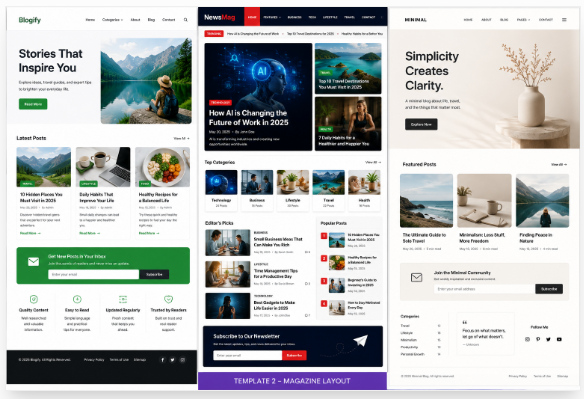
Best Blog Template Types by Niche
Your niche blog template should match your content, not just your taste. A good layout helps your readers find information faster and keeps them on your website longer.
| Blog Niche | Best Blog Layout | Must-Have Features |
|---|---|---|
| Tech & AI | Clean tutorial layout | Code blocks, comparison tables, table of contents |
| Food | Image-first layout | Recipe cards, cooking time, category filters |
| Personal Finance | Trust-focused layout | Tables, disclaimer, author profile |
| Travel | Visual gallery layout | Large photos, destination categories, maps |
| Health | Simple reading layout | Medical disclaimer, author bio, clear headings |
| News | Magazine grid | Trending posts, latest news, fast homepage |
| Personal Blog | Minimal layout | About section, recent posts, email signup |
If you run a tech blog, choose a clean design with plenty of white space. Add code blocks, comparison tables, and tutorial boxes because they make technical guides much easier to follow.
For a food blog, pick an image-first layout with recipe cards and category filters. Large photos help readers choose recipes quickly, while organized categories keep your blog easy to browse.
A personal finance blog needs trust more than decoration. Therefore, use clean tables, clear disclaimers, and a visible author profile so readers feel confident about your advice.
A travel blog works best with large photos and destination categories. Also, choose a map-friendly layout because it helps readers plan trips without getting lost.
If you write about health, keep every page simple and easy to read. Add a medical disclaimer and author bio because readers expect reliable information before following health tips.
A news blog needs a magazine-style homepage with trending stories and clear sections. Keep the homepage fast because visitors often leave if pages take more than 3 seconds to load.
Finally, a personal blog grows well with a simple homepage, an About page, and an email signup form. This niche blog template gives you room to grow, keeps your website evergreen, and makes it easier for both readers and search engines to understand your content.
Free vs Paid Blog Templates: Which Should Varshith Choose?
If you compare free vs paid blog templates, first think about your goal. If you only want to learn blogging, a free template is enough to start.
Free blog templates cost nothing, so they fit a small budget. They also help you test your blog idea before you spend money.
However, free templates often give fewer layout choices. They may also receive fewer updates and slower support.
Paid blog templates give you more features from day one. They usually include better support, regular updates, and easier customization.
You also get ready-made layouts for many niches. As a result, you spend less time changing the design yourself.
| Your Need | Best Choice |
|---|---|
| Lowest budget | Free WordPress or Blogger template |
| Beginner blog | Blogger, Wix, Squarespace, or WordPress starter template |
| Better SEO and long-term growth | Lightweight paid template from a trusted developer |
| Fast website setup | Website builder template |
| Full design control | Custom WordPress block theme or Bootstrap template |
Before you choose, ask yourself these simple questions:
- Will this template fit your niche?
- Does it load fast on mobile?
- Is the layout easy to read?
- Can you change colors, fonts, and menus?
- Does the developer provide regular updates?
- Will it still work after your blog grows?
If you are like Varshith, start with a good free template while you learn. Later, move to a paid template only when you really need extra features, better support, or more design freedom.
The best blog templates are not always the most expensive ones. Instead, choose the one that matches your budget, supports SEO, loads quickly, and helps your readers enjoy your content.
WordPress, Blogger, Wix, Squarespace, or Bootstrap: Which Platform Has Better Blog Templates?
Choosing the right blog templates becomes easy when you match the platform with your goal. You do not need the most popular option; you need the one that fits your skills and future plans.
Today, WordPress is the most popular blogging platform in the world. According to W3Techs, it powers 41.5% of all websites and holds 59.2% of the known CMS market share, so you can find thousands of WordPress blog templates, plugins, and tutorials.
If you are starting your first blog, Blogger is a smart choice. It is free, easy to use, and lets you publish your content without worrying about hosting or technical work.
Wix works well if you want to build your website by dragging and dropping sections. TechRadar’s 2026 review says Wix offers 900+ website templates, so you can quickly find a design for almost any niche.
Squarespace is another good option if you like clean and modern designs. Its templates are polished, mobile-friendly, and made for blogs, portfolios, businesses, restaurants, and many other niches.
Bootstrap blog templates are different from the others. They are best for developers because you usually need HTML, CSS, and Bootstrap knowledge to customize them properly.
Quick Comparison
| Platform | Best For | Technical Skill | Template Choice |
|---|---|---|---|
| WordPress | Long-term blogging and SEO | Low to Medium | Thousands |
| Blogger | Complete beginners | Very Low | Limited but simple |
| Wix | No-code websites | Very Low | 900+ templates |
| Squarespace | Professional-looking blogs | Very Low | Large collection of premium designs |
| Bootstrap | Developers | High | Developer-focused templates |
Which Platform Should You Choose?
Choose WordPress if you want the best long-term SEO, flexibility, and unlimited growth. Choose Blogger if you want a free and simple start, choose Wix or Squarespace if you prefer visual editing without coding, and choose Bootstrap blog templates only if you already know web development. This approach helps you pick blog templates that save time today and still support your website as it grows.
SEO Checklist Before Selecting Any Blog Template
Before you install any SEO friendly blog template, spend just 10 minutes on this blog SEO checklist. That one habit helps you choose a layout that supports Google SEO and your readers from day one.
A beautiful template is never enough. Instead, pick one that is fast, simple, and easy for both people and search engines to understand.
Check These SEO Features First
| Checklist | Why you should check it |
|---|---|
| ✅ Mobile responsive | Your blog should look perfect on phones, tablets, and desktops. Google mainly uses the mobile version of your site for indexing. |
| ✅ PageSpeed Insights test | Run the demo URL through Google PageSpeed Insights. Good Core Web Vitals aim for LCP under 2.5 seconds, INP under 200 ms, and CLS below 0.1. |
| ✅ Clean heading structure | Check whether the template uses one H1 and proper H2 and H3 headings. This makes your content easier to read. |
| ✅ Clean source code | Avoid templates with hidden links, hidden text, or messy code. These make future changes harder. |
| ✅ Schema markup | Pick a template that supports schema. It helps Google understand your pages better. |
| ✅ Breadcrumbs | Breadcrumbs improve navigation and support internal linking. |
| ✅ Title and meta support | You should easily edit SEO titles and meta descriptions. |
| ✅ Image lazy loading | Images should load only when needed. This improves page speed. |
| ✅ No intrusive popups | Large popups can annoy visitors and increase bounce rate. |
| ✅ Easy internal linking | The layout should naturally highlight related posts and categories. |
| ✅ SEO plugin support | Make sure it works with popular SEO plugins if you use WordPress. |
| ✅ Accessible fonts and contrast | Clear fonts and good color contrast improve readability for every visitor. |
Finally, open the template demo on your phone and click every menu, button, and link. If everything feels fast, clean, and simple, you have probably found the best template for Google ranking and a strong SEO friendly blog template for long-term growth.
Common Blog Template Mistakes Beginners Make
Your blog template mistakes can slow your growth before you even publish your first post. So, choose a template that helps your readers first and your design second.
| Mistake | What happens | Better choice |
|---|---|---|
| Choosing only by looks | Good design but poor speed | Pick a clean and fast template |
| Heavy animations | Slow loading pages | Use simple effects only |
| Ignoring mobile layout | Poor reading on phones | Test every page on mobile |
| Tiny fonts | Readers leave quickly | Use 16–18 px body text |
| Too many widgets | Cluttered layout | Keep only useful sections |
| Wrong niche design | Visitors get confused | Match the template to your niche |
| No update history | Security and compatibility problems | Choose regularly updated templates |
| Too many plugins | Slow website and conflicts | Pick a template with built-in features |
| No ad or email space | Hard to earn and grow | Plan ad and email sections early |
A beautiful demo can easily fool you. However, a slow template makes people leave before reading your content.
Likewise, avoid templates with too many animations and effects. They look impressive for a few seconds, but they increase loading time and hurt the reading experience.
Next, always check the mobile version before making your final decision. Today, more than 60% of website traffic comes from mobile devices, so your blog must work well on every screen.
Also, use clear and readable fonts instead of tiny text. If people need to zoom in, they usually leave your website.
Then, remove extra widgets that do not help your visitors. A simple sidebar always works better than a crowded one.
Moreover, match your template with your niche from the beginning. A food blog, tech blog, and travel blog each need a different layout.
Finally, check the template update history, avoid fixing poor designs with many plugins, and leave space for ads and your email signup form. These simple steps help you avoid beginner blog design mistakes and choose a blog template that stays fast, useful, and ready for long-term SEO success.
Varshith’s 7-Step Strategy to Choose the Perfect Blog Template
If you are wondering how to choose a blog template, follow this simple plan. It helps you avoid bad choices and pick a layout that works well for many years.
Step 1: Decide Your Niche First
Start with your blog topic before looking at any template. A food blog, tech blog, travel blog, or finance blog needs a different layout.
Step 2: List the Features You Need
Now write a small checklist: only include features that help your readers. For most blogs, these are enough:
- Mobile-friendly design
- Fast loading pages
- Easy navigation
- Search box
- Category menu
- Related posts
- Simple customization
- SEO-friendly code
Step 3: Shortlist Only Five Templates
Next, save only five templates that match your niche. Too many choices waste your time and make the final decision harder.
Step 4: Test the Mobile Preview
Then open every template on your phone before choosing it. Since Google mainly uses the mobile version for indexing, your blog should stay clean and easy to read on small screens.
Step 5: Check the Speed Demo
After that, open the live demo and see how quickly each page loads. A lightweight template usually gives your visitors a better reading experience and reduces waiting time.
Step 6: Read Reviews and Support History
Now spend a few minutes reading recent user reviews and update notes. Choose a template that receives regular updates and has helpful support when you need it.
Step 7: Choose the Simplest Template That Can Grow
Finally, pick the simplest design instead of the flashiest one. A clean template can easily support your blog for the next 2–3 years as your content grows.
Quick Blog Template Checklist
| Check | Why it matters |
|---|---|
| Matches your niche | Gives readers the right experience |
| Mobile responsive | Works well on every device |
| Fast loading | Improves user experience |
| Clean navigation | Helps readers find content |
| SEO-friendly structure | Makes pages easier for search engines to understand |
| Regular updates | Keeps your website secure |
| Easy customization | Saves time later |
The best blog template strategy is always simple: choose a template that helps your readers find information quickly and lets search engines understand your pages without difficulty. When you follow these seven steps, you can confidently choose a blog template that looks professional today and still serves your website well in the years ahead.
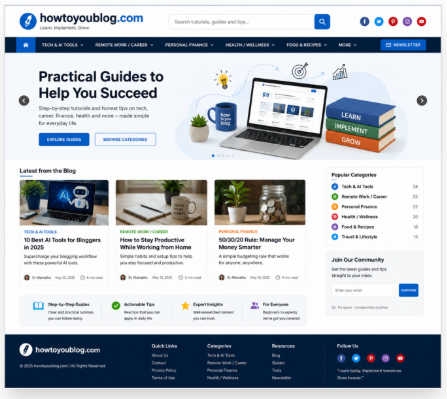
Best Blog Template Recommendation by Situation
Choosing the best blog templates becomes easy when you first decide what your blog really needs. Then, you can pick a template that fits your budget, skills, and long-term plan instead of selecting one only because it looks nice.
| Your Situation | Best Choice | Why It Fits |
|---|---|---|
| New blogger | Simple WordPress starter template or Blogger template | Easy to use and quick to publish |
| Professional website | Lightweight premium WordPress theme | Better support, speed, and customization |
| No coding | Wix or Squarespace template | Drag-and-drop editing with ready-made layouts |
| Small budget | Free WordPress or Blogger template | No upfront cost and simple setup |
| Long-term SEO | Lightweight WordPress theme with schema support | Faster loading and better search visibility |
| Content-heavy blog | Lightweight magazine-style template | Organizes many articles without slowing the site |
If you are starting your first blog, choose a beginner blog template with a clean layout. You can learn faster because you spend more time writing than fixing your website.
If you want a business-quality website, buy a lightweight premium WordPress theme. It usually includes regular updates, better documentation, and reliable customer support.
If you never want to touch code, choose Wix or Squarespace. Their visual editors help you build pages by clicking and dragging different sections.
If your budget is very small, start with a free Blogger or WordPress template. Later, you can upgrade after your blog begins getting regular visitors.
If Google traffic is your main goal, choose a professional blog template with clean code, schema support, mobile responsiveness, and plugin compatibility. Lightweight themes such as Astra, GeneratePress, Kadence, Neve, and Blocksy remain popular because they focus on speed, SEO, and long-term maintenance.
Finally, if you plan to publish hundreds of articles, choose a lightweight magazine-style template. It helps your readers find more content easily while keeping your best blog templates choice useful for many years.
Final Blog Template Selection Checklist
Use this blog template checklist before you install or buy any template. It helps you avoid poor choices, and it helps you build a blog that can grow for years.
| Check | What you should verify |
|---|---|
| Niche fit | Match the design with your blog topic. |
| Mobile design | Test the layout on phones and tablets. |
| Speed | Open the demo and check that pages load fast. |
| SEO structure | Look for clean headings, schema support, and breadcrumb support. |
| Readability | Choose clear fonts, enough spacing, and simple colors. |
| Homepage flexibility | Make sure you can change sections without coding. |
| Category layout | Check that categories are easy to find and browse. |
| Support | Pick a developer who answers questions and fixes issues. |
| Update history | Choose a template updated regularly during the last 12 months. |
| Customization ease | Change colors, fonts, and logos without difficulty. |
| Monetization spaces | Keep room for ads, affiliate links, and email signup forms. |
| Long-term scalability | Select a design that can handle more posts and new features later. |
Finally, use this SEO blog template checklist before making your final decision. A simple, fast, mobile-friendly, and easy-to-read template gives your visitors a better experience, and it gives your blog a stronger base for future growth.
If you’d like, I can also make this section more Google Featured Snippet friendly with a one-minute checklist and richer semantic SEO signals.
Conclusion: Choose a Template That Makes Blogging Easier
Varshith started with one simple goal: finding the right blog templates for a professional website. In the end, he learned that a fast, useful, and evergreen layout always beats a fancy design.
You can follow the same path today. First, choose a template that matches your niche, supports mobile users, has a clean SEO structure, and can grow with your blog for years.
Before you decide, compare only three templates: this saves time and makes the choice easier. Then test each one for loading speed, mobile view, navigation, and readability before you publish your website.
Your final checklist is simple:
- Match your blog niche.
- Load pages quickly.
- Work well on mobile.
- Keep the layout clean.
- Support SEO features.
- Stay easy to update later.
You do not need the most expensive or colorful design. You only need one of the best blog templates that helps your readers enjoy your content and helps search engines understand your website.
FAQ: Blog Templates
1. What are blog templates?
A blog template is a ready-made website layout that controls how your blog looks and works. It includes your homepage, blog posts, menu, header, footer, sidebar, fonts, and colors, so you can launch a professional blog without coding.
2. Which blog template is best for beginners?
Choose a simple, lightweight, and SEO-friendly blog template that matches your niche instead of picking the most colorful design. A responsive template with fast loading, easy customization, and regular updates helps you grow your blog with less effort.
3. Are free blog templates good for SEO?
Yes, many free blog templates work well if they use clean code, load quickly, and support mobile devices. However, premium templates often include better support, more features, frequent updates, and easier customization for long-term blogging.
4. Do blog templates affect Google ranking?
Yes, your blog template can influence SEO because it affects page speed, mobile experience, navigation, and readability. Google mainly indexes the mobile version of your website, so a responsive and fast template gives both visitors and search engines a better experience.
5. What is an evergreen blog template?
An evergreen blog template stays useful for many years because its design is clean, simple, and easy to update. It focuses on user experience instead of short-term design trends, so you rarely need to rebuild your website.
6. Should I choose WordPress or Blogger templates?
Choose WordPress templates if you want more control, advanced SEO options, and room to grow your blog. Choose Blogger templates if you want a free platform that is easy to start and requires very little technical knowledge.
7. How do I know if a blog template is fast?
Test the template demo with Google PageSpeed Insights before you install it. Also check these points:
- Loads quickly on mobile.
- Uses clean and lightweight code.
- Scores well on Core Web Vitals.
- Does not use unnecessary animations or large scripts.
8. Can I change my blog template later?
Yes, you can change your blog template whenever you want, but always create a full backup first. After switching, check your menus, widgets, images, internal links, and mobile layout to make sure everything still works correctly.


Leave a Reply