A few years ago, I watched a development team spend almost an entire weekend fixing a deployment mistake that could have been avoided in minutes. One small manual error caused downtime, frustrated customers, and a lot of stress. That’s when I truly understood why DevOps pipeline automation matters.
At its core, DevOps pipeline automation is simply the process of using tools and scripts to handle repetitive software delivery tasks automatically. Instead of manually building code, running tests, and deploying applications, the pipeline does the heavy lifting for you. Developers can focus on creating features instead of clicking buttons all day.
The reason so many companies are investing in automation is pretty simple. They want faster releases, fewer mistakes, and happier customers. According to the annual research from the DORA (DevOps Research and Assessment) program, high-performing engineering teams deploy software far more frequently and recover from failures much faster than teams that rely on manual processes.
Whether you’re a beginner trying to understand CI/CD pipelines or an experienced engineer looking to improve delivery speed, this guide will walk you through how DevOps pipeline automation works, why it has become a standard practice, and how modern teams are using it to deliver software with confidence in 2026.
What Is DevOps Pipeline Automation?
If you’ve ever worked on a software project, you know how many small tasks happen between writing code and getting that code into production. A developer writes code, someone reviews it, tests are run, applications are built, servers are updated, and finally everything gets deployed. Doing all of this by hand can be slow, stressful, and honestly… mistakes happen.
That’s where DevOps pipeline automation comes in.
In simple words, DevOps pipeline automation is the process of using tools and scripts to automatically move code through different stages of software development. Instead of a person manually performing every task, the pipeline handles much of the work on its own.
Think about it like an assembly line in a factory. Once you place something on the conveyor belt, it moves through different stations automatically. A DevOps pipeline works in a similar way. When a developer pushes code to a repository like GitHub, the pipeline can automatically build the application, run tests, check for security issues, and deploy it to a server without anyone clicking dozens of buttons.
I remember working on a project years ago where deployments were done manually every Friday evening. Everyone was nervous. One small mistake in a configuration file could keep the whole team working late into the night. After automation was introduced, deployments became much smoother and far less stressful.
A typical DevOps lifecycle includes planning, coding, building, testing, releasing, deploying, operating, and monitoring. Automation connects these stages together so work flows smoothly from one step to the next.
The difference between manual and automated pipelines is huge. In a manual pipeline, people perform most tasks themselves, which takes time and increases the chance of human error. In an automated pipeline, tools handle repetitive work consistently and much faster.
Today, high-performing engineering teams rely heavily on automation. Research from the DevOps Research and Assessment (DORA) program continues to show that teams with mature automation practices can deploy software more frequently, recover from failures faster, and deliver updates with greater reliability.
At the end of the day, DevOps pipeline automation isn’t really about replacing people. It’s about removing repetitive work so developers, testers, and operations teams can spend more time solving real problems and building better software.
Why DevOps Pipeline Automation Matters in Modern Software Development
A few years ago, I worked on a project where deployments were mostly manual. Every release day felt a little stressful. Someone had to build the application, another person had to run tests, and somebody else had to deploy it. If even one small step was missed, things could go wrong pretty quickly. Honestly, nobody looked forward to deployment days.
That’s one reason DevOps pipeline automation has become such a big deal.
When repetitive tasks are automated, teams spend less time clicking buttons and copying commands. They spend more time building useful features and fixing real problems. Human mistakes still happen, of course, but automation removes many of the common ones that show up during builds, testing, and deployments.
Think about a developer pushing new code to GitHub. Instead of waiting for someone to manually start testing, an automated CI/CD pipeline can immediately build the application, run tests, scan for security issues, and prepare it for deployment. The feedback comes back within minutes, not days. That speed makes a huge difference.
The numbers tell the same story. Research from the DORA team continues to focus on four key software delivery metrics: deployment frequency, lead time for changes, mean time to recovery (MTTR), and change failure rate. These measurements help teams understand how quickly and reliably they deliver software. High-performing teams consistently score better because they rely heavily on automation.
Industry studies from the Continuous Delivery Foundation also show that CI/CD adoption keeps growing among experienced engineering teams. That isn’t surprising. Once teams experience faster releases and fewer deployment headaches, they rarely want to go back to manual processes.
Another thing I’ve noticed is how automation changes team confidence. Developers aren’t as nervous about releasing updates because testing and validation happen automatically. Problems get caught earlier. Feedback arrives faster. The whole process feels smoother.
At the end of the day, DevOps pipeline automation isn’t really about replacing people. It’s about removing boring, repetitive work so teams can focus on building better software. And honestly, that’s something every developer can appreciate.
How a DevOps Pipeline Works (Step-by-Step)
When I first heard people talking about a DevOps pipeline, I imagined something complicated with dozens of servers, dashboards, and engineers staring at screens all day. Then I worked with a real CI/CD pipeline and realized it’s actually a pretty logical process. The goal is simple: take code written by developers and move it safely into production without creating chaos.
Think of it like an assembly line in a factory. Every step checks the work before it moves forward.
1. Code Commit
Everything starts when a developer writes code and pushes it to a Git repository such as GitHub, GitLab, or Bitbucket.
Maybe it’s a new feature. Maybe it’s a bug fix that kept customers awake all night. Either way, once the code is committed, the pipeline wakes up and starts working automatically.
2. Build
The next step is the build stage.
Here, the source code gets compiled and packaged into something the system can run. If there are missing files, broken dependencies, or coding mistakes, the build usually fails right here.
Honestly, finding problems at this stage saves a lot of headaches later.
3. Unit Testing
Now the pipeline runs unit tests.
These are small tests that check whether individual pieces of code behave as expected. It’s a bit like checking each part of a car before assembling the whole vehicle.
If a test fails, the pipeline stops. No point moving forward with broken code.
4. Security Scan
Security isn’t something teams can leave until the end anymore.
Modern DevOps pipelines automatically scan code for known vulnerabilities, exposed secrets, outdated libraries, and other risks. According to the latest industry reports from organizations such as the Open Worldwide Application Security Project (OWASP), software supply chain attacks continue to be a major concern, which is why automated security checks have become a standard part of CI/CD workflows.
5. Integration Testing
Unit tests check individual pieces.
Integration tests check how those pieces work together.
For example, can your application successfully talk to the database? Does the login system communicate correctly with other services? This stage catches issues that often stay hidden until real users start clicking around.
6. Staging Deployment
If everything looks good, the application moves to a staging environment.
Staging is basically a practice field that closely matches production. Teams can test features, verify performance, and spot unexpected problems before customers ever see them.
I’ve seen teams avoid major production incidents simply because they caught a small issue in staging first.
7. Approval Gates
Some organizations use approval gates before deployment.
A manager, senior engineer, security specialist, or product owner reviews the release and decides whether it’s ready to go live. This extra checkpoint is common in industries like banking, healthcare, and government, where mistakes can be expensive.
8. Production Deployment
Now comes the exciting part.
The application gets deployed to production, where actual users can access it. Modern deployment strategies such as blue-green deployments and canary releases help reduce risk by rolling out changes gradually instead of updating everything at once.
9. Monitoring
Many people think deployment is the finish line.
It isn’t.
Once the application is live, monitoring tools keep watching system health, performance, logs, and user activity. If something goes wrong, alerts notify the team immediately.
This final stage is one reason high-performing DevOps teams can recover from incidents quickly. The DORA metrics framework, widely used across the software industry, identifies fast recovery times and reliable deployments as key indicators of engineering performance.
And that’s really the DevOps pipeline workflow in a nutshell. Code moves through a series of automated checks, tests, and deployments until it reaches users. The less manual work involved, the faster teams can release software with confidence—and get a good night’s sleep instead of fixing production issues at 2 a.m.
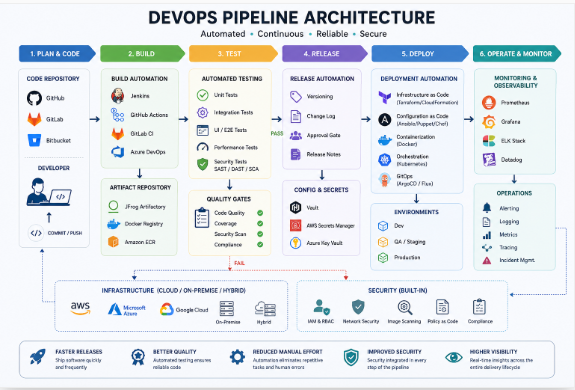
Core Components of DevOps Pipeline Automation
When people first hear the phrase “DevOps pipeline automation,” it can sound a bit overwhelming. I remember feeling the same way years ago. It seemed like everyone was throwing around fancy tool names and complicated diagrams.
But when you break it down, a DevOps pipeline is really just a series of steps that help developers move code from their laptops to real users with as little manual work as possible.
Think of it like an assembly line. Every tool has a job. One tool stores code. Another builds it. Another tests it. And another pushes it into production. When all these pieces work together, teams can release software faster and with fewer headaches.
Let’s look at the main parts that make it happen.
Source Control
Every DevOps pipeline starts with source control.
This is where developers save, track, and manage their code changes. Without source control, teamwork becomes messy very quickly. Imagine five developers editing the same file and sending copies through email. Sounds painful, right?
That’s exactly why tools like Git became the industry standard.
Git helps developers keep track of every change made to the code. If something breaks, you can go back and see exactly what happened and when.
Most teams use platforms built around Git, such as:
- GitHub
- GitLab
- Bitbucket
These platforms do much more than store code. They help teams review changes, discuss improvements, track issues, and trigger automated pipelines whenever new code is pushed.
Today, GitHub alone hosts more than 420 million repositories and serves over 150 million developers worldwide, making it one of the largest software collaboration platforms on the planet.
In real projects, a simple code push to GitHub or GitLab can automatically start building, testing, and deploying an application without anyone clicking a button.
That’s where automation starts to feel pretty amazing.
Build Automation
Once code is stored in source control, the next step is building it.
Building means turning source code into something that can actually run.
Years ago, developers often had to build applications manually. It wasn’t unusual to hear someone say, “It works on my machine,” only for the application to fail somewhere else.
Build automation solved a lot of those problems.
Popular build tools include:
- Maven
- Gradle
- NPM
If you’re working with Java applications, you’ll probably run into Maven or Gradle. For JavaScript projects, NPM is almost everywhere.
These tools automatically download dependencies, compile code, package applications, and prepare everything needed for deployment.
For example, when a developer commits code to a Git repository, Maven can automatically create a new application package within minutes. No manual copying. No guessing. No forgotten steps.
That consistency is a big reason modern software teams can release updates several times a day.
Testing Automation
Now comes the part that saves developers from many sleepless nights.
Testing.
Nobody enjoys finding a major bug after customers discover it first.
Automated testing helps catch problems before software reaches production.
Most DevOps pipelines include several types of tests:
Unit Tests
These test small pieces of code individually. Think of checking one door lock instead of inspecting the entire house.
Integration Tests
These make sure different parts of the application can communicate properly with each other.
For example, can your website successfully connect to its database?
Regression Tests
These check whether new changes accidentally broke features that were working before.
This happens more often than developers would like to admit.
According to industry reports from the Continuous Delivery Foundation and Google Cloud’s DORA research, high-performing engineering teams rely heavily on automated testing because it helps reduce deployment failures and improve software reliability.
Honestly, once you’ve experienced a production outage caused by an overlooked bug, automated testing stops feeling optional.
Deployment Automation
After code is built and tested successfully, it’s ready to go live.
This is where deployment automation takes over.
Instead of manually copying files to servers at midnight and hoping nothing breaks, modern teams use automated deployment tools.
Some of the most widely used technologies include:
- Docker
- Kubernetes
- ArgoCD
Docker packages applications into lightweight containers. These containers run the same way whether they’re on a developer’s laptop, a testing server, or a cloud platform.
Kubernetes manages those containers at scale. If one container crashes, Kubernetes can automatically replace it. If traffic suddenly spikes, it can launch more containers to handle the load.
Then there’s ArgoCD, a popular GitOps tool that automatically syncs Kubernetes environments with code stored in Git repositories.
Many teams love this approach because Git becomes the single source of truth. If it’s in Git, it gets deployed. If it’s not in Git, it doesn’t.
That simple idea removes a surprising amount of confusion.
When all these components work together—source control, build automation, testing automation, and deployment automation—you get a DevOps pipeline that can move software from development to production quickly, safely, and consistently.
And honestly, that’s the real goal of DevOps automation. Not just speed. Confidence. The confidence to release software without crossing your fingers every single time.
Read More: The Most Frequently Asked Questions for Freshers from Big IT MNC Companies in India.
DevOps Automation Tools Comparison (2026)
If you’ve spent even a few months working in DevOps, you’ve probably noticed something pretty quickly: there isn’t a single “best” automation tool.
I learned this the hard way.
A few years ago, I thought Jenkins could handle everything. Then I joined a project that was deeply tied to GitHub, and suddenly GitHub Actions felt much easier. Later, on a Kubernetes-heavy project, ArgoCD became the star of the show.
That’s the thing about DevOps tools. The right choice depends on your team, your workflow, and honestly, what problems you’re trying to solve.
Here’s a simple comparison of some of the most widely used DevOps automation tools in 2026.
| Tool | Best For | Difficulty |
|---|---|---|
| Jenkins | Enterprise CI/CD | Medium |
| GitHub Actions | GitHub Projects | Easy |
| GitLab CI/CD | Complete DevOps Platform | Medium |
| Azure DevOps | Microsoft Ecosystem | Medium |
| ArgoCD | GitOps Deployments | Advanced |
| Terraform | Infrastructure Automation | Medium |
Jenkins
Jenkins has been around for years, and somehow it still refuses to disappear.
Many large organizations continue to rely on it because of its flexibility and huge plugin ecosystem. You can automate almost anything with Jenkins if you’re willing to spend some time configuring it.
The downside? Maintenance.
I’ve seen Jenkins servers become so packed with plugins that nobody wanted to touch them. When it’s managed properly, though, it’s still a powerful choice for enterprise CI/CD pipelines.
GitHub Actions
If your code already lives on GitHub, GitHub Actions feels surprisingly natural.
You don’t need extra servers. You don’t need complicated setup. Most teams can create their first automated workflow in less than an hour.
That’s one reason it has become so popular among startups, developers, and smaller engineering teams. Simple tasks like testing code, building Docker images, and deploying applications can be automated with only a few lines of YAML.
GitLab CI/CD
GitLab takes a different approach.
Instead of combining multiple tools, it tries to give you everything in one place. Source control, CI/CD, security scanning, issue tracking, and deployment tools all sit inside the same platform.
For teams that prefer fewer moving parts, GitLab can save a lot of headaches. You spend less time connecting tools and more time shipping software.
Azure DevOps
Companies that already use Microsoft products often lean toward Azure DevOps.
It works well with Azure cloud services, Active Directory, Visual Studio, and other Microsoft technologies. Large enterprises especially like the governance and reporting features that come with the platform.
It may not be the flashiest option, but it gets the job done.
ArgoCD
ArgoCD has become one of the biggest names in GitOps.
Instead of manually deploying applications, developers make changes in Git repositories, and ArgoCD automatically syncs those changes to Kubernetes clusters.
The learning curve is definitely steeper than GitHub Actions or GitLab CI/CD. Still, once teams understand GitOps principles, deployments often become cleaner and easier to manage.
Terraform
Terraform isn’t technically a CI/CD tool, but leaving it out of a DevOps automation discussion would feel wrong.
Terraform automates infrastructure creation. Need servers, databases, networking, storage, or Kubernetes clusters? Terraform can build them from code.
The Infrastructure as Code approach has become standard practice across modern cloud environments because it reduces manual work and makes environments reproducible.
Which Tool Should You Choose?
If you’re a beginner, GitHub Actions is usually the easiest place to start.
If you need enterprise-level customization, Jenkins remains a strong option.
Want an all-in-one platform? GitLab CI/CD is worth serious consideration.
Working heavily with Microsoft technologies? Azure DevOps fits naturally.
Running Kubernetes at scale? ArgoCD shines.
And if your goal is automating infrastructure, Terraform is almost impossible to ignore.
According to recent industry reports from organizations such as the Continuous Delivery Foundation and leading DevOps surveys, Jenkins, GitHub Actions, GitLab CI/CD, and Terraform continue to rank among the most widely adopted automation tools used by engineering teams worldwide. The reason is pretty simple—they solve real problems and help teams release software faster with fewer manual steps.
At the end of the day, the best DevOps automation tool isn’t necessarily the most popular one. It’s the one your team can actually use effectively without turning every deployment into a stressful Friday night event.
Read More: NxtWave CCBP 4.0 Certification Programs.
Infrastructure as Code (IaC) and Pipeline Automation
I still remember the first time I had to set up a server manually. It took hours. I clicked through dozens of settings, copied files, installed software, and hoped I didn’t miss anything. A week later, I had to create another server and do the whole thing again. It was frustrating.
That’s one of the biggest reasons Infrastructure as Code (IaC) became such a game changer in the DevOps world.
Instead of manually creating servers, networks, databases, and cloud resources, IaC lets you define everything in code. The setup becomes repeatable, predictable, and much easier to manage. If you need ten identical environments, you don’t have to spend ten times the effort. You simply run the code.
One of the most popular IaC tools today is Terraform. Developers and DevOps teams use Terraform to automate cloud infrastructure across providers like AWS, Microsoft Azure, and Google Cloud. Instead of clicking buttons in a cloud dashboard, you write a few configuration files and Terraform handles the heavy lifting.
If you’re working mainly in AWS, you might come across AWS CloudFormation. It works in a similar way but is designed specifically for AWS environments. Many organizations use it to manage large cloud deployments while keeping everything version-controlled.
Another tool that has been getting a lot of attention is Pulumi. What makes Pulumi interesting is that you can use familiar programming languages like Python, JavaScript, TypeScript, Go, and C# instead of learning a separate configuration language. For developers who already write code every day, that feels much more natural.
The real magic happens when IaC becomes part of your CI/CD pipeline.
Imagine a developer pushes code to GitHub. The pipeline automatically runs tests, builds the application, creates any required cloud resources with Terraform, deploys the application, and verifies everything is working. No late-night manual deployments. No forgotten settings. No guessing what changed.
That’s why Infrastructure as Code and Pipeline-as-Code have become core parts of modern DevOps practices. Recent industry research and engineering studies continue to show that automation improves consistency, reduces human error, and helps teams deliver software faster and more reliably.
For me, the biggest benefit isn’t even speed. It’s peace of mind. When your infrastructure is stored in version control alongside your application code, you can see exactly who changed what, when they changed it, and if needed, roll it back. That level of visibility can save hours of troubleshooting when something unexpected happens.
At the end of the day, IaC is really about making infrastructure behave more like software. Once teams experience that, it’s hard to imagine going back to manual setups and endless configuration checklists.
DevSecOps – Automating Security in CI/CD Pipelines
A lot of teams spend months building a fast CI/CD pipeline. Code gets pushed, tests run automatically, and deployments happen in minutes. Sounds great… until a security problem sneaks into production.
I’ve seen this happen more than once. Everyone celebrates a successful deployment, and then a few days later someone discovers a vulnerable package, an exposed password, or a security hole that should have been caught earlier. Fixing it after release is usually stressful, expensive, and honestly a bit embarrassing.
That’s why DevSecOps has become such a big deal. The idea is simple: don’t treat security as something you do at the end. Make it part of the development process from the very beginning. People often call this Shift Left Security because security checks move closer to the coding stage instead of waiting until deployment day.
One common practice is SAST (Static Application Security Testing). These tools scan source code while developers are still writing it. They can spot risky coding patterns, security weaknesses, and common mistakes before the application is even built. Catching a problem early can save hours of troubleshooting later.
Then there’s DAST (Dynamic Application Security Testing). Unlike SAST, DAST tests a running application. Think of it like hiring someone to poke around your website and look for weak spots before attackers do. It helps uncover issues that may not be visible from source code alone.
Containers need attention too. With Docker and Kubernetes becoming standard in many DevOps environments, container scanning is now a must. Security scanners check container images for outdated packages, known vulnerabilities, and risky configurations. According to the latest data from the U.S. government’s National Vulnerability Database (NVD), thousands of new software vulnerabilities are reported every year, which makes regular scanning a practical necessity rather than an optional task.
Another thing many teams overlook is secret detection. Developers sometimes accidentally commit passwords, API keys, cloud credentials, or database connection strings into Git repositories. It sounds surprising, but it happens more often than people think. Automated secret scanning tools can catch these mistakes before they become security incidents.
A secure DevOps pipeline isn’t about slowing developers down. It’s actually the opposite. When security checks run automatically inside the CI/CD pipeline, teams can release software faster and with more confidence. Nobody wants to get a late-night phone call because a password was exposed or a vulnerable library made it to production. A few automated security checks today can prevent a lot of headaches tomorrow.
AI-Powered DevOps Pipeline Automation
A few years ago, most DevOps teams spent hours doing things that felt repetitive. Someone had to check deployment logs, watch dashboards, review code changes, and jump into action when something broke. It worked, but honestly, it wasn’t the best use of skilled engineers’ time.
Now AI is changing some of that.
The interesting part is that AI isn’t replacing DevOps engineers. It’s helping them make faster and smarter decisions. In fact, recent research from DORA’s 2025 report found that AI works best when it supports strong engineering practices rather than replacing them. Teams with good DevOps foundations tend to get more value from AI tools than teams looking for a shortcut.
One area where AI is making a real difference is deployments. Modern CI/CD platforms can analyze deployment patterns, spot unusual behavior, and even warn teams before a release goes live. Imagine pushing code on a Friday evening and getting a notification that says, “This deployment looks riskier than previous successful releases.” That’s the kind of extra safety net many teams appreciate.
Code reviews are changing too.
Nobody enjoys waiting hours for feedback on a pull request. AI-powered review tools can quickly scan code, point out security issues, highlight potential bugs, and suggest cleaner solutions. They’re not perfect. I’ve seen AI recommendations that made little sense. Still, they often catch small mistakes that busy reviewers might overlook.
Another helpful use case is automated incident detection.
Most production outages don’t start with alarms blaring everywhere. They begin with tiny signals. A response time increases by a few milliseconds. Memory usage creeps higher than normal. Database queries start taking longer. AI systems can notice these patterns much earlier than humans staring at dashboards all day. That early warning can save hours of troubleshooting later.
Predictive monitoring might be the most exciting part.
Instead of telling you something is already broken, AI can estimate what might happen next. For example, if traffic trends continue growing at the current rate, the system may predict that servers will hit capacity in a few days. That gives teams time to fix the issue before customers notice anything.
That said, AI isn’t magic. It can’t replace good monitoring, solid testing, clear processes, or experienced engineers. The best DevOps teams still focus on fundamentals first. AI simply helps them move faster, reduce noise, and spend more time solving real problems instead of chasing alerts.
If you’re building or improving a DevOps pipeline in 2026, AI is worth exploring. Just don’t think of it as a replacement for DevOps. Think of it as another teammate sitting beside you, helping spot things you might miss after staring at logs for the third hour in a row.
GitOps and Kubernetes Automation
The first time I worked with Kubernetes deployments, I quickly realized something. Deploying applications manually might work when you have one or two services, but once the number starts growing, things get messy. One small mistake in a configuration file can turn a normal day into a stressful one.
That’s where GitOps started making sense to me.
GitOps is actually a pretty simple idea. Your Git repository becomes the single source of truth for everything. Application code, Kubernetes manifests, configurations, and deployment settings all live inside Git. If you want to make a change, you update the code, commit it, and push it. The system takes care of the rest.
One of the most popular GitOps tools is ArgoCD. It continuously watches your Git repository and compares it with what’s running inside your Kubernetes cluster. If something doesn’t match, ArgoCD automatically syncs the changes. No late-night manual deployments. No guessing which version is running.
FluxCD works in a similar way. Many teams like it because it’s lightweight and fits naturally into Kubernetes environments. Both tools help reduce deployment mistakes and make releases much more predictable.
What’s interesting is that GitOps adoption continues to grow across cloud-native organizations. According to the Cloud Native Computing Foundation (CNCF) ecosystem reports, Kubernetes remains one of the most widely adopted container orchestration platforms worldwide, and GitOps has become a preferred deployment approach for many teams managing large-scale applications.
In real projects, GitOps automation feels almost boring—and that’s actually a good thing. You make a change, create a pull request, get it reviewed, merge it, and Kubernetes updates itself through ArgoCD or FluxCD. Everything is tracked. Everything is version-controlled. And when something goes wrong, rolling back is often as simple as reverting a Git commit.
Honestly, that’s one of the biggest reasons DevOps teams love GitOps. Less manual work. Fewer surprises. More confidence when deploying to production.
Measuring Success with DORA Metrics
If you’ve ever worked on a DevOps team, you’ve probably heard someone say, “The deployment worked, so everything is fine.”
Well… not always.
A successful deployment is great, but it doesn’t tell the whole story. What really matters is how quickly your team delivers changes, how often things break, and how fast you can recover when they do.
That’s where DORA metrics come in.
DORA stands for DevOps Research and Assessment. These four metrics have become the go-to way for engineering teams to measure software delivery performance. In fact, many companies use them to see whether their DevOps practices are actually helping or just creating more work.
1. Deployment Frequency
This measures how often your team releases code to production.
A team deploying several times a day can usually deliver customer feedback faster than a team deploying once every few weeks.
I remember working on a project where releases happened only once a month. Everyone was nervous on release day. If something went wrong, it affected a huge amount of code. Later, after automating our CI/CD pipeline, we started deploying multiple times a week. Releases became almost boring—which is actually a good thing.
2. Lead Time for Changes
This tracks how long it takes for a code change to move from commit to production.
Shorter lead times usually mean your development process is smooth and efficient. Long delays often point to bottlenecks, manual approvals, slow testing, or deployment issues.
Think of it this way. If you fix a bug today but customers don’t get the fix for three weeks, that’s not exactly fast delivery.
3. Mean Time to Recovery (MTTR)
No system is perfect. Things break.
MTTR measures how quickly your team can restore service after an incident or outage.
The goal isn’t to pretend failures never happen. The goal is to recover fast when they do.
I’ve seen teams spend an entire weekend trying to fix a production issue because they had no rollback plan. On the other hand, teams with automated recovery processes can often restore service in minutes.
4. Change Failure Rate
This metric looks at the percentage of deployments that cause problems in production.
For example, if you deploy 100 times and 10 releases create incidents, your change failure rate is 10%.
A lower number generally means better testing, stronger automation, and more reliable releases.
According to the latest DORA research, high-performing technology organizations focus on balancing speed with stability. Releasing code quickly is great, but not if every deployment creates a fire that someone has to put out later.
At the end of the day, these four metrics give you a much clearer picture of your DevOps health than simply counting deployments or completed tasks. They help answer the questions that really matter: Are we delivering value faster? Are we reliable? And when something breaks, can we fix it quickly?
Those answers tell the real story.
Common DevOps Pipeline Automation Mistakes
I’ve seen teams spend weeks building a fancy CI/CD pipeline, only to realize later that it became harder to manage than the application itself. That’s one of the biggest mistakes in DevOps automation—overengineering. A pipeline doesn’t need twenty stages, endless approval gates, and complex scripts just to deploy a simple update. Keep it practical. If your team struggles to understand the pipeline, it’s probably too complicated.
Another mistake is treating security like something you’ll “add later.” Sadly, many companies still do this. Recent reports from the Cloud Native Computing Foundation show that security remains one of the top concerns in cloud-native environments. A small secret exposed in a repository or an unscanned container image can create a huge problem when software reaches production.
Then there’s the rollback issue. Things break. They always do at some point. Yet many teams automate deployments without planning how to undo them. That’s a stressful place to be when customers start reporting errors at 2 a.m.
Poor monitoring causes trouble too. If nobody knows a deployment failed, automation isn’t helping much. Good monitoring should tell you what’s happening before users start complaining.
And honestly, skipping tests is like driving a car without checking the brakes. You might be fine for a while. Then one day you’re not. Automated testing catches bugs early and saves a lot of frustration later. The best DevOps pipelines aren’t necessarily the most complex ones. They’re the ones that are simple, secure, tested, and easy to trust.
Real-World Example of an Automated DevOps Pipeline
I think the easiest way to understand DevOps pipeline automation is to stop looking at diagrams for a minute and imagine a real software team building a simple web application.
Let’s say a developer fixes a bug in an online shopping website. After testing the fix on their laptop, they push the code to GitHub. That’s where the automation journey begins.
The moment the code reaches GitHub, GitHub Actions wakes up and starts working. Nobody has to click a button. Nobody has to send an email saying, “Hey, can someone deploy this?” The process starts automatically. Honestly, this alone saves a surprising amount of time in many teams.
Next, GitHub Actions checks the code and runs automated tests. If something breaks, the pipeline stops right there. The developer gets feedback within minutes instead of finding out hours later after a failed deployment.
If all tests pass, the pipeline moves to the Docker stage. Docker takes the application and packages everything it needs into a container. Think of it like putting the entire app into a sealed box. Whether that box runs on a developer’s laptop, a testing server, or a cloud platform, it behaves the same way. That’s one reason Docker became so popular with DevOps teams.
After the Docker image is created, Terraform takes over. Terraform automatically creates or updates the required cloud infrastructure. Maybe the application needs a new server, a load balancer, or additional storage. Instead of manually logging into cloud consoles and clicking through dozens of screens, Terraform handles it using code. One small configuration change can update an entire environment.
Now comes the exciting part. The fresh Docker image gets deployed to Kubernetes.
Kubernetes manages the containers and keeps the application running smoothly. If a server crashes, Kubernetes automatically moves the application to a healthy server. If website traffic suddenly doubles because of a marketing campaign, Kubernetes can launch more application instances without human intervention.
The story doesn’t end after deployment.
Monitoring tools such as Prometheus and Grafana continuously watch the application. They track response times, CPU usage, memory consumption, and errors. If something unusual happens, alerts are sent immediately to the operations team.
This kind of workflow isn’t just a nice idea. High-performing technology organizations measured through DORA’s software delivery research consistently focus on automation to improve deployment frequency, reduce failures, and recover faster from incidents. That’s one reason modern DevOps teams invest so heavily in automated CI/CD pipelines.
So the complete flow looks like this:
Developer → GitHub → GitHub Actions → Docker Build → Terraform → Kubernetes → Monitoring
One code push. Multiple automated steps. Very little manual work.
And that’s really the goal of DevOps pipeline automation—spending less time on repetitive tasks and more time building better software.
Future Trends in DevOps Pipeline Automation
If you’ve worked in DevOps for even a few years, you’ve probably noticed something interesting. The tools keep changing, but the goal stays the same: ship software faster, safer, and with fewer headaches.
What’s changing now is how much work machines can handle on their own.
One trend that’s getting a lot of attention is AI agents in DevOps. These aren’t just chatbots answering questions. They’re starting to help teams analyze logs, detect unusual behavior, suggest fixes, and even create pipeline configurations. I remember spending hours digging through deployment logs to find a tiny configuration mistake. Today, some AI-powered tools can point engineers in the right direction within minutes. They’re not replacing DevOps engineers, but they can definitely save time and reduce frustration.
Another big shift is Platform Engineering. According to the 2025 DORA Report, organizations with strong platform engineering practices often see improvements in developer productivity and software delivery performance. Instead of every team building its own deployment process, companies are creating internal developer platforms that make common tasks simple and consistent. Think of it as giving developers a well-organized toolbox instead of asking them to build the toolbox first.
We’re also seeing growth in self-healing infrastructure. Sounds futuristic, but it’s already happening. If a server crashes, monitoring tools can automatically restart services, replace unhealthy containers, or scale resources without waiting for a human to wake up at 2 a.m. and fix things manually.
Then there’s Policy as Code. Rather than relying on someone to remember security rules, organizations are writing those rules directly into code. The system automatically checks compliance before deployments happen. Less guessing. Fewer mistakes.
And maybe the most exciting development is autonomous deployments. Some advanced teams are already using automated pipelines that test, verify, deploy, monitor, and roll back applications with very little human involvement. A deployment can move from code commit to production while engineers focus on building new features instead of babysitting release processes.
Honestly, I don’t think DevOps engineers are going away anytime soon. If anything, their role is becoming more valuable. The future of DevOps isn’t about replacing people. It’s about removing repetitive work so engineers can spend more time solving real problems and creating better software.
Frequently Asked Questions About DevOps Pipeline Automation
What is DevOps pipeline automation?
DevOps pipeline automation is simply the process of using tools to handle software development tasks automatically instead of doing everything by hand. Things like building code, running tests, checking security issues, and deploying applications can happen automatically once a developer pushes code.
I still remember teams manually copying files to servers late at night. It worked… until someone forgot a step and the whole release went sideways. Automation helps avoid those kinds of headaches.
Which tool is best for DevOps automation?
There isn’t one perfect tool for everyone. It depends on your team’s needs.
If you’re heavily using GitHub, GitHub Actions is often the easiest choice. Many enterprise companies still rely on Jenkins because it supports almost anything. GitLab CI/CD, Azure DevOps, Terraform, and ArgoCD are also widely used.
The “best” tool is usually the one that fits your workflow and your team’s skills.
What is CI/CD pipeline automation?
CI/CD stands for Continuous Integration and Continuous Delivery (or Deployment).
In simple terms, whenever developers make changes to code, the pipeline automatically builds, tests, and prepares the application for release. Instead of waiting days or weeks for deployments, teams can release updates much faster and with fewer mistakes.
Is Jenkins still used in 2026?
Yes, absolutely.
Even though newer tools like GitHub Actions and GitLab CI/CD have become very popular, Jenkins remains one of the most widely used CI/CD tools in large organizations. Many companies have years of Jenkins pipelines already running in production, so it isn’t disappearing anytime soon.
What are DORA metrics?
DORA metrics are four measurements used to understand how well a software team delivers changes.
They include:
- Deployment Frequency
- Lead Time for Changes
- Change Failure Rate
- Mean Time to Recovery (MTTR)
These metrics are still considered industry standards and are recommended by the DevOps Research and Assessment (DORA) team. Many high-performing engineering organizations track them regularly to improve delivery speed and reliability.
What is GitOps?
GitOps is a way of managing infrastructure and deployments using Git repositories.
Think of Git as the single source of truth. If you want to deploy a new version of an application or change infrastructure settings, you update files in Git. Tools like ArgoCD automatically detect those changes and apply them.
It’s surprisingly simple once you start using it.
How does Terraform automate infrastructure?
Terraform lets you describe servers, networks, databases, and cloud resources using code.
Instead of clicking through dozens of cloud dashboards, you write configuration files and Terraform creates everything automatically. Need ten servers? Change a few lines of code and Terraform handles the rest.
This approach saves time and helps teams avoid manual configuration mistakes.
Can AI automate DevOps pipelines?
AI is already helping with parts of DevOps, but it doesn’t replace engineers.
Today, AI can assist with code reviews, security analysis, log investigation, incident detection, and even pipeline optimization. Google’s DORA research has found that AI can improve developer productivity when used correctly, though human oversight is still essential.
My view? AI is becoming a very useful teammate. It’s great at handling repetitive tasks, but experienced DevOps engineers still make the important decisions when systems are on the line.
Conclusion
If you’ve made it this far, you’ve probably noticed that DevOps pipeline automation isn’t really about replacing people. It’s about getting rid of the repetitive work that slows teams down and causes mistakes.
Think about it. Nobody enjoys manually deploying the same application every week or checking dozens of files just to make sure nothing broke. Automation takes those routine jobs off your plate so you can focus on solving real problems.
I’ve seen teams go from releasing software once a month to deploying several times a day after building a solid automated pipeline. The code moved faster, bugs were caught earlier, and everyone spent less time dealing with last-minute emergencies. That’s a huge win.
Security improves too. Automated testing, code scanning, and compliance checks can catch issues long before they reach production. It feels a lot better finding a problem in a pipeline than hearing about it from angry users.
And looking ahead, tools powered by AI, along with GitOps practices, are making software delivery even smarter. The teams that start learning and adopting these approaches now will be in a much stronger position over the next few years.
At the end of the day, the goal is simple: ship better software, with less stress, and give your team more time to build things that actually matter.




Leave a Reply