One of my friends asked me, What is Grok AI and How to use Grok AI to generate AI images? so for that question, I have explained everything in detail below.
Discover how to use the Grok AI Image Generator to turn your ideas into eye-catching visuals. Whether you’re creating concept art, marketing graphics, blog images, or social media content, Grok makes the process simple with powerful AI-driven image generation. This guide walks you through the steps and shares practical tips for producing high-quality images that match your vision.
True to its name, Grok is designed to understand what you want. Developed by Elon Musk’s AI company, it goes beyond the capabilities of a typical chatbot. From animating still images with creative effects to helping visualize complex ideas, Grok offers a versatile set of tools for creators. Unlike many AI image generators that focus only on producing visuals, Grok is tightly integrated with X (formerly Twitter), making it especially useful for content creators who want to generate and share engaging posts quickly. If you’re looking for fast and effective content creation for your X audience, Grok is a powerful tool worth exploring.
What is Grok AI?
Grok AI was created by Elon Musk’s AI company to challenge leading AI chatbots such as ChatGPT and Gemini. What sets Grok apart is its conversational style, which often feels more direct, humorous, and human-like. The chatbot is known for delivering witty responses, occasional sarcasm, and engaging interactions that appeal to many users.
Beyond text conversations, Grok has expanded into AI-powered image and video generation, allowing users to create content in multiple artistic styles. This capability has positioned it as a strong competitor in the rapidly growing AI image and video creation market.
Under the hood, Grok relies on advanced technologies such as deep learning, neural networks, and machine learning models that receive regular updates and improvements. A major milestone came in July 2025 with the launch of Grok 4, followed by the release of specialized models including Grok Code Fast 1 and Grok 4 Fast in August and September 2025, further enhancing performance and efficiency across different use cases.
Key Features:
Fast Image Generation: Grok AI creates high-quality JPEG images in just 3 to 5 seconds, making it one of the quickest AI image generation tools available.
Text-to-Image Creation: Simply enter a descriptive prompt, and Grok AI turns your ideas into detailed, visually appealing images. The generated visuals are highly consistent and typically free from unwanted distortions or visual defects.
Image-to-Video Conversion: Grok AI can transform still images into engaging video clips ranging from 6 to 15 seconds. These videos feature smooth transitions, natural motion, and a coherent storyline without sudden jumps or distracting elements.
Advanced Image Editing: You can upload or select an existing image and modify it using text instructions. The more specific your editing request, the more accurate and refined the final result will be.
Flexible Output Options: The platform can generate up to four image variations from a single prompt. It also supports multiple aspect ratios—up to ten different formats—along with high-resolution output for professional-quality results.
Trend-Aware Content Generation: Because Grok AI is integrated with the X platform, it can create memes, graphics, and other visual content inspired by trending topics, viral discussions, and real-time events.
How Does Grok AI Image Generator Work?
Grok AI Image Generator is powered by xAI’s advanced Aurora model and a mixture-of-experts (MoE) architecture. Instead of creating an image all at once, the system gradually builds it pixel by pixel, resulting in highly detailed and realistic visuals. The model has been trained on a massive collection of text and image data gathered from the internet, allowing it to understand prompts accurately and transform written descriptions into compelling artwork.
For instance, if you enter a prompt such as “a sunset over a mountain range with a tranquil lake in the foreground,” Grok can capture the scene with impressive precision, from the warm colors of the sunset to the reflections on the water. The AI is also capable of blending artistic styles, refining fine details, and adding complex visual elements without requiring manual adjustments.
One of the standout strengths of Grok 4 AI is its creative versatility. Whether you prefer the expressive brushstrokes of Impressionism, the dreamlike visuals of Surrealism, or the clean simplicity of Minimalism, Grok can adapt its image generation style to match your vision.
Read More: How to use Google Gemini?
Step-by-Step Guide: How to Use Grok AI Image Generator?
How to Use the Grok AI Image Generator
Now that you understand the basics of the Grok AI Image Generator, let’s walk through the process of creating images with it.
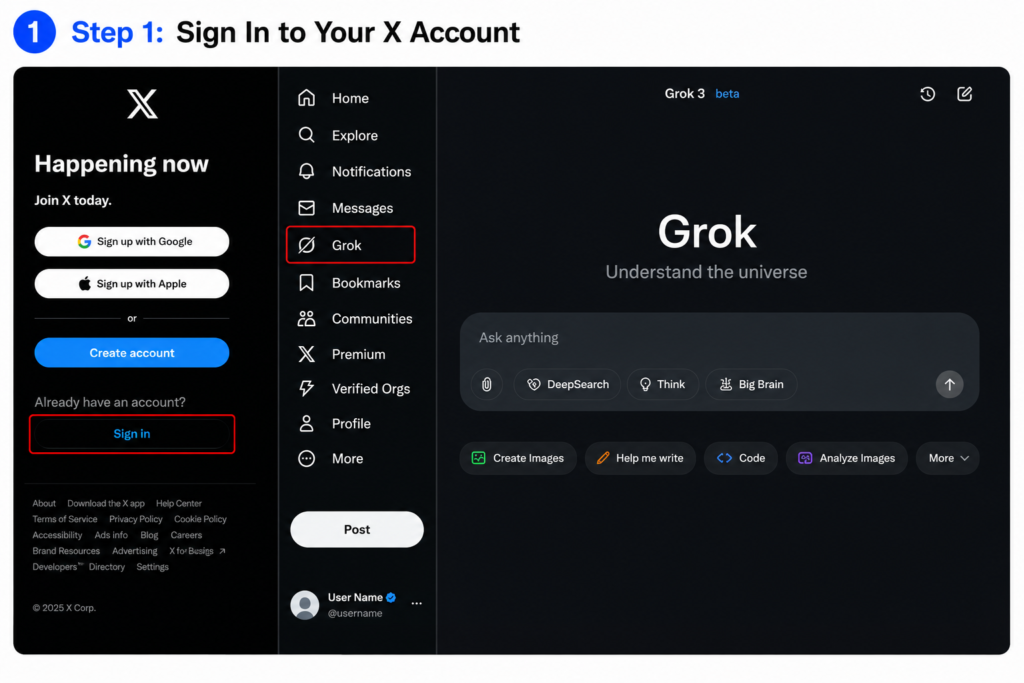
Step 1: Sign In to Your X Account
To get started, you’ll need an X account. If you don’t already have one, you can create it for free. Grok is integrated with X, so you’ll need to log in through either the web version or the mobile app.
Once you’re signed in, open Grok from the navigation menu. On desktop, you’ll find it in the sidebar. On mobile, simply swipe through the menu options until you see Grok.
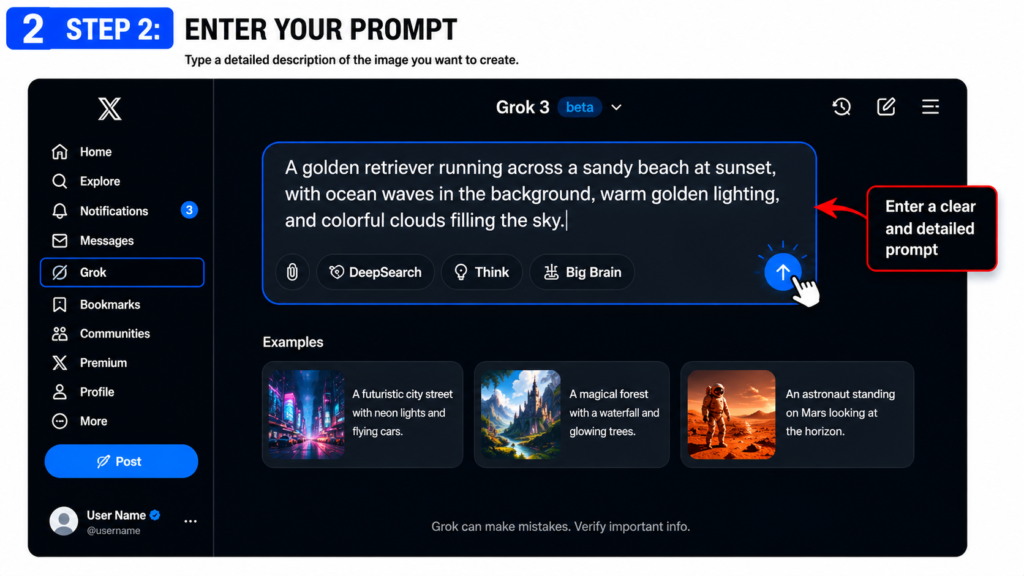
Step 2: Enter Your Prompt
The quality of your image depends heavily on the prompt you provide. Describe your idea as clearly as possible, including details about the subject, setting, colors, mood, and style.
For example:
Simple Prompt:
“A dog running on a beach.”
Detailed Prompt:
“A golden retriever running across a sandy beach at sunset, with ocean waves in the background, warm golden lighting, and colorful clouds filling the sky.”
The more details you include, the closer the generated image will match your vision.
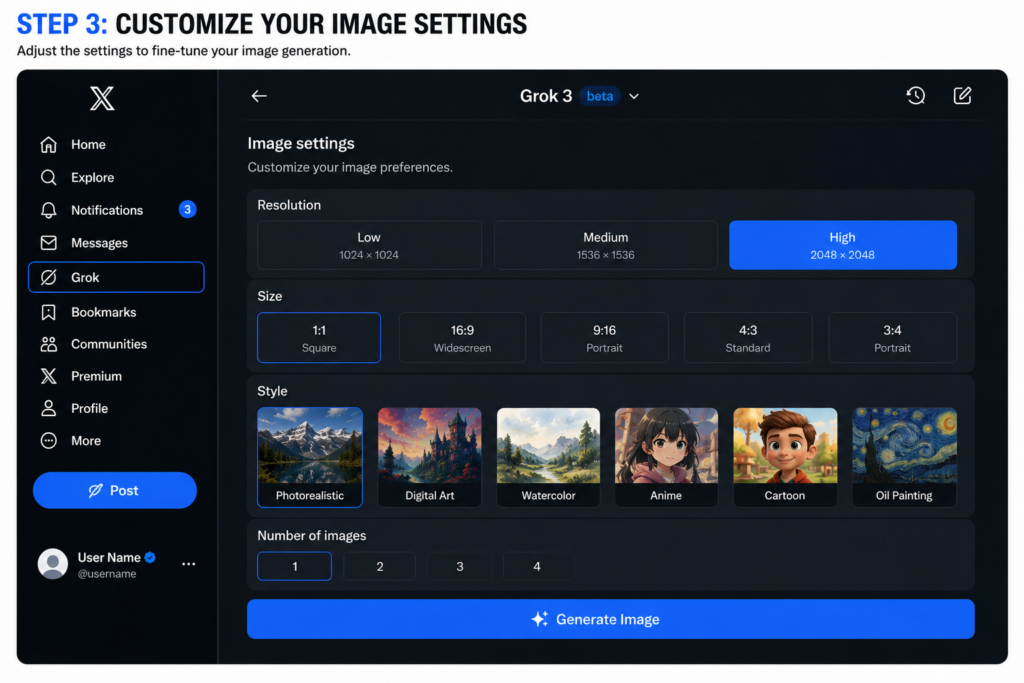
Step 3: Customize Your Image Settings
Before generating your image, you can fine-tune several settings to achieve the desired result.
- Resolution: Choose low, medium, or high quality.
- Size: Select dimensions ranging from small thumbnails to large banner images.
- Style: Specify an artistic style such as photorealistic, digital art, watercolor, oil painting, anime, or cartoon.
Being specific with your preferences helps Grok produce more accurate and personalized results.
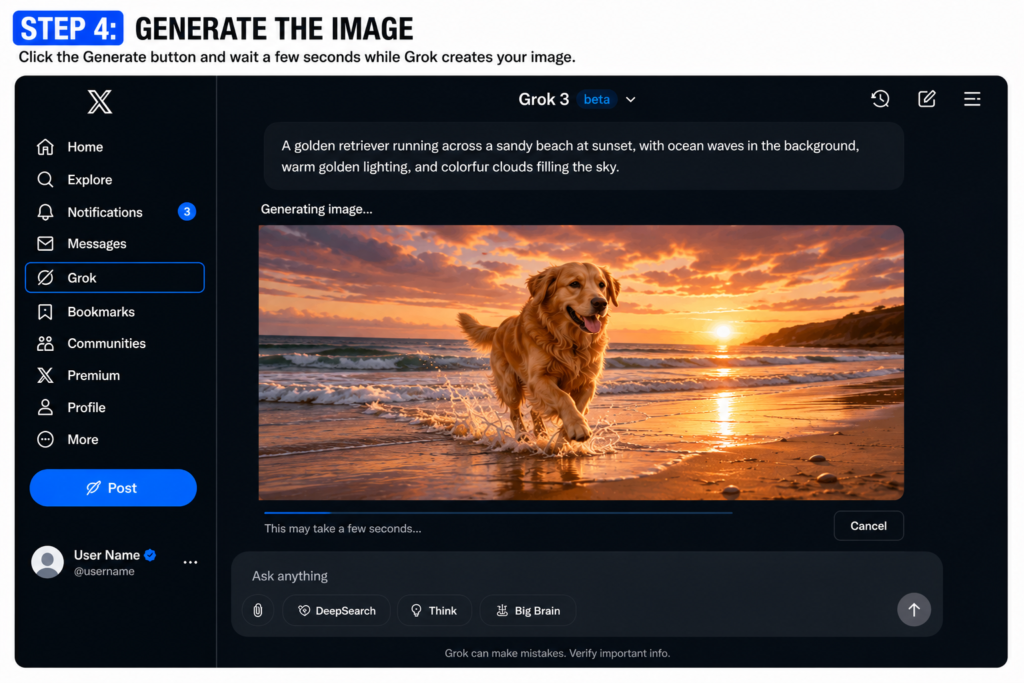
Step 4: Generate the Image
After finalizing your prompt and settings, click the Generate button.
Within a few seconds, Grok will create your image based on the instructions you provided. If the result isn’t exactly what you envisioned, you can modify the prompt and generate a new version.
You can also upload an existing image and ask Grok to make changes, such as adjusting colors, adding elements, changing styles, or enhancing image quality.
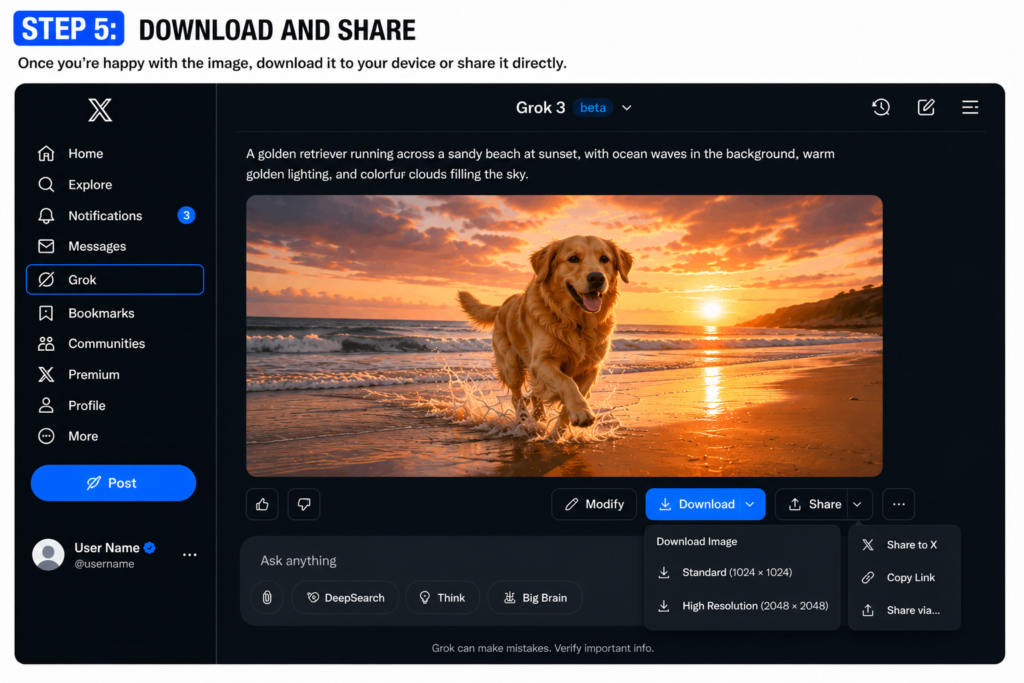
Step 5: Download and Share
Once you’re happy with the final image, download it to your device.
From there, you can share it on social media, use it in presentations, add it to blog posts, or continue refining it until it perfectly matches your creative vision.
Don’t be afraid to experiment with different prompts and styles. Some of the most impressive AI-generated images come from testing multiple ideas and making small improvements along the way.
This version removes awkward phrasing and jokes that might confuse readers while keeping the content engaging and easy to follow.
Tips to Create Images with Grok AI Image Generator
Creating impressive AI-generated images with the Grok AI Image Generator takes more than just typing a few words. A well-crafted prompt can make a huge difference in the final result. Here are some practical tips to help you generate better images:
Use Detailed Prompts
The quality of your image often depends on the level of detail in your prompt. Instead of writing something generic like “a cat in a garden,” try describing the scene more clearly, such as “a fluffy Persian cat relaxing in a colorful flower garden on a sunny afternoon.” Include details about the subject, surroundings, mood, lighting, actions, and overall atmosphere to help the AI understand your vision.
Explore Different Artistic Styles
Don’t limit yourself to a single visual style. Experiment with various artistic approaches, including realistic photography, digital art, watercolor paintings, fantasy illustrations, or abstract designs. Focus on describing the scene first, then specify the style and any special effects you’d like to see. This often leads to more visually appealing and creative results.
Refine and Improve Your Prompts
Not every generated image will match your expectations on the first try. If the result isn’t quite right, adjust your prompt by adding more details, changing descriptions, or modifying specific elements. Small improvements can often produce dramatically better images.
Take Advantage of Advanced Tools
If you’re using Grok 4 AI, make use of its advanced image generation and editing capabilities. These features allow you to enhance existing images, make targeted modifications, and transform visuals based on detailed text instructions, giving you greater control over the final outcome.
Read More: How to Get New Google AI Certificate?
Use Cases for Grok AI Image Generator
Creative Projects
The Grok AI image generator is a valuable tool for artists, designers, and illustrators looking to bring ideas to life. Whether you’re creating concept art, digital illustrations, or experimenting with unique visual styles, it can generate detailed and inspiring images in minutes. Its built-in chat capability also makes brainstorming easier, allowing users to explore creative directions, discuss design concepts, and refine ideas before starting a project.
Marketing and Branding
Marketing teams and branding professionals can use Grok AI to quickly create eye-catching visuals for social media, advertising campaigns, blog content, websites, and promotional materials. By reducing the time spent on design tasks, it helps teams work more efficiently and meet tight deadlines without sacrificing creativity or quality.
Content Creation
Content creators, including bloggers, YouTubers, vloggers, and social media influencers, can generate professional-looking thumbnails, banners, and engaging visual content for various platforms. The tool can also help creators experiment with trending concepts, creative graphics, and even viral-worthy meme ideas to increase audience engagement.
Education and Learning
Teachers, trainers, and online educators can use Grok AI to create educational illustrations, diagrams, and visual learning materials. By transforming complex topics into easy-to-understand visuals, it makes lessons more engaging and interactive, helping students grasp concepts more effectively.
Final Thoughts
The future of Grok AI image generator looks promising. As the AI technology continues to evolve, Grok AI and its future variants will likely bring more advanced features.




Leave a Reply