In previous post, we learned What is Kubernetes for DevOps? in this post we will learn its involvement in DevOps project life cycle.
The first time I worked on a DevOps project that moved from a few containers to dozens of services, things got messy fast. Development teams were pushing code every day. Operations teams were trying to keep systems stable. Everyone was busy, but nobody wanted to manually deploy, monitor, and scale applications all day.
That’s where Kubernetes started showing up in almost every stage of the DevOps life cycle.
When developers commit code, CI/CD pipelines build container images and push them to a registry. Kubernetes then takes over the heavy lifting. It deploys those containers into testing, staging, and production environments using the same configuration. No surprises. No “it worked on my machine” arguments.
I use Kubernetes as the control center for application delivery. If a pod crashes, Kubernetes replaces it automatically. If traffic suddenly doubles, it can launch additional pods within minutes. When demand drops, it scales resources back down.
What I like most is consistency. The same deployment process works whether you’re running five containers or five hundred. Teams spend less time managing infrastructure and more time improving applications.
In a modern DevOps workflow, Kubernetes sits right in the middle—connecting development, automation, deployment, monitoring, scaling, and operations into a single platform that keeps applications running reliably.
Continuous Integration & Continuous Deployment (CI/CD)
The first time I worked on a project without a proper CI/CD pipeline, deployments felt stressful. Not difficult. Stressful.
Every release involved copying files, running scripts, checking logs, and hoping nobody forgot a step. Most of the problems weren’t caused by bad code. They happened because humans are human. Somebody missed a command. Somebody deployed the wrong version. Somebody updated one server but forgot another.
Kubernetes changes that experience completely.
One thing I appreciate most is how Kubernetes works with immutable infrastructure. In simple terms, you build a container image once and use that exact same image everywhere. Development, testing, staging, production—same container.
That sounds small until you’ve spent hours trying to figure out why an application works perfectly in one environment but fails in another. I’ve seen teams waste entire afternoons on configuration differences that never should have existed. Running identical container images across all environments removes a huge amount of uncertainty.
Then there’s GitOps.
A lot of teams now use tools such as ArgoCD and Flux to connect Git repositories directly to Kubernetes clusters. Instead of logging into servers and making manual changes, everything starts from Git.
The workflow becomes surprisingly simple:
- Developer pushes code.
- CI pipeline builds a container image.
- Git repository gets updated.
- ArgoCD or Flux detects the change.
- Kubernetes automatically applies the new state.
No midnight SSH sessions. No mystery configuration changes. No wondering who changed what three weeks ago.
Every change leaves a trace in Git history, which makes troubleshooting much easier when something breaks.
Automated rollouts are another reason Kubernetes fits naturally into modern CI/CD pipelines.
Let’s say your application runs on ten pods.
Kubernetes doesn’t shut down all ten and start over. Instead, it gradually replaces old pods with new ones. Users continue accessing the application while the update happens in the background. Most of the time they don’t even notice.
That’s a big deal for production systems where downtime directly affects customers, revenue, and trust.
Of course, deployments don’t always go smoothly.
We’ve all seen releases that looked fine during testing but started failing once real users arrived. Kubernetes handles this situation surprisingly well through instant rollbacks. If monitoring tools detect problems or teams spot unexpected errors, reverting to a previous container version takes minutes instead of hours.
Sometimes even minutes feel too risky.
That’s where canary deployments become useful.
Instead of sending 100% of users to a new application version, Kubernetes can route a small percentage of traffic first—maybe 5% or 10%. Teams watch error rates, response times, and customer feedback before increasing traffic gradually.
Many engineering teams prefer this approach because it reduces deployment risk without slowing down delivery.
When I look at modern Kubernetes-based CI/CD pipelines, the biggest benefit isn’t faster deployments. It’s confidence. Teams release changes more frequently because the platform provides safe rollout strategies, quick recovery options, and consistent environments from development all the way to production.
Infrastructure as Code (IaC) & Configuration
The first time I managed a few Linux servers manually, everything felt under control. Five servers? Fine. Ten? Still manageable. Then changes started piling up. One server had a different package version. Another had an extra configuration file nobody remembered creating. A few months later, nobody could confidently explain why production behaved differently from staging.
That’s the kind of mess Kubernetes helps avoid.
Instead of logging into servers and making changes by hand, Kubernetes relies on declarative manifests. These are usually YAML files where we simply describe the state we want. We don’t tell Kubernetes every step to perform. We tell it the end result.
For example, I can create a Deployment file that says:
- Run 3 application replicas
- Use a specific container image
- Expose port 8080
- Restart failed containers automatically
Once the YAML file is applied, Kubernetes continuously works to maintain that desired state.
Another thing I appreciate is environment parity. This sounds fancy, but the idea is simple. The same Kubernetes manifests used in production can also run in development and testing environments with only minor adjustments.
Before Kubernetes, I often heard developers say, “It works on my machine.” That statement usually meant trouble was coming. With Kubernetes, local, testing, and production environments can follow the same deployment model, which dramatically reduces surprises during releases.
Configuration management is another area where Kubernetes feels practical. Application code and configuration stay separate.
Kubernetes provides:
| Resource | Purpose |
|---|---|
| ConfigMaps | Store non-sensitive settings such as URLs, ports, and feature flags |
| Secrets | Store sensitive data such as passwords, API keys, and certificates |
This separation makes updates easier because teams can change configuration values without rebuilding application images.
Then there’s the unified API. Honestly, this is one of the most underrated features. Compute resources, networking rules, storage volumes, deployments, services, and scaling policies all flow through a single Kubernetes API.
Instead of learning different tools for every infrastructure component, teams interact with one control plane. That consistency saves time, reduces mistakes, and makes large environments much easier to manage.
After working with Kubernetes in real projects, I’ve found that Infrastructure as Code isn’t really about writing YAML files. It’s about creating predictable systems. When everything is defined in code, version controlled, and repeatable, deployments become less stressful and operations become far easier to trust.
Scaling & Resource Management
One of the first things that surprised me about Kubernetes was how quickly it reacted when traffic suddenly increased.
I was testing an application during a product launch. Everything looked normal in the morning. Then traffic jumped. A lot. In a traditional setup, somebody would have been watching dashboards, adding servers, restarting services, and hoping nothing broke along the way. Kubernetes handled most of it automatically.
That’s where scaling starts to feel less like infrastructure work and more like having an extra team member quietly doing the boring tasks for you.
Horizontal Autoscaling
Let’s say your application normally runs with three replicas. Traffic doubles. CPU usage climbs above the threshold you configured.
Kubernetes notices.
Instead of waiting for an engineer to step in, it creates additional replicas automatically. Five replicas. Eight. Ten. Whatever is needed within the limits you’ve defined.
Then traffic drops later in the day.
The extra replicas disappear, which means you’re not paying for resources you don’t need. I’ve seen teams save a surprising amount of cloud spending just by configuring autoscaling properly.
Cluster Autoscaling
Sometimes adding more application replicas isn’t enough.
The cluster itself runs out of room.
When that happens, Kubernetes can work with cloud providers to add new virtual machines automatically. AWS, Azure, and Google Cloud all support this behavior.
From an operations perspective, it’s pretty satisfying. You don’t have to predict every traffic spike weeks in advance. The cluster expands when workloads need space and shrinks when demand falls.
Less guessing. Fewer late-night surprises.
Resource Quotas
Not every problem comes from too little capacity.
Sometimes a single team accidentally consumes too much.
I’ve seen development environments where one workload grabbed most of the cluster’s CPU and memory, leaving other teams wondering why their applications suddenly slowed down.
Resource quotas solve that problem.
You can assign CPU and memory limits to individual namespaces or teams. Everyone gets their share of resources, and one runaway application can’t take down the entire environment.
Self-Healing
This is probably the feature people appreciate most after running Kubernetes in production.
Containers crash. Nodes fail. Hardware has bad days.
Kubernetes constantly checks the health of workloads. If a container stops responding, Kubernetes restarts it. If a pod fails, it creates a replacement. If an entire node becomes unavailable, workloads move elsewhere in the cluster.
Most users never notice anything happened.
And honestly, that’s the goal. Good infrastructure isn’t exciting. It’s the kind that quietly keeps applications running while everyone focuses on building features instead of fixing outages.
Observability & Monitoring
The first time I managed a Kubernetes cluster in production, I made a mistake that still makes me laugh a little. I assumed that if all the pods were running, everything was fine.
It wasn’t.
Users were reporting slow response times. The application looked healthy from the outside, but something inside the cluster was struggling. That’s when I learned a lesson every Kubernetes engineer learns sooner or later: if you can’t see what’s happening, you’re basically guessing.
That’s where Kubernetes observability and monitoring become so valuable.
Centralized Logging Makes Troubleshooting Easier
Every container generates logs. A few containers aren’t difficult to manage. Hundreds of containers spread across multiple nodes? Completely different story.
Kubernetes works well with logging tools such as Fluentd, Logstash, Elasticsearch, and Kibana (often called the ELK Stack). Instead of logging into individual servers and searching through files, logs from container stdout and stderr streams can be collected and stored in one place.
When an application fails at 3 a.m., having centralized logs often means finding the root cause in minutes instead of hours.
Metrics Collection Shows What’s Really Happening
Logs tell you what happened.
Metrics tell you how your systems are behaving right now.
This is why Prometheus has become the monitoring standard in many Kubernetes environments. It continuously collects data such as:
- CPU usage
- Memory consumption
- Network traffic
- Pod restarts
- Request latency
- Error rates
According to the Cloud Native Computing Foundation (CNCF), Prometheus remains one of the most widely adopted cloud-native monitoring projects across Kubernetes deployments.
A quick glance at a Prometheus dashboard can reveal problems long before users start complaining.
Proactive Health Checks Prevent Bigger Problems
One feature I genuinely appreciate is Kubernetes health probes.
Kubernetes uses:
- Liveness Probes — checks whether an application is still running correctly.
- Readiness Probes — checks whether the application is ready to receive traffic.
If a container becomes unresponsive, Kubernetes can automatically restart it. If an application is still starting up, traffic won’t be routed to it until it’s ready.
Small feature. Huge impact.
Service Mesh Adds Deep Visibility
As microservices grow, understanding service-to-service communication becomes harder.
Tools such as Istio and Linkerd provide a service mesh layer that helps teams track requests as they move between services. You can see latency, failures, retries, and traffic patterns without modifying application code.
I’ve seen teams spend days troubleshooting distributed systems before adopting a service mesh. Afterward, the same investigation took less than an hour.
That’s the real goal of Kubernetes observability and monitoring—not collecting more data, but making problems visible before they become outages.
Core Architecture Components
The first time I opened a Kubernetes cluster and saw Pods, Deployments, Services, ReplicaSets, Ingress resources, and a dozen other objects staring back at me, I honestly felt lost. Not because Kubernetes was difficult. There were just so many moving parts.
After working with Kubernetes in production environments, I’ve noticed something interesting. Most DevOps engineers spend the majority of their day interacting with only a handful of core Kubernetes objects. Once you understand these building blocks, the rest of the platform starts making much more sense.
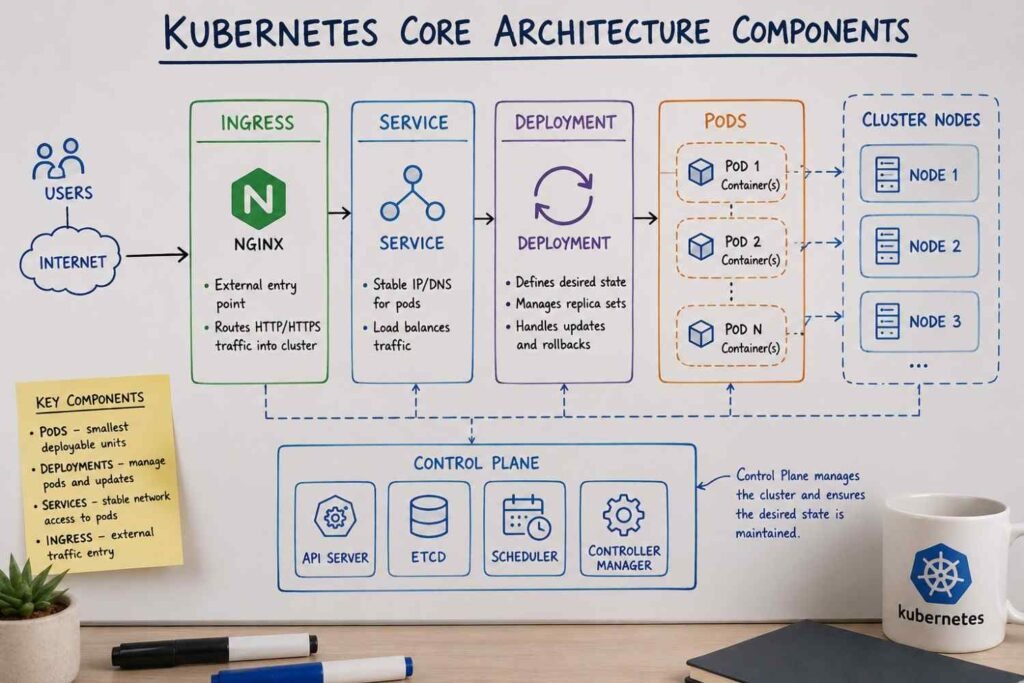
Pods: Where Containers Actually Run
Pods are usually the first Kubernetes object you’ll encounter.
When I was learning Kubernetes, I assumed containers ran directly on cluster nodes. Not quite. Kubernetes wraps containers inside Pods, which become the smallest deployable unit in the cluster.
In many real-world applications, a Pod contains a single container. Sometimes you’ll see multiple containers inside the same Pod when they need to share storage, network access, or work closely together.
For example, a web application container might run alongside a logging sidecar container. Both live inside the same Pod and communicate locally.
Simple idea. Very important concept.
Deployments: Keeping Applications Alive
Nobody wants to manually create or replace Pods.
That’s where Deployments come in.
A Deployment tells Kubernetes how many Pod replicas should be running and how updates should happen. If you request five replicas and one crashes, Kubernetes automatically creates another one to maintain the desired state.
I’ve seen clusters where hundreds of Pods were running across multiple nodes. Nobody was creating those Pods manually. Deployments handled everything.
Even better, Deployments support rolling updates. New application versions are introduced gradually instead of replacing everything at once. If something breaks, rolling back usually takes only a few commands.
Services: Stable Access to Moving Targets
Pods are temporary by design.
They get replaced during updates, node failures, scaling events, and maintenance operations. Their IP addresses change constantly.
This creates a problem.
How does your application connect to a database Pod if that Pod might disappear tomorrow?
Services solve this issue by providing a stable network endpoint. Instead of connecting directly to individual Pods, applications communicate through a Service that automatically routes traffic to healthy Pods behind the scenes.
Most developers don’t even notice the complexity because Kubernetes handles it for them.
Ingress: Managing External Traffic
Eventually, users need access to your applications.
An Ingress resource acts as the front door of a Kubernetes cluster. It manages incoming HTTP and HTTPS traffic and routes requests to the correct Services.
For example:
app.company.com→ Frontend Serviceapi.company.com→ Backend API Serviceadmin.company.com→ Admin Portal Service
Without Ingress, exposing multiple applications can become messy very quickly.
Once Pods, Deployments, Services, and Ingress start working together, Kubernetes stops feeling like a collection of random objects. You begin to see a complete system where each component has a clear responsibility, making large-scale application management far more predictable than doing everything manually.




Leave a Reply