If you ask why new blogs are not getting indexed in 2026, the answer is simple: Google is now more picky.
Your blog may be live, but Google may still skip it.
Google says crawling, indexing, and showing a page in search are not guaranteed. It also says crawling may take a few days to a few weeks.
Most new blog indexing issues come from 5 places:
| Problem | What it means |
|---|---|
| Technical blocking | Google cannot access the page |
| Weak discovery | Google cannot find the page easily |
| Low site trust | Your site is too new or unknown |
| Thin or copied content | The post adds little new value |
| Poor internal links | No strong page points to the new post |
So, do not only press “Request Indexing.”
First, check your page in Google Search Console. Then fix blocks, add internal links, improve the post, update the sitemap, and request indexing again.
That is the real fix when Google is not indexing your new blog posts in 2026.
What Does “Not Indexed” Actually Mean?
When your page is not indexed, Google may know your blog post exists, but it does not show it in search results. This is the first thing you must understand about Google indexing.
Think of Google in 3 simple steps:
| Step | Meaning |
|---|---|
| Crawling | Googlebot visits your page. |
| Indexing | Google stores your page. |
| Ranking | Google shows your page in the SERP. |
So, crawling is not the same as indexing. A page can be crawled today and still not appear on Google.
In Google Search Console, you may see “Discovered – currently not indexed.” This means Google found your URL through a sitemap, link, or feed, but Googlebot has not visited it yet.
You may also see “Crawled – currently not indexed.” This means Googlebot visited your page, but Google chose not to add it to the index.
In simple words: “Discovered” means Google knows the address. “Crawled” means Google opened the door.
But indexing means Google decided the page is useful enough to keep. So, if your new blog is not indexed, check URL Inspection, sitemap, internal links, and page quality first.
The 7 Main Reasons New Blogs Are Not Getting Indexed in 2026
If you are searching for reasons blog posts not indexed, start here: Google may see your page, but still skip it.
Google says it does not promise to crawl, index, or show every page, even when the page follows basic rules.
1. Google Does Not Trust the New Site Yet
A new blog has no history yet.
So, Google may crawl it slowly because it has no strong proof that your site is useful.
This happens more when your blog has:
- No backlinks
- No author page
- No About page
- No brand searches
- No real social mentions
- No clear topic focus
- No regular publishing history
Fix this first: publish 10–15 strong posts around one topic, link them together, and build real mentions from trusted sites.
2. The Blog Has Weak Internal Links
Google finds and judges pages through links.
So, if your new post has no internal links, Google may treat it like a lonely page.
For example, do not publish a post and leave it only in the sitemap.
Instead, link it from your homepage, category page, and 2–3 older posts.
Use simple anchor text like: “Google indexing checklist” or “fix crawled but not indexed.”
This helps Google understand the page faster.
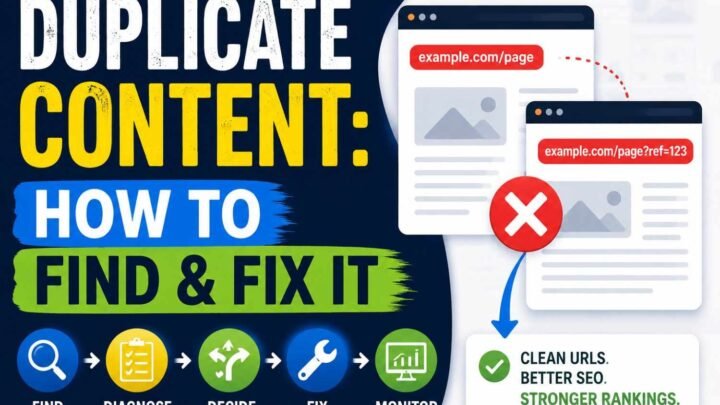
3. Content Looks Too Similar to Existing Pages
Google does not need another copy of the same answer.
So, if your blog post sounds like every other post, Google may crawl it and skip it.
This is common with AI-style content.
It is also common with rewritten competitor articles, thin affiliate reviews, copied product descriptions, and duplicate category pages.
Fix it with real proof:
- Add your own test
- Add screenshots
- Add local examples
- Add mistakes you faced
- Add a simple table
- Add a clear opinion
- Add one thing competitors missed
My strong view: a new blog should not publish “safe” content.
Safe content usually sounds correct, but it gives Google no reason to index it.
4. Sitemap Exists but Is Low Quality
A sitemap helps Google discover URLs.
But a bad sitemap can also waste crawl attention.
Your sitemap becomes weak when it includes:
- Old URLs
- Tag pages
- Search pages
- Thin author pages
- Duplicate URLs
- HTTP and HTTPS versions
- Wrong or fake
lastmoddates
Fix this: keep only clean, useful, index-worthy URLs in your sitemap.
Also, update lastmod only when you make a real content change.
5. Technical Blocking Issues
Sometimes Google is not the problem.
Your site may be silently blocking Google.
Check these issues before rewriting content:
| Issue | What it does | Quick fix |
|---|---|---|
noindex | Tells Google not to index | Remove it |
robots.txt block | Stops crawling | Allow Googlebot |
| Wrong canonical | Sends Google to another URL | Use self-canonical |
| 404 error | Page not found | Restore page |
| 403 error | Access blocked | Fix server rule |
| 500 error | Server failed | Fix hosting issue |
| Password page | Google cannot see content | Remove protection |
Google explains that robots rules control crawler access, while indexing needs proper page-level signals.
6. Mobile Rendering Problems
Google mainly uses the mobile version for indexing.
So, your desktop page may look fine, but your mobile page may hide the real content.
Check this carefully.
Your blog may not get indexed if mobile users cannot see the main text, images, links, menu, or author details.
Google’s mobile-first indexing guide says the mobile version should contain the same important content as desktop.
Fix this: open the post on your phone and read it like a visitor.
If it feels broken, slow, hidden, or hard to use, fix mobile before blaming Google.
7. Google Crawled It but Found No Unique Value
This is the hard truth.
“Crawled” does not mean “approved.”
In Google Search Console, Crawled – currently not indexed means Google visited the URL but did not add it to search results.
This usually means the page is technically visible, but not useful enough yet.
Ask this before you request indexing again:
- Does this page say anything new?
- Is the answer better than the top results?
- Can a reader take action after reading it?
- Does it show real experience?
- Does it solve one clear problem?
- Would anyone share or bookmark it?
If the answer is no, do not just resubmit the URL.
Rewrite it, improve it, link it, and make it worth storing in Google’s index.
In short, Google not indexing new site pages in 2026 is usually not one single issue: it is trust, links, content value, sitemap quality, technical access, mobile experience, and uniqueness working together.
Discovered vs Crawled — Which Problem Do You Have?
If you see discovered currently not indexed or crawled currently not indexed, do not panic. These two messages look close, but they mean very different problems.
Google says crawling and indexing are separate steps. So, a page can be found, crawled, and still not show in search.
| GSC Status | Meaning | Main Cause | Best Fix |
|---|---|---|---|
| Discovered – currently not indexed | Google knows your URL but has not crawled it yet | Low crawl priority | Add internal links, clean sitemap, improve server speed |
| Crawled – currently not indexed | Google crawled your page but did not index it | Low value, weak content, or duplicate content | Improve content, add unique points, build trust |
| Excluded by noindex | You told Google not to index it | Meta tag or header rule | Remove the noindex tag |
| Alternate page with canonical | Google picked another page instead | Duplicate URL or wrong canonical | Fix the canonical tag |
What Should You Fix First?
If the status says Discovered – currently not indexed, Google has not visited the page yet. So, your first job is simple: help Google reach it faster.
Add 3 to 5 internal links from already indexed pages. Then update your sitemap and make sure your server gives a fast 200 OK response.
If the status says Crawled – currently not indexed, Google already checked the page. In plain words: Google saw it and said, “Not useful enough yet.”
So, do not keep pressing Request Indexing again and again. Instead, add fresh examples, real screenshots, better answers, original data, and stronger internal links.
Quick Rule
Use this simple rule: Discovered means Google needs a path; crawled means Google needs a reason.
Fix the path first. Then fix the value, because crawled currently not indexed usually needs better content, not more button clicking.
2026 Indexing Checklist: Fix These in Order
To fix blog indexing issues, do not start with “Request indexing.” Start with the page itself.
Google can crawl a page and still skip it. So, fix the reason first, then ask Google to check again.
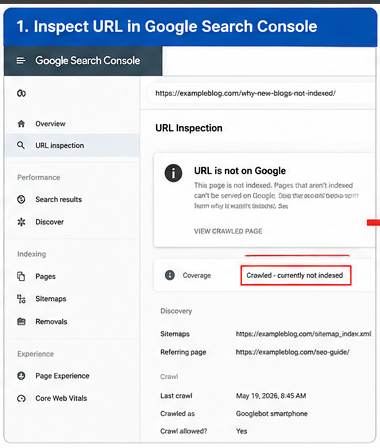
1. Inspect the URL in Google Search Console
Open Google Search Console. Paste your blog post URL into the URL Inspection box.
Check the exact message: “Discovered,” “Crawled,” “Excluded,” or “Indexed.” This one line tells you where the real problem starts.
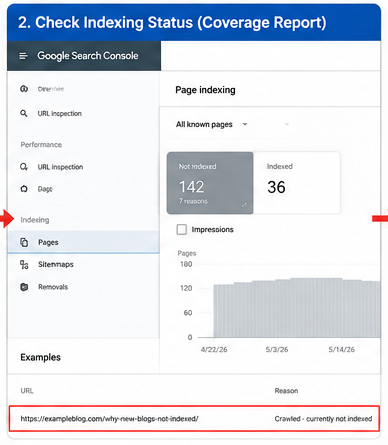
2. Make Sure the Page Shows 200 OK
Your page must open with a 200 OK status. Google says it indexes pages served with HTTP 200 success status, not error pages.
Use Search Console, a browser, or any HTTP status checker. If you see 404, 403, 500, or redirect loops, fix that first.
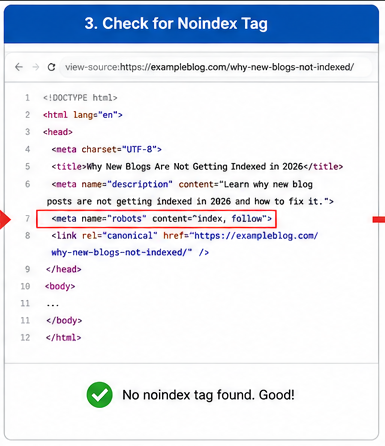
3. Check the Noindex Tag
Look for this line in your page code: noindex.
If it exists, you are telling Google: “Do not index this page.” Google says noindex can block a page from appearing in Search.
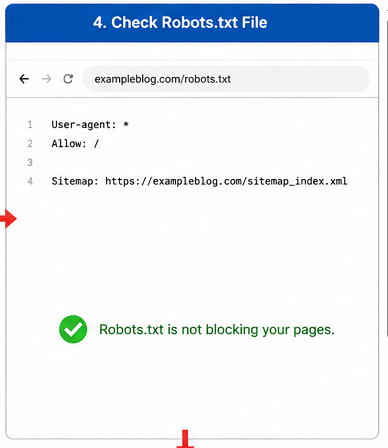
4. Check Robots.txt
Robots.txt can stop Googlebot from crawling your post. So, check if your post folder is blocked.
Do not use robots.txt to remove a page from Google. Use noindex only when you truly want the page out.
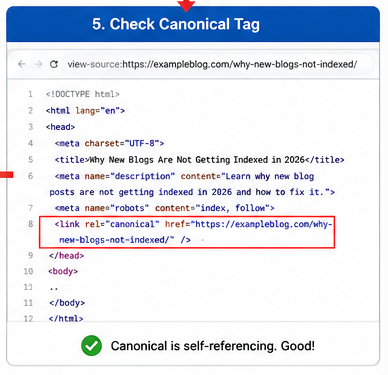
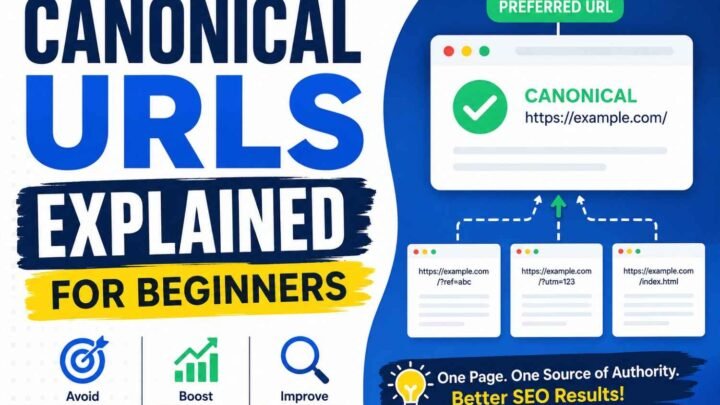
5. Check the Canonical Tag
A canonical tag tells Google which URL is the main version. If it points to another page, your new post may not get indexed.
This is common on WordPress, Blogger, and copied template pages. Always make the canonical point to the same post URL unless you have a clear reason.
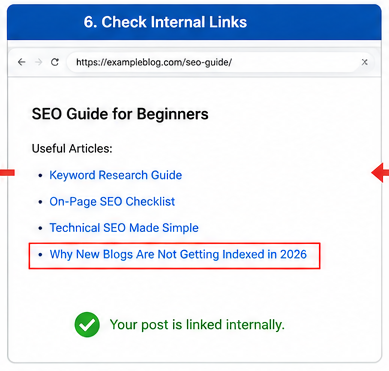
6. Add 3–5 Internal Links
Now add links from old indexed posts to the new post. Use simple anchor text that fits the topic.
Example: link from your “SEO checklist” post with the words fix blog indexing issues. This helps Google find and value the page faster.
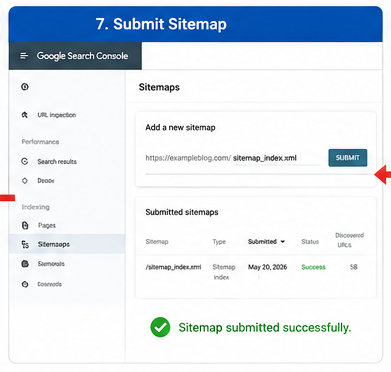
7. Submit the Updated XML Sitemap
Update your sitemap after publishing or editing the post. Then submit it in Search Console.
A sitemap helps Google discover URLs. But Google says requesting a crawl does not guarantee instant indexing or indexing at all.
8. Improve the Page Before Requesting Indexing
Rewrite the title if it sounds generic. Make the intro answer the search query in the first few lines.
Add examples, screenshots, personal notes, data, and clear steps. A thin post may stay in “Crawled – currently not indexed.”
9. Add Original Proof
Add one real screenshot, one tested result, or one small case note. This makes your post feel lived, not copied.
For example: “I added 4 internal links from indexed posts, updated the sitemap, and requested indexing after 20 minutes.” That sounds real because it is specific.
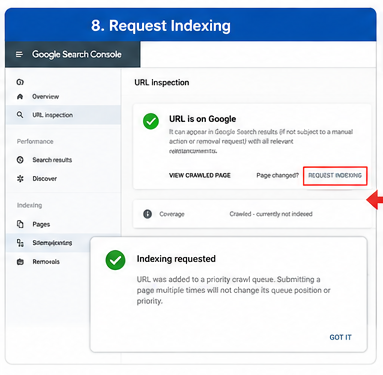
10. Request Indexing Last
After all fixes, go back to URL Inspection. Click Request Indexing once.
Do not click it every day. If Google Search Console request indexing is not working, the page still has a trust, quality, crawl, or technical issue.
Quick Checklist Table
| Step | What to Check | Good Result |
|---|---|---|
| URL Inspection | Current Google status | Clear issue shown |
| HTTP status | Page response | 200 OK |
| Noindex | Meta tag or header | No noindex |
| Robots.txt | Crawl block | Not blocked |
| Canonical | Main URL | Self-canonical |
| Internal links | Links from old posts | 3–5 links |
| Sitemap | Fresh URL listed | Submitted |
| Content | Unique value | Better than similar posts |
| Proof | Images, data, examples | Original signals |
| Request indexing | Final step | Done once |
Short Summary
To get blog indexed faster, fix access, crawl, canonical, links, sitemap, and content quality first.
The smart order is simple: repair the page, strengthen the page, then request indexing. That is the safest way to fix blog indexing issues in 2026.
What New Bloggers Get Wrong About Indexing
Many new bloggers think indexing mistakes happen only because Google is slow. But in 2026, Google often skips new blog posts because the page does not look useful enough yet.
Posting More Does Not Mean Faster Indexing
Posting daily can help only when each post solves a real problem. If you publish 30 weak posts in one month, you may only give Google more low-value pages to crawl.
So, do not ask: “How many posts should I publish?” Ask: “Is this post better than the page already ranking?”
Your Homepage Can Rank While Posts Stay Hidden
This is common. Google may index your homepage first because it is easy to find.
But your posts may stay out if they have no strong internal links, no clear topic, or no fresh value.
AI Content Is Not the Real Problem
AI content can get indexed. But AI content with no testing, no examples, and no human view may be ignored.
Google says content should help people first, and AI pages without added value can break spam rules.
Request Indexing Is Not a Magic Button
Submitting the same URL again and again is not a fix. Google says request indexing does not guarantee that a page will appear in the index.
Fix the page first. Then request indexing once.
Do Not Trust Paid Indexing Tools First
Buying indexing tools may feel fast. But if the real issue is poor content, weak links, or duplicate posts, the tool only hides the real problem.
Quick Check
| Mistake | Better Action |
|---|---|
| Posting daily | Publish fewer, stronger posts |
| Repeating index requests | Fix page quality first |
| Trusting sitemap only | Add internal links |
| Using plain AI text | Add real examples |
A sitemap helps Google discover URLs. But Google says a sitemap does not guarantee indexing or ranking.
So, the real fix for indexing mistakes is simple: make each post worth finding, worth crawling, and worth saving.
Real User Problems Seen in Communities
If you search Reddit Google indexing issues, you see one clear thing: new bloggers are not lazy; they are confused.
They publish, wait, check Search Console, and then see scary words: “Discovered,” “Crawled,” or “Not indexed.”
The Pattern Real Bloggers Report
One blogger said the site had about 50 indexed posts after 4 months. Then Google dropped it to 1 indexed page: only the homepage.
This is the part many beginners miss: Google may test your site first, then remove weak or low-trust pages later.
Blogger and Blogspot Indexing Pain
Many people also search Blogger not indexed because free Blogspot sites often feel slow to enter Google.
One Reddit user said they waited two years, then bought a custom domain; after that, Google indexed the blog within a couple of weeks.
Common Community Problems
| Problem | What it usually means | What you should do |
|---|---|---|
| Only homepage indexed | Google does not trust deeper posts yet | Add strong internal links |
| Crawled, not indexed | Google saw it but skipped it | Improve content value |
| Discovered, not indexed | Google knows the URL but delays crawling | Link from indexed pages |
| Blocked by robots.txt | Google may not crawl the page | Fix robots rules |
What SEO Communities Keep Saying
A 6-year blog owner said only 60 out of 200+ articles were indexed. The rest had mixed issues like crawled, discovered, and blocked by TXT.
So, do not only blame Google. Check your content, links, sitemap, robots.txt, and page quality.
The real fix for Reddit Google indexing issues is simple: make every post easy to find, useful to read, and strong enough to deserve a place in Google.
Fastest, Safest, and Best Fixes by Situation
The fastest way to index blog post content is not magic: help Google find the page, then ask Google to check it. First, add 3 to 5 internal links from old indexed posts, then use URL Inspection in Google Search Console.
Quick Decision Table
| Situation | Best Fix | Why It Works |
|---|---|---|
| New post is not found | Add internal links | Google follows links |
| Page is crawled but not indexed | Improve the content | Google saw it but skipped it |
| Page has errors | Fix blockers first | Google cannot trust broken pages |
| Large site has many weak URLs | Clean index bloat | Google spends crawl time better |
| Beginner is confused | Use URL Inspection | It shows the real issue |
Fastest Fix: Internal Links Plus Request Indexing
Pick your 3 strongest posts and link to the new blog post from them. Then request indexing in Search Console, but do it only after the page is clean.
Google says you can ask for recrawling through Search Console, but this does not promise indexing. So, treat request indexing like a doorbell, not a VIP pass.
Safest Fix: Remove Technical Blocks First
Before you rewrite anything, check the basics: noindex, robots.txt, wrong canonical, 404, 403, and slow server response. One small tag can block the whole page.
This is the safest indexing fix because it prevents wasted work. You should never polish content before you know Google can reach it.
Best Long-Term Fix: Build Real Topical Value
If Google shows “Crawled – currently not indexed,” the page may not give enough fresh value. Add real examples, screenshots, local data, personal testing, expert quotes, or a clear opinion.
In 2026, plain copycat posts feel dead. A small post with one real test often beats a long post with borrowed points.
Cheapest Fix: Improve Thin Posts
You do not always need new tools. Rewrite weak posts, remove repeated lines, add internal links, and answer the main query in the first 100 words.
Expert Fix: Audit Crawl Waste
For bigger sites, check crawl logs, duplicate tags, filter URLs, weak category pages, and wrong canonicals. Google says most small sites do not need crawl budget work, but large or fast-changing sites should keep sitemaps clean and check index coverage often.
The fastest way to index blog post pages is simple: fix access, link well, improve value, then request indexing once.
How to Make a New Blog Post Worth Indexing
Content quality for indexing starts with one simple rule: write something Google cannot already find on 50 other blogs.
Google says it rewards helpful, reliable, people-first content, not content made only to rank. It also says AI content is allowed when it adds real value, but mass AI pages with no added value can break spam rules.
Add Your Own Experience First
Before you write, ask this: “What did I see, test, fail, compare, or learn myself?”
For example, do not write, “Use internal links.” Say, “I added 5 links from old posts, requested indexing, and the post appeared in Search Console after 6 days.”
Answer Faster Than Other Blogs
Your first 100 words must solve the main doubt. Do not start with history, quotes, or soft talk.
Use this order: problem, reason, fix, proof. This helps both users and helpful content SEO.
Add Proof, Not Decoration
Google looks for original, high-quality content with experience, expertise, authority, and trust. So, show your proof where the reader needs it.
Add these:
- A screenshot from Google Search Console.
- A short checklist.
- A before-and-after example.
- A small comparison table.
- One trusted source link.
Use a Simple Comparison Table
| Weak Blog Post | Worth Indexing Blog Post |
|---|---|
| Says “write quality content” | Shows how to improve one weak post |
| Copies top-ranking points | Adds real test results |
| Has no proof | Shows screenshots or examples |
| Gives broad tips | Gives exact next steps |
Match Search Intent
If the reader asks, “does Google index AI content,” answer clearly: yes, but only if the page helps people better than existing results.
Then explain the risk: generic AI summaries often sound correct, but they bring no new example, no field proof, and no fresh opinion.
Remove Fluff Before Publishing
Cut any line that does not teach, warn, compare, or help the reader decide.
A post worth indexing feels useful line by line. It gives the reader a clear action, not just more reading.
Final Check
Before you publish, ask: “Would I bookmark this if I had the same problem?”
If yes, your content quality for indexing is stronger, your post feels human, and Google has a better reason to keep it in the index.
How Long Does Indexing Take in 2026?
For a strong old site, Google may index a new blog post in a few hours or a few days.
For a new blog, indexing often takes a few days to a few weeks.
Google says crawling can take “a few days to a few weeks,” and indexing is never guaranteed.
Quick Indexing Time Guide
| Blog Type | Normal Time | What It Means |
|---|---|---|
| Trusted old site | Hours to 3 days | Google visits often |
| New blog | 3 days to 4 weeks | Google is still testing trust |
| Thin or copied blog | 30+ days or never | Google sees low value |
| Technical issue site | Until fixed | Google may not read it well |
What You Should Do
Do not keep pressing “Request indexing” every day.
Google says repeated requests do not make crawling faster.
First, check the page in Google Search Console.
Then fix clear issues: noindex, robots.txt block, wrong canonical, slow server, weak internal links.
If your page is stuck for 30 to 90 days, stop waiting.
Treat it as a quality or discovery problem: improve the post, add useful examples, link from old indexed posts, and update your sitemap.
My strong view is this: Google does not owe every new blog post a place in search.
So, the real answer to how long Google indexing takes is this: good pages get a chance faster, weak pages wait longer, and empty pages may never enter Google.
Final 10-Minute Action Plan
Use this fix indexing issue checklist before you blame Google. Most new blog indexing problems start with one small block, one weak post, or one missing link.
Step 1: Check the URL in Google Search Console
Open Google Search Console and paste your blog URL in URL Inspection. This tool shows if Google can crawl, index, and read your page.
Then check the status: Indexed, Discovered, Crawled, or Blocked. Google says URL Inspection can also test if a live page is indexable.
Step 2: Fix the Basic Blocks First
Check these four things first:
| Check | What you need |
|---|---|
| Page status | 200 OK |
| Meta tag | No noindex |
| Robots.txt | Not blocking Googlebot |
| Canonical | Points to the same URL |
Do not skip this step. Google says robots.txt controls crawling, but noindex controls indexing.
Step 3: Help Google Find the Page
Add 3 to 5 internal links from old indexed posts. Use natural anchor text, not spam words.
Next, update your XML sitemap. Google says a sitemap is only a hint, so it helps discovery but does not promise indexing.
Step 4: Improve the Page Before Requesting Indexing
Add one fresh example, one real screenshot, one table, or one personal test note. Thin content often gets crawled but ignored.
Then request indexing in Search Console. Google allows this, but it does not guarantee instant indexing.
Step 5: Wait, Watch, and Decide
Wait 7 to 14 days, then check the same URL again. Do not press “request indexing” every day.
If Google still ignores it, make a hard choice: merge it, rewrite it, or delete it. That is the cleanest Google not indexing checklist for a new blog in 2026.
FAQ Section
Why is my new blog not indexed by Google?
Your new blog not indexed by Google issue often starts with trust. Google may know your site, but it may not trust it yet.
So, check these first: sitemap, robots.txt, noindex tag, canonical tag, and internal links. Google says Search Console helps you find and fix these search issues.
Is “Crawled – currently not indexed” bad?
No, it is not always bad. It means Google visited your page, but did not add it to search yet.
Google says this page may or may not get indexed later. So, improve the page before you submit it again.
Should I request indexing every day?
No, do not request indexing every day. That is like knocking on the same door again and again.
First, fix the real issue: weak content, no internal links, wrong canonical, or thin value. Then request indexing once.
Can AI content get indexed?
Yes, AI content can get indexed. But plain, copied, or empty AI content may fail.
In 2026, Google also treats tricks made to manipulate AI search as spam. So, add real examples, your own tests, and clear answers.
Does Google index Blogspot blogs?
Yes, Google can index Blogspot blogs. But Blogspot users still report issues with redirects, mobile URLs, and Search Console errors.
For example, some Blogger pages use ?m=1 mobile URLs. So, test the live URL in Search Console before blaming the platform.
Do backlinks help indexing?
Yes, backlinks can help Google find and trust your blog faster. But bad links do not fix bad content.
Start with safe links: social profiles, niche directories, guest mentions, and links from your older indexed posts. Avoid spam links.
Why is only my homepage indexed?
Your homepage may be easier for Google to find. Your blog posts may be too deep, weak, or not linked well.
Fix it this way:
| Issue | Quick Fix |
|---|---|
| No internal links | Link from homepage and old posts |
| Thin posts | Add examples and original value |
| Sitemap issue | Resubmit clean sitemap |
| Wrong canonical | Point canonical to the same post |
Should I delete non-indexed posts?
Do not delete them too fast. First, check if each post can become useful.
Keep and improve helpful posts. Merge weak posts, redirect duplicate posts, and delete only pages with no clear value.
In short, a new blog not indexed by Google needs trust, clear links, clean settings, and useful content. Fix those first, then ask Google to index again.


Leave a Reply