Your blog traffic dropped, but your rankings may still look fine.
That hurts more, because nothing looks “broken” at first.
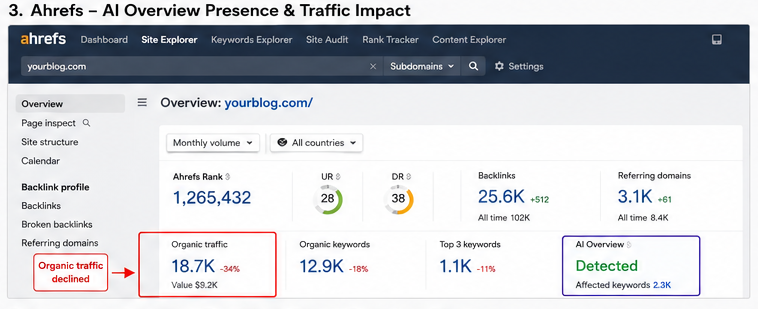
In 2026, this is common: Google AI Overviews answer many simple searches before people click a blog.
So, you may still rank, but you may get fewer visits.
Here is the plain truth: to recover blog after Google AI Overview traffic drop, you must stop chasing only rankings.
You need to win clicks, trust, and AI mentions.
What Changed?
Google now shows AI answers at the top of many search pages.
That means the user may get the answer without opening your post.
Pew Research found that users clicked normal search results 8% of the time when an AI summary appeared.
Without an AI summary, they clicked normal results 15% of the time.
Ahrefs also found that AI Overviews were linked with a 58% lower CTR for the top-ranking page in December 2025.
So, your blog may not be punished.
It may simply be getting fewer clicks from the same search spots.
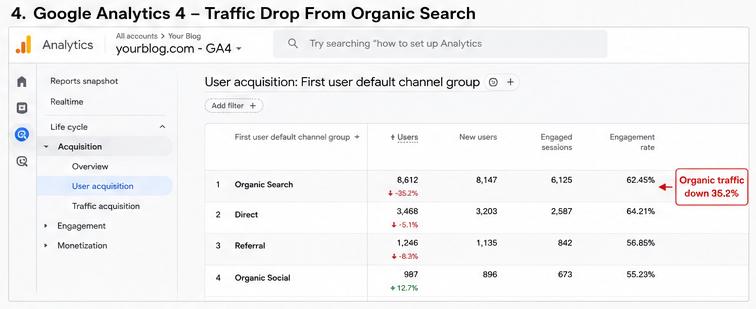
If rankings remain stable but clicks fall sharply, AI Overviews may be reducing organic CTR rather than causing a ranking penalty.
What This Guide Will Help You Do
You will learn how to check the real cause first.
Then, you will fix the posts that still have search demand.
Key steps:
Find pages with high impressions and low clicks.
Check if AI Overviews appear for those queries.
Update weak posts with real examples and fresh proof.
Add clear answers that Google and humans can trust.
Move some focus from simple “what is” posts to deeper buyer, problem, and comparison posts.
What Recovery Really Means
You may not get every lost click back.
That is the honest part most SEO posts skip.
But you can still recover useful traffic.
You can earn better clicks, more leads, and more brand trust.
Think of this as a traffic reset, not a death sentence.
Your goal is simple: make your blog too useful to skip.
By the end, you will know how to recover blog after Google AI Overview traffic drop without panic, spam, or fake SEO tricks.
Is Google AI Overview Really the Reason Your Blog Traffic Dropped?
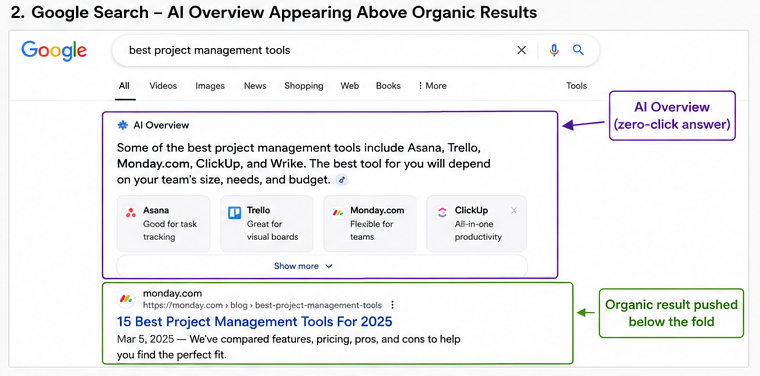
Your Google AI Overview traffic drop may not mean your blog is weak. It may mean Google now gives the answer before people click.
AI Overview is the AI answer box you see at the top of Google. It pulls facts from many pages, gives a quick answer, and then shows some source links.
So, your page can still rank well, but your clicks can fall. This is why many bloggers ask: “My rankings are unchanged, so why did clicks disappear?”
The main issue is AI Overview CTR loss. Pew Research found that users clicked normal search results only 8% of the time when an AI summary appeared, but 15% when no AI summary appeared.
Ahrefs also found that AI Overviews were linked with a 58% lower average CTR for the top-ranking page in its December 2025 data.
Here is the simple test:
| What you see in Search Console | What it may mean |
|---|---|
| Impressions stay high | Google still shows your page |
| Average position stays stable | Your ranking may not be the issue |
| Clicks drop hard | AI Overview may answer the query |
| CTR goes down | Users see enough on Google |
This hits “what is” and “how to” blog posts the most. For example, a post like “what is keyword research” may lose more clicks than “best keyword research tool for bloggers.”
However, do not blame AI first. Compare AI Overview vs core update signs before you change your content.
If rankings dropped, check a Google update, indexing issue, or weak content. If rankings stayed stable but traffic dropped, then AI Overview may be stealing the click.
The best clue is this: impressions up, clicks down. That means Google still trusts your page, but users may not need to visit it.
So yes, a Google AI Overview traffic drop can be real. But your next move is not panic; your next move is diagnosis.
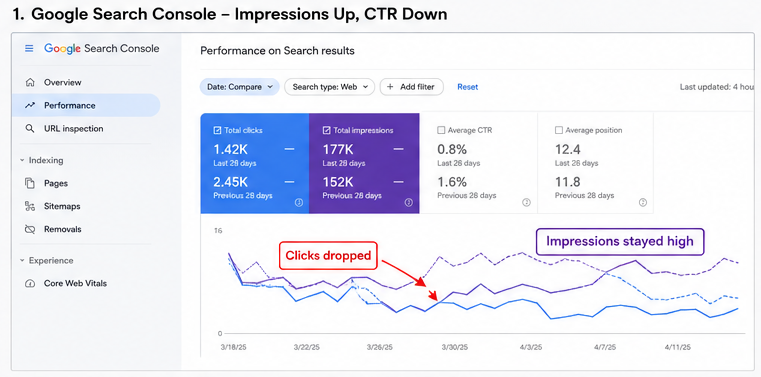
First, Confirm That AI Overviews Are Actually the Cause
Before you fix anything, check the real reason first. A Google AI Overview traffic drop often looks like this: your page still ranks, but fewer people click.
Pew Research found that people clicked normal Google results only 8% of the time when an AI summary appeared. Without an AI summary, they clicked normal results 15% of the time.
Check Google Search Console
Open Google Search Console first. Go to Performance → Search results.
Check these four things:
| Metric | What to look for |
|---|---|
| Impressions | Are people still seeing your page? |
| CTR | Did clicks drop hard? |
| Average position | Did ranking stay the same? |
| Queries | Did the lost clicks come from question keywords? |
This is the key test. If impressions stay high but CTR drops, AI Overviews may be taking the click.
Also check query changes. Terms like what is, how to, why does, and best way to are more exposed to AI answers.
Compare Before vs After
Now compare two clear date ranges. Use 28 days before the drop and 28 days after the drop.
Check these filters one by one:
- Landing pages: Which posts lost clicks?
- Queries: Which searches lost CTR?
- Countries: Did the drop happen in the US, UK, India, or all regions?
- Devices: Did mobile fall faster than desktop?
This small check saves you weeks. Many bloggers rewrite the wrong posts because they only look at total traffic.
Rule Out Other Causes
Do not blame AI Overview too fast. Sometimes the real issue is boring, but fixable.
Compare your drop against:
| Cause | Fast sign |
|---|---|
| Core Update | Rankings dropped across many pages |
| Spam Update | Thin or copied content lost visibility |
| Technical SEO | Pages load badly or break |
| Indexing issue | Pages vanish from Google |
| Seasonality | Demand drops every year in the same month |
Also check Google’s AI feature guidance. Google says normal Search controls like nosnippet, max-snippet, and noindex can affect how content appears in AI features.
Decision Box
Use this simple rule:
- If rankings fell: investigate a ranking issue first.
- If rankings stayed: investigate AI Overview traffic loss.
- If impressions fell: check demand, indexing, or keyword loss.
- If CTR fell: improve titles, snippets, intent match, and AI citation chances.
So, before you start a full SEO rewrite, prove the cause. A smart Google AI Overview traffic drop fix starts with Search Console, not guesswork.
The 7-Step Recovery Framework That Actually Works
Step 1: Identify Pages Losing Clicks
Start your AI Overview traffic drop recovery by opening Google Search Console.
Do not guess; check real page data first.
Go to Performance → Search Results → Pages.
Then compare the last 28 days with the previous 28 days.
Look for pages with high impressions but low CTR.
That means Google still shows your page, but people do not click.
This is the new SEO wound.
Your ranking may look fine, but Google’s AI answer may take the click.
In 2025, Pew Research found users clicked normal Google results only 8% of the time when an AI summary appeared.
Without an AI summary, users clicked normal results 15% of the time.
So, your first job is simple: find pages where clicks fell faster than rankings.
These are your recovery pages.
Use this quick check:
| What You See | What It Means | What To Do |
|---|---|---|
| High impressions, low CTR | Google shows you, but users skip you | Rewrite title and intro |
| Same ranking, fewer clicks | AI Overview may answer the query | Add deeper value |
| Lower ranking and fewer clicks | Ranking issue, not only AI | Audit SEO basics |
| High clicks, low conversion | Wrong traffic | Improve intent match |
Here is my honest rule.
If a page gets impressions but no clicks, it is not dead; it is under-selling itself.
Update the title first.
Make it sound like a real answer, not a keyword box.
Bad title: What Is SEO?
Better title: What Is SEO? A Plain Guide With Real Examples
Also check queries inside each page.
Find the exact search terms where CTR dropped.
Do not fix every page.
Fix the top 10 pages that lost the most clicks first.
Step 2: Prioritize Commercial Intent
Next, stop chasing only “what is” keywords.
They are easy for AI Overviews to answer.
For example, “what is SEO” is too broad.
Google can answer it in five lines.
But “best SEO tools for small blogs” has buying intent.
The reader still needs comparison, price, proof, and opinion.
That is where your blog can win.
AI can summarize, but it cannot test tools like a real person.
Semrush reported that AI Overviews first appeared mostly on long-tail informational searches.
But it also found they are now growing across commercial and transactional searches too.
So, do not think commercial keywords are fully safe.
They are just better because users still need judgment.
Use this shift:
| Weak Topic | Better Topic |
|---|---|
| What is email marketing? | Best email marketing tools for bloggers |
| What is hosting? | Bluehost vs Hostinger for new blogs |
| What is keyword research? | Best keyword research tools under $50 |
| What is AI SEO? | AI SEO tools tested on a real blog |
This gives your blog a better chance to recover.
You move from “answer content” to “decision content.”
Decision content gets more clicks.
People click because they want help choosing.
Add things AI cannot fake well:
- Your screenshots
- Your test results
- Your mistakes
- Your price notes
- Your personal pick
- Your warning
- Your final recommendation
For example, do not write only: “Semrush is an SEO tool.”
Write: “I used Semrush to find 37 low-competition keywords for a 6-month-old blog, but the price may hurt beginners.”
That sounds human.
It also gives Google and readers a reason to trust you.
End each recovery page with a clear next step.
Tell the reader what to choose, what to avoid, or what to test today.
This is how to recover a blog after Google AI Overview traffic drop: keep the pages Google still shows, then turn them into pages people still need to click.
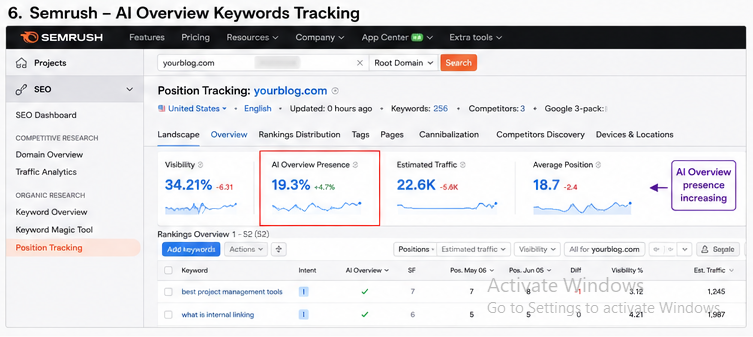
Step 3: Add Original Experience
To recover blog traffic after Google AI Overview traffic drop, stop writing posts that sound like every other post. Add proof that you tested, saw, compared, or fixed something yourself.
Google AI can copy a plain answer, but it cannot copy your real work. So add things that prove you were there:
- A small case study
- Your own screenshots
- A before-and-after result
- A real client or site example
- A mistake you made and fixed
- A test with dates and numbers
For example, do not write: “Update old content to improve rankings.” Write: “I updated 12 posts on June 4, 2026, added fresh screenshots, and 5 posts gained clicks within 21 days.”
This makes your blog harder to replace. It also gives AI Overviews something specific to cite.
Pew Research found that users click normal Google results less when an AI summary appears: 8% with AI summaries versus 15% without them. So your content must give people a reason to leave Google and visit you.
A simple rule works well: add one “proof block” every 400 to 500 words. That proof block can be a screenshot, mini story, test result, quote, or table.
Quick action list
- Add one real example under each main claim.
- Replace generic tips with your own result.
- Use screenshots from Google Search Console.
- Mention dates, tools, numbers, and changes.
- Add a short “What I noticed” note.
This is where many blogs win. Real experience feels human, and readers trust it more than neat rewritten summaries.
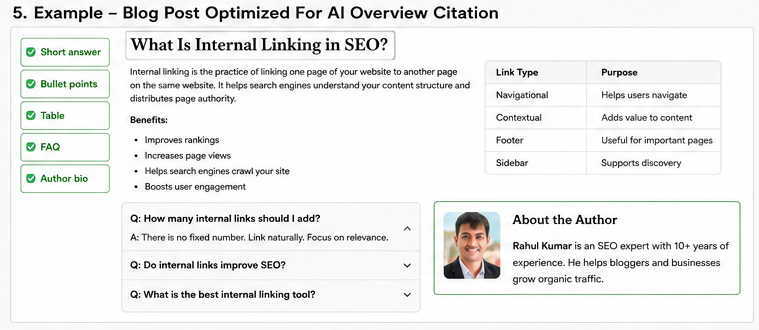
Step 4: Create AI-Friendly Sections
Next, make your blog easy for humans and AI tools to read. Do not hide the answer inside long blocks of text.
AI Overviews often pull clean answers, lists, steps, tables, and short definitions. So give your content a clear shape.
Use these blocks inside each blog post:
| Content block | Why it helps |
|---|---|
| Short definition | Helps Google understand the topic |
| Bullet list | Makes steps easy to extract |
| Numbered process | Shows order and action |
| Comparison table | Helps readers make a choice |
| FAQ section | Targets real search questions |
| Summary box | Gives AI a clean answer |
For example, add a short box like this:
Simple answer: If your rankings stay stable but clicks drop, your issue may be AI Overview CTR loss, not a ranking penalty.
This helps both readers and search engines. It also gives your page a better chance to appear as a source in AI search.
Semrush found AI Overviews appeared for 6.49% of queries in January 2025, peaked at 24.61% in July, and dropped to 15.69% in November. That means this feature changes fast, so your page structure must stay easy to scan.
Use this simple format
- Answer first.
- Explain next.
- Show proof.
- Give steps.
- Add a warning.
- Add a small example.
Do not write like a textbook. Write like you are helping one worried site owner fix one real traffic problem.
Step 5: Improve Topical Authority
One post cannot carry your whole recovery plan. You need a small topic cluster around Google AI Overview traffic drop.
Think of your blog like a street map. One strong page is good, but connected pages help Google understand that you own the topic.
Build this cluster:
| Main topic | Supporting post idea |
|---|---|
| Google AI Overview | What Google AI Overview means for bloggers |
| CTR loss | Why impressions stay high but clicks fall |
| Zero-click SEO | How to win when users do not click |
| Schema | Best schema for blog posts and FAQs |
| AI citations | How to get cited in AI Overviews |
| Brand authority | How mentions help AI search trust you |
Then link these posts together. Use clear anchor text like “AI Overview CTR loss” or “zero-click SEO recovery.”
This helps readers move deeper into your site. It also helps Google see that your blog is not guessing from one article.
Here is the simple path:
Google AI Overview
↓
CTR loss
↓
Zero-click search
↓
Schema
↓
AI citations
↓
Brand authority
Do not publish 20 weak posts. Publish 5 strong posts that answer different parts of the same problem.
This is safer and cleaner. It also keeps your site away from thin content.
Step 6: Refresh Old Content
Old blog posts often lose traffic first. They may still rank, but they no longer feel fresh, useful, or worth clicking.
Start with pages that have high impressions and low CTR in Google Search Console. These are your best recovery targets.
Update each post with this checklist:
- Add new screenshots.
- Update old stats.
- Replace outdated tools.
- Add fresh examples from 2025 or 2026.
- Remove dead advice.
- Improve the intro.
- Add missing FAQs.
- Add internal links.
- Add a better title.
- Add a clearer summary box.
Do not just change the publish date. That is lazy, and readers can feel it.
For example, if a post says “AI Overviews are new,” update it. Google AI Overviews now reach over 2.5 billion monthly users, according to Google’s 2026 I/O figures reported by Business Insider.
A strong refresh should change the value of the page. It should not only change the date at the top.
Best refresh order
- Fix the title and intro.
- Add fresh facts.
- Add original proof.
- Improve structure.
- Add FAQs.
- Add internal links.
- Re-submit the URL in Search Console.
This is one of the fastest ways to recover useful traffic. You already have the URL, age, links, and search history.
Step 7: Diversify Traffic
You should still care about Google, but you should not depend only on Google. AI search has made that risky.
The best blog recovery plan builds other paths to the same content. This gives your blog more safety and more brand signals.
Use this practical traffic mix:
| Channel | What to do |
|---|---|
| Turn each guide into a short weekly email | |
| YouTube | Make a 5-minute screen-share version |
| Share one chart, lesson, or mistake | |
| Answer real questions without dropping spam links | |
| Communities | Join niche groups and give useful replies |
| Newsletter | Build repeat readers you own |
| Direct traffic | Make your brand name worth searching |
Do not post the same thing everywhere. Change the angle for each place.
On YouTube, show your screen. On LinkedIn, share the lesson. On Reddit, answer the pain point. In email, give the checklist.
This is how real recovery works now. You turn one strong blog post into many small trust signals.
Also, community mentions matter more than before. When real users talk about your content in forums, AI tools can treat those mentions as trust signals.
Here is the key point: do not chase traffic only; chase memory. You want readers to remember your site name after they leave Google.
To recover blog traffic after Google AI Overview traffic drop, build content that AI can cite, humans can trust, and communities can repeat.
How to Optimize Blog Posts for Google AI Overviews
To optimize for Google AI Overview, write like a helpful person, not like a keyword machine. Google picks sources that give clear answers, strong proof, useful structure, and trust signals.
AI Overviews now matter because clicks are thinner. Pew Research found users clicked normal Google results only 8% of the time when an AI summary appeared, compared with 15% when it did not.
Clear Answers First
Put the answer in the first 2–3 lines. Do not warm up slowly.
Use this format: problem, answer, next step. This helps both people and AI tools understand your page fast.
Unique Data
Add something Google cannot find on 50 other blogs. Use your own test, small survey, client result, screenshot, checklist, or field note.
Example: “I checked 20 posts in Google Search Console from January 2025 to March 2026. The pages with tables kept better CTR.”
Original Images
Use your own images, not stock photos. Add screenshots, charts, workflow maps, and before-after traffic graphs.
Also use clear alt text: “Google Search Console CTR drop after AI Overview.” This supports AI Overview SEO and normal image SEO.
Expert Quotes
Add one short quote from a real SEO, founder, editor, or niche expert. Real names build trust.
Better still, ask one sharp question: “What did you change first after AI Overview traffic dropped?”
Statistics
Use fresh numbers with dates. For example, Google AI Overviews reached more than 2.5 billion monthly active users by May 2026, based on Google I/O reporting.
But do not stuff stats. Use one number to prove one point.
Entity SEO
Name the things Google connects to the topic: Google Search Console, CTR, impressions, AI Overviews, schema, EEAT, topical authority, Reddit, YouTube, and zero-click search.
This helps Google see your post as part of the full topic, not a lonely article.
Schema
Use Article schema, FAQ schema, Breadcrumb schema, and Person schema. Google says structured data helps it understand page content and entities.
Schema does not force AI citations. Still, it makes your content easier to read by machines.
FAQ Optimization
Answer real user questions in plain words:
- Why did my clicks drop?
- Can I get cited in AI Overview?
- Does schema help?
- Should I delete old posts?
Keep each FAQ short. Give the answer first, then explain.
Table Optimization
Use tables for choices, steps, and comparisons.
| Page Type | Best Fix |
|---|---|
| Informational post | Add clear answer, FAQ, data |
| Review post | Add comparison table |
| Old post | Refresh stats and screenshots |
| Weak post | Merge or prune |
Tables help readers scan. They also help AI pull clean facts.
Comparison Blocks
Add honest trade-offs. Compare “refresh vs rewrite,” “SEO vs YouTube,” and “schema vs content quality.”
Google selects sources that answer the full question clearly. So, to optimize for Google AI Overview, make your post easy to quote, easy to trust, and useful after the quick answer.
What Should You Stop Doing?
If you want to fix a Google AI Overview traffic drop, stop doing random SEO work first. You need clean proof, not panic edits.
In 2025, Pew found that users clicked normal Google links only 8% of the time when an AI summary appeared. Without an AI summary, they clicked 15% of the time.
Stop These Mistakes First
Do not waste time on these moves:
- Publishing AI-generated fluff with no real proof
- Changing only the publish date
- Stuffing the same keyword again and again
- Keeping thin posts that say nothing new
- Ignoring CTR in Google Search Console
- Ignoring pages with high impressions and low clicks
- Chasing every Google update like a fire drill
- Publishing five posts that answer the same question
Why “I Updated 100 Posts” Often Fails
Many bloggers say: “I updated 100 posts and nothing changed.”
That usually means they changed words, not value.
Google does not need another soft intro or longer paragraph. It needs a clearer answer, fresher proof, real screenshots, better examples, and a reason to cite you.
What To Do Instead
| Stop doing this | Do this instead |
|---|---|
| Refreshing dates | Add new data and examples |
| Adding more words | Add clearer answers |
| Repeating keywords | Match real search intent |
| Copying competitors | Add your own test or view |
| Checking rankings only | Check CTR and clicks |
Ahrefs reported that AI Overviews can reduce clicks to top-ranking pages by 58%. So your goal is not just “rank higher”; your goal is to earn the click or become a trusted source.
Stop writing like the web already has your answer. After a Google AI Overview traffic drop, write like only you can show the missing proof.
Real Recovery Timeline
An AI Overview traffic drop recovery timeline is not a 3-day job. You need about 90 days to see what is real.
Google AI Overviews now touch search at a huge scale. Pew Research found that users clicked normal results only 8% of the time when an AI summary showed, compared with 15% without one.
Week 1: Audit the Damage
Do not edit anything first. Open Google Search Console and find pages where clicks dropped, but impressions stayed close.
Check these numbers:
| Metric | What it tells you |
|---|---|
| Clicks | Did people stop visiting? |
| Impressions | Does Google still show you? |
| CTR | Did the search page steal the click? |
| Position | Did rankings fall? |
If rankings fell, it may not be an AI Overview problem. If rankings stayed, but CTR dropped, AI search may be the thief.
Week 2: Refresh the Right Pages
Do not refresh every post. Start with the 10 pages that lost the most clicks.
Add what AI cannot fake well:
- Your own screenshots
- Real test results
- Fresh 2026 facts
- Clear steps
- Short answer boxes
- Better titles
- Strong FAQs
I would not waste time on thin “what is” posts first. I would fix posts that can still bring leads, sales, email signups, or loyal readers.
Month 1: Add Internal Links
Now connect your weak pages to your strong pages. Internal links help Google see your topic map.
Use links like this:
- From old traffic pages to updated recovery pages
- From broad guides to money pages
- From FAQs to deeper posts
- From case studies to service pages
Do not use vague anchor text like “click here.” Use clear words like “Google AI Overview traffic drop checklist.”
Month 2: Build Authority Outside Your Blog
This is where many bloggers fail. They only edit posts, but they do not build trust.
Start showing up where real people talk:
- Reddit threads
- YouTube comments
- LinkedIn posts
- Expert roundups
- Niche forums
- Podcast notes
- Newsletter mentions
Google said AI Overviews had over 2 billion monthly users across 200+ countries and territories in 2025. So, your brand must be easy to find beyond your own site.
Month 3: Evaluate and Cut Waste
After 90 days, check the same pages again. Do not judge recovery after one week.
Put each page into one group:
| Result | Action |
|---|---|
| Clicks return | Keep improving |
| Impressions grow, CTR low | Rewrite title and intro |
| Rankings fall | Rebuild the page |
| No value remains | Merge or delete |
| Leads improve | Keep it, even with less traffic |
Here is my strong view: you may not win back every lost click. But you can win better clicks.
Short Recovery Summary
Use this simple order:
- Week 1: Audit.
- Week 2: Refresh.
- Month 1: Link.
- Month 2: Build trust.
- Month 3: Measure.
The AI Overview traffic drop recovery timeline is slow because search behavior has changed. So, stop chasing old clicks and start building pages that both people and AI systems can trust.
Frequently Asked Questions
Can AI Overview completely replace SEO?
No, AI Overview cannot fully replace SEO. But it can take many easy clicks from your blog.
You still need SEO because Google needs clear, trusted pages to cite. Google says normal Search rules still matter for AI features.
Can I block AI Overview?
You can limit how Google shows your content with nosnippet, max-snippet, and data-nosnippet. But this can also hurt your normal Google snippets.
So, do not block first. First, test which pages lost clicks, then decide.
Should I delete informational posts?
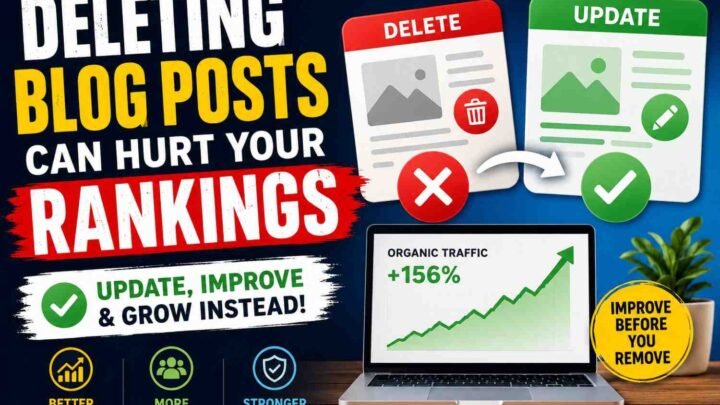
Do not delete a post just because AI Overview took some clicks. First, check if the page still gets impressions, links, leads, or email signups.
Delete only weak pages that bring no traffic, no trust, and no business value. Better pages should be updated, merged, or turned into stronger guides.
Does schema help?
Yes, schema can help Google understand your page. But schema alone will not recover lost blog traffic.
Use Article, FAQ, Breadcrumb, Person, and Organization schema. Then add clear answers, real examples, and fresh proof.
Is AI-generated content enough?
No, plain AI content is not enough. Google AI Overview already gives users a fast summary.
Instead, create a content that AI cannot replace.
Your blog must add what AI cannot fake well: real tests, screenshots, prices, failures, opinions, and local examples. That is where trust starts.
How long does recovery take?
Small fixes may show signs in 2 to 4 weeks. Bigger recovery often takes 60 to 90 days.
Do not judge by traffic alone. Track CTR, leads, rankings, branded searches, and AI citations.
Should bloggers focus on YouTube?
Yes, but do not leave your blog. Use YouTube to support your blog, not replace it.
A good plan is simple: turn one blog post into one video, one short, one email, and one LinkedIn post. This helps you win outside Google too.
Does topical authority matter?
Yes, topical authority matters more now. One thin post will not beat a clear content cluster.
For example, do not write only one post on AI Overview traffic loss. Also cover CTR drops, GSC checks, zero-click SEO, schema, content refresh, and blog recovery steps.
Can rankings stay the same while traffic drops?
Yes, this is very common now. Your page can rank well, but users may stop clicking because AI Overview answers the query first.
Pew found users clicked normal Google results only 8% of the time when an AI summary appeared, compared with 15% when it did not appear.
Is zero-click SEO the future?
Yes, partly. More searches now end without a click, so your goal is not only traffic.
Your new goal is visibility: get cited, get remembered, get searched by name, and get users to come back direct. That is how to recover a blog after Google AI Overview traffic drop.
Final Action Plan
Your Google AI Overview traffic drop recovery starts with one clear rule: do not fix every post at once. Fix the pages where clicks fell, but rankings stayed close.
Today, open Google Search Console. Check the last 28 days against the previous 28 days.
Look for this pattern:
| Signal | What it means |
|---|---|
| Impressions stay high | Google still shows your page |
| Position stays stable | You did not fully lose ranking |
| CTR drops hard | AI Overview may take the click |
In 2025, Pew Research found that users clicked normal Google results only 8% of the time when an AI summary showed. So, your first job is simple: protect the clicks that still matter.
Tomorrow, refresh your top losing pages. Add a short answer, new stats, real screenshots, and one honest field note from your own work.
This week, improve your entities. Name the tools, people, brands, methods, dates, and steps clearly.
This month, build traffic outside Google. Use email, YouTube, LinkedIn, Reddit, and direct brand search.
Keep this in mind: recovery is not about getting every old click back. It is about making content that AI systems want to cite and real people want to trust.
That is the real Google AI Overview traffic drop recovery plan.



Leave a Reply