Are you learning DevOps, or already DevOps engineer, then understand this Kubernetes(K8s) Overview in simple langauge.
Think about the first time you deployed an application using containers. Everything works fine when a few users access it. Then traffic suddenly increases, containers start failing, and managing them manually becomes a nightmare. This is exactly where Kubernetes becomes valuable.
After working with Kubernetes for years in production environments, I’ve noticed that many beginners assume it’s just another container tool. It isn’t. Kubernetes helps you manage hundreds or even thousands of containers without constantly monitoring each one yourself.
For example, if an application container crashes, Kubernetes can automatically create a replacement. If your application suddenly receives more traffic, it can launch additional containers to handle the load. When traffic drops, it can reduce resources and save costs.
One common mistake beginners make is learning Kubernetes before understanding containers and Docker properly. You’ll have a much easier time if you first understand how containers work and then move into Kubernetes concepts such as Pods, Deployments, and Services.
As your applications grow, Kubernetes helps keep everything organized, scalable, and reliable with far less manual effort.
Key Features of Kubernetes
The first time I managed a growing application with containers, I thought adding more containers would make life easier. For a while, it did. Then the numbers started climbing. Ten containers became fifty. Fifty became hundreds. Suddenly, keeping track of everything felt like trying to manage a busy city with no traffic lights.
That’s where Kubernetes started making sense to me.
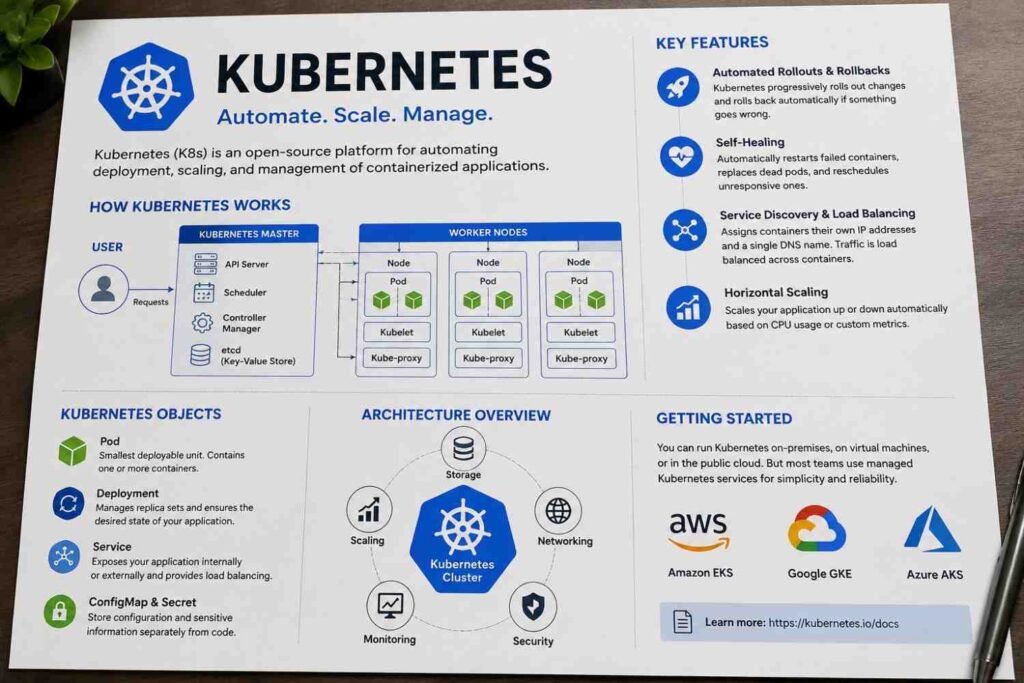
One feature I rely on all the time is Automated Rollouts and Rollbacks. Software updates rarely go exactly as planned. You test everything, push the new version, and then someone finds a bug five minutes later. Kubernetes handles deployments gradually instead of replacing everything at once. If problems appear, it can roll back to the previous stable version. That safety net saves a lot of stress during production releases.
Then there’s Self-Healing, which sounds fancy until you see it working in real life. Containers crash. Processes freeze. Servers have bad days. It happens. Kubernetes constantly watches your applications and takes action when something fails. It restarts failed containers, replaces unhealthy pods, and removes instances that stop responding to health checks. Most users never even notice that something went wrong.
I also appreciate Service Discovery and Load Balancing because it removes a surprising amount of manual work. Every container receives its own IP address, and Kubernetes provides a stable DNS name that applications can use to communicate with each other. When traffic arrives, Kubernetes spreads requests across multiple container instances automatically. No complicated configuration every time you add a new container.
Scaling is another area where Kubernetes shines. Traffic on modern applications can change quickly. A normal Tuesday afternoon can suddenly become your busiest hour of the month. With Horizontal Scaling, Kubernetes can increase or decrease the number of running containers based on CPU usage, memory consumption, or custom metrics. Instead of guessing how many servers you’ll need next week, the platform adjusts as demand changes.
Here is a quick summary:
| Feature | What It Does |
|---|---|
| Automated Rollouts & Rollbacks | Deploys updates gradually and reverts changes if failures occur |
| Self-Healing | Restarts, replaces, and recovers failed workloads automatically |
| Service Discovery & Load Balancing | Connects services and distributes traffic across containers |
| Horizontal Scaling | Adds or removes container instances based on workload demand |
When people first hear about Kubernetes, they often focus on containers. What keeps teams using it is everything happening behind the scenes. These features reduce manual work, improve reliability, and make large-scale applications far easier to manage than they would be otherwise.
Core Architecture of Kubernetes
The first time I looked at a Kubernetes cluster diagram, I honestly thought it was more complicated than it needed to be. Boxes everywhere. New terms. Components talking to other components. It felt like learning a city map before even driving a car.
Then I spent some time working with actual clusters, and things started making sense.
At a high level, Kubernetes has two major parts:
| Component | Job |
|---|---|
| Control Plane | Makes decisions and manages the cluster |
| Worker Nodes | Run the actual applications |
You can think of the Control Plane as the operations team behind the scenes. It doesn’t run your application containers directly. Instead, it constantly watches the entire cluster and decides what should happen next.
For example, let’s say you deploy a web application that needs five running instances.
You don’t manually start five containers on five servers.
You simply tell Kubernetes what you want.
The Control Plane takes over from there.
Inside the Control Plane, several components work together:
- API Server receives all commands and requests.
- Scheduler decides which worker node should run a new pod.
- Controller Manager continuously checks whether the cluster matches the desired state.
- etcd stores the cluster’s configuration and current state in a highly reliable key-value database.
I usually describe etcd as Kubernetes’ memory. If Kubernetes forgets what’s supposed to be running, everything becomes much harder to manage.
Then come the Worker Nodes.
These are the machines that do the heavy lifting.
Every Worker Node contains:
- Kubelet – an agent that communicates with the Control Plane.
- Container Runtime – software responsible for running containers, such as containerd.
- Pods – the smallest deployable units where your application containers run.
One thing that surprised me early on was how little direct interaction happens with individual servers. In traditional environments, I spent a lot of time logging into machines and troubleshooting them one by one.
Kubernetes changes that mindset completely.
The Control Plane focuses on what should happen. Worker Nodes focus on making it happen.
Once that idea clicks, most Kubernetes concepts become much easier to understand. Everything else—Pods, Deployments, Services, Autoscaling—builds on top of this simple relationship between the Control Plane and the Worker Nodes.
Getting Started & Managed Services
The first time I tried setting up a Kubernetes cluster from scratch, I spent more time fixing networking issues, certificates, and node problems than actually deploying applications. That’s when I realized why so many companies choose managed Kubernetes services.
Sure, you can run Kubernetes on your own servers, virtual machines, or private data centers. Plenty of organizations still do. But managing the control plane, upgrades, security patches, backups, and high availability takes serious time and expertise.
Most teams would rather focus on building applications.
That’s where managed services come in. The cloud provider handles much of the Kubernetes infrastructure while your team concentrates on workloads and deployments. According to official documentation, Amazon EKS, Google Kubernetes Engine (GKE), and Azure Kubernetes Service (AKS) simplify cluster operations by managing key Kubernetes components and reducing operational overhead.
The three most popular options are:
- Amazon EKS – Best suited for organizations already using AWS services.
- Google Kubernetes Engine (GKE) – Created by the company that originally developed Kubernetes and known for strong automation features.
- Azure Kubernetes Service (AKS) – A common choice for teams invested in the Microsoft ecosystem.
If you’re just getting started, I’d strongly suggest learning Kubernetes concepts first, then using a managed service. You’ll spend less time maintaining clusters and more time learning how Kubernetes actually works.




Leave a Reply