In this post, learn what are AWS components microservices and Kubernetes microservices to deploy your multiservice application. As we already discussed on AWS resources that infrastructure building, Kubernetes architecture.
A few years ago, I worked on an application where every feature lived inside one massive codebase. User login, payments, product catalog, notifications, reports—everything sat together. At first, it felt simple. Then traffic started growing.
One small update in the payment module suddenly affected user accounts. A bug in reporting slowed down the entire application. Deployments became stressful. Nobody wanted to touch the code because one small mistake could bring everything down.
That’s usually the point where many teams start looking at microservices.
AWS has become one of the most popular platforms for running microservices because it gives developers managed tools for compute, networking, storage, monitoring, and deployment. Instead of managing complex infrastructure manually, teams can focus more on building features and less on maintaining servers.
What Makes AWS Microservices Different?
When people hear the term “microservices,” they often think it’s just about splitting an application into smaller pieces.
That’s only part of the story.
In a microservices architecture, every service handles a specific business responsibility. One service may manage user accounts. Another handles payments. Another processes orders. Yet another sends emails or SMS notifications.
Each service works independently.
If the payment service needs an update, developers can deploy it without touching the inventory service. If product searches receive heavy traffic, only the search service can be scaled.
That’s a huge advantage when applications start serving thousands—or even millions—of users.
Monolithic vs Microservices Architecture
Before understanding AWS microservices, it helps to see how they differ from traditional monolithic applications.
| Feature | Monolithic Architecture | Microservices Architecture |
|---|---|---|
| Deployment | Entire application deployed together | Individual services deployed independently |
| Scaling | Whole application scales | Only required services scale |
| Failure Impact | One issue may affect everything | Problems stay isolated |
| Technology Choice | Usually one technology stack | Different technologies allowed |
| Development Speed | Slows as code grows | Teams work independently |
| Maintenance | More difficult over time | Easier to manage smaller services |
Think about an e-commerce website.
In a monolithic system, checkout traffic during a flash sale forces the entire application to scale.
With microservices, only the checkout-related services need extra resources.
Less waste. Better performance.
Characteristics of AWS Microservices
Autonomous Services
One of the biggest reasons organizations adopt microservices is independence.
Every service can be:
- Developed separately
- Tested separately
- Deployed separately
- Monitored separately
- Scaled separately
This means different teams can work simultaneously without constantly blocking each other.
For example:
- User Team → Authentication Service
- Payments Team → Payment Service
- Product Team → Catalog Service
- Notifications Team → Email Service
Everyone moves faster.
Specialized Responsibilities
Each microservice should solve one specific business problem.
A common mistake I see is creating huge microservices that eventually become mini-monoliths.
A better approach is keeping services focused.
Examples:
| Service | Responsibility |
|---|---|
| User Service | Login and account management |
| Cart Service | Shopping cart operations |
| Order Service | Order processing |
| Payment Service | Payment transactions |
| Notification Service | Emails and SMS alerts |
Smaller services are easier to maintain and understand.
Core AWS Services Used in Microservices Architecture
AWS provides dozens of services, but a few become the foundation of most microservices projects.
Compute Services
AWS Lambda
AWS Lambda allows developers to run code without managing servers.
You upload code.
AWS handles:
- Infrastructure
- Scaling
- Availability
- Operating system maintenance
This works extremely well for event-driven microservices.
Examples:
- Image processing
- Order validation
- Payment notifications
- User registration workflows
You only pay for actual execution time.
Amazon ECS
Amazon Elastic Container Service (ECS) is AWS’s managed container orchestration platform.
Developers package applications into Docker containers and deploy them on ECS.
Many organizations choose ECS because:
- Simpler Kubernetes alternative
- Deep AWS integration
- Lower operational overhead
Amazon EKS
Amazon Elastic Kubernetes Service (EKS) runs Kubernetes on AWS.
Teams already using Kubernetes often prefer EKS because AWS manages the Kubernetes control plane while developers manage workloads.
Large enterprises commonly use EKS for:
- Multi-team environments
- Large-scale deployments
- Hybrid cloud strategies
API Management and Networking
Amazon API Gateway
API Gateway acts like a front door for microservices.
Instead of exposing dozens of backend services directly, clients communicate through API Gateway.
It handles:
- Authentication
- Request routing
- Rate limiting
- API security
- Monitoring
A mobile app might call API Gateway, which then routes requests to user, order, and payment services behind the scenes.
AWS App Mesh
As applications grow, service-to-service communication becomes harder to manage.
App Mesh helps teams:
- Control traffic flow
- Observe service communication
- Improve reliability
- Implement advanced routing rules
For large microservice environments, this visibility becomes extremely valuable.
Databases for Microservices
One principle of microservices is decentralized data ownership.
Instead of sharing one giant database, each service owns its own data.
Amazon DynamoDB
DynamoDB is AWS’s fully managed NoSQL database.
It’s known for:
- Millisecond response times
- Automatic scaling
- High availability
- Massive throughput
Common use cases include:
- User profiles
- Shopping carts
- Session management
Amazon RDS
Some services require relational databases.
Amazon RDS supports engines such as:
- MySQL
- PostgreSQL
- MariaDB
- SQL Server
It’s often used when transactions and relationships between data are important.
Messaging Between Services
Direct communication isn’t always the best approach.
Many successful AWS microservices systems use asynchronous communication.
Amazon SQS
Amazon Simple Queue Service (SQS) helps decouple services.
Example:
- Order Service creates an order.
- Message enters SQS queue.
- Payment Service processes it later.
- Notification Service sends confirmation.
Even if one service slows down, others continue functioning.
Amazon SNS
Amazon Simple Notification Service (SNS) follows a publish-subscribe model.
One event can notify multiple services at once.
For example:
“Order Placed”
This event may trigger:
- Billing Service
- Shipping Service
- Analytics Service
- Email Service
All at the same time.
Benefits of AWS Microservices
Agility and Faster Development
Smaller teams move faster.
Instead of coordinating dozens of developers around one massive application, teams own their services and release updates independently.
This often reduces release cycles from weeks to days—or even hours.
Flexible Scaling
One of the biggest AWS advantages is granular scaling.
Suppose a checkout service suddenly receives 10 times more traffic during a holiday sale.
You scale only that service.
Not the entire application.
That keeps infrastructure costs under control.
Easier Deployments
Modern DevOps pipelines work naturally with microservices.
Using AWS services such as:
- CodePipeline
- CodeBuild
- CodeDeploy
teams can automate testing and deployments.
If something goes wrong, rolling back becomes much simpler.
Technology Freedom
Not every problem needs the same programming language.
A recommendation engine might use Python.
A payment service may use Java.
A lightweight API could run in Node.js.
Microservices allow teams to choose what works best for each problem.
Better Fault Isolation
Failures happen.
Servers crash.
Code breaks.
Third-party APIs go down.
In a monolithic application, one issue can affect everything.
In a microservices architecture, failures stay isolated.
Users may temporarily lose one feature while the rest of the application continues working.
That’s a major reason companies building large-scale applications choose microservices.
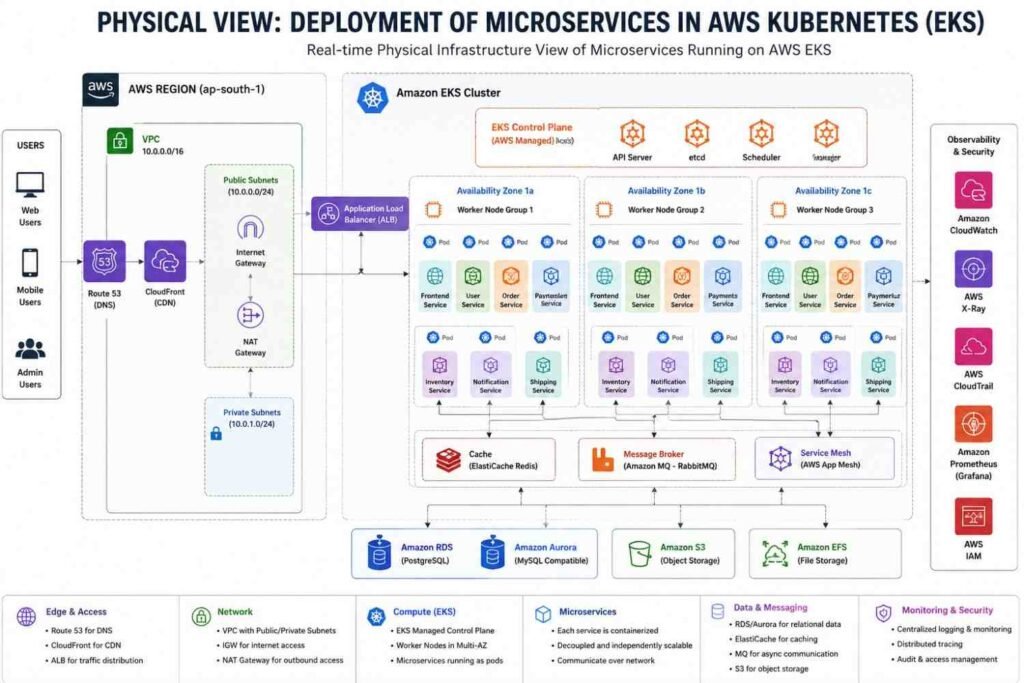
A Real-World AWS Microservices Example
Consider an online shopping platform.
Instead of one giant application, AWS microservices might look like this:
- User Service → Amazon ECS
- Product Service → Amazon EKS
- Cart Service → DynamoDB
- Order Service → AWS Lambda
- Payment Service → Amazon ECS
- Notification Service → SNS + Lambda
- API Layer → API Gateway
- Monitoring → Amazon CloudWatch
When traffic spikes during a flash sale, only the affected services scale.
Customers continue shopping without noticing the complexity happening behind the scenes.
And that’s really the goal of microservices—making massive applications feel simple and reliable for users while giving development teams the freedom to build, update, and scale independently.
How to Implement a Payment Microservice Using Helm in AWS Kubernetes (Amazon EKS)
A few years ago, I worked on an e-commerce platform where the payment service quickly became the most sensitive microservice in the entire application. Inventory issues could wait a few minutes. Cart problems were annoying. But payment failures? Customers left immediately.
That’s when I learned something important.
Deploying a payment microservice isn’t just about getting pods running in Kubernetes. You need secure secrets management, controlled access to AWS resources, reliable scaling, TLS encryption, and a deployment process that doesn’t break checkout transactions during upgrades.
This is where Helm becomes incredibly useful.
Instead of maintaining dozens of Kubernetes YAML files manually, Helm helps package everything into a reusable deployment template that can be promoted from development to staging and finally production with very little effort.
Let’s walk through a real-world implementation.
Step 1: Containerize the Payment Microservice
Before Helm enters the picture, the payment application must be packaged as a Docker image.
Whether you’re using:
- Node.js
- Spring Boot
- Go
- Python
- .NET
the deployment process remains mostly the same.
One thing I always tell engineers:
Never place payment gateway credentials inside the Docker image.
That includes:
- Stripe Secret Keys
- PayPal Client Secrets
- Razorpay Keys
- Database passwords
- JWT signing keys
Images should remain portable and secure.
After building the image, push it to Amazon Elastic Container Registry (ECR).
Login to Amazon ECR
aws ecr get-login-password --region us-east-1 \
| docker login --username AWS \
--password-stdin <account-id>.dkr.ecr.us-east-1.amazonaws.com
Tag and Push the Image
docker tag payment-service:latest \
<account-id>.dkr.ecr.us-east-1.amazonaws.com/payment-service:v1

docker push \
<account-id>.dkr.ecr.us-east-1.amazonaws.com/payment-service:v1
At this stage, your application image is available inside AWS and ready for deployment into Amazon EKS.
Step 2: Create the Helm Chart Structure
Now comes the Helm part.
Instead of manually creating Kubernetes manifests, generate a starter chart.
helm create payment-serviceThis command automatically creates a directory structure.
payment-service/
│
├── Chart.yaml
├── values.yaml
├── templates/
│   ├── deployment.yaml
│   ├── service.yaml
│   ├── ingress.yaml
│   └── serviceaccount.yaml
Understanding Helm Files
| File | Purpose |
|---|---|
| Chart.yaml | Chart metadata |
| values.yaml | Environment variables and configuration |
| deployment.yaml | Pod deployment definition |
| service.yaml | Internal service exposure |
| ingress.yaml | External access configuration |
| serviceaccount.yaml | AWS IAM integration |
Think of values.yaml as the control panel.
Most production changes happen there instead of modifying Kubernetes templates directly.
Step 3: Configure the Deployment Template
The deployment template defines how Kubernetes creates payment service pods.
Why This Matters
Payment services often need access to:
- AWS Secrets Manager
- Amazon DynamoDB
- Amazon SQS
- Amazon RDS
- CloudWatch
Using IAM Roles for Service Accounts (IRSA) is considered the AWS best practice.
Instead of storing AWS credentials inside pods, Kubernetes automatically assigns permissions through IAM roles.
A simplified deployment configuration looks like this:
serviceAccountName: {{ include "payment-service.serviceAccountName" . }}This allows the pod to securely access AWS resources.
Managing Sensitive Credentials
Payment gateways require API keys.
Rather than hardcoding them, reference Kubernetes Secrets.
env:
  - name: STRIPE_SECRET_KEY
    valueFrom:
      secretKeyRef:
        name: payment-gateway-credentials
        key: stripe-key
This approach significantly reduces security risks.
I’ve seen teams accidentally commit production API keys into Git repositories. Cleaning up that mistake later becomes painful.
Avoid it from day one.
Step 4: Configure the Kubernetes Service
Pods are temporary.
Their IP addresses change regularly.
Applications therefore communicate through Kubernetes Services.
Service Template Example
apiVersion: v1
kind: Service
metadata:
  name: payment-service
spec:
  type: ClusterIP
Using ClusterIP keeps the payment service accessible only inside the cluster.
This is typically what you want.
For example:
Shopping Cart Service
        ↓
Payment Service
        ↓
Database
Only internal services communicate with the payment API.
External users should never directly reach backend pods.
That’s where Ingress comes in.
Step 5: Configure AWS Application Load Balancer (ALB)
Most payment APIs must accept requests from web applications or mobile applications.
A secure entry point becomes necessary.
In Amazon EKS, the preferred solution is:
AWS Load Balancer Controller + Application Load Balancer (ALB)
Why ALB?
Benefits include:
- SSL termination
- Path-based routing
- Automatic scaling
- AWS-managed availability
- Integration with ACM certificates
A typical Ingress configuration looks like:
alb.ingress.kubernetes.io/scheme: internet-facing
alb.ingress.kubernetes.io/target-type: ip
alb.ingress.kubernetes.io/ssl-redirect: '443'
Payment Traffic Example
Customer
    ↓
AWS ALB
    ↓
Ingress
    ↓
Payment Service
    ↓
Stripe API
This creates a secure payment processing path.
Always force HTTPS.
Payment information should never travel over plain HTTP.
Step 6: Populate values.yaml
One reason Helm became popular is environment management.
Instead of changing Kubernetes manifests repeatedly, store environment-specific values in one place.
Example values.yaml
replicaCount: 3

image:
  repository: <account-id>.dkr.ecr.us-east-1.amazonaws.com/payment-service
  tag: "v1"

service:
  type: ClusterIP
  port: 8080

env:
  environment: production
  secretName: payment-gateway-credentials

ingress:
  enabled: true
  host: payments.yourdomain.com
Why This Helps
Development:
replicaCount: 1Production:
replicaCount: 5No template changes required.
Just update values.
Much cleaner.
Much safer.
Step 7: Create Secrets and Deploy to Amazon EKS
Before deployment, create Kubernetes secrets.
Connect kubectl to EKS
aws eks update-kubeconfig \
--region us-east-1 \
--name my-eks-cluster
Create Namespace
kubectl create namespace paymentsNamespaces help isolate workloads.
A large production cluster may contain:
- payments
- inventory
- monitoring
- logging
- staging
all running independently.
Create Payment Secret
kubectl create secret generic payment-gateway-credentials \
--from-literal=stripe-key="sk_live_xxxxx" \
-n payments
Now the Stripe key remains encrypted inside Kubernetes instead of appearing in source code.
Deploy the Helm Chart
helm install payment-prod ./payment-service \
-n payments
Helm automatically creates:
- Deployment
- Service
- Ingress
- Service Account
- Replica Sets
in a single command.
Step 8: Verify the Deployment
Never assume deployment success.
Always verify.
Check Pods
kubectl get pods -n paymentsExpected output:
payment-service-xxxxx Running
payment-service-yyyyy Running
payment-service-zzzzz Running
Check Service
kubectl get svc -n paymentsCheck Ingress
kubectl get ingress -n paymentsCheck ALB Creation
kubectl describe ingress payment-service -n paymentsAWS may take several minutes to provision the Application Load Balancer.
Be patient.
This is completely normal.
Step 9: Scale and Upgrade Without Downtime
One of Helm’s biggest strengths is upgrades.
Suppose a new payment feature is released.
Update the image tag:
image:
  tag: "v2"
Deploy the change:
helm upgrade payment-prod ./payment-service \
-n payments
Kubernetes performs a rolling update.
Benefits include:
- No downtime
- No payment interruption
- No customer impact
- Easy rollback capability
If something breaks:
helm rollback payment-prod 1Within seconds, the previous version returns.
For payment systems, this feature alone can save hours of troubleshooting during a production incident.
Final Thoughts
Whenever I build payment microservices on Amazon EKS, I follow the same pattern: ECR for images, Helm for deployment management, Kubernetes Secrets for credentials, IRSA for AWS permissions, and ALB for secure traffic routing.
The result is predictable, repeatable, and production-ready.
More importantly, it gives teams confidence. You can deploy new payment features, scale during peak shopping events, and roll back instantly if something goes wrong. That’s exactly what you want when real customer money is moving through your system.
I verified the technical points from official Helm, Kubernetes, AWS EKS, AWS ECR, and AWS Load Balancer Controller docs. Helm supports chart dependencies and subcharts, EKS supports IRSA with eks.amazonaws.com/role-arn, Kubernetes Ingress routes HTTP/HTTPS traffic to services, and AWS ECR recommends get-login-password for Docker login. ([Helm][1])
How to Implement Multiple Microservices Using Helm in AWS K8s
When I deploy more than one microservice in AWS EKS, I don’t like treating each service like a random YAML folder. That becomes messy fast. One service has three replicas, another needs a different image tag, one service needs S3 access, and another one should never touch AWS resources at all.
This is where Helm helps a lot.
Think of Helm like a clean packaging system for Kubernetes. Instead of applying 20 separate YAML files by hand, we keep Deployments, Services, Ingress, ConfigMaps, and ServiceAccounts inside charts. Then we install or upgrade them with one command.
For multiple microservices in AWS EKS, I normally use one of these two patterns.
H3: Umbrella Chart Pattern for Multiple Microservices
The umbrella chart pattern works well when your services are released together. For example, suppose we have:
| Microservice | Purpose |
|---|---|
auth-service | Handles login and user tokens |
payment-service | Handles payments |
inventory-service | Tracks product stock |
Here, we create one parent chart and keep each microservice as a subchart.
helm create core-platform
cd core-platform/charts

helm create auth-service
helm create payment-service
helm create inventory-service
Your folder will look like this:
core-platform/
  Chart.yaml
  values.yaml
  charts/
    auth-service/
    payment-service/
    inventory-service/
Now open the parent Chart.yaml file and add dependencies.
apiVersion: v2
name: core-platform
description: Umbrella chart for multiple microservices on AWS EKS
type: application
version: 1.0.0
appVersion: "1.0.0"

dependencies:
  - name: auth-service
    version: 0.1.0
    repository: "file://charts/auth-service"

  - name: payment-service
    version: 0.1.0
    repository: "file://charts/payment-service"

  - name: inventory-service
    version: 0.1.0
    repository: "file://charts/inventory-service"
This is simple. The parent chart controls all child charts.
Now update dependencies:
helm dependency update ./core-platformH3: Managing Values for Each Microservice
The parent values.yaml becomes your main control file. I like this because I can see the full platform configuration in one place.
global:
  environment: production
  awsRegion: ap-south-1

auth-service:
  replicaCount: 3
  image:
    repository: 123456789012.dkr.ecr.ap-south-1.amazonaws.com/auth-service
    tag: v1.2.0
  service:
    port: 80

payment-service:
  replicaCount: 2
  image:
    repository: 123456789012.dkr.ecr.ap-south-1.amazonaws.com/payment-service
    tag: v1.0.4
  service:
    port: 80

inventory-service:
  replicaCount: 2
  image:
    repository: 123456789012.dkr.ecr.ap-south-1.amazonaws.com/inventory-service
    tag: v1.1.0
  service:
    port: 80
Small thing, but it matters: don’t hardcode image tags inside templates. Keep them in values files. Your CI/CD pipeline can update only the tag and redeploy safely.
H3: Independent Helm Charts Pattern
Now, if different teams own different services, I don’t prefer umbrella charts. It creates unnecessary coupling.
In that case, each service should have its own Helm chart:
auth-service/chart
payment-service/chart
inventory-service/chart
Then we deploy them using Helmfile, Argo CD, or a CI/CD pipeline.
Example helmfile.yaml:
releases:
  - name: auth-service
    namespace: production
    chart: ./charts/auth-service
    values:
      - ./environments/prod/auth-values.yaml

  - name: payment-service
    namespace: production
    chart: ./charts/payment-service
    values:
      - ./environments/prod/payment-values.yaml

  - name: inventory-service
    namespace: production
    chart: ./charts/inventory-service
    values:
      - ./environments/prod/inventory-values.yaml
This pattern feels more real in bigger companies. One team can release payment service without waiting for inventory service. That is a big deal in production.
H3: AWS EKS Service Account with IRSA
Please don’t put AWS access keys inside Kubernetes secrets unless you have no better option. In EKS, we can use IAM Roles for Service Accounts, usually called IRSA.
Inside each microservice chart, update templates/serviceaccount.yaml.
apiVersion: v1
kind: ServiceAccount
metadata:
  name: {{ include "auth-service.serviceAccountName" . }}
  annotations:
    eks.amazonaws.com/role-arn: arn:aws:iam::123456789012:role/AuthServiceS3AccessRole
Then make sure your Deployment uses that service account:
spec:
  serviceAccountName: {{ include "auth-service.serviceAccountName" . }}
This gives only the required AWS permission to that service. For example, auth-service may access Secrets Manager, but inventory-service may only access DynamoDB. Clean separation. Less risk.
H3: Exposing Multiple Microservices with AWS ALB Ingress
Don’t create one LoadBalancer service for every microservice. That gets expensive and hard to manage.
A better pattern is to use AWS Load Balancer Controller and expose services through one ALB using path-based routing.
Create templates/ingress.yaml in the parent chart or in a separate platform chart.
apiVersion: networking.k8s.io/v1
kind: Ingress
metadata:
  name: platform-ingress
  namespace: production
  annotations:
    alb.ingress.kubernetes.io/scheme: internet-facing
    alb.ingress.kubernetes.io/target-type: ip
spec:
  ingressClassName: alb
  rules:
    - host: api.example.com
      http:
        paths:
          - path: /auth
            pathType: Prefix
            backend:
              service:
                name: auth-service
                port:
                  number: 80

          - path: /payment
            pathType: Prefix
            backend:
              service:
                name: payment-service
                port:
                  number: 80

          - path: /inventory
            pathType: Prefix
            backend:
              service:
                name: inventory-service
                port:
                  number: 80
Now your routing becomes easy:
| URL Path | Service |
|---|---|
/auth | auth-service |
/payment | payment-service |
/inventory | inventory-service |
Simple. And much easier to explain in an interview too.
H3: Build, Push, and Deploy to AWS EKS
First, login to Amazon ECR.
aws ecr get-login-password --region ap-south-1 \
  | docker login --username AWS --password-stdin \
  123456789012.dkr.ecr.ap-south-1.amazonaws.com
Build and push each image:
docker build -t auth-service:v1.2.0 ./auth-service
docker tag auth-service:v1.2.0 123456789012.dkr.ecr.ap-south-1.amazonaws.com/auth-service:v1.2.0
docker push 123456789012.dkr.ecr.ap-south-1.amazonaws.com/auth-service:v1.2.0
Deploy the umbrella chart:
helm upgrade --install core-platform-release ./core-platform \
  -f values.yaml \
  --namespace production \
  --create-namespace
Check everything:
kubectl get pods -n production
kubectl get svc -n production
kubectl get ingress -n production
If pods are failing, I usually check in this order:
kubectl describe pod <pod-name> -n production
kubectl logs <pod-name> -n production
kubectl describe ingress platform-ingress -n production
H3: Real-Time Best Practices I Follow
Use umbrella charts only when services release together. Use independent charts when teams release separately.
Keep image tags outside templates. Use values.yaml.
Use IRSA for AWS access. Don’t share one big IAM role across all services.
Use one ALB with path-based routing when possible.
Keep separate values files:
values-dev.yaml
values-stage.yaml
values-prod.yaml
And please test Helm rendering before deploying:
helm template core-platform-release ./core-platform -f values.yaml
helm lint ./core-platform
These two commands catch many silly mistakes before they hit the cluster.
H3: FAQs on Helm Multiple Microservices in AWS EKS
H4: Should I use one Helm chart for all microservices?
Use one umbrella chart if all services are released together. If each service has its own release cycle, use separate charts.
H4: Can one Ingress route traffic to many microservices?
Yes. You can use path-based routing like /auth, /payment, and /inventory through AWS Load Balancer Controller.
H4: Should each microservice have its own IAM role?
Yes, in most production setups. It keeps permissions clean and safer.
H4: Is Helm enough for CI/CD?
Helm handles packaging and deployment well, but for GitOps flow, I prefer Argo CD with Helm charts. It gives better visibility and rollback control.
H4: What is the best setup for a real project?
For small projects, umbrella chart is fine. For real company-level microservices, independent Helm charts with Argo CD is usually better.
AWS Infrastructure vs Microservices: Understanding the Difference Without the Confusion
I have noticed that many beginners entering cloud computing or DevOps often mix up AWS Infrastructure and Microservices. Honestly, it happens all the time.
Someone learns Amazon EC2, Amazon RDS, Amazon VPC, and AWS Lambda. Then they hear about microservices and assume it’s another AWS service.
It isn’t.
A few years ago, while discussing architecture with a development team, one developer said, “We’re moving to AWS, so we’re moving to microservices.” That statement sounds reasonable at first. But AWS and microservices solve completely different problems.
One focuses on where applications run.
The other focuses on how applications are built.
Once you understand that distinction, cloud architecture becomes much easier to understand.
AWS Infrastructure vs Microservices: The Simple Explanation
Think about building a shopping mall.
You need land, electricity, roads, security systems, water supply, and parking spaces.
That’s infrastructure.
Then you decide how many stores will exist inside the mall, how they communicate with each other, and how customers move between them.
That’s architecture.
The same idea applies to software systems.
AWS Infrastructure provides the foundation where applications run.
Microservices provide the design pattern that determines how the application itself is organized.
They work together, but they are not the same thing.
What Is AWS Infrastructure?
AWS Infrastructure refers to the cloud resources provided by Amazon Web Services.
These resources allow businesses to run applications without purchasing physical servers, networking devices, storage systems, or data center space.
AWS operates hundreds of data centers globally through its infrastructure regions and availability zones.
When you create an AWS account, you’re essentially renting computing resources from Amazon rather than owning hardware yourself.
Common AWS infrastructure services include:
| AWS Service | Purpose |
|---|---|
| Amazon EC2 | Virtual servers |
| Amazon RDS | Managed databases |
| Amazon S3 | Object storage |
| Amazon EBS | Block storage |
| Amazon VPC | Network isolation |
| Elastic Load Balancer | Traffic distribution |
| Route 53 | DNS management |
| AWS Lambda | Serverless compute |
When I launch an EC2 instance, I’m not designing software architecture.
I’m simply provisioning infrastructure.
The application could be a monolithic application, a microservices application, or even a simple website.
AWS doesn’t care.
It just provides the resources.
What Are Microservices?
Microservices are a software architecture approach.
Instead of building one massive application containing every feature, developers split the application into smaller independent services.
Each service handles a specific business function.
For example, consider an e-commerce platform.
Rather than creating one giant application, the system may contain:
- User Service
- Product Service
- Inventory Service
- Shopping Cart Service
- Payment Service
- Order Service
- Notification Service
Each service can be developed, tested, deployed, and scaled independently.
That’s the core idea.
Small pieces.
Independent teams.
Independent deployments.
Faster development.
Real-World Microservices Example
Imagine an online shopping application during a major sale.
Thousands of customers are browsing products.
Only a few are making payments.
With a traditional monolithic application, the entire application must scale together.
Even if only the product catalog experiences heavy traffic, every component consumes additional infrastructure resources.
Microservices solve this problem differently.
The Product Service can scale independently.
The Payment Service remains unchanged.
The Inventory Service remains unchanged.
This targeted scaling reduces costs and improves performance.
That’s one reason large companies prefer microservices.
Core Differences Between AWS Infrastructure and Microservices
Although people often compare them, they actually belong to different layers of technology.
| Feature | AWS Infrastructure | Microservices |
|---|---|---|
| Category | Cloud infrastructure | Software architecture |
| Purpose | Provides computing resources | Organizes application code |
| Examples | EC2, RDS, S3, VPC | User Service, Billing Service |
| Managed By | AWS manages hardware | Development teams manage code |
| Focus | Servers, networking, storage | Business functionality |
| Scaling Method | Scale servers and resources | Scale individual services |
| Deployment | Infrastructure provisioning | Application deployment |
| Dependency | Can exist without microservices | Usually needs infrastructure |
The easiest way to remember this:
AWS Infrastructure is the house.
Microservices are the rooms inside the house.
Without the house, the rooms have nowhere to exist.
Without the rooms, the house has little purpose.
How AWS Infrastructure Supports Microservices
Modern microservices depend heavily on cloud platforms.
Running dozens of independent services on physical machines quickly becomes difficult.
This is where AWS becomes extremely valuable.
AWS provides managed services that simplify deployment, monitoring, networking, security, and scaling.
Hosting Microservices with Amazon ECS
Amazon ECS (Elastic Container Service) allows teams to run containerized microservices.
Each service runs independently.
For example:
- Cart Service in Container A
- Inventory Service in Container B
- Payment Service in Container C
If Inventory Service receives more traffic, only that service scales.
The others remain unchanged.
This saves money and resources.
Running Microservices with AWS Fargate
Managing servers can become exhausting.
Operating systems need updates.
Security patches need installation.
Capacity planning never ends.
AWS Fargate removes much of that burden.
Developers simply provide containers.
AWS handles the underlying infrastructure automatically.
Many organizations now use Fargate because it reduces operational overhead significantly.
Building Serverless Microservices with AWS Lambda
Sometimes you don’t even want containers.
You only want code execution.
AWS Lambda makes this possible.
Each microservice function executes only when triggered.
For example:
- User Registration Function
- Payment Processing Function
- Email Notification Function
No servers to manage.
No operating systems.
No capacity planning.
You pay only for actual execution time.
For applications with unpredictable traffic patterns, Lambda can be extremely cost-effective.
Connecting Services with Amazon API Gateway
Microservices constantly communicate.
Users also need a single entry point into the application.
Amazon API Gateway acts as that front door.
A request arrives.
API Gateway routes it to the correct microservice.
Examples:
- Login request → Authentication Service
- Checkout request → Payment Service
- Product search → Product Service
This routing happens automatically and securely.
When Microservices Are Not the Right Choice
Many technology blogs make microservices sound like the answer to everything.
They’re not.
I’ve seen teams spend months breaking apart applications that only had a few thousand users.
The result?
More complexity.
More deployments.
More monitoring.
More troubleshooting.
Not necessarily better software.
Microservices introduce challenges such as:
- Distributed debugging
- Network latency
- Service discovery
- Data consistency
- Complex deployments
- Increased monitoring requirements
A small startup with three developers may not need microservices immediately.
A simple monolithic application can often move faster.
When a Monolithic Application Makes More Sense
A monolithic architecture may be a better choice when:
- The application is new.
- The development team is small.
- Traffic levels are low.
- Deployment frequency is limited.
- Infrastructure budgets are tight.
Many successful companies started with monoliths before transitioning to microservices later.
There is nothing wrong with that approach.
In fact, it often reduces unnecessary complexity.
When Microservices Become Valuable
Microservices start showing their real advantages when:
- Multiple development teams work simultaneously.
- Application traffic becomes very large.
- Different services require different scaling patterns.
- Continuous deployments happen frequently.
- Business requirements change rapidly.
Large organizations such as Netflix, Amazon, Uber, and Spotify rely heavily on microservices because they operate at enormous scale.
At that level, independent deployment becomes a major competitive advantage.
Final Thoughts on AWS Infrastructure vs Microservices
The biggest takeaway is simple.
AWS Infrastructure and Microservices are not competing technologies.
They solve different problems.
AWS Infrastructure provides the servers, networking, storage, databases, and cloud resources needed to run applications.
Microservices determine how the application itself is structured and deployed.
Most modern cloud-native applications use both together.
AWS provides the foundation.
Microservices provide the architecture.
Once you separate those two ideas in your mind, understanding cloud computing, DevOps, containers, Kubernetes, and modern application design becomes much easier.
AWS Microservices for a Real-World DevOps Project
The first time I moved a large application from a monolithic setup to microservices on AWS, one thing became obvious very quickly—building microservices is actually the easy part. Running them reliably, deploying them safely, monitoring them, and making them talk to each other without creating chaos is where the real work begins.
AWS provides a huge collection of services that help solve these problems. Instead of piecing together dozens of third-party tools, you can build an entire production-grade microservices platform using AWS services that are designed to work together.
If you’re planning a serious DevOps project, these are the AWS services you’ll encounter most often.
Compute and Hosting Services for Microservices
These services run your application containers, APIs, and backend business logic.
Amazon ECS (Elastic Container Service)
Amazon ECS is AWS’s native container orchestration platform.
I often recommend ECS for teams that want Kubernetes-like container management without dealing with Kubernetes complexity. You simply package your application into Docker containers and ECS handles scheduling, scaling, deployment, and recovery.
Common use cases:
- Inventory management service
- Shopping cart service
- Payment service
- Product catalog service
- Authentication service
Key benefits:
- Simple deployment process
- Tight AWS integration
- Lower operational overhead
- Automatic scaling support
Amazon EKS (Elastic Kubernetes Service)
Many enterprises already use Kubernetes.
Instead of managing Kubernetes control planes manually, EKS provides a fully managed Kubernetes environment.
Large organizations often prefer EKS because:
- Kubernetes skills are widely available
- Multi-cloud portability becomes easier
- Large open-source ecosystem support
- Advanced workload management
If you’re building a DevOps portfolio project similar to what many Fortune 500 companies run, EKS is usually the preferred choice.
AWS Fargate
Managing EC2 instances sounds exciting until you spend weekends patching servers.
That’s where Fargate helps.
With AWS Fargate, you don’t provision or manage virtual machines. AWS automatically provides the compute resources needed to run your containers.
Advantages include:
- No server management
- Pay only for resources used
- Faster deployment cycles
- Reduced operational burden
Many startups use ECS + Fargate together because the combination is simple and highly scalable.
AWS Lambda
Not every microservice needs a container.
Sometimes a function that runs for a few seconds is enough.
AWS Lambda allows you to execute code without managing servers.
Typical examples:
- Image processing
- Email notifications
- Order validation
- File conversion
- Scheduled background jobs
Lambda automatically scales from a few requests to thousands of requests per second.
CI/CD Services for Automated Delivery
Modern DevOps projects rely heavily on automation. Nobody wants to manually deploy dozens of microservices.
AWS CodePipeline
CodePipeline acts as the central automation workflow.
A typical flow looks like this:
| Stage | Action |
|---|---|
| Source | Pull code from GitHub |
| Build | Trigger CodeBuild |
| Scan | Run security checks |
| Package | Create Docker image |
| Store | Push image to ECR |
| Deploy | Release to ECS or EKS |
This automation reduces deployment errors dramatically.
AWS CodeBuild
CodeBuild is AWS’s managed build service.
Whenever developers commit code, CodeBuild can:
- Compile applications
- Execute unit tests
- Run integration tests
- Build Docker images
- Generate deployment artifacts
The nice part is that you don’t need dedicated Jenkins build servers.
Amazon ECR (Elastic Container Registry)
Every containerized microservice requires a secure image repository.
Amazon ECR stores:
- Docker images
- Versioned application builds
- Security-scanned container images
A common production workflow looks like this:
Developer → CodeBuild → ECR → ECS/EKS
Simple and reliable.
AWS CodeDeploy
Deployments can break production systems.
CodeDeploy reduces that risk through deployment strategies such as:
- Rolling deployment
- Canary deployment
- Blue/Green deployment
Blue/Green deployments are especially popular because they allow testing a new version before directing all traffic to it.
Networking and API Management Services
Microservices must communicate efficiently and securely.
Amazon API Gateway
API Gateway serves as the front door of your application.
Instead of exposing every service individually, users communicate with a single API endpoint.
Benefits include:
- Authentication
- Rate limiting
- API version management
- Traffic routing
- Security controls
Most production microservice architectures use API Gateway as the entry point.
AWS App Mesh
As systems grow, service-to-service communication becomes complicated.
App Mesh provides:
- Traffic management
- Service discovery
- Observability
- Retry policies
- Circuit breaking
This creates a service mesh layer that helps maintain stability across distributed systems.
AWS Cloud Map
Microservices frequently scale up and down.
IP addresses constantly change.
Cloud Map helps services discover each other dynamically.
Instead of hardcoding addresses, services locate one another automatically.
Elastic Load Balancing (ELB)
Traffic spikes happen.
A load balancer spreads incoming requests across multiple service instances.
Benefits:
- High availability
- Better performance
- Fault tolerance
- Reduced downtime
Without load balancing, a single container failure can affect users immediately.
Databases and Messaging Services
One of the biggest microservices principles is keeping services loosely coupled.
Amazon DynamoDB
DynamoDB is AWS’s fully managed NoSQL database.
It delivers:
- Single-digit millisecond response times
- Automatic scaling
- Serverless operation
- Global replication support
It works extremely well for user sessions, shopping carts, and high-volume workloads.
Amazon RDS and Amazon Aurora
Some applications require relational databases.
Examples include:
- Banking systems
- Payment platforms
- ERP applications
- Inventory tracking
Aurora often delivers better performance than traditional MySQL and PostgreSQL deployments while remaining compatible with both.
Amazon SQS (Simple Queue Service)
Microservices shouldn’t depend directly on each other whenever possible.
SQS acts as a buffer.
Example:
- Customer places an order.
- Order service sends a message.
- Payment service processes later.
- Inventory service updates stock.
Even if one service temporarily fails, messages remain safely stored.
Amazon SNS (Simple Notification Service)
SNS follows a publish-subscribe model.
One event can notify multiple services simultaneously.
For example:
Order Created Event
↓
Payment Service
↓
Inventory Service
↓
Email Service
↓
Analytics Service
This design keeps services independent while enabling real-time communication.
Monitoring, Logging, and Observability Services
Microservices generate a huge amount of logs and metrics.
Without monitoring, troubleshooting becomes painful.
Amazon CloudWatch
CloudWatch provides:
- Application logs
- Infrastructure metrics
- Performance dashboards
- Automated alerts
Teams often configure alerts for:
- CPU usage above 80%
- Memory spikes
- API latency increases
- Failed deployments
AWS X-Ray
Finding performance bottlenecks across multiple microservices can be frustrating.
AWS X-Ray traces requests as they move through services.
You can quickly identify:
- Slow database calls
- Network delays
- API bottlenecks
- Failing services
This saves hours of troubleshooting.
AWS CloudTrail
Every AWS API action gets recorded through CloudTrail.
Examples include:
- User logins
- Infrastructure changes
- IAM modifications
- Resource deletions
For security audits and compliance requirements, CloudTrail is often mandatory.
Infrastructure as Code (IaC)
Modern DevOps teams treat infrastructure exactly like application code.
AWS CloudFormation
CloudFormation allows teams to define infrastructure using templates.
Resources can include:
- VPCs
- ECS clusters
- EKS clusters
- Databases
- Security groups
- Load balancers
The entire environment becomes reproducible and version controlled.
AWS CDK (Cloud Development Kit)
Many developers prefer writing infrastructure using actual programming languages.
AWS CDK supports:
- TypeScript
- Python
- Java
- C#
- Go
Instead of large YAML files, developers can build infrastructure using reusable code components.
Final Thoughts
When I design a real-world AWS microservices DevOps project today, the stack usually looks something like this:
- EKS or ECS for containers
- Fargate for serverless compute
- ECR for image storage
- CodePipeline for CI/CD
- API Gateway for external access
- SQS and SNS for communication
- DynamoDB or Aurora for data
- CloudWatch and X-Ray for monitoring
- CloudFormation or CDK for infrastructure
Together, these services create a scalable, secure, and production-ready microservices platform that closely matches what many modern organizations run in AWS environments today.
How to Implement AWS Microservices for a DevOps Project
The first time I worked on a microservices deployment in AWS, I made the same mistake many beginners make. I focused too much on containers and Kubernetes while ignoring the foundation underneath.
A microservices platform is not just Docker containers running in the cloud.
It’s networking. Security. CI/CD. Monitoring. Scaling. Disaster recovery.
When all these pieces work together, you get a production-ready DevOps platform that can handle thousands or even millions of requests without becoming a maintenance nightmare.
If you’re building a real-world DevOps project, this is the approach I would follow today.
H3: Step 1 – Build the AWS Infrastructure First
Before deploying even a single microservice, I always create the AWS infrastructure using Infrastructure as Code (IaC).
Manual setup works for demos.
Production environments are different.
You need the ability to recreate the entire infrastructure in minutes.
H4: Create a Custom VPC
A Virtual Private Cloud (VPC) becomes the foundation of everything.
A typical production setup includes:
| Component | Purpose |
|---|---|
| Public Subnets | Host Load Balancers |
| Private Subnets | Host Applications |
| NAT Gateway | Internet access for private resources |
| Internet Gateway | Public internet connectivity |
| Route Tables | Traffic routing |
I usually create:
- 2 Public Subnets
- 2 Private Subnets
- Multiple Availability Zones
- Internet Gateway
- NAT Gateway
This design improves availability if one AWS Availability Zone fails.
H4: Use Terraform for Everything
Instead of clicking through the AWS Console:
- VPC
- Security Groups
- EKS Cluster
- RDS Databases
- IAM Roles
- Load Balancers
Everything should be written in Terraform code.
Benefits:
- Reproducible environments
- Version control
- Faster deployments
- Easier disaster recovery
A simple Terraform execution looks like this:
terraform init
terraform plan
terraform apply
Within minutes, the entire environment is ready.
H3: Step 2 – Containerize Every Microservice
Each service should run independently.
For example:
| Service | Responsibility |
|---|---|
| Inventory Service | Product stock management |
| Cart Service | Shopping cart operations |
| Payment Service | Payment processing |
| User Service | Authentication |
| Notification Service | Emails and alerts |
Every service gets:
- Separate repository
- Separate Dockerfile
- Separate deployment pipeline
This isolation reduces dependency problems.
H4: Write Optimized Dockerfiles
Many beginners create huge Docker images.
That becomes expensive and slow.
I prefer multi-stage Docker builds.
Example benefits:
- Smaller image size
- Faster downloads
- Faster deployments
- Better security
Typical image size reduction:
- Before: 1.2 GB
- After optimization: 200–300 MB
That difference becomes noticeable when dozens of deployments happen daily.
H4: Store Images in Amazon ECR
After building images, push them into Amazon Elastic Container Registry (ECR).
Example repositories:
inventory-service
payment-service
cart-service
user-service
Advantages:
- Private image storage
- Image versioning
- IAM integration
- Vulnerability scanning
A common deployment flow looks like:
docker build
docker tag
docker push
Every new image version becomes available for deployment immediately.
H3: Step 3 – Give Each Microservice Its Own Database
One database for all services sounds easy.
It’s also one of the biggest architecture mistakes.
I have seen entire applications become impossible to scale because every service depended on a single database.
Instead, follow the database-per-service pattern.
H4: Database Choices
For relational workloads:
- Amazon RDS MySQL
- Amazon RDS PostgreSQL
For high-scale NoSQL workloads:
- Amazon DynamoDB
Example:
| Service | Database |
|---|---|
| Inventory | PostgreSQL |
| Payment | MySQL |
| Cart | DynamoDB |
| User | PostgreSQL |
Benefits include:
- Independent scaling
- Better fault isolation
- Faster deployments
- Service ownership
If Inventory Service fails, Payment Service keeps working.
That’s the goal.
H3: Step 4 – Deploy Microservices Using Amazon EKS
This is where containers become a real platform.
Amazon EKS manages Kubernetes without forcing your team to maintain the Kubernetes control plane.
For most modern DevOps projects, EKS is the preferred option.
H4: Create the EKS Cluster
A standard setup includes:
- EKS Control Plane
- Managed Node Groups
- Auto Scaling
- Worker Nodes
- IAM Integration
Terraform can create everything automatically.
Once the cluster is available:
kubectl get nodesYou should see Kubernetes worker nodes ready for workloads.
H4: Deploy Applications Using Kubernetes
Each microservice typically requires:
deployment.yaml
service.yaml
ingress.yaml
configmap.yaml
secret.yaml
Kubernetes handles:
- Scheduling
- Auto-healing
- Scaling
- Rolling updates
If a container crashes, Kubernetes automatically recreates it.
No manual intervention required.
H3: Step 5 – Route Traffic Through an Application Load Balancer
Users never communicate directly with containers.
Traffic enters through an Application Load Balancer (ALB).
The ALB then forwards requests to the correct service.
Example:
| URL Path | Destination |
|---|---|
| /products | Inventory Service |
| /cart | Cart Service |
| /payment | Payment Service |
| /users | User Service |
This creates a clean architecture while keeping backend services protected inside private subnets.
H3: Step 6 – Build Automated CI/CD Pipelines
This is where DevOps really starts saving time.
Imagine deploying manually five times a day.
Now imagine doing that for ten microservices.
It becomes exhausting very quickly.
Automation solves the problem.
H4: Source Code Management
Store code in:
- GitHub
- AWS CodeCommit
Every commit becomes the trigger for deployment.
H4: Build Pipeline
A typical pipeline performs:
- Pull source code
- Run unit tests
- Run SonarQube analysis
- Build Docker image
- Scan image using Trivy
- Push image to ECR
Tools commonly used:
- GitHub Actions
- Jenkins
- AWS CodeBuild
H4: GitOps Deployment
My preferred approach today is Argo CD.
Why?
Because the cluster state always matches Git.
Workflow:
Developer Pushes Code
        ↓
CI Pipeline Builds Image
        ↓
Manifest Updated
        ↓
Git Repository Updated
        ↓
Argo CD Detects Change
        ↓
Deployment Happens Automatically
Simple. Reliable. Auditable.
H3: Step 7 – Add Monitoring, Logging, and Security
Many projects stop after deployment.
That is a mistake.
Running microservices is where the real work begins.
H4: Centralized Logging
Send application logs to:
- Amazon CloudWatch Logs
Benefits:
- Faster troubleshooting
- Centralized visibility
- Easier auditing
When a payment transaction fails, engineers can quickly identify the root cause.
H4: Distributed Tracing with AWS X-Ray
Microservices communicate constantly.
Finding bottlenecks can be difficult.
AWS X-Ray helps visualize:
- Request flow
- Service dependencies
- Latency issues
- Failed transactions
Instead of guessing, you see exactly where delays occur.
H4: Secure Access with IAM Roles for Service Accounts (IRSA)
Never hardcode AWS credentials inside containers.
Instead:
- Create IAM Roles
- Attach permissions to Kubernetes Service Accounts
- Grant only required access
Example:
| Service | Permissions |
|---|---|
| Inventory | Read DynamoDB |
| Payment | Access Secrets Manager |
| Notification | Send SNS Messages |
This follows the Principle of Least Privilege.
A compromised container cannot access resources it doesn’t need.
H3: Final AWS Microservices Architecture
A production-ready AWS microservices DevOps architecture usually looks like this:
Users
   ↓
Application Load Balancer
   ↓
Amazon EKS Cluster
   ↓
Microservices Pods
   ↓
RDS / DynamoDB
   ↓
CloudWatch + X-Ray
For deployments:
Developer
   ↓
GitHub
   ↓
CI Pipeline
   ↓
Amazon ECR
   ↓
Argo CD
   ↓
Amazon EKS
This architecture gives you:
- High availability
- Auto scaling
- Faster deployments
- Better security
- Easy monitoring
- Disaster recovery readiness
And most importantly—it mirrors what many modern DevOps teams actually run in production today.
Helm for AWS Kubernetes Microservices
The first time I managed a Kubernetes-based microservices platform on Amazon EKS, I quickly realized something painful.
Five services became ten.
Ten became twenty.
Every deployment meant editing YAML files, checking image tags, updating ingress rules, verifying services, and hoping nothing was missed.
One small configuration mistake could break an entire deployment.
That’s exactly where Helm changed everything.
Instead of maintaining dozens of separate Kubernetes manifests, I started packaging microservices into Helm charts. Deployments became predictable, version-controlled, and much easier to manage. More importantly, teams could repeat the same deployment process across Development, QA, Staging, and Production without rewriting configurations every time.
For AWS Kubernetes environments, Helm has become one of the most practical tools available.
Why Helm Makes Sense for Amazon EKS
Amazon EKS already handles Kubernetes control plane management, but application deployment is still your responsibility.
Without Helm, a typical microservice might require:
- Deployment.yaml
- Service.yaml
- Ingress.yaml
- ConfigMap.yaml
- Secret.yaml
- HorizontalPodAutoscaler.yaml
- ServiceAccount.yaml
Now multiply that by 20 microservices.
The result isn’t pretty.
Helm packages all these resources into a reusable chart. Instead of deploying resources individually, you deploy an application package.
One command.
Done.
helm upgrade --install billing-prod ./core-billing-serviceThat single command can create or update every Kubernetes resource needed by the application.
H4: Two Helm Architecture Patterns for Microservices
Over the years, I’ve seen two deployment models dominate production environments.
1. Umbrella Chart Pattern
This is usually the easiest approach when all services belong to one application ecosystem.
You create one parent chart and include every microservice as a dependency.
Structure usually looks like this:
my-company-stack/
├── Chart.yaml
├── values.yaml
└── charts/
    ├── user-service/
    ├── payment-service/
    ├── inventory-service/
    └── notification-service/
The parent chart controls the entire application stack.
Deployment becomes simple:
helm install ecommerce-stack .Every microservice gets deployed together.
I usually prefer this pattern in:
- Development environments
- QA testing environments
- Demo environments
- Internal platforms
Because teams can bring up the complete ecosystem in minutes.
2. Independent Chart Pattern
Large organizations often prefer a different approach.
Each microservice owns its own Helm chart.
Example:
payment-service/
├── src/
├── Dockerfile
├── Jenkinsfile
└── helm/
Now each team can deploy independently.
The payment team deploys payment-service.
The inventory team deploys inventory-service.
Nobody waits for another team’s release cycle.
This model works exceptionally well when combined with:
- Jenkins
- GitHub Actions
- ArgoCD
- Amazon ECR
- Amazon EKS
A typical deployment flow looks like:
Git Commit
      ↓
Build Docker Image
      ↓
Push to Amazon ECR
      ↓
Update Helm Values
      ↓
Deploy to Amazon EKS
Most enterprise production environments follow this strategy.
H3: AWS Components Every Helm Chart Should Integrate
Creating charts is only half the story.
Your Helm deployments must communicate properly with AWS services.
H4: AWS Load Balancer Controller
External traffic needs a way into the cluster.
The AWS Load Balancer Controller automatically creates Application Load Balancers (ALBs) whenever an Ingress resource appears.
A simple Helm values configuration might look like this:
ingress:
  enabled: true
  className: alb
  annotations:
    alb.ingress.kubernetes.io/scheme: internet-facing
    alb.ingress.kubernetes.io/target-type: ip
When deployed, AWS provisions the ALB automatically.
No manual load balancer creation required.
That saves a surprising amount of operational effort.
H4: IAM Roles for Service Accounts (IRSA)
One mistake I still see in projects is hardcoding AWS credentials inside applications.
Please don’t do that.
Instead, use IAM Roles for Service Accounts (IRSA).
Your application receives temporary AWS permissions through Kubernetes Service Accounts.
Example annotation:
serviceAccount:
  annotations:
    eks.amazonaws.com/role-arn: arn:aws:iam::123456789012:role/billing-role
Now the microservice can access:
- Amazon S3
- DynamoDB
- SQS
- SNS
- Secrets Manager
Without storing access keys anywhere.
Security teams love this approach.
H4: External Dependencies
Many microservices depend on databases, message queues, and caches.
Helm can manage these dependencies too.
Common examples include:
- RabbitMQ
- Redis
- PostgreSQL
- MySQL
- Kafka
You can add dependency charts directly inside Chart.yaml.
dependencies:
  - name: redis
    version: "18.0.0"
    repository: "https://charts.bitnami.com/bitnami"
Now Redis gets deployed alongside your application stack.
Everything remains version-controlled.
H3: Step-by-Step Helm Deployment on Amazon EKS
Let’s walk through a practical example.
H4: Step 1 – Create a Helm Chart
Start by generating a template.
helm create core-billing-serviceHelm automatically creates folders such as:
core-billing-service/
├── templates/
├── values.yaml
├── Chart.yaml
└── charts/
This gives you a ready-made structure.
H4: Step 2 – Configure values.yaml
The real power of Helm lives inside values.yaml.
replicaCount: 3

image:
  repository: 123456789012.dkr.ecr.us-east-1.amazonaws.com/billing-service
  tag: "v1.2.0"

service:
  type: ClusterIP
  port: 8080
The same chart can now run in:
- Development
- QA
- Staging
- Production
Only the values change.
The templates stay exactly the same.
H4: Step 3 – Deploy to EKS
Once kubectl is connected to your cluster:
aws eks update-kubeconfig \
--region us-east-1 \
--name production-cluster
Deploy the application.
helm upgrade --install billing-prod \
./core-billing-service \
--namespace production \
--set replicaCount=5
If the release already exists, Helm upgrades it.
If not, Helm creates it.
Simple.
H3: Helm Best Practices for Production Environments
After managing several EKS platforms, a few habits consistently prevent deployment disasters.
H4: Validate Before Deployment
Always check your charts before touching production.
helm lint ./core-billing-servicePreview the generated Kubernetes resources.
helm install \
--dry-run \
--debug \
billing-test \
./core-billing-service
This catches many mistakes early.
H4: Use GitOps with ArgoCD
Manual deployments eventually become difficult to track.
I prefer storing:
- Helm charts
- Environment values
- Kubernetes configurations
Inside Git repositories.
ArgoCD continuously watches Git and keeps EKS synchronized with the desired state.
Benefits include:
- Automatic deployments
- Rollback history
- Audit trails
- Configuration visibility
For large teams, GitOps often becomes the missing piece that brings deployment consistency.
H4: Version Everything
Never use image tags like:
latestUse versioned tags.
Examples:
v1.0.0
v1.2.3
v2.0.1
When something breaks, rollback becomes much easier.
Final Thoughts on Helm for AWS Kubernetes Microservices
From my experience, Helm becomes almost mandatory once an EKS environment grows beyond a handful of services.
Small clusters can survive with raw YAML files.
Large microservice platforms rarely can.
Helm brings structure. It reduces repetitive work. It standardizes deployments across environments and gives teams a reliable way to manage Kubernetes applications at scale.
Whether you’re running three services or three hundred, investing time in Helm pays off surprisingly fast. Most teams feel the difference after their first few deployments—and after that, going back to manual YAML management usually isn’t something they want to do.
H3: List of AWS Kubernetes Microservices Used in Real-World Deployments
The first time I worked on a production Amazon EKS environment, I expected Kubernetes itself to handle everything. It didn’t.
What I quickly learned was that a successful AWS Kubernetes microservices platform isn’t just a Kubernetes cluster running a few containers. There are dozens of supporting services working together behind the scenes—networking, storage, security, monitoring, logging, scaling, image management, and service discovery.
That’s why modern companies build their Kubernetes environments using a combination of AWS-managed services and internal Kubernetes microservices.
Let’s look at the most commonly used AWS Kubernetes microservices and supporting services that form a production-ready architecture.
H3: Core Container Orchestration and Infrastructure Services
These services provide the foundation of the entire Kubernetes platform.
H4: Amazon EKS Control Plane
Amazon Elastic Kubernetes Service (EKS) is the managed Kubernetes service offered by AWS.
Instead of maintaining Kubernetes master nodes yourself, AWS manages:
- Kubernetes API Server
- etcd database
- Controller Manager
- Scheduler
- Cluster availability
This reduces operational overhead significantly.
Most organizations choose EKS because AWS automatically handles Kubernetes control plane upgrades, patching, backups, and high availability across multiple Availability Zones.
Typical Use Case
- Hosting microservices applications
- Running CI/CD workloads
- Deploying enterprise container platforms
H4: Amazon EC2 Managed Node Groups
While EKS manages the control plane, your application containers need worker nodes.
Managed Node Groups provide:
- Automatic node provisioning
- Node upgrades
- Auto-repair
- Auto Scaling integration
Most production environments still use EC2 nodes because they provide maximum flexibility and cost control.
Common instance types include:
| Instance Type | Usage |
|---|---|
| t3.medium | Development |
| m6i.large | General workloads |
| c7g.large | Compute-heavy applications |
| r7g.large | Memory-intensive services |
H4: AWS Fargate
Sometimes teams don’t want to manage worker nodes at all.
That’s where AWS Fargate helps.
With Fargate:
- No EC2 servers
- No operating system maintenance
- No capacity planning
You simply deploy pods and AWS allocates compute resources automatically.
Many organizations use Fargate for:
- Scheduled jobs
- Lightweight APIs
- Event-driven applications
- Temporary workloads
H4: Amazon Elastic Container Registry (ECR)
Every Kubernetes deployment starts with a container image.
Amazon ECR acts as a secure Docker image repository where teams store:
- Microservice images
- Base images
- Helm chart artifacts
- Build outputs
A typical deployment flow looks like this:
Developer → GitHub → Jenkins/GitHub Actions → Docker Build → ECR → EKS
This workflow has become the standard pattern across AWS Kubernetes environments.
H3: Networking and Traffic Management Services
Networking becomes complicated very quickly in microservices environments.
One application may have:
- 50 services
- Hundreds of pods
- Thousands of API calls per second
That’s where AWS networking services help.
H4: AWS Load Balancer Controller
This controller automatically creates AWS load balancers from Kubernetes manifests.
Instead of manually creating an Application Load Balancer, Kubernetes handles it automatically.
Benefits include:
- Automatic ALB provisioning
- SSL termination
- Path-based routing
- Host-based routing
- Web Application Firewall integration
For example:
- api.company.com → API Service
- shop.company.com → Shopping Service
- admin.company.com → Admin Portal
All managed through Kubernetes Ingress resources.
H4: Amazon API Gateway
Many organizations place API Gateway in front of EKS clusters.
It acts as a secure front door.
Features include:
- API key management
- Authentication
- Rate limiting
- Request throttling
- Request transformation
This becomes especially useful when exposing APIs to external customers.
H4: Amazon VPC CNI
The AWS VPC Container Network Interface (CNI) plugin gives Kubernetes pods native AWS networking.
Each pod receives an IP address directly from the VPC.
Benefits:
- Better performance
- Simplified networking
- Improved security controls
- Easier troubleshooting
This is one of those components most people never think about until networking issues appear.
H4: Amazon VPC Lattice
Large organizations often operate:
- Multiple EKS clusters
- Multiple AWS accounts
- Multiple regions
Managing service communication becomes difficult.
Amazon VPC Lattice simplifies:
- Service discovery
- Cross-cluster communication
- Traffic management
- Security policy enforcement
It removes much of the complexity traditionally associated with service meshes.
H3: Storage and Database Microservices
Not every microservice is stateless.
Some need persistent data storage.
H4: Amazon EBS CSI Driver
Applications such as:
- PostgreSQL
- Elasticsearch
- Jenkins
- MongoDB
often require block storage.
The EBS CSI Driver allows Kubernetes pods to dynamically provision Amazon Elastic Block Store volumes directly from Kubernetes manifests.
Developers simply create a PersistentVolumeClaim, and Kubernetes handles the rest.
H4: Amazon EFS CSI Driver
Some applications require shared storage across multiple pods.
Amazon Elastic File System (EFS) provides:
- Shared file storage
- Multi-node access
- Automatic scaling
- High availability
Common examples include:
- Shared uploads
- CMS platforms
- Content repositories
- Machine learning workloads
H4: Amazon DynamoDB
Many modern microservices rely on DynamoDB because of its speed and scalability.
Advantages include:
- Single-digit millisecond latency
- Fully managed infrastructure
- Automatic scaling
- Serverless architecture
It’s frequently used for:
- User sessions
- Shopping carts
- Product catalogs
- Metadata storage
H4: Amazon RDS
When transactional consistency matters, companies often choose Amazon RDS.
Popular engines include:
- PostgreSQL
- MySQL
- MariaDB
Typical workloads:
- Payment systems
- Order management
- ERP applications
- Financial services
H3: Observability and Operations Services
Running microservices without monitoring is asking for trouble.
Problems spread fast.
Very fast.
H4: Amazon CloudWatch
CloudWatch serves as the central monitoring platform.
Teams use it for:
- Logs
- Metrics
- Dashboards
- Alerts
- Infrastructure monitoring
Common metrics monitored include:
- CPU utilization
- Memory consumption
- Pod restarts
- Network traffic
- API latency
H4: AWS X-Ray
Microservices generate complex request paths.
A single customer request might pass through:
- API Gateway
- Authentication Service
- Product Service
- Inventory Service
- Payment Service
- Notification Service
AWS X-Ray helps visualize this entire journey.
When latency spikes occur, X-Ray quickly identifies where the bottleneck exists.
H4: AWS Controllers for Kubernetes (ACK)
One feature many teams discover later is ACK.
It allows AWS resources to be created directly through Kubernetes manifests.
For example, developers can provision:
- S3 Buckets
- DynamoDB Tables
- SNS Topics
- SQS Queues
without leaving Kubernetes.
Everything becomes Infrastructure as Code.
H3: Common Internal Kubernetes Microservices Running Inside EKS
AWS provides the platform. Organizations still deploy several supporting microservices inside the cluster itself.
H4: Ingress Controllers
Popular options include:
- NGINX Ingress Controller
- Kong Gateway
- Traefik
These services route external traffic to internal application services.
Without them, exposing applications becomes difficult.
H4: Karpenter and Cluster Autoscaler
Traffic changes constantly.
Some days are quiet.
Some days aren’t.
Autoscaling services automatically adjust infrastructure based on demand.
Benefits include:
- Reduced cloud costs
- Better application performance
- Faster scaling during traffic spikes
Karpenter has become especially popular because it launches optimized EC2 instances much faster than traditional scaling methods.
H4: CoreDNS
Every Kubernetes cluster relies on CoreDNS.
It provides internal service discovery.
Instead of remembering IP addresses, applications communicate using service names such as:
- inventory-service
- payment-service
- cart-service
This makes microservice communication simple and reliable.
H3: Final Thoughts on AWS Kubernetes Microservices
A production-grade AWS Kubernetes environment involves much more than deploying containers. In real-world organizations, Amazon EKS works alongside networking services, storage systems, observability tools, autoscaling components, ingress controllers, and databases to create a complete microservices platform.
When all these pieces work together properly, teams can deploy hundreds of microservices, scale automatically during traffic spikes, monitor application health in real time, and deliver software updates with minimal downtime. That’s why Amazon EKS has become one of the most widely adopted Kubernetes platforms for modern cloud-native applications.
H3: Helm Deployment File Example Explained Using a Real Application
The first time I opened a Helm chart, I honestly felt a bit overwhelmed.
There were folders inside folders, strange template variables like {{ .Values }}, helper files, YAML files everywhere, and everyone kept saying, “Helm makes Kubernetes easier.”
At that moment, it definitely didn’t feel easier.
But after working on real production deployments, I realized Helm solves one major problem. It stops you from maintaining dozens of almost identical Kubernetes YAML files across development, testing, staging, and production environments.
To understand how Helm deployment files work, I’ll use a real-world example.
Suppose we are deploying an E-commerce application that contains:
- Frontend Service
- Cart Service
- Payment Service
- Inventory Service
- PostgreSQL Database
Instead of writing separate Kubernetes manifests for every environment, we package everything into a Helm chart.
H3: Standard Helm Deployment File Structure
A typical Helm chart looks like this:
ecommerce-chart/
├── Chart.yaml
├── values.yaml
├── values-production.yaml
├── .helmignore
├── charts/
└── templates/
    ├── _helpers.tpl
    ├── deployment.yaml
    ├── service.yaml
    ├── ingress.yaml
    ├── configmap.yaml
    ├── NOTES.txt
    └── tests/
        └── test-connection.yaml
Every file has a specific responsibility. Once you understand the role of each file, Helm becomes much easier to manage.
H3: Chart.yaml – The Identity Card of the Application
The Chart.yaml file contains metadata about the Helm chart.
Think of it as the application’s passport.
A typical file looks like this:
apiVersion: v2
name: ecommerce-chart
description: Online shopping platform
type: application
version: 1.0.0
appVersion: "2.4.1"
H4: Real-Time Usage
For our E-commerce application:
| Field | Purpose |
|---|---|
| name | Chart name |
| version | Chart package version |
| appVersion | Actual application version |
| description | Project details |
| apiVersion | Helm chart specification version |
When another DevOps engineer downloads your chart six months later, this file immediately tells them what they’re dealing with.
H3: values.yaml – The Configuration Center
If there is one file you will modify more than any other, it is values.yaml.
This file stores all configurable variables.
replicaCount: 2

image:
  repository: myregistry/frontend-service
  tag: v2.4.1
  pullPolicy: IfNotPresent

service:
  port: 80

resources:
  limits:
    cpu: 500m
    memory: 512Mi
H4: Why It Matters
Instead of hardcoding values inside Kubernetes manifests, Helm reads them from this file.
For example:
replicas: {{ .Values.replicaCount }}If you change:
replicaCount: 5Helm automatically deploys five pods.
No YAML rewriting.
No copy-pasting.
No mistakes.
That’s one reason Helm became the standard package manager for Kubernetes.
H3: values-production.yaml – Production Environment Settings
In real companies, development and production environments rarely use the same resources.
Developers usually run smaller workloads.
Production needs more capacity.
A production override file may look like this:
replicaCount: 5

resources:
  limits:
    cpu: 1
    memory: 2Gi
H4: Real-Time Example
Development:
replicaCount: 2Production:
replicaCount: 10Deployment command:
helm install ecommerce-app . \
-f values-production.yaml
This keeps your base chart clean while allowing environment-specific customization.
H3: deployment.yaml – Creating Application Pods
The deployment.yaml file is where Kubernetes learns how to create your containers.
A simplified template looks like this:
apiVersion: apps/v1
kind: Deployment

spec:
  replicas: {{ .Values.replicaCount }}

  template:
    spec:
      containers:
      - name: frontend
        image: "{{ .Values.image.repository }}:{{ .Values.image.tag }}"
H4: Real-Time Example
For the Frontend Service:
image:
  repository: myregistry/frontend
  tag: v2.4.1
Helm converts the template into:
image: myregistry/frontend:v2.4.1during deployment.
This makes upgrades extremely simple.
Need version 2.5.0?
Change one value.
Deploy again.
Done.
H3: service.yaml – Exposing the Application
Pods receive dynamic IP addresses.
Those IPs change frequently.
Applications need a stable endpoint.
That’s where Kubernetes Services come in.
Example:
apiVersion: v1
kind: Service
H4: Real-Time Example
Our Frontend Service exposes:
port: 80Cart Service exposes:
port: 8080Payment Service exposes:
port: 8081Services allow microservices to communicate reliably even when pods restart.
H3: ingress.yaml – Routing User Traffic
Users don’t access Kubernetes services directly.
Traffic typically enters through an Ingress Controller.
Example:
apiVersion: networking.k8s.io/v1
kind: Ingress
H4: Real-Time Example
shop.company.comroutes to:
Frontend ServiceMeanwhile:
api.company.comroutes to:
Backend APIsWithout ingress, exposing multiple applications becomes messy very quickly.
H3: configmap.yaml – Storing Application Configuration
Not every setting belongs in container images.
Many settings change regularly.
For example:
DATABASE_HOST=db-service
LOG_LEVEL=INFO
These values belong inside a ConfigMap.
H4: Real-Time Example
For our E-commerce platform:
SPRING_PROFILE=production
PAYMENT_TIMEOUT=30
can be stored centrally and updated without rebuilding Docker images.
H3: _helpers.tpl – Reusable Template Functions
As Helm charts grow, repetitive code becomes a headache.
That’s why _helpers.tpl exists.
It stores reusable snippets.
Example:
{{- define "ecommerce.labels" }}
app: ecommerce
environment: production
{{- end }}
Now every manifest can reuse those labels.
H4: Real-Time Benefit
Instead of copying labels into:
- Deployment
- Service
- Ingress
- ConfigMap
you define them once and reuse them everywhere.
Less duplication.
Less maintenance.
H3: charts/ Directory – Managing Dependencies
Large applications often depend on other software.
Examples include:
- PostgreSQL
- Redis
- RabbitMQ
- Elasticsearch
These dependencies can be installed as subcharts.
Example structure:
charts/
└── postgresql/
H4: Real-Time Example
Our E-commerce application requires PostgreSQL.
Instead of manually installing PostgreSQL, Helm automatically deploys it as a dependency.
This simplifies cluster provisioning significantly.
H3: NOTES.txt – Instructions After Deployment
One file many beginners ignore is NOTES.txt.
This file displays useful information immediately after installation.
Example output:
Application deployed successfully

URL:
https://shop.company.com
H4: Real-Time Usage
DevOps teams often include:
- Application URL
- Health check commands
- Admin login instructions
- Monitoring links
This saves time for everyone using the chart.
H3: tests/test-connection.yaml – Deployment Validation
Deploying an application isn’t enough.
You need to verify it actually works.
Helm supports post-installation tests.
Example:
helm test ecommerce-appH4: Real-Time Example
The test pod may:
- Check database connectivity
- Verify API availability
- Confirm service endpoints respond
- Validate authentication services
Many production teams integrate these tests into CI/CD pipelines.
H3: How All Helm Files Work Together
When I explain Helm to new DevOps engineers, I usually describe it like this:
Chart.yaml→ Identityvalues.yaml→ Configurationdeployment.yaml→ Pod creationservice.yaml→ Networkingingress.yaml→ External accessconfigmap.yaml→ Application settings_helpers.tpl→ Shared functionscharts/→ DependenciesNOTES.txt→ User guidancetests/→ Validation
When you run:
helm install ecommerce-app .Helm combines all template files with the values provided in values.yaml, generates Kubernetes manifests, and deploys them into the cluster.
That’s the real magic of Helm.
You manage one reusable chart, and Helm creates environment-specific Kubernetes resources automatically. Once you’ve deployed a few real applications using this structure, the directory tree starts making perfect sense.




Leave a Reply