You may write good posts, but Google may still miss them. That is why an internal linking strategy for small blogs matters from day one.
Internal links are links from one page on your blog to another page on the same blog. Google says it mainly finds pages through links, so your links help both readers and search engines move through your site.
Here is the simple truth: internal linking is not adding random links. It is giving each post a clear road.
Use this small plan:
- Link new posts to old useful posts.
- Link old posts to fresh posts.
- Link small posts to one main guide.
- Use clear words, not “click here.”
- Fix pages with no internal links.
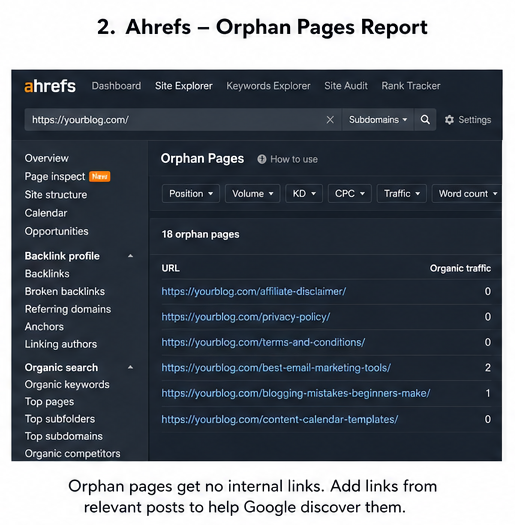
Ahrefs calls a page with no incoming internal links an orphan page. In plain words, it is a good post sitting alone with no road to it.
So, when you learn how to internal link blog posts, think like a shop owner in India, the US, or anywhere else. You place signs where people need them, not where they look pretty.
This internal linking SEO for beginners plan helps readers stay longer. It also helps Google and AI search tools understand which pages matter most.
Start small today: open one old post and add two helpful links. That is the first real step in your internal linking strategy for small blogs.
What Is Internal Linking?
Internal linking in SEO means linking one page on your site to another page on the same site.
For example: your blog post about keyword research can link to your post about SEO tools.
Google uses links to find pages and understand how pages connect. Good link text also helps people and Google know what the next page is about.
Internal Links vs External Links
| Link type | Meaning | Simple example |
|---|---|---|
| Internal link | Sends you to another page on your own site | Blog post → SEO tools page |
| External link | Sends you to another website | Blog post → Google Search Central |
Use internal links when you want readers to stay and learn more.
Use external links when you need to support a point with a trusted source.
Contextual Links vs Navigation Links
Contextual links sit inside your content.
Example: “Use these SEO tools before you write your next post.”
Navigation links sit in your menu, sidebar, footer, or category pages.
Example: Home, Blog, About, Contact.
Related-Post Links vs In-Content Links
Related-post links appear after the article.
They are useful, but many readers may not reach them.
In-content links appear while the reader is learning.
So, they often feel more natural and helpful.
Key Points
- Internal links connect your own pages.
- They help readers find the next useful page.
- They help Google crawl and understand your site.
- Use clear anchor text; avoid “click here.”
- For small blogs, internal linking in SEO works best when every link helps the reader.
Why Internal Linking Matters More for Small Blogs
An internal linking strategy for small blogs matters because your site may not have many backlinks yet. So, you must use the links you already control.
Think of each post like a small shop in a narrow lane. If you do not place signboards, people and Google may miss it.
Google says links help it find new pages and understand what each page is about. Clear anchor text also helps both readers and Google make sense of your content.
Small blogs need this more because every page must work harder. One good link from a strong post can guide traffic to a weaker or newer post.
Yoast explains that internal links help spread link value across your site. In simple words: your best pages can support your hidden pages.
Internal links also reduce dead ends. When a reader finishes one post, you can send them to the next useful guide.
For example, if you write about “blog SEO tips,” link to your “keyword research guide.” This keeps the reader moving instead of leaving.
Here is the simple value:
| Need | How internal links help |
|---|---|
| More page views | Readers visit more posts |
| Faster discovery | Google finds buried pages |
| Better SEO | Strong posts support weak posts |
| Better trust | Your blog feels complete |
Also, avoid orphan pages: these are pages with no internal links pointing to them. Semrush calls them pages separated from the rest of your site.
So, the best move is simple: link old posts to new posts, and new posts back to useful old posts. That is the heart of an internal linking strategy for small blogs.
The Best Internal Linking Structure for a Small Blog
The best internal linking structure for blog growth is simple: make every page easy to reach.
Think of your blog like a small town, not a maze.
Start With Your Homepage
Your homepage is the main road.
It should link to your main categories and your best pillar posts.
Use it to send readers to your strongest topics.
For example: SEO, blogging tools, content writing, or affiliate marketing.
Build Pillar Posts
A pillar post is your main guide on one big topic.
It should answer the broad question first.
Then, it should link to smaller posts.
Google says good link text helps users and Google understand the page you link to.
Example:
| Page Type | Example |
|---|---|
| Pillar post | Complete SEO Guide for Bloggers |
| Supporting post | How to Find Long-Tail Keywords |
| Related post | Best Free Keyword Tools |
Add Supporting Posts
Supporting posts cover small, clear topics.
They usually target long-tail keywords.
For example, your pillar post can be about “blog SEO.”
Your supporting post can be about “topic cluster internal linking.”
Each supporting post should link back to the pillar post.
This tells Google: “This is my main page on this topic.”
Link Related Posts Sideways
Related posts should also link to each other.
This keeps readers moving through your blog.
For example, a post on anchor text can link to a post on orphan pages.
Both help the same reader solve the same SEO problem.
Send Readers to Money Pages Carefully
Money pages include product reviews, service pages, email signup pages, and affiliate pages.
Link to them only when the next step feels useful.
Do not force a sales link into every post.
That feels pushy and weak.
Use This Simple Blog Structure
Use this path:
- Homepage → Category page
- Category page → Pillar post
- Pillar post → Supporting posts
- Supporting posts → Pillar post
- Related posts → Related posts
- Helpful posts → Money pages
Key Takeaway
For a small blog, the best internal linking structure for blog SEO is clean and natural.
Make your reader’s next click feel obvious.
How Many Internal Links Should a Blog Post Have?
Focus keyphrase: how many internal links per blog post
For a small blog, the best answer is simple: add only the links that help the reader move to the next useful page.
Google uses links to find pages and understand what they are about, so your internal links must feel clear and useful.
Simple Rule You Can Use
| Blog Post Length | Safe Internal Link Range |
|---|---|
| 1,000 words | 3–6 useful links |
| 2,000 words | 5–10 useful links |
| New small blog | Link by need, not by count |
So, do not chase a fixed number.
Instead, ask this: “Will this link help the reader right now?”
My Practical Rule
I start with 3 internal links per post.
Then, I add more only when the post naturally opens a new question.
For example, if you write about “blog SEO,” you can link to posts about keyword research, title tags, and image SEO.
But you should not force links to random posts just because they exist.
When Is It Too Many?
Too many internal links can confuse both users and crawlers.
Semrush says hundreds or thousands of links can make it hard to see which links matter.
Best Choice by Skill Level
- Beginner-friendly: add 3 useful links.
- Safest choice: link only when it helps the reader.
- Advanced choice: use an internal link audit to push power to weak posts.
- Fastest choice: update old posts and link them to new posts.
The best internal link ratio is not a formula.
The best answer to how many internal links per blog post is this: use enough links to guide the reader, but not so many that the page feels noisy.
Step-by-Step Internal Linking Strategy for Small Blogs
Your internal linking strategy for small blogs should feel like a clean village road map: every useful post should lead to the next useful post.
Do not link for Google first; link for the reader first, then Google follows the path.
Step 1 — List Your Most Important Pages
First, open a simple sheet and list the pages that matter most.
These are the pages you want readers and Google to find fast.
Add these four page types:
| Page Type | What to Pick |
|---|---|
| Pillar posts | Big guides that explain a full topic |
| Best posts | Posts already getting traffic |
| Money pages | Affiliate, product, service, or email signup pages |
| Almost-ranking posts | Pages stuck on Google page 2 or 3 |
Here is the real trick: do not start with all posts.
Start with the 10 pages that can bring the most value or money.
Step 2 — Group Posts Into Topic Clusters
Next, group your posts like small families.
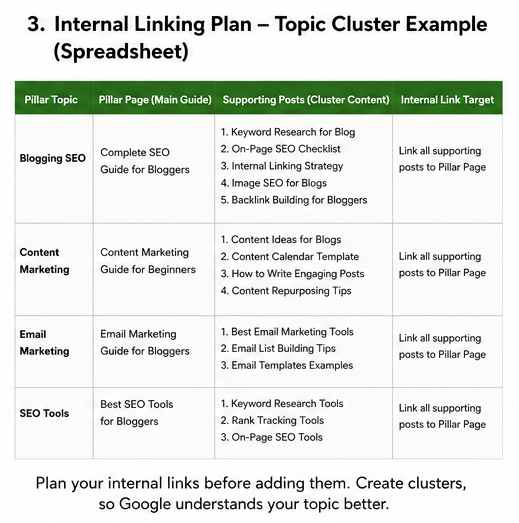
Each family needs one main post and a few support posts.
Example:
- Main topic: Blogging SEO
- Pillar post: Complete SEO Guide for Bloggers
- Support posts: keyword research, title tags, internal linking, image SEO, backlinks
Now link each support post back to the pillar post.
Then link the pillar post back to the best support posts.
This builds a clear topic cluster.
It also helps Google understand your site structure and content depth.
Step 3 — Link From Strong Pages to Weak Pages
Now find your strong pages.
These are pages that already get clicks, backlinks, or steady traffic.
Use Google Search Console for this.
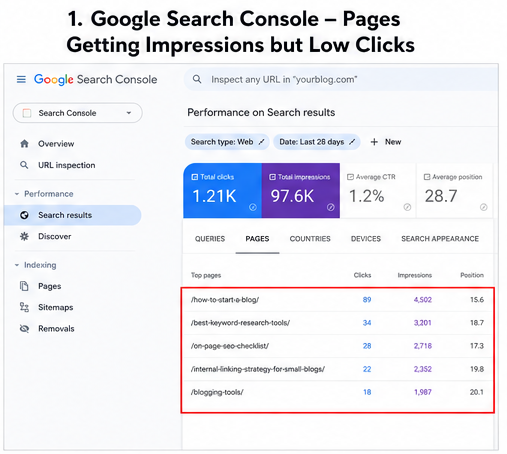
Go to Performance, then find pages with impressions but low clicks.
These pages need help:
- A post ranking at position 11 to 30
- A page with many impressions but poor clicks
- A new post with no internal links
- An orphan page that no post links to
Then add links from strong pages to these weak pages.
Ahrefs and Semrush both recommend fixing orphan pages and adding links from relevant existing pages, not random pages.
Step 4 — Add Contextual Links Naturally
Contextual links work best when they sit inside a useful sentence.
They should feel like advice, not like an SEO trick.
Good example:
Before building backlinks, make sure your on-page SEO basics are fixed.
Bad example:
Click here.
Google says anchor text should be descriptive, short, and relevant to both pages.
So, use words that clearly tell the reader what they will get next.
Use this simple anchor text rule:
- Bad: click here
- Okay: read this guide
- Better: on-page SEO checklist
- Best: beginner on-page SEO checklist for blog posts
Step 5 — Update Old Posts Every Month
Small blogs grow slowly, so old posts must help new posts.
Once a month, spend 30 minutes on internal links.
Do this simple audit:
- Add links from old posts to new posts
- Remove broken internal links
- Replace redirected links with final URLs
- Fix posts with only one incoming internal link
- Add links to pages stuck on page 2 or 3
Do not wait for a full SEO audit.
A monthly 30-minute check is enough for most small blogs.
The best internal linking strategy for small blogs is simple: choose key pages, group related posts, link from strong pages, use clear anchor text, and refresh old posts every month.
Internal Linking Examples for Small Blogs
These internal linking examples show how you can guide readers without forcing links. The goal is simple: help the reader take the next useful step, and help Google understand your site better.
Example 1: Food Blog
Say you run a small food blog. Your main guide is Healthy Meal Prep Guide.
Now link smaller posts to it:
- Vegan Lunch Ideas
- High-Protein Snacks
- Budget Meal Prep Recipes
For example, inside a recipe post, you can write: “Need a full weekly plan? Read this healthy meal prep guide.”
This works because the reader is already thinking about food planning. So the link feels useful, not pushed.
Example 2: Personal Finance Blog
Say your pillar post is Budgeting for Beginners. Your smaller posts can support it like branches on a tree.
Good supporting posts are:
- How to Build an Emergency Fund
- Best Saving Apps
- Debt Payoff Plan
- Monthly Budget Template
For example, in your emergency fund post, link back to your budgeting guide. This tells Google that budgeting is your main topic.
It also helps readers move from one money problem to the next. That builds trust faster.
Example 3: Local Business Blog
Say you own a fence company. Your service page is Fence Installation.
Your blog post is Best Fence Materials for Homes. Add a link only when it helps the reader.
Good example: “If you already picked a material, our fence installation team can help you plan the next step.”
Bad example: “Click here for fence installation.”
Google recommends clear anchor text that helps people and search engines understand the linked page. So use words that explain the page, not vague words like “click here.”
| Blog Type | Page to Link From | Page to Link To | Main Goal |
|---|---|---|---|
| Food blog | Recipe post | Meal prep guide | More guide visits |
| Finance blog | Saving tips post | Budgeting guide | Build topic depth |
| Local business | Material guide | Service page | Get leads naturally |
The best internal linking examples feel like helpful hand signals. You are not pushing readers; you are showing them where to go next.
Common Internal Linking Mistakes to Avoid
Internal linking mistakes can quietly hold your small blog back. So, before you add more posts, fix these simple link problems first.
1. Using Weak Anchor Text
Do not use “click here” or “read more” again and again. Google says good anchor text should be clear, short, and related to the page you link to.
Use words that tell the reader what comes next. For example: use “blog SEO checklist” instead of “click here.”
2. Linking Every Keyword to the Same Page
This looks forced. Also, it makes your blog feel like a sales page.
Link only when the next page truly helps. If the link does not help the reader, remove it.
3. Using the Same Anchor Text for Different Pages
Do not use “SEO tips” for five different posts. Google and readers may get confused.
Give each page its own clear link name. For example: “image SEO tips” and “internal linking tips” are better.
4. Adding Too Many Links in One Paragraph
Too many links feel noisy. The reader does not know where to click.
Use one strong link in one paragraph. Then, let the reader breathe.
5. Forgetting Old Posts
Your old posts are not dead. They can pass value to your new posts.
Each month, open your best old posts. Then, add links to your newer useful posts.
6. Leaving Orphan Pages
An orphan page has no internal links pointing to it. Semrush says these pages are hard for Google to find and crawl.
Fix this fast: link to every important post from at least one related post.
7. Linking to Broken or Redirected URLs
Broken internal links waste trust. Redirect chains also slow the path.
Semrush lists broken links, orphan pages, too many links, nofollow internal links, and internal redirects as common internal link issues.
8. Nofollowing Internal Links
Do not add nofollow to normal internal links. Semrush says you should not use nofollow for internal links in most cases.
9. Linking Only to the Homepage
Your homepage does not need every link. Your helpful posts need links too.
Link to pillar posts, guides, reviews, and service pages when they fit.
Quick Fix Checklist
| Mistake | Better Action |
|---|---|
| “Click here” | Use clear anchor text |
| Orphan pages | Add links from related posts |
| Broken links | Update or remove them |
| Too many links | Keep only useful links |
| Homepage-only links | Link to deeper posts |
Avoid these internal linking mistakes, and your small blog becomes easier to read, crawl, and rank.
Best Tools for Internal Linking on a Small Blog
The best internal linking tools are not always costly tools. For a small blog, you need tools that show three things: which pages get traffic, which pages need links, and which links are broken.
Start with free tools first. Then pay only when your blog has enough posts to save real time.
| Tool | Best For | Cost Level |
|---|---|---|
| Google Search Console | Finding pages with impressions, clicks, and position | Free |
| Google Analytics | Finding popular posts and reader paths | Free |
| Screaming Frog | Finding broken links and crawl issues | Free/paid |
| Ahrefs | Finding orphan pages and link gaps | Paid |
| Semrush | Running an internal link audit | Paid |
| Link Whisper | WordPress internal link ideas | Free/paid |
| Yoast SEO | Basic link ideas while writing | Free/paid |
Use Google Search Console first. It shows queries, impressions, clicks, and average position, so you can find posts that Google already notices but has not ranked well yet.
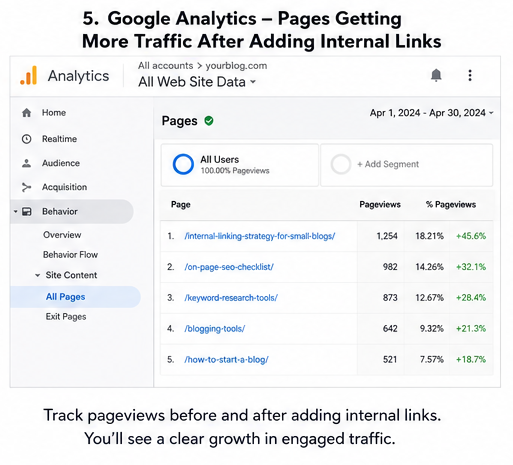
Then use Google Analytics. Its Pages and screens report shows which pages people visit, so you can link from those popular posts to weaker but useful posts.
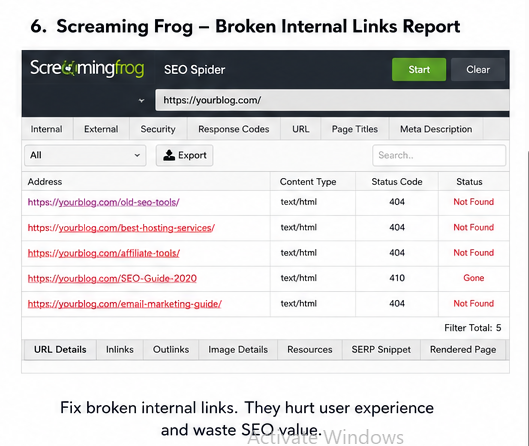
Use Screaming Frog when your blog feels messy. The free version crawls up to 500 URLs, which is enough for most small blogs.
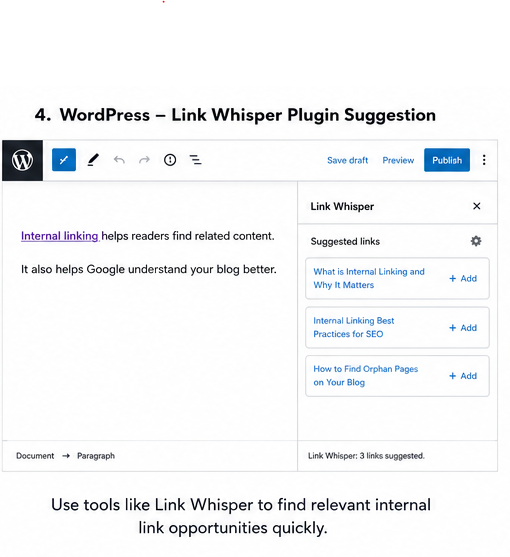
Use Link Whisper if you run WordPress and hate manual link hunting. Its WordPress plugin helps find internal link chances faster, and the plugin page says it is used by 50,000+ site owners.
Use Yoast SEO Premium if you already write inside WordPress. Its internal linking feature suggests related posts while you write, which saves time.
My honest pick is simple: use Search Console, Analytics, and Screaming Frog first. Add a WordPress internal linking plugin only when your blog crosses 50 posts.
Key point: the best internal linking tools do not replace your judgment. They only point to pages; you still choose links that help the reader.
Internal Linking Checklist for Every New Blog Post
Use this internal linking checklist before you hit publish. It takes 10 minutes, but it can save a weak post from getting lost.
First, link your new post to 1 pillar page. This tells Google and your reader: “This post belongs to this main topic.”
Next, link to 1–3 related supporting posts. Pick posts that truly help the reader take the next step.
Then, go back to 2–3 old posts and link them to your new post. This is the step most small bloggers skip.
Use clear anchor text. Google says anchor text should help people and search engines understand the page you link to.
Do not use lazy words like “click here.” Use words like “blog SEO checklist” or “keyword research guide” instead.
Also, do not repeat the same anchor text again and again. Mix it in a natural way, like you speak.
Check every link before publishing. One wrong link can send your reader to the wrong page and break trust fast.
Keep important posts within 3 clicks from your homepage when you can. This helps readers and crawlers reach your best content faster.
Place links where they fit the sentence. A good internal link feels like a helpful road sign, not an ad.
Quick checklist:
- Add 1 pillar page link.
- Add 1–3 related post links.
- Add links from 2–3 old posts.
- Use simple anchor text.
- Avoid “click here.”
- Test every link.
- Keep key posts easy to reach.
- Link only where it helps.
In short, this internal linking checklist keeps your blog clean, useful, and easier to crawl.
Internal Linking Strategy by Blog Size
Your internal linking strategy for small blogs should grow with your blog. So, do not use a big-site SEO plan when you have only 10 posts.
Google uses links to find pages and understand page meaning. So, every useful post needs at least one clear path from another page.
Best Strategy by Blog Size
| Blog Size | Best Strategy |
|---|---|
| 1–10 posts | Link only when it helps the reader. First, build clear blog categories. |
| 10–30 posts | Create 2–3 small topic clusters. Then, link old posts to new posts. |
| 30–100 posts | Check orphan pages every month. Also, send more links to pillar posts. |
| 100+ posts | Use tools, sheets, and crawl reports. Now, treat links like site plumbing. |
1–10 Posts: Keep It Natural
At this stage, your blog is still a small house. So, do not add links just to look “SEO smart.”
Link only when the next post truly helps. For example: a post on “blog SEO basics” can link to “keyword research for beginners.”
10–30 Posts: Build Small Clusters
Now, you can group posts by topic. For example: one cluster for keyword research, one for content writing, and one for blog SEO.
Each support post should link to the main guide. Also, the main guide should link back to the support posts.
30–100 Posts: Fix Orphan Pages
This is where small blogs start leaking traffic. An orphan page has no internal links pointing to it, so users and search engines may miss it.
Semrush says pages with only one internal link can be harder for search engines to find and treat as important. So, check these pages during your monthly content update.
100+ Posts: Use a System
At 100+ posts, memory will fail you. So, use Google Search Console, Screaming Frog, Ahrefs, Semrush, or a simple spreadsheet.
Your job is simple: find weak pages, find strong pages, then connect them with useful links. This is the safest internal linking strategy for a niche site.
Quick Decision Guide
- Cheapest choice: Google Search Console plus a manual sheet.
- Fastest choice: a WordPress internal linking plugin.
- Safest choice: manual links inside helpful sentences.
- Expert choice: crawl audit plus topical authority map.
Key Takeaway
Start small, then add structure. The best internal linking strategy for small blogs is not more links; it is better links.
How to Measure If Internal Linking Is Working
You can measure internal linking SEO with one simple habit: write down the day you added the links. Then check the same pages after 30, 60, and 90 days.
Do not judge it in one week. Google Search Console often needs more time to show a fair trend.
Track These Simple Numbers
| What to check | Where to check | Good sign |
|---|---|---|
| Indexed pages | Google Search Console | More useful pages appear in Google |
| Organic clicks | Performance report | Clicks go up |
| Average position | Performance report | Ranking number moves closer to 1 |
| Pageviews per session | Google Analytics | Readers visit more pages |
| Time on site | Google Analytics | Readers stay longer |
| Important page clicks | GA4 events | Money pages get more visits |
| Orphan pages | SEO audit tool | Orphan pages go down |
| Linked page ranking | Search Console | Target pages improve |
Google says links help it find pages and understand your site. So, your first win is simple: more key pages should get found and crawled.
Use a Before and After Check
Open Google Search Console. Go to Performance, pick the linked page, and compare dates.
Use this clean test:
- Day 0: add internal links
- Day 30: check clicks and impressions
- Day 60: check average position
- Day 90: decide if you need more links
Also, check orphan pages. Ahrefs defines an orphan page as a page with no incoming internal links, so your goal is to bring that number down.
Here is my blunt rule: if a linked page gets more impressions but no clicks, your title may be weak. If it gets no impressions, your link may be buried, weak, or not relevant.
So, measure internal linking SEO like a small shop owner checks sales: note the date, watch the numbers, and fix only what the data proves.
How to Check Whether Your Internal Links Are Indexable?
Check for rel="nofollow" on internal links. A nofollow attribute tells search engines not to follow that link. As a result, the linked page may receive less crawling attention and does not receive the full SEO value that a normal internal link can pass. Use regular, followable internal links unless you have a specific reason to use nofollow.
FAQ
Are internal links good for small blogs?
Yes, internal links are very good for small blogs. They help Google find your posts, and they help readers move to the next useful page.
A smart internal linking strategy for small blogs also builds trust between related posts. Google says good links help both users and search engines understand your site.
How many internal links should I add per post?
Add 3 to 6 internal links in a normal 1,000-word post. But first, ask this: “Will this link help the reader right now?”
For longer posts, use 5 to 10 links. Still, do not add links just to fill space.
Should I link to my homepage from every blog post?
You can, but you do not need to force it. Your menu, logo, and breadcrumbs often already link to your homepage.
Instead, link to your best guide, service page, or related post. That helps the reader more.
Can too many internal links hurt SEO?
Yes, too many links can make the page feel messy. Also, readers may not know where to click next.
Use this simple rule: one clear link is better than five weak links. Link only when the next page adds real value.
What is the best anchor text for internal links?
The best anchor text tells the reader what they will get. Google recommends anchor text that is clear, short, and relevant.
Use words like internal linking checklist or SEO title guide. Avoid empty words like click here or read more.
Should internal links open in a new tab?
No, internal links should usually open in the same tab. This feels normal for readers.
Use a new tab mostly for external links. That way, your blog flow stays clean.
How often should I update internal links?
Update internal links once every month. Also, update them whenever you publish a new post.
A simple habit works well: after publishing one new post, add links from 3 old posts to it.
Do internal links help new posts get indexed?
Yes, they can help. Google can find a new post faster when an old indexed post links to it.
For best results, link from a strong old post. Then submit the new URL in Google Search Console.
Are related posts enough for internal linking?
No, related posts are helpful, but they are not enough. Contextual links inside the article are stronger for readers.
So, use both: in-text links and related-post blocks. This gives readers two easy paths.
What are orphan pages?
Orphan pages are posts with no internal links pointing to them. Yoast says these pages are harder for users and Google to find.
Fix them first in your internal linking strategy for small blogs. Find lonely posts, then link to each one from a related article.
Final Takeaway
Your internal linking strategy for small blogs should stay simple: link pages that truly help each other.
So, do not build a big SEO system first; build a clear path for your reader.
Use helpful anchor text, because Google says link text helps users and Google understand the page you link to.
Also, give every important post at least one link from another post, so it does not sit alone.
Here is the easy rule:
- Link new posts to old posts.
- Link old posts back to new posts.
- Link small posts to pillar posts.
- Use words people understand.
In short, the best internal linking strategy for small blogs is this: help the reader move to the next useful page.