In earlier content, we discussed about On-page SEO and Off-page SEO. Here we discuss on technical SEO which all bloggers couldn’t be perfect but I cover here for new blogs.
Technical SEO improves a website’s infrastructure so search engines can crawl, render, index, and rank its pages efficiently. It also makes websites faster, more secure, and easier to use. Without good technical SEO, even excellent content may struggle to appear in search results. This guide explains how technical SEO works, why it matters, its key components, common mistakes, essential tools, and 2026 best practices.
So, before audit the technical SEO, first of all, submit your site/blog/website to Search engines.
Technical SEO Quick Facts
| Item | Details |
|---|---|
| Purpose | Improve crawling, indexing, rendering, and website performance |
| Primary Goal | Help search engines discover and understand every important page |
| Main Search Engines | Google, Bing, DuckDuckGo and AI-powered search systems |
| Key Technologies | HTML, XML Sitemap, robots.txt, HTTPS, Schema Markup, Core Web Vitals |
| Related SEO Types | On-page SEO, Off-page SEO, Content SEO |
| Best For | Blogs, business websites, eCommerce, SaaS, news sites, portfolios |
What Is Technical SEO?
Technical SEO focuses on optimizing your website’s backend structure rather than its written content. It helps search engines such as Google and Bing access pages, understand relationships between them, and include the right pages in search results.
It also improves user experience by increasing page speed, strengthening security, fixing crawl issues, and ensuring the website works well on desktops, tablets, and smartphones.
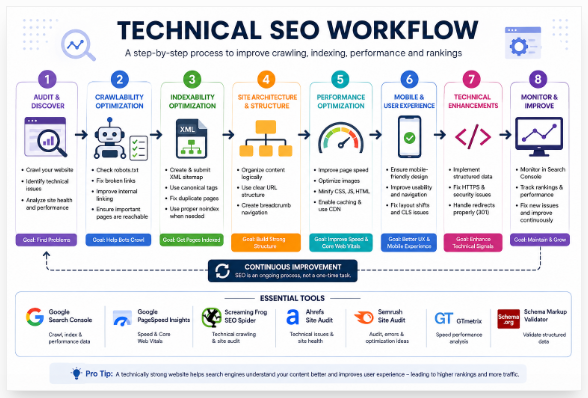
How Technical SEO Works
When someone searches online, search engines generally follow four steps:
- Discover pages through links and XML Sitemaps.
- Crawl pages using automated bots such as Googlebot.
- Render HTML, CSS, and JavaScript to understand page content.
- Index useful pages and rank them based on hundreds of relevance and quality signals.
Technical SEO improves every stage of this process, making it easier for search engines to process your website efficiently.
Why Technical SEO Matters
A technically optimized website benefits both search engines and visitors.
Key advantages include:
- Faster page loading
- Better crawl efficiency
- Higher indexing rate
- Improved Core Web Vitals
- Better mobile usability
- Stronger HTTPS security
- Rich results through structured data
- Lower bounce rates
- Better user experience
- Greater long-term organic visibility
Evolution of Technical SEO
| Year | Milestone |
|---|---|
| 1998 | Early search engines relied mainly on HTML links for crawling. |
| 2005 | XML Sitemaps became widely supported. |
| 2014 | HTTPS became a Google ranking signal. |
| 2018 | Google introduced Mobile-First Indexing. |
| 2021 | Core Web Vitals became part of Google’s ranking systems. |
| 2023 | AI-powered search increased the importance of structured data and semantic HTML. |
| 2025–2026 | Technical SEO increasingly supports AI Overviews, generative search, and machine-readable content. |
Core Components of Technical SEO
| Component | Why It Matters |
|---|---|
| Crawlability | Helps bots reach important pages. |
| Indexability | Ensures valuable pages appear in search results. |
| Site Architecture | Organizes pages for users and crawlers. |
| URL Structure | Creates readable, consistent URLs. |
| XML Sitemap | Lists important pages for discovery. |
| robots.txt | Controls crawler access. |
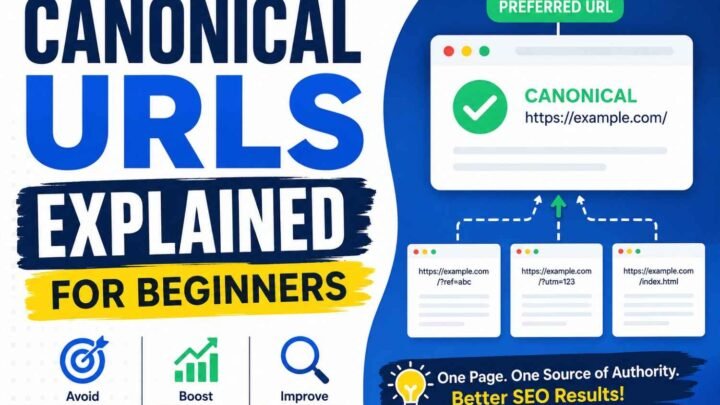
| Canonical Tags | Prevent duplicate-content issues. |
| HTTPS | Protects user data and builds trust. |
| Page Speed | Improves rankings and user satisfaction. |
| Mobile Optimization | Supports Google’s mobile-first indexing. |
| Structured Data | Enables rich results and better content understanding. |
| Internal Linking | Distributes authority and improves navigation. |
Technical SEO vs On-Page SEO
| Technical SEO | On-Page SEO |
|---|---|
| Optimizes website infrastructure | Optimizes page content |
| Improves crawling and indexing | Improves relevance for keywords |
| Focuses on speed, security, and architecture | Focuses on headings, metadata, and content quality |
| Uses Schema, XML Sitemaps, and canonical tags | Uses titles, headings, images, and internal links |
Strong SEO requires both. Technical SEO makes pages accessible, while on-page SEO helps them satisfy search intent.
Technical SEO Checklist
Review your website regularly using this checklist:
- HTTPS enabled
- XML Sitemap submitted
- robots.txt configured correctly
- Canonical tags implemented
- No broken internal links
- No orphan pages
- Fast loading pages
- Responsive mobile design
- Core Web Vitals performing well
- Structured data validated
- Clean URL structure
- Optimized images (WebP or AVIF)
- Minimal redirect chains
- Few or no 404 errors
Common Technical SEO Mistakes
Many ranking problems come from avoidable technical issues.
Common examples include:
- Blocking important pages in robots.txt
- Missing XML Sitemap
- Slow web hosting
- Oversized images
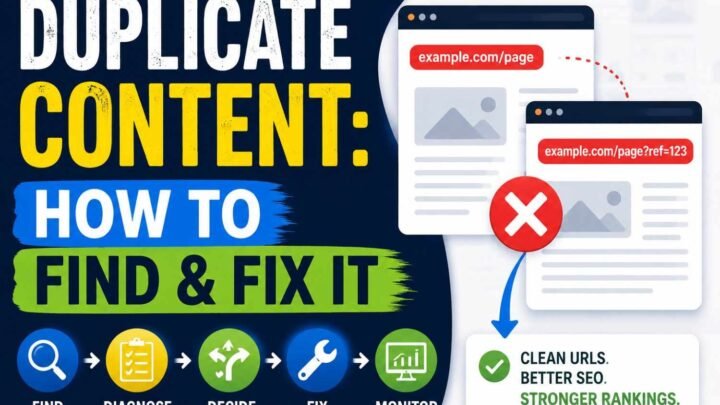
- Duplicate URLs
- Broken redirects
- Incorrect canonical tags
- Heavy JavaScript delaying rendering
- Poor internal linking
- Missing Schema Markup
Regular technical audits help identify and fix these problems before they affect search visibility.
Best Technical SEO Tools
| Tool | Primary Use |
|---|---|
| Google Search Console | Crawl reports, indexing, search performance |
| Google PageSpeed Insights | Speed and Core Web Vitals |
| Lighthouse | Performance, accessibility, SEO audits |
| Screaming Frog SEO Spider | Technical site crawling |
| Ahrefs Site Audit | Website health monitoring |
| Semrush Site Audit | Technical issue detection |
| GTmetrix | Speed analysis |
| Bing Webmaster Tools | Bing indexing and diagnostics |
Technical SEO in 2026
Technical SEO now supports both traditional search engines and AI-powered search experiences. Well-structured HTML, semantic headings, Schema Markup, fast servers, and strong internal linking help AI systems understand, summarize, and reference your content more accurately.
As search increasingly combines traditional rankings with AI-generated answers, technical SEO has become a long-term investment in visibility across multiple search platforms.
Frequently Asked Questions
Is technical SEO difficult?
Basic tasks such as submitting an XML Sitemap or enabling HTTPS are beginner-friendly. Advanced work—including server optimization, JavaScript rendering, and large-scale migrations—usually requires developer expertise.
How often should you perform a technical SEO audit?
Small websites should audit every three to six months. Large, eCommerce, or frequently updated websites benefit from monthly audits.
Can technical SEO improve rankings without creating new content?
Yes. Fixing crawl, indexing, speed, and usability issues can improve visibility, but combining technical SEO with helpful content and quality backlinks delivers the strongest long-term results.
Is technical SEO still important in 2026?
Yes. AI-powered search has increased the value of clean site architecture, structured data, fast performance, and crawl-friendly websites.
Key Takeaways
Technical SEO forms the foundation of successful search optimization. It helps search engines discover, crawl, render, and index your pages while improving speed, security, and usability for visitors. Whether you run a personal blog, business website, online store, or SaaS platform, maintaining a technically healthy website improves organic visibility today and prepares your content for both traditional search engines and AI-driven search experiences.