A few years ago, I thought starting a YouTube channel was something only tech experts, celebrities, or people with expensive cameras could do. Then I watched a teenager recording videos in a small bedroom with nothing more than a phone and a cheap microphone. That made me realize something: starting a YouTube channel is actually the easy part.
The hard part isn’t clicking the “Create Channel” button. It’s showing up again tomorrow. And next week. And next month when your video gets 17 views and 2 of them are probably from your family.
If you’re wondering how to start a YouTube channel in 2026, you’re not alone. People still ask, “Is it too late to start YouTube?” Honestly, no. New creators are growing every day. The platform is crowded, sure, but there are also more viewers than ever looking for helpful, entertaining, and genuine content.
The creators who succeed aren’t always the most talented. They’re usually the ones who have a clear topic, keep learning, and stay consistent even when growth feels painfully slow.
So if you’ve been thinking about starting a YouTube channel, don’t wait for the perfect camera, perfect room, or perfect confidence. Most successful channels didn’t begin that way. They started with one simple video and a person willing to press “Publish.”
This guide will walk you through every step, from choosing a niche and setting up your channel to creating videos, getting subscribers, and building something that can grow over time.
What Do You Need Before Starting a YouTube Channel?
When people think about starting a YouTube channel, they often imagine expensive cameras, fancy lights, and a room that looks like a professional studio. I used to think the same thing. Honestly, that belief stops a lot of beginners before they even upload their first video.
The truth? You don’t need most of that stuff.
At the very beginning, all you really need is a Google account. That’s what you’ll use to create and manage your YouTube channel. If you already use Gmail, you’re halfway there.
Next comes a device to record videos. A good smartphone is more than enough for many new creators. In fact, thousands of successful channels started with nothing but a phone camera. If your phone records clear video and decent sound, you’re ready to go.
Speaking of sound, a basic microphone can make a bigger difference than an expensive camera. People will often forgive average video quality, but they’ll quickly click away if they can’t hear you properly. Even an affordable clip-on microphone can help.
You’ll also need a stable internet connection for uploading videos. Some videos can take a while to upload, especially if they’re longer, so patience helps too.
Before recording anything, spend some time thinking about your niche. What do you enjoy talking about? What problems can you help people solve? Picking a clear topic makes it easier for viewers to understand why they should subscribe.
For editing, don’t overcomplicate things. Free apps like CapCut, VN, or DaVinci Resolve are powerful enough for beginners. Learn the basics first. Fancy editing can come later.
And here’s the one thing most YouTube channel requirement lists forget to mention: time and consistency.
You don’t need a ₹1 lakh camera setup. You don’t need a studio. What you do need is the willingness to keep showing up, even when your first few videos get only a handful of views.
A simple phone, a basic microphone, a good idea, and the patience to keep creating—that’s a much better start YouTube channel checklist than most people realize.
Step 1: Choose the Right YouTube Niche
If there’s one mistake I see beginners make all the time, it’s starting a YouTube channel without choosing a clear niche first.
I get it. When you’re excited about YouTube, you want to talk about everything. One day it’s technology. The next day it’s motivation. Then maybe a cooking video appears out of nowhere.
The problem? Your audience gets confused.
Imagine subscribing to a channel because of a helpful smartphone review, then suddenly seeing videos about gardening and stock market tips. Most people won’t stick around.
That’s why choosing the right niche matters.
A simple way to pick your niche is to look at three things:
- What do you enjoy talking about?
- What do you know something about?
- What are people actively searching for?
The sweet spot is where all three meet.
For example, if you love cooking and your friends always ask for your recipes, that’s a good sign. If you’re constantly reading about AI tools and testing them for fun, maybe that’s your niche. If you’ve worked in farming, government jobs, education, finance, or technology, you already have knowledge that other people may find useful.
One thing I wouldn’t recommend is copying big YouTubers just because they’re getting millions of views.
A lot of beginners see a famous creator making daily vlogs or expensive challenge videos and think, “I’ll do the same.”
Honestly, that’s usually a fast way to get frustrated.
Big creators have teams, editors, money, and years of experience. You’re starting from zero. Your goal isn’t to become them. Your goal is to build something that feels natural to you.
Another trick that helped me understand niche selection is this:
Ask yourself, “Can I make 50 videos about this topic?”
Not five.
Not ten.
Fifty.
If the answer is no, the niche may be too broad or you may not be interested enough to stay consistent.
Let’s say you choose “smartphones.” You can create reviews, comparisons, tips, hidden features, buying guides, troubleshooting videos, and much more. That’s dozens of video ideas already.
But if your niche is too narrow, you may run out of ideas after a few uploads.
Here are some popular YouTube niche ideas that continue to attract viewers:
| Niche | Beginner Difficulty | Monetization Potential | Video Ideas |
|---|---|---|---|
| Education | Medium | High | Exam tips, tutorials, skill training |
| Technology | Medium | High | Mobile reviews, AI tools, gadget comparisons |
| Cooking | Easy | Medium-High | Recipes, kitchen hacks, meal prep |
| Finance | Medium-Hard | High | Saving money, investing basics, budgeting |
| Motivation | Easy | Medium | Success stories, productivity tips |
| Vlogging | Easy | Medium | Daily life, travel, personal experiences |
| Product Reviews | Easy | High | Product testing, comparisons, recommendations |
| AI Tools | Easy-Medium | High | AI tutorials, tool reviews, productivity hacks |
| Farming | Medium | Medium-High | Crop tips, equipment reviews, success stories |
| Jobs & Careers | Easy-Medium | High | Job updates, interview tips, career guidance |
| Local News | Medium | Medium | Community updates, local events, public issues |
Don’t spend weeks trying to find the “perfect” niche.
Most successful creators adjust along the way anyway.
Pick something you genuinely enjoy, make a few videos, pay attention to what people watch, and improve from there. Your first niche doesn’t have to be perfect. It just has to be good enough to get started.
Step 2: Understand Your Target Audience
One mistake I see a lot of new YouTubers make is trying to create videos for “everyone.”
Sounds nice, right? More people, more views.
But that’s usually where things start going wrong.
Think about it. If you’re talking to everyone, you’re really talking to no one. Your videos become too broad, too general, and people don’t feel like they’re made for them.
Before you record your first video, spend a little time figuring out exactly who you want to help, entertain, or teach.
Ask yourself a few simple questions:
- How old are they?
- What language do they speak?
- What problems are they trying to solve?
- Where do they live?
- What are they interested in?
Let’s say you want to start an English-learning channel. That’s still a huge audience.
Now narrow it down.
Maybe you’re helping Telugu-speaking students improve their English for job interviews. See the difference? Suddenly your content becomes much more focused and useful.
The same thing applies to almost any niche.
A fitness channel could target busy office workers.
A cooking channel could help college students make cheap meals.
A technology channel could focus on beginners who don’t understand complicated tech terms.
The more clearly you understand your audience, the easier it becomes to come up with video ideas.
When I get stuck for content ideas, I don’t guess. I look at what people are already asking.
A simple trick is to type a topic into YouTube search and watch the suggestions appear. Those suggestions come from real searches people make every day.
For example, if you type “how to learn English,” YouTube might suggest:
- how to learn English speaking at home
- how to learn English fast
- how to learn English for beginners
That’s free audience research right there.
Another place I like checking is the comments section of popular videos. People openly share their struggles, questions, and frustrations.
You can also browse Reddit, Quora, and Google’s “People Also Ask” section. Sometimes you’ll find dozens of video ideas in just a few minutes.
Pay attention to the exact words people use. Those words often become great video titles later.
At the end of the day, YouTube audience research isn’t about chasing views. It’s about understanding real people.
When you know who you’re talking to, creating content feels much easier. Your videos become more helpful, your titles become clearer, and viewers start feeling like you actually understand them.
And honestly, that’s what keeps people coming back.
Read More: How to Create a AI Images?
Step 3: Create Your YouTube Channel
Now comes the fun part. You finally get to create your YouTube channel.
Honestly, this step takes only a few minutes. When I created my first channel, I spent more time thinking about the channel name than actually setting it up. The technical part is surprisingly easy.
If you’ve never done it before, don’t worry. Just follow these simple steps.
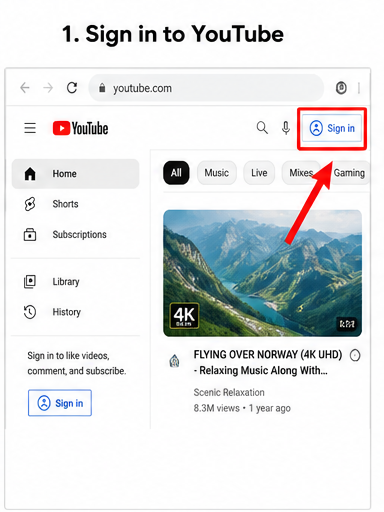
1. Sign in to YouTube
Go to YouTube and sign in with your Google account.
If you already use Gmail, you don’t need to create anything new. Your Google account works automatically with YouTube.
A lot of beginners think they need some special YouTube account. You don’t. A regular Google account is enough to get started.
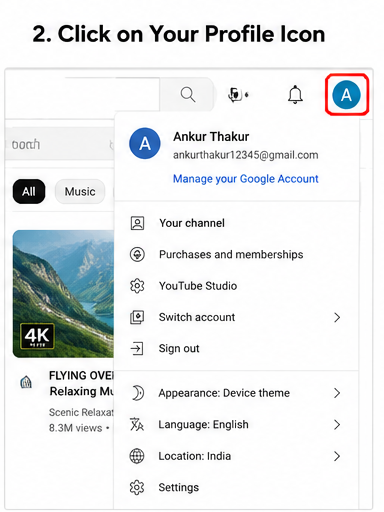
2. Click Your Profile Picture
Look at the top-right corner of the screen.
You’ll see your profile picture or a small circle with your initial on it. Click it.
A menu will appear with several options.
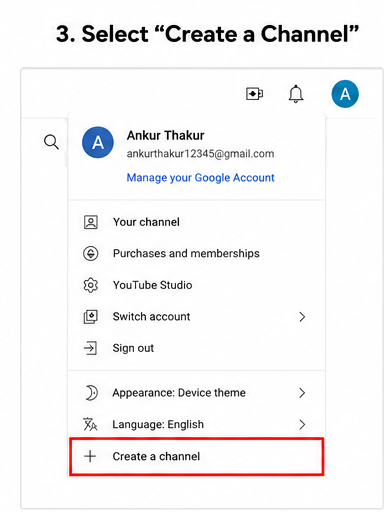
3. Click “Create a Channel”
You should see an option called “Create a Channel.”
Click it.
YouTube will ask for some basic information. Nothing complicated here.
Just follow the prompts on the screen.
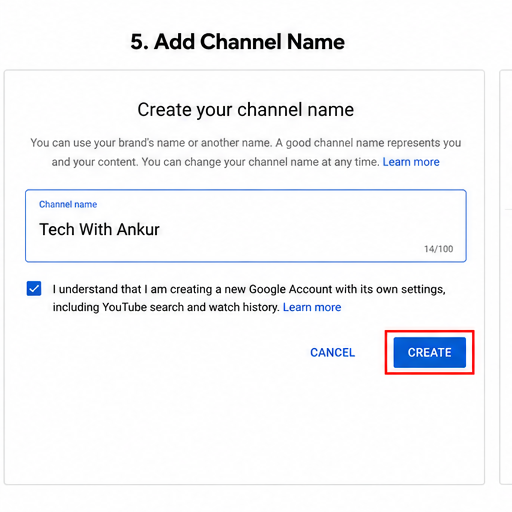
4. Add Your Channel Name
This part matters more than people think.
Choose a name that’s easy to remember and easy to spell. Imagine someone hearing your channel name in a video and then searching for it later.
If they can’t spell it, they probably won’t find it.
For example:
- Good: “Simple Cooking Tips”
- Good: “Tech With Ravi”
- Not so good: “XxProCreator2026xX”
Keep it clean and simple.
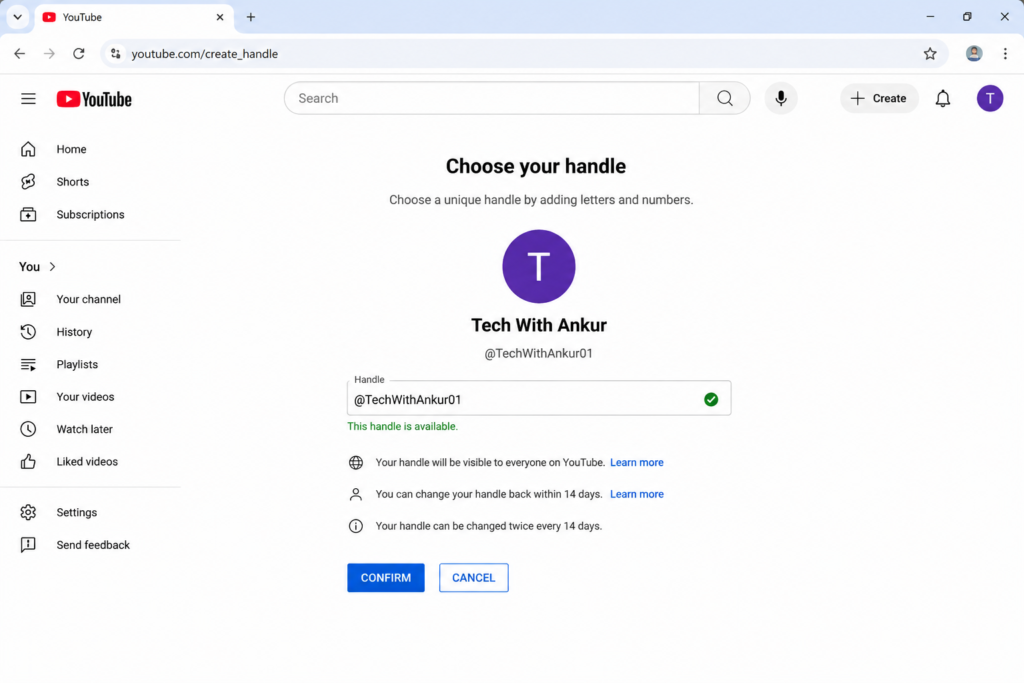
5. Choose Your Handle
Your handle starts with the @ symbol.
Something like:
- @TechWithRavi
- @DailyFitnessTips
- @LearnEnglishEasy
Try to keep it close to your channel name so people can recognize you easily across different platforms.
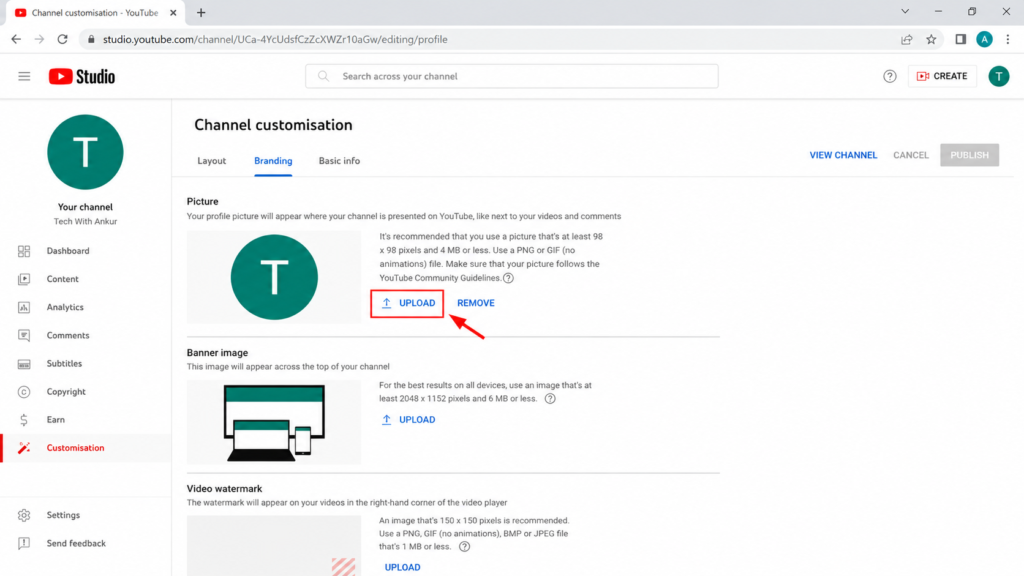
6. Upload a Profile Picture
Please don’t skip this.
Channels without a profile picture often look unfinished.
You don’t need a professional logo on day one.
A clear photo of yourself works perfectly if you’re building a personal brand. If you’re creating a business channel, a simple logo is fine.
The goal is to make your channel look real and trustworthy.
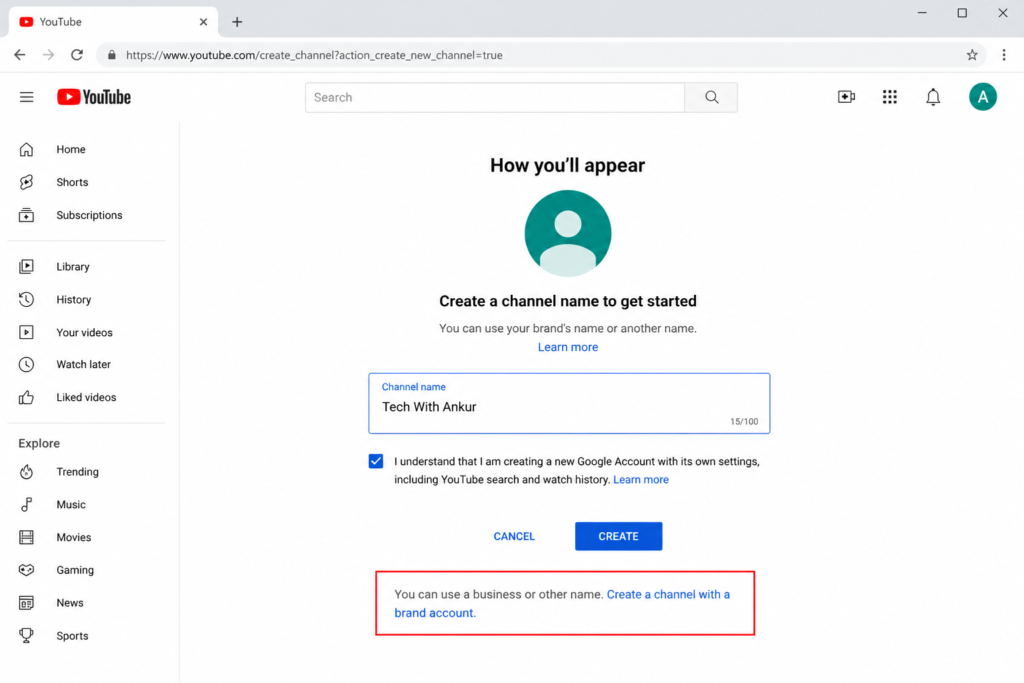
7. Create a Brand Account (Optional)
If you’re building a channel for a business, website, team, or company, consider creating a Brand Account.
The nice thing about a Brand Account is that multiple people can help manage the channel later.
For example, if your channel grows and you hire an editor or social media manager, you won’t have to share your personal Google password.
Most solo creators can start with a regular channel and switch later if needed.
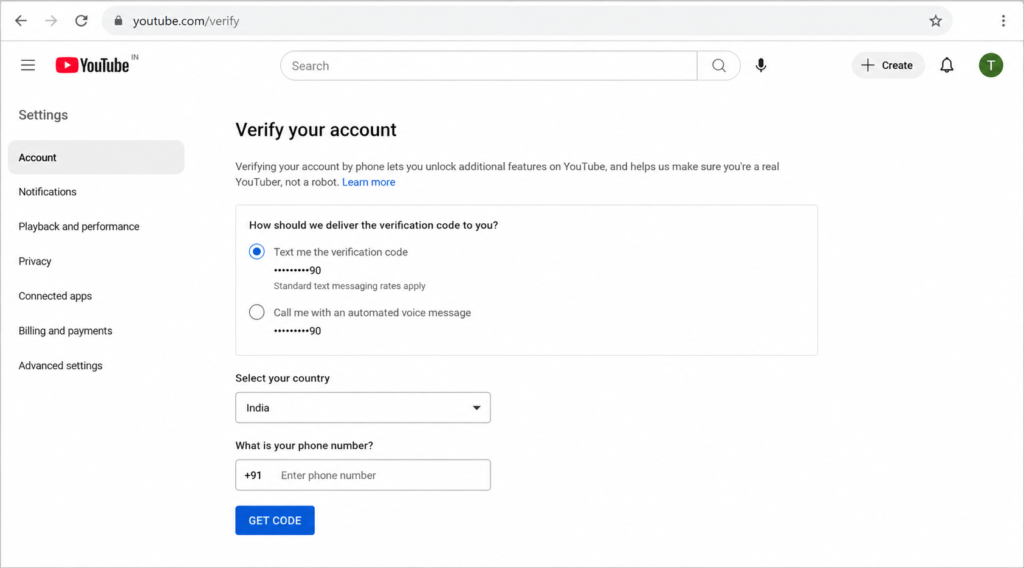
8. Verify Your Account
This is one step many beginners forget.
Go to YouTube verification settings and verify your phone number.
Verification unlocks useful features such as:
- Custom thumbnails
- Longer video uploads
- Live streaming
- Extra channel features
It’s free and only takes a minute.
Quick YouTube Channel Setup Checklist
Before moving to the next step, make sure you have:
✅ Signed in with your Google account
✅ Created your channel
✅ Added a channel name
✅ Selected your handle
✅ Uploaded a profile picture
✅ Verified your account
✅ Chosen whether you need a Brand Account
At this point, your YouTube channel officially exists.
That’s a great feeling, honestly.
The hardest part for many people isn’t creating the channel. It’s finally deciding to start. Once you’ve done that, you’re already ahead of thousands of people who keep saying they’ll start “someday.”
Step 4: Choose a Memorable Channel Name
Picking a YouTube channel name sounds easy until you actually sit down and try to come up with one. I remember helping a friend start a channel, and we spent almost two hours throwing ideas around. Every name either sounded boring, was already taken, or felt way too complicated.
The truth is, your channel name doesn’t have to be perfect. It just needs to be easy for people to remember.
Try to keep it short. If someone watches your video today, can they remember your channel name tomorrow without writing it down? That’s a good test. Names like “Tech With Ravi” or “Simple Cooking Tips” are much easier to remember than something long and confusing.
Make sure it’s easy to spell too. If viewers can’t type it correctly when searching, you’re making their job harder. I’ve seen channels use strange spellings just to look unique. Most of the time, it creates more problems than benefits.
Your name should also match your content. If you’re planning to share fitness videos, a name related to health, workouts, or your personal brand makes sense. If you’re creating gaming content, your channel name should give people a small clue about what they’ll find there.
One thing I’d avoid is adding random numbers and symbols unless there’s a real reason. A name like “GamingMaster45892X” isn’t very memorable. Simple almost always wins.
A question many beginners ask is, “Should I use my real name on YouTube?” Honestly, it depends. If you’re building a personal brand, your real name can work really well. But if you want more flexibility to cover different topics later, a niche-related name might be the better choice.
Before making a final decision, check whether the name is available on YouTube, Instagram, and as a website domain. Even if you don’t need a website today, you might want one later. It’s nice when everything matches.
Don’t overthink this step for weeks. Pick a good name, start creating videos, and let your content become the reason people remember you.
Step 5: Set Up Channel Branding
A lot of new creators spend hours worrying about cameras, editing software, and fancy gear. I get it. I did the same thing when I first started creating content online. But honestly? One of the easiest ways to make your YouTube channel look professional is getting your branding right.
Think about it. When someone lands on your channel, they see your profile picture, banner, and channel description before they watch a single video. Those few seconds matter.
Choose a Clear Profile Picture
Your profile picture is like your channel’s face.
If you’re building a personal brand, use a clear photo of yourself. Don’t use a blurry image cropped from a group photo. People want to see who they’re learning from or following.
If you’re creating a business or niche channel, a simple logo can work well too.
A quick tip: make sure your image still looks good when it’s tiny. Most people will first see it on their phone.
Create a Simple YouTube Banner
Your YouTube banner sits at the top of your channel page. It’s one of the first things visitors notice.
You don’t need an expensive designer. Free tools like Canva can help you create a professional-looking banner in minutes.
Your banner should tell people:
- What your channel is about
- Who it’s for
- How often you upload
For example:
Helping Beginners Learn Blogging & SEO
New Videos Every Week
That’s simple. No fancy words. No confusion.
If you’re wondering about YouTube banner size, the recommended size is 2560 x 1440 pixels.
Pick Consistent Brand Colors
You don’t need a full marketing team to choose colors.
Just pick two or three colors and stick with them.
Maybe blue and white. Maybe black and yellow. Whatever fits your personality and niche.
Use the same colors in your banner, thumbnails, logo, and social profiles. Over time, people start recognizing your content instantly. That’s how branding slowly works.
Write an About Section That Sounds Human
A surprising number of channels leave this section empty.
That’s a mistake.
Tell people who you are, what they’ll learn, and why they should subscribe.
Keep it simple. Imagine introducing yourself to someone at a coffee shop.
Here’s a copy-paste template you can customize:
About Section Template
“Hi, I’m [Your Name].
On this channel, I share videos about [Topic/Niche] to help beginners learn faster and avoid common mistakes.
You’ll find practical tips, step-by-step tutorials, and real experiences that actually work.
New videos every [Week/Day].
Subscribe and join me as we learn and grow together.”
Add a Channel Trailer
A channel trailer is a short video that introduces your channel.
It doesn’t need movie-level production.
Just spend 30–60 seconds explaining:
- Who you are
- What your channel covers
- Why someone should subscribe
That’s enough.
Some creators overcomplicate this part and never publish anything. Don’t fall into that trap.
Add Helpful Links
If you have a blog, website, Instagram page, Facebook page, or newsletter, connect them to your channel.
People often want to learn more about you after watching a video.
Make it easy for them.
Make One Clear Promise
Before someone subscribes, they should know exactly what they’re getting.
Try something simple like:
- New videos every week about blogging and SEO.
- Easy fitness tips for busy people.
- Simple English lessons for beginners.
- Honest tech reviews and tutorials.
A clear promise attracts the right audience and keeps expectations realistic.
Your channel branding doesn’t have to be perfect on day one. Mine certainly wasn’t. Start simple, stay consistent, and improve little by little. Most successful YouTubers didn’t begin with amazing branding. They built it over time.
Step 6: Plan Your First 10 Videos
One mistake I see many new creators make is spending hours setting up their channel and then sitting there thinking, “Okay… now what do I upload?”
That blank-screen feeling is real.
The easiest way to avoid it is to plan your first 10 videos before you publish anything. You don’t need 100 ideas. Just 10. That’s enough to build momentum and stop yourself from quitting after the first week.
When I look at successful small channels, most of them didn’t start with fancy equipment or perfect editing. They started with a simple plan.
A good YouTube content plan usually includes three types of videos:
- Problem-solving videos
- Beginner guides
- Personal stories or experiences
This mix works because people come to YouTube for help, but they subscribe because they connect with the person behind the channel.
Start With Searchable Videos
Your first videos shouldn’t be random.
Nobody knows who you are yet, so don’t expect people to search for your name. Instead, create videos that answer questions people are already typing into YouTube.
Think about what your audience wants to learn, fix, or understand.
If your channel is about fitness, people may search for:
- How to lose belly fat at home
- Beginner workout routine
- Best exercises for weight loss
If your channel is about blogging, they may search for:
- How to start a blog
- Best blogging tips for beginners
- How to get traffic to a new blog
These are the kinds of videos that can bring viewers from search even when your channel has zero subscribers.
Create 5 Problem-Solving Videos
For your first ten uploads, try making five videos that solve a specific problem.
People love solutions.
Whenever I need help fixing something, learning something, or figuring something out, YouTube is usually the first place I go. Most people do the same.
Ask yourself:
“What problem can I help someone solve today?”
For a cooking channel, examples could be:
- Easy breakfast recipes for busy mornings
- Lunch box ideas for office workers
- Budget dinner recipes under ₹200
- Quick snacks for kids after school
- Healthy recipes for weight loss
Notice how each video answers a real need.
That’s exactly what you want.
Create 3 Beginner Guide Videos
Next, make three beginner-friendly guides.
These videos help new viewers understand the basics of your topic and often perform well because beginners are always searching for simple explanations.
A gardening channel could create:
- Gardening for complete beginners
- How to grow tomatoes in pots
- Common gardening mistakes to avoid
A tech channel could create:
- Best apps every Android user should know
- How to use ChatGPT as a beginner
- Basic laptop maintenance tips
Keep things simple. Don’t try to sound like a professor. Talk like you’re helping a friend figure things out over a cup of tea.
Create 2 Personal or Story Videos
This is the part many creators skip.
Information gets views.
Stories build trust.
Share something from your own experience. It doesn’t have to be dramatic.
Maybe:
- Why you started the channel
- A mistake you made and what you learned
- Your progress after 30 days
- How you solved a challenge
People remember stories much longer than facts.
I still watch creators whose advice I can find anywhere else online. Why? Because I like hearing their experiences and seeing their personality.
Do Keyword Research Before Recording
Before you grab your camera or phone, spend a few minutes checking what people are actually searching for.
Type your topic into YouTube search and look at the suggestions that appear. Those suggestions come from real searches.
You can also use tools like Google Trends, Keyword Planner, vidIQ, or TubeBuddy to find ideas.
A small amount of research can save you from making a video that nobody is looking for.
Trust me, it’s frustrating to spend hours recording and editing only to realize there was almost no demand for the topic.
Plan your first ten videos carefully, keep the topics simple, and focus on helping people. You don’t need viral ideas right now. You just need useful videos that answer real questions. That’s usually where good channels begin.
Step 7: Record Videos Without Expensive Equipment
One of the biggest mistakes new creators make is thinking they need expensive gear before they can start. I used to think the same thing. I’d watch YouTubers with fancy cameras, colorful studios, and crystal-clear audio and tell myself, “Maybe I’ll start when I can afford all that.”
The problem? That day never comes for most people.
The truth is, many successful creators started with whatever they already had. Some used old smartphones. Some recorded videos in small bedrooms. A few even filmed their first videos while sitting on the floor because they didn’t have a proper desk.
If you’re wondering, “Can I start YouTube with a phone?” the answer is yes. Absolutely.
Most modern smartphones have cameras that are more than good enough for beginner YouTube videos. Don’t get stuck comparing your setup to creators who have been doing this for years. Right now, your goal is to create, not impress people with expensive equipment.
Lighting matters more than many beginners realize. You don’t need costly studio lights. A window can do the job. Try recording during the daytime and face the natural light. You’ll probably notice a huge difference right away. The video looks brighter, cleaner, and more professional without spending a single rupee.
Audio is another thing people often ignore.
Viewers can forgive average video quality. Bad sound? That’s a different story.
A cheap collar microphone can make your videos sound much better. You can find one online for a small amount of money. It’s one of the few beginner investments that actually makes a noticeable difference.
Now let’s talk about your background.
You don’t need a fancy studio wall with glowing LED lights. A clean room, a bookshelf, a plain wall, or even a tidy corner of your house works perfectly fine. People are watching you for your content, not your furniture.
Try to record in a quiet place too. Ceiling fans, traffic sounds, barking dogs, and television noise can be distracting. Sometimes I recorded videos early in the morning simply because the house was quieter.
Before hitting the record button, write a few bullet points. You don’t need a word-for-word script unless that helps you. A simple list of key ideas can keep you focused and stop those awkward moments when your mind suddenly goes blank.
And honestly, this might be the most important tip in this whole guide.
Don’t wait for the perfect setup.
The perfect camera becomes outdated. The perfect microphone gets replaced by a newer model. The perfect background never feels perfect enough.
Meanwhile, creators who start with simple equipment keep uploading videos, learning new skills, and growing their channels.
Your first video won’t be perfect. Mine wasn’t. Most people’s aren’t.
Just press record and begin. That’s how every YouTube channel starts.
Step 8: Edit and Upload Your First Video
You don’t need to be a professional video editor to publish your first YouTube video. Trust me, most successful creators weren’t editing Hollywood-style videos when they started. They just learned little by little.
When I look back at some of my first videos, they were far from perfect. A few awkward pauses, some background noise, and editing mistakes were all there. But nobody really cared. People watched because the information helped them.
For beginners, keep editing simple.
There are plenty of free video editing apps that work surprisingly well. If you’re using a phone, apps like CapCut and VN Video Editor are easy to learn. If you’re editing on a computer, DaVinci Resolve is one of the best free tools available. It looks a bit scary when you open it for the first time, but after a few tutorials, you’ll get comfortable.
While editing, focus on removing boring parts. Cut long silences, mistakes, or moments where nothing useful is happening. Most viewers have short attention spans. If a video feels slow, they’ll leave within seconds.
You can also add simple text on the screen when it helps explain something. Don’t go overboard with fancy animations and effects. New creators often make that mistake. A clean video is usually better than a flashy one.
Audio matters more than many people think.
People may forgive average video quality, but poor audio can make them click away immediately. If your voice sounds too low, increase the volume slightly. Remove background noise if possible. Even basic improvements can make a huge difference.
Once your video is ready, it’s time to upload it.
Click the Create button on YouTube and choose Upload Video. Then add a title that clearly explains what the video is about. Think about what someone would search for. For example, “How to Upload First YouTube Video Using Mobile” is much better than a vague title like “My First Video.”
Next, write a simple description. Explain what viewers will learn and naturally include your main keyword if it fits. Don’t force it.
Now create a thumbnail. It doesn’t need to be complicated. Clear text, a good image, and a simple message usually work well.
Before publishing, take a minute to add end screens or cards if you have other videos people might enjoy. These small features can help viewers stay on your channel longer.
Then hit the publish button.
Honestly, that moment feels exciting and a little scary at the same time. But remember, your first video isn’t supposed to be perfect. Its job is simply to get you started. Your tenth video will be better. Your fiftieth video will be much better. The important thing is pressing “Publish” and learning as you go.
Step 9: Learn Basic YouTube SEO
When I first started learning about YouTube SEO, I honestly thought it was some complicated technical thing. I imagined spreadsheets, coding, and stuff that would make my head spin.
Turns out, it’s much simpler than that.
YouTube SEO is really about helping YouTube understand what your video is about so it can show it to the right people.
Think about it this way. If you make an amazing video but YouTube has no clue what it’s about, how can it recommend it to viewers?
That’s where a few simple SEO habits can make a huge difference.
Put Your Main Keyword in the Title
Let’s say you’re creating a video about starting a YouTube channel.
Instead of using a vague title like:
“My YouTube Experience”
Try something clearer:
“How to Start a YouTube Channel for Beginners (Step-by-Step Guide)”
Notice how the keyword appears naturally in the title.
You don’t need to force it. Actually, forcing keywords usually makes titles look weird and nobody wants to click them.
I always ask myself one question before publishing:
“If I were searching for this topic, would I type these words into YouTube?”
If the answer is yes, you’re probably on the right track.
Use Your Keyword in the First Two Lines of the Description
Most people spend hours editing their video and then write a description in ten seconds.
I’ve done it too.
But those first two lines matter more than many beginners realize.
For example:
Bad Description
“Hi friends, welcome back to my channel.”
Better Description
“In this video, I’ll show you how to start a YouTube channel from scratch, even if you’re a complete beginner with no experience.”
See the difference?
The second version immediately tells YouTube and viewers what the video is about.
Keep it natural. Write for humans first.
Say the Keyword Naturally in the Video
This one surprised me when I learned it.
YouTube can understand the words spoken inside your video.
So if your video is about YouTube SEO, actually say phrases like:
- “Today I’ll show you some simple YouTube SEO tips.”
- “Here’s how to rank YouTube videos faster.”
- “These YouTube keywords helped me get more views.”
Don’t repeat the same phrase twenty times. That’s just awkward.
Talk normally. If the keyword fits naturally into the conversation, you’re good.
Add Chapters to Your Videos
People love knowing what’s coming next.
Imagine opening a 20-minute video and having no idea where the useful part is.
Most viewers won’t stay long.
Video chapters help organize your content and improve the viewing experience.
For example:
00:00 Introduction
01:15 Choose a Niche
04:40 Channel Setup
08:10 YouTube SEO Basics
12:35 Common Mistakes
15:20 Final Tips
I’ve noticed viewers stay longer when videos are easy to navigate. And longer watch time is something YouTube likes.
Create a Custom Thumbnail
Let’s be honest.
People judge videos by thumbnails all the time.
I know I do.
A good thumbnail doesn’t need fancy design skills.
It just needs to grab attention and clearly explain what the viewer will get.
A few simple tips:
- Use large readable text
- Keep words short
- Show emotion if your face is in the thumbnail
- Use clear images
- Don’t make false promises
Good thumbnails help improve your click-through rate, often called CTR.
Higher CTR means more people choose your video when they see it.
Add Videos to Playlists
Many new creators ignore playlists.
Big mistake.
Playlists help YouTube understand how your content is connected.
For example, if you have several videos about YouTube growth, put them into a playlist called:
YouTube Growth for Beginners
When someone watches one video, YouTube can automatically suggest the next video in that playlist.
That means more watch time without creating any extra content.
Pretty nice, right?
Focus on Watch Time and Click-Through Rate
A lot of beginners obsess over tags.
Honestly, watch time and CTR matter much more.
Think about it.
If people click your video and watch most of it, YouTube gets a strong signal that viewers enjoy it.
That’s exactly what the platform wants.
Instead of asking:
“Which secret tag should I use?”
Ask:
“Would I personally watch this video until the end?”
That question usually leads to better results.
Example YouTube SEO Setup
Video Title
How to Start a YouTube Channel for Beginners in 2026
Description
Want to learn how to start a YouTube channel from scratch? In this beginner-friendly guide, I’ll walk you through channel setup, video creation, YouTube SEO, and simple growth strategies that actually work.
Tags
how to start a youtube channel, youtube channel for beginners, youtube seo, youtube growth tips, youtube tutorial, youtube keywords, grow youtube channel
Thumbnail Text
START YOUTUBE TODAY
or
0 TO 1000 SUBSCRIBERS
YouTube SEO isn’t magic. It’s mostly common sense mixed with consistency.
Use clear titles. Write useful descriptions. Create videos people actually want to watch. Then keep showing up.
That’s what works. Not overnight, maybe. But over time, absolutely.
Step 10: Create Thumbnails That Get Clicks
I’ll be honest. When I uploaded my first few videos, I spent hours recording and editing them. Then I threw together a thumbnail in about two minutes.
Big mistake.
The videos barely got any views. At first, I thought the content was the problem. Later, I realized many people never even clicked the video in the first place.
Think about how you use YouTube. You’re scrolling through dozens of videos. You don’t read every title carefully. Your eyes usually go to the thumbnail first. Mine do too.
That’s why your thumbnail matters so much.
Show Emotion When It Makes Sense
If you’re in the video, don’t be afraid to show a real expression. Excitement, surprise, confusion, curiosity—people naturally notice faces.
For example, if you’re making a video about earning your first YouTube income, a genuine excited expression often works better than a blank face staring at the camera.
That said, don’t force it. Fake reactions are easy to spot. Most viewers have seen enough YouTube to know when someone is pretending.
Keep Thumbnail Text Short
One thing I learned the hard way: less text usually works better.
Try to keep it between 2 and 4 words whenever possible.
Instead of:
“How I Grew My YouTube Channel From 0 To 1,000 Subscribers In 30 Days”
Try:
“0 to 1,000 Subs”
Much easier to read, especially on a phone screen.
Make the Text Big and Easy to Read
A lot of people watch YouTube on mobile devices. Tiny text disappears.
Before uploading, zoom out or look at your thumbnail on your phone. If you can’t read it instantly, make the text larger.
Simple beats fancy almost every time.
Use Strong Contrast
Your thumbnail should stand out from the videos around it.
Dark text on a dark background? Hard to see.
Light text on a light background? Same problem.
Use colors that separate important elements. You want viewers to understand the image in a split second without struggling.
Don’t Trick People With Clickbait
This is where many new creators go wrong.
Sure, a shocking thumbnail might get a click. But if the video doesn’t deliver what the thumbnail promised, people leave fast.
That hurts your watch time and sends the wrong signals to YouTube.
I’ve clicked videos that promised something amazing and delivered almost nothing. After that, I usually avoid that creator completely.
Trust is hard to earn and easy to lose.
Make Sure the Thumbnail Matches the Video
Your thumbnail and title should work together like a team.
If your video teaches viewers how to make their first YouTube thumbnail, don’t use a thumbnail showing stacks of cash or a luxury car. It creates confusion.
The best thumbnails make viewers curious while still being honest about what’s inside the video.
A simple rule I like to follow is this:
If someone clicks because of the thumbnail, they should find exactly what they expected when the video starts.
Do that consistently, and you’ll improve your YouTube CTR, build trust with viewers, and give your videos a much better chance of growing.
Step 11: Use YouTube Shorts to Grow Faster
If you’re starting a new YouTube channel, don’t ignore Shorts.
I know a lot of beginners focus only on regular videos because that’s what most successful creators seem to do. I thought the same thing when I first started looking at YouTube seriously. But then I noticed something interesting. Many small channels were getting thousands of views from 30-second videos while their longer videos barely had a few hundred.
That’s because YouTube Shorts are great for discovery.
A person who has never heard of you before is much more likely to stumble across a Short than a 15-minute video. The Shorts feed keeps showing content to new people, and sometimes a simple video can reach hundreds or even thousands of viewers in a day. For a brand-new channel, that’s a huge opportunity.
That said, Shorts and long videos do different jobs.
Shorts help people find you. Long videos help people trust you.
Think about it this way. A Short is like someone saying hello at a party. A longer video is the actual conversation that happens afterward. Most subscribers don’t stick around because of one quick clip. They stay because your longer content solves problems, teaches something useful, or entertains them consistently.
One thing that works really well is turning your long videos into several Shorts.
Let’s say you create a 10-minute video about starting a YouTube channel. Inside that video, there are probably five or six useful tips. Each tip can become a separate Short. You’re not creating new content from scratch. You’re simply reusing what you’ve already made.
And please, don’t waste the first few seconds.
People scroll fast. Really fast.
If your video starts with, “Hi guys, welcome back to my channel…” many viewers are already gone.
Instead, begin with something that creates curiosity.
“Most new YouTubers make this mistake.”
“I got my first 1,000 views using this simple trick.”
“Nobody told me this when I started YouTube.”
Those kinds of openings make people stop scrolling for a moment.
Finally, tell viewers what to do next.
A lot of creators forget this part. If someone watches your entire Short, that’s a good sign. They’re interested. Give them a simple next step.
You can say:
- Watch the full video linked below.
- Follow for more YouTube tips.
- Check out my channel for the complete guide.
- Subscribe if you’re starting your first channel.
Keep it simple. No pressure. Just a clear direction.
Shorts alone won’t build a successful YouTube channel. But when you combine Shorts for reach and longer videos for trust, things start to click. That’s when growth becomes much easier to see.
Step 12: Be Consistent With a Simple Upload Schedule
One mistake I see a lot of new YouTubers make is trying to do too much too soon.
They get excited. They upload a video every day for a week. Then life happens. Work gets busy. Classes pile up. Family needs attention. Before they know it, the channel sits silent for a month.
I’ve seen this happen more times than I can count.
When you’re starting a YouTube channel, you don’t need an aggressive upload schedule. In fact, it’s usually better to keep things simple. One or two videos per week is enough for most beginners. That gives you time to plan, record, edit, and still have a life outside YouTube.
A lot of people ask, “How often should I upload on YouTube?” The honest answer is whatever schedule you can realistically follow for months, not just a few days.
Think about it this way. Posting two videos every week for six months is much better than posting daily for ten days and then disappearing.
Something that helped me stay organized was batch recording. Instead of setting up my camera every time I needed a video, I would record several videos in one session. Maybe three videos on a Saturday afternoon. Then I could edit and schedule them throughout the week. It saved a surprising amount of time.
You should also keep a simple content calendar. Nothing fancy. A notebook, spreadsheet, or even notes on your phone works fine. Write down your upcoming video ideas and planned upload dates. When you sit down to create content, you won’t waste an hour wondering what to make next.
And here’s something nobody talks about enough: motivation comes and goes.
Some days you’ll feel excited to create videos. Other days you’ll want to do literally anything else.
That’s normal.
The channels that grow aren’t always run by the most talented people. Many times, they’re run by people who keep showing up even when they don’t feel like it. That’s where YouTube consistency matters.
Don’t chase perfection. Don’t chase crazy upload numbers.
Pick a schedule you can stick to. Maybe every Tuesday. Maybe Wednesday and Saturday. Whatever works for your life.
Then keep going.
A simple upload schedule followed consistently will beat random bursts of motivation almost every time.
Step 13: Promote Your Channel Without Spamming
Creating videos is only half the job. The other half is helping people find them.
When I uploaded my first few videos, I made a mistake that many beginners make. I thought YouTube would magically send viewers to my channel. It didn’t. My videos sat there with barely any views, and honestly, it felt a little disappointing.
That’s when I realized promotion matters. But there’s a right way and a wrong way to do it.
One simple way to promote your YouTube channel for free is by sharing videos in groups where people are already interested in your topic. If you make gardening videos, join gardening communities. If your channel is about fitness, look for fitness groups. The key is to be part of the conversation first. People can tell when someone joins a group just to drop links and disappear.
Speaking of links, avoid link dumping.
Nobody likes the person who posts “Watch my video!” twenty times a day. It usually gets ignored or deleted anyway. Instead, answer questions, share useful advice, and only mention your video when it genuinely helps someone.
If you have a blog, you’re sitting on a great opportunity. Add relevant videos inside your blog posts. A blog article about weight loss, for example, can include your workout video. Some readers prefer watching instead of reading, so it works both ways.
Short clips can also bring new people to your channel. Take a useful moment from your YouTube video and post it on Instagram, Facebook, or even YouTube Shorts. A 20-second tip can sometimes attract more attention than a full 10-minute video.
Another thing that helped me was answering questions on platforms like Quora and Reddit. People are already searching for solutions there. If your video answers the question, mention it naturally. Don’t force it. Help first.
And don’t overlook small creators.
Many new YouTubers dream about collaborating with huge channels, but smaller creators are often easier to connect with. You can appear in each other’s videos, share ideas, and introduce your audiences to one another. It’s a win for both sides.
If you’re wondering how to get your first 100 subscribers or how to grow a YouTube channel from zero, the answer is usually less exciting than people expect. Keep creating useful videos. Show up consistently. Help people. Be visible in places where your audience already spends time.
Growth is often slow at the beginning. Mine certainly was. But one helpful video, one genuine conversation, and one new subscriber at a time can eventually turn a tiny channel into something much bigger.
Step 14: Understand YouTube Monetization
At some point, almost every new creator asks the same question: “Can I actually make money from YouTube?”
The short answer is yes. Plenty of people do. Some earn a little extra cash each month. Others turn it into a full-time career. But there’s something I wish more beginners understood early on.
Money usually comes after you build trust, not before.
I’ve seen people start a channel expecting quick income, then quit after a few weeks because the views didn’t come fast enough. YouTube doesn’t really work that way. Most successful creators spent months, sometimes years, making videos before they saw meaningful earnings.
One of the most common ways to earn is through the YouTube Partner Program (YPP). Once you meet YouTube monetization requirements and get accepted, ads can start appearing on your videos. When viewers watch or interact with those ads, you earn a share of the revenue.
A lot of beginners ask, “How much does YouTube pay?” The honest answer is… it depends. A channel about personal finance might earn more per view than a gaming channel. Audience location, watch time, niche, and advertiser demand all play a role. Two channels with the same number of views can earn very different amounts.
But ad revenue isn’t the only way to make money on YouTube.
Many creators earn through affiliate marketing. This simply means recommending a product or service and earning a commission when someone buys through your link. For example, if you review a microphone, camera, or software tool that you genuinely use, you can place an affiliate link in your video description.
Then there are sponsorships. Companies may pay you to mention or review their products. What surprises many people is that you don’t always need hundreds of thousands of subscribers. Smaller channels with loyal audiences often attract sponsors too.
Some creators sell digital products like ebooks, templates, courses, presets, or guides. Others offer services or consulting. A graphic designer might get clients from YouTube. A fitness coach could sell personal training sessions. A blogger might offer SEO consulting. Your channel can become a place where people discover what you do.
Still, I wouldn’t recommend starting YouTube only for money.
If money is the only reason you’re uploading videos, the slow days can feel frustrating. There will be videos that barely get views. There will be weeks when growth seems stuck. That’s normal.
Start because you enjoy sharing something, teaching something, or helping someone solve a problem. The income can come later. In many cases, it does. But the creators who last the longest are usually the ones who would still make videos even if nobody paid them for a while.
That’s the mindset that tends to win in the long run.
Common Beginner Mistakes to Avoid
I’ve seen a lot of people start a YouTube channel full of excitement. They upload a few videos, wait for views to explode, and then… nothing happens. A few weeks later, the channel is abandoned.
The truth is, most YouTube channels don’t struggle because the creator isn’t talented. They struggle because of a few common mistakes that are surprisingly easy to make.
1. Not Having a Clear Niche
One day you’re posting cooking videos. The next day it’s cricket highlights. Then a motivational speech shows up.
I’ve actually seen channels like this.
Imagine someone subscribes because they liked your recipe video. Then suddenly they’re seeing videos about stock market tips. Most people won’t stick around.
You don’t have to lock yourself into one topic forever, but people should understand what your channel is about within a few seconds of visiting it.
2. Ignoring Audio Quality
Many beginners spend hours worrying about cameras and fancy editing.
Meanwhile, the audio sounds like it was recorded inside a bathroom.
People will forgive average video quality. They won’t forgive bad sound.
Think about it. Have you ever clicked away from a video because you couldn’t hear the speaker properly? I know I have.
Even a simple budget microphone can make a huge difference.
3. Writing Weak Titles
This one hurts because I’ve made this mistake myself.
You create a great video. You spend hours editing it. Then you give it a title like:
“My New Video”
Nobody knows what that means.
Your title should tell people exactly what they’ll get from watching. If someone is searching for a solution, your title should make that solution obvious.
A good video with a bad title often gets buried.
4. Uploading Randomly
Some creators upload three videos in one week and then disappear for two months.
Life gets busy. I get it.
But YouTube rewards consistency more than short bursts of motivation.
You don’t need daily uploads. Most beginners don’t have time for that anyway.
One or two quality videos every week is far better than uploading ten videos and then quitting for a month.
5. Copying Other Creators
It’s normal to learn from successful YouTubers.
The problem starts when you try to become them.
Viewers can usually tell when someone is forcing a personality that isn’t natural.
Your voice, your experiences, and your way of explaining things are what make your channel different.
Nobody can compete with you at being you.
6. Ignoring Analytics
A lot of new creators never look at their channel data.
Then they wonder why their YouTube channel is not growing.
Analytics can tell you which videos people enjoy, where viewers leave, and what topics are working.
You don’t need to become a data expert.
Just spend a few minutes each week checking what your audience is actually responding to.
7. Giving Up Too Early
This might be the biggest mistake of all.
Many people quit after uploading 10 videos. Some quit after five.
The hard part is that YouTube often takes time.
A channel with 50 views today can suddenly gain momentum months later. I’ve seen creators struggle for a year and then one video changes everything.
If you’re creating useful content and improving with every upload, don’t judge your channel too quickly.
8. Making Videos Nobody Is Searching For
Sometimes creators spend days making a video that nobody is interested in watching.
That sounds harsh, but it happens.
Before recording, spend a few minutes checking what people are actually searching for. Use YouTube search suggestions, comments, forums, and even questions from friends.
When your videos solve real problems or answer real questions, getting views becomes much easier.
At the end of the day, most YouTube beginner mistakes aren’t complicated. Stay focused on one niche, improve your audio, create stronger titles, upload consistently, and keep learning from your results. Most importantly, don’t quit before you’ve given yourself a real chance to succeed.
30-Day YouTube Channel Launch Plan
When most people start a YouTube channel, they get stuck before they even upload their first video.
I know because I’ve seen it happen again and again. Someone creates a channel, watches a few YouTube growth videos, buys a microphone, designs a fancy banner… and then never publishes anything.
The first month doesn’t need to be complicated.
You don’t need expensive gear. You don’t need 100 video ideas. And honestly, you don’t need to know everything about YouTube.
You just need a simple plan.
Here’s a practical 30-day YouTube launch plan that helps you go from “I want to start a channel” to actually publishing videos.
Week 1: Pick Your Niche and Set Up Your Channel
The first week is all about building the foundation.
Start by choosing a niche you genuinely enjoy. Not something you picked because a random YouTuber said it makes money.
Ask yourself a simple question:
Can I make 50 videos about this topic without getting bored?
If the answer is yes, you’re probably on the right track.
Next, think about who you’re creating videos for.
Students? Job seekers? Fitness beginners? Small business owners?
The clearer your audience, the easier your content becomes.
Once you’ve figured that out, create your channel.
Add a profile picture, channel banner, handle, and a short description explaining what viewers can expect. Don’t spend three days trying to make everything perfect. Most successful channels looked pretty basic when they started.
Mine would’ve looked embarrassing if someone had seen it on day one.
Week 2: Research Keywords and Write Your First 5 Video Scripts
Now comes the fun part.
Open YouTube and start typing topics related to your niche into the search bar.
The suggestions that appear are often things people are actively searching for.
Write those ideas down.
Look at videos getting lots of views in your niche. Read comments too. People often tell creators exactly what questions they still have.
Choose your first five video topics.
Don’t overthink them.
Focus on solving one problem in each video.
Then create simple scripts or bullet-point outlines.
You don’t need a Hollywood screenplay.
Sometimes a page of rough notes works better than a twenty-page script.
Week 3: Record and Edit Your Videos
This is where many beginners freeze.
They think their voice sounds weird.
They worry about lighting.
They record the same introduction fifteen times.
Trust me, almost everyone feels awkward in front of a camera at first.
Use your phone if that’s what you have.
Find a quiet room. Sit near a window for natural light.
Record your videos and keep moving forward.
Don’t chase perfection.
After recording, edit out mistakes, long pauses, and anything that doesn’t add value.
Simple edits are enough.
Your goal is to publish, not win an editing award.
Week 4: Publish, Promote, and Learn From Analytics
Now it’s time to put your work into the world.
Upload your videos with clear titles and attractive thumbnails.
Share them with friends, relevant communities, social media accounts, or your blog if you have one.
But don’t spam links everywhere. People can spot that from a mile away.
Then pay attention to your analytics.
Look at things like:
- Which videos get the most views
- How long people watch
- Which thumbnails attract clicks
- What topics generate comments
Don’t obsess over subscriber counts during your first month.
Seriously.
Many new creators quit because their first few videos don’t explode.
Most channels grow slowly at the beginning.
That’s normal.
At the end of these 30 days, you’ll have something far more valuable than a perfect plan.
You’ll have a real YouTube channel, published videos, and actual experience.
And that’s the point.
Because the creators who succeed aren’t always the smartest or the most talented.
They’re usually the ones who keep showing up after the first month ends.
Final Checklist Before Publishing Your First Video
I still remember staring at the “Publish” button on my first video. I had watched the video at least ten times, changed the title three times, and somehow convinced myself that one tiny mistake would ruin everything. It didn’t. But having a simple checklist would’ve saved me a lot of stress.
Before you upload your first video, take a few minutes to go through these basics.
Your First YouTube Video Checklist
☐ Channel name is ready
Make sure it’s easy to remember and fits your topic.
☐ Profile picture uploaded
People are more likely to trust a channel that looks complete.
☐ Banner added
A clean banner makes your channel look much more professional, even if you’re just starting.
☐ About section written
Tell viewers who you are, what your channel is about, and what they can expect.
☐ First 10 video ideas planned
This one matters more than most beginners think. You don’t want to publish one video and then wonder what to make next week.
☐ Video title optimized
Use clear words that people actually search for. Don’t try to sound clever. Try to be useful.
☐ Thumbnail created
A good thumbnail helps people notice your video. It doesn’t need fancy design skills. It just needs to be clear.
☐ Description written
Add a short summary of the video and include important keywords naturally.
☐ Playlist created
Even if you only have one video, setting up playlists early keeps your channel organized as it grows.
☐ Share your video after publishing
Send it to friends, post it on your social accounts, or share it in relevant communities where it’s allowed.
And one more thing. Don’t keep delaying because everything isn’t perfect.
Most successful YouTubers look back at their first videos and laugh a little. The lighting wasn’t great. The editing was rough. The audio could’ve been better. That’s normal.
Your first video isn’t supposed to be your best video.
It’s just supposed to be your first.
Hit publish, learn something, and make the next one a little better.
FAQs About Starting a YouTube Channel
If you’re thinking about starting a YouTube channel, chances are your head is full of questions. I get it. Mine was too.
When I first thought about creating videos, I spent more time searching for answers than actually recording anything. Maybe you’re doing the same thing right now.
So, let’s go through some of the most common questions people ask before starting YouTube.
Is It Free to Start a YouTube Channel?
Yes. Completely free.
You don’t have to pay YouTube to create a channel. All you need is a Google account, and you’re ready to go.
A lot of beginners think they need expensive cameras, fancy lights, and professional editing software before they can upload their first video. That’s simply not true.
Some of the biggest creators today started with basic smartphones and whatever light was coming through their bedroom window.
Your first videos probably won’t look perfect. Mine wouldn’t either. But honestly, viewers care much more about useful content than a perfect camera setup.
Can I Start YouTube Without Showing My Face?
Absolutely.
In fact, many successful channels never show the creator’s face.
Think about channels that post tutorials, animations, motivational videos, gaming content, tech reviews, facts, nature videos, or storytelling videos. Many of them are completely faceless.
If you’re camera shy, don’t force yourself.
You can use screen recordings, slideshows, stock footage, animations, AI voiceovers, or simply record your own voice over visuals.
A friend of mine wanted to start YouTube for nearly two years but kept delaying because he hated being on camera. Once he discovered faceless channels, he finally started uploading. Today, he’s glad he stopped waiting.
The truth is simple. Most viewers care about the value you provide, not what you look like.
How Many Videos Should I Upload Per Week?
There’s no magic number.
Some creators upload every day. Others upload once a week and still grow.
For beginners, I usually think one or two videos per week is a good starting point.
Why?
Because it’s realistic.
Many people get excited and decide they’ll upload seven videos every week. Then life happens. Work gets busy. Family needs attention. Energy drops.
A month later, the channel is abandoned.
It’s much better to upload one quality video every week for six months than ten videos in one week and disappear afterward.
Consistency wins more often than intensity.
Can I Start YouTube With No Money?
Yes, you can.
Will it be harder? Maybe a little.
Will it stop you? Not at all.
Most smartphones today record surprisingly good video. Free editing apps like CapCut, VN, and DaVinci Resolve can help you edit without spending anything.
You can use free music libraries, free thumbnail tools like Canva, and free keyword research using YouTube search suggestions.
When people say they need money to start YouTube, what they often need is confidence.
Start with what you have.
You can always upgrade your equipment later.
How Long Does It Take to Grow on YouTube?
This is probably the question everyone wants answered.
The honest answer?
Nobody knows.
Some channels grow in a few weeks. Others take months or even years.
I’ve seen creators upload 50 videos before getting traction. I’ve also seen someone post a single video that suddenly takes off.
A lot depends on your niche, video quality, competition, consistency, and a bit of luck.
The mistake many beginners make is expecting huge results after three or four videos.
That’s like planting a seed today and getting upset because it isn’t a tree next week.
Focus on improving one video at a time.
Growth usually comes slowly at first. Then one day you look back and realize you’ve come much farther than you thought.
What Is the Best Niche for YouTube?
The best niche is usually the one where three things meet:
- Something you enjoy
- Something people want to watch
- Something you can keep talking about for a long time
Many beginners chase trends because they hear a niche makes good money.
But if you hate the topic, creating videos becomes painful very quickly.
Popular niches include:
- Technology
- Education
- Personal finance
- Health and fitness
- Cooking
- Gaming
- Travel
- AI tools
- Career advice
- Motivation
Before choosing a niche, ask yourself a simple question:
“Can I make 50 videos about this topic without getting bored?”
If the answer is yes, you’re probably on the right track.
Can I Earn Money From YouTube Shorts?
Yes.
YouTube now shares ad revenue with eligible Shorts creators.
But that’s not the only way to earn money.
Many creators use Shorts to attract viewers and then make money through affiliate marketing, sponsorships, digital products, courses, consulting, or their longer videos.
The important thing to understand is that Shorts can help you get discovered faster, but building trust often happens through regular videos as well.
Think of Shorts as the front door.
They help people find you.
What happens after that depends on the value you provide.
Final Thoughts
Starting a YouTube channel feels scary in the beginning. I think almost everyone experiences that little voice saying, “What if nobody watches?”
That’s normal.
The funny thing is that most successful creators started with the same fear.
Their first videos weren’t perfect. Their thumbnails weren’t amazing. Their editing wasn’t professional.
They simply started.
If you’re waiting for the perfect camera, perfect idea, or perfect moment, you might be waiting forever.
Press record.
Your future channel can’t grow until your first video exists.



Leave a Reply