If you are searching for what is ArgoCD, you are already moving toward modern DevOps. Today, thousands of companies use ArgoCD to deploy Kubernetes applications automatically through GitOps, instead of making risky manual changes.
Why Should You Learn ArgoCD?
You only update your code or YAML files in GitHub. Then ArgoCD checks your Git repository and safely updates your Kubernetes cluster without extra work.
Unlike Jenkins, which mainly builds and tests your application, ArgoCD focuses on deployment. It also works smoothly with GitHub, Helm charts, and Kubernetes, so your entire delivery process stays simple and reliable.
| Tool | Main Job |
|---|---|
| GitHub | Stores your code and Kubernetes files |
| Jenkins | Builds and tests applications |
| Helm | Packages Kubernetes applications |
| ArgoCD | Deploys and keeps Kubernetes in sync |
What You Will Learn
In this ArgoCD tutorial, you will learn:
- What ArgoCD does in real projects
- Why GitOps makes deployments safer
- How ArgoCD works with Kubernetes, GitHub, and Helm
- How ArgoCD compares with Jenkins
- How to start using ArgoCD step by step in 2026
By the end of this guide, you will clearly understand what is ArgoCD and feel ready to use GitOps in your own Kubernetes projects.
Why Was ArgoCD Created?
The main reason why use ArgoCD is to remove manual deployment work and make every Kubernetes deployment safe, repeatable, and easy to track. Instead of logging in and running commands yourself, ArgoCD watches your Git repository and automatically keeps your cluster exactly the same as the files stored in Git. This GitOps approach helps teams avoid mistakes and maintain the desired state at all times.
Why Isn’t kubectl Enough?
You can deploy an application with kubectl apply, and it works well for small projects. However, problems start when many developers, clusters, and environments are involved.
Common issues include:
- Someone forgets a YAML change.
- Someone runs the wrong command.
- Production becomes different from Git.
- Nobody knows who changed what.
- Rollback takes more time.
This problem is called configuration drift. It happens when the running Kubernetes cluster no longer matches the files stored in Git. ArgoCD continuously checks both and brings them back into sync automatically.
Why Not Jenkins?
Many people ask what is ArgoCD used for if Jenkins already deploys applications. The answer is simple.
Jenkins pushes changes only when a pipeline runs. After that, it usually stops checking the cluster. On the other hand, ArgoCD keeps watching your cluster 24×7. If anyone changes resources manually, ArgoCD detects the difference and can restore the correct configuration from Git automatically.
| Manual Deployment | GitOps with ArgoCD |
|---|---|
Developer runs kubectl apply | Developer commits code to Git |
| Human mistakes can happen | Deployment starts automatically |
| No continuous checking | Continuous monitoring |
| Configuration drift occurs | Cluster always matches Git |
Real Production Example
Imagine you update a Deployment YAML file to increase the number of application replicas from 2 to 4.
Instead of this:
Developer
↓kubectl apply
↓
Human mistakes
Use this workflow:
Developer changes YAML
↓
Git commit
↓
ArgoCD detects the change
↓
Automatic deployment
This is why large companies adopt GitOps. Every change stays in Git, every deployment becomes traceable, and every Kubernetes cluster remains consistent without manual work. That is exactly why use ArgoCD for modern Kubernetes deployments.
What Is ArgoCD in Kubernetes?
If you want to understand what is ArgoCD in Kubernetes, first look at how you normally deploy an app. You update your Kubernetes YAML files in Git, and then kubernetes argocd keeps checking whether your cluster matches those files all the time.
Unlike many older CD tools, ArgoCD runs inside your Kubernetes cluster. Therefore, it works as a Kubernetes-native Continuous Deployment (CD) tool and follows the GitOps method from start to finish.
Why Does ArgoCD Watch Git?
Think of Git as the single place that stores the correct version of your application. Every time you change a YAML file, Helm chart, or Kustomize file and push it to Git, ArgoCD notices the change.
As a result, you do not need to log in to your Kubernetes cluster and apply files manually every day. Instead, Git becomes the source that controls every deployment.
How Does Kubernetes ArgoCD Work?
ArgoCD follows the same process every time.
| Step | What Happens |
|---|---|
| Desired State | Reads the latest Kubernetes files from your Git repository. |
| Actual State | Checks what is currently running inside the Kubernetes cluster. |
| Difference Detection | Finds anything that does not match. |
| Synchronization | Updates the cluster until both states become the same. |
You can also remember it like this:
Desired State
⬇
Actual State
⬇
Difference Detection
⬇
Synchronization
This simple cycle keeps running continuously. Therefore, your applications stay exactly as they are written in Git.
What Is Desired State?
Desired State simply means the configuration that you want Kubernetes to run. Usually, these files stay in a Git repository as YAML manifests, Helm charts, or Kustomize files.
For example, suppose your Deployment should have:
- 3 Pods
- Image version v2.1
- Port 8080
- 2 GB memory limit
These settings become your Desired State because they are stored in Git.
What Is Actual State?
Actual State means what your Kubernetes cluster is running right now. Sometimes both states match, but sometimes they do not.
For example, someone may change the image version by using kubectl edit. Although the application still runs, the cluster no longer matches Git.
How Does ArgoCD Detect Differences?
ArgoCD constantly compares both states. If it finds even one change, it marks the application as OutOfSync.
Some common differences include:
- Image version changed
- Replica count changed
- Service updated manually
- Deployment deleted
- ConfigMap edited outside Git
Therefore, you always know when the cluster has drifted away from Git.
How Does Synchronization Work?
After finding differences, ArgoCD synchronizes the cluster with Git. You can start the sync manually, or you can enable Automatic Sync so ArgoCD fixes the changes by itself.
This saves time and also removes manual deployment mistakes. As a result, every environment stays consistent across development, testing, and production.
Now you clearly understand what is ArgoCD in Kubernetes and why kubernetes argocd has become one of the most trusted GitOps deployment tools for Kubernetes in 2026. It continuously watches Git, compares the desired and live states, detects every difference, and synchronizes your cluster automatically whenever needed.
H2: What Is GitOps and How Does ArgoCD Use It?
If you want to understand what is GitOps ArgoCD, start with one simple idea. You keep every Kubernetes change inside Git, and GitOps ArgoCD makes your cluster match those files automatically instead of doing manual work.
H3: What Is GitOps?
Think about how you already save your application code in GitHub. Now you also save your Kubernetes YAML files, Helm charts, and configuration files in the same Git repository.
Git becomes the single source of truth. That simply means whatever is inside Git is the correct version that must run inside your Kubernetes cluster.
Instead of logging into servers and running kubectl apply, you change the files in Git. After that, ArgoCD notices the new commit and updates Kubernetes automatically.
H3: How ArgoCD Uses GitOps
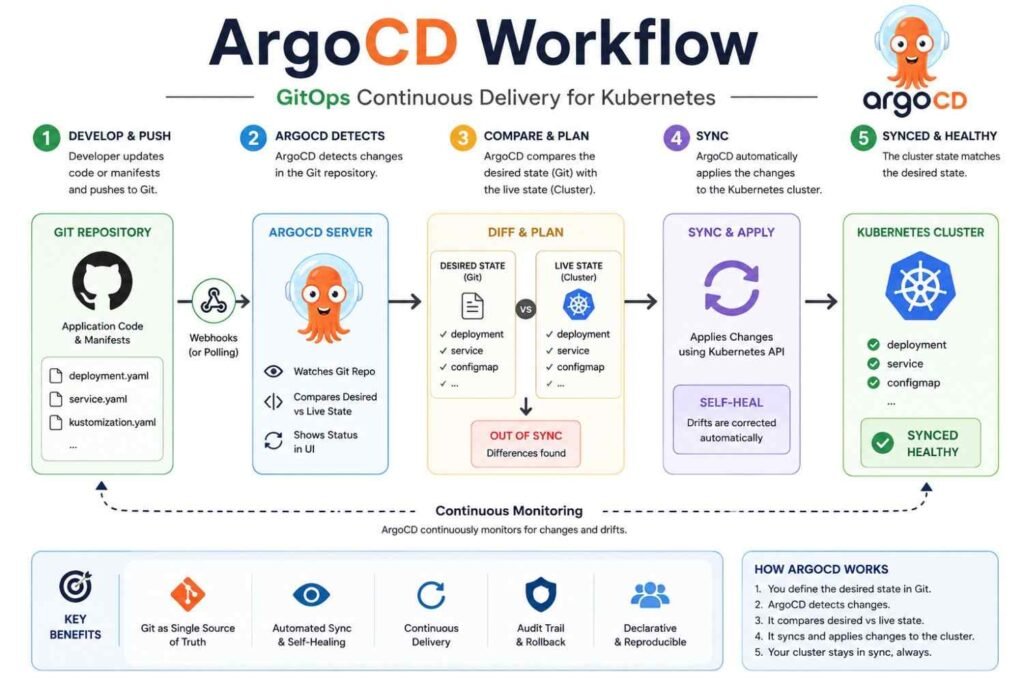
ArgoCD continuously watches your Git repository. Then it compares the files in Git with what is actually running in Kubernetes.
If both are different, ArgoCD starts syncing them. As a result, your cluster always matches the version stored in Git.
Even if someone changes Kubernetes manually, ArgoCD detects the difference. Then it can change the cluster back to the correct state automatically when auto-sync and self-heal are enabled.
H3: GitOps Workflow
The complete workflow looks very simple.
| Step | What Happens |
|---|---|
| 1 | Developer updates application or Kubernetes YAML files |
| 2 | Code is pushed to GitHub |
| 3 | ArgoCD detects the new Git commit |
| 4 | ArgoCD syncs the changes to Kubernetes |
| 5 | Your application starts running with the latest version |
Workflow
Developer
     ↓
GitHub
     ↓
ArgoCD
     ↓
Kubernetes
     ↓
Application Running
This pull-based workflow is safer than giving every CI pipeline direct access to production clusters.
H3: Why Git Is the Source of Truth
Git stores every change with a commit. Therefore, you always know:
- Who changed the deployment
- What changed
- When it changed
- Why it changed through Pull Requests
- Which version is running
This creates a complete audit trail. It also makes compliance much easier for companies that must track production changes.
H3: Version-Controlled Deployments and Rollback
Every deployment becomes part of Git history. Therefore, if a new release causes problems, you simply revert the Git commit.
ArgoCD detects the previous commit and deploys that version again. This makes rollback much faster than editing production manually.
H3: Benefits of GitOps ArgoCD
Using GitOps gives you several practical advantages.
- Automatic deployments
- Easy rollback using Git commits
- Full audit trail
- Less manual work
- Better team collaboration
- Same configuration across Dev, Test, and Production
- Faster disaster recovery
- Reduced configuration drift between environments
H3: Drawbacks of GitOps
GitOps is powerful, but it also has limits.
- Learning GitOps takes time.
- Teams must follow Git workflows carefully.
- Poorly managed repositories become difficult to maintain.
- Secret management needs additional tools like Vault or Sealed Secrets.
Large organizations usually solve these problems with clear standards and automation.
H3: When GitOps Is NOT Ideal
GitOps is not the best choice in every situation.
- Very small projects with one developer
- Applications that change configuration every few seconds
- Emergency fixes that cannot wait for Git approval
- Systems without version-controlled infrastructure
In these cases, traditional deployment methods may be faster.
By now, you understand what is GitOps ArgoCD and why many Kubernetes teams use it in 2026. Once you start treating Git as the only source of truth, deployments become more automatic, rollbacks become easier, and your entire Kubernetes environment stays consistent with much less manual work.
H2: How Does ArgoCD Work?
If you want to understand how ArgoCD works, think about one simple rule. Your Git repository becomes the only place where your Kubernetes application should match, and ArgoCD makes sure that happens all the time.
Instead of logging into your cluster and running manual commands, you only update Git. Then ArgoCD detects the change, checks your cluster, and deploys only what is needed.
ArgoCD Workflow Step by Step
The complete workflow looks like this.
| Step | What Happens |
|---|---|
| 1 | You commit code or Kubernetes files to Git. |
| 2 | Git sends a webhook to ArgoCD, or ArgoCD detects the change during its regular repository check. |
| 3 | Repository Server downloads the latest files. |
| 4 | Repository Server creates Kubernetes manifests from YAML, Helm, or Kustomize. |
| 5 | Application Controller compares Git with the live Kubernetes cluster. |
| 6 | If differences exist, ArgoCD starts synchronization. |
| 7 | Kubernetes resources are updated. |
| 8 | Your application becomes the latest version running in the cluster. |
The complete flow is easy to remember.
Git Commit
      ↓
Webhook
      ↓
Repository Detection
      ↓
Manifest Generation
      ↓
Comparison
      ↓
Sync
      ↓
Application Updated
This process usually finishes within seconds or minutes, depending on your application size and cluster resources. Git webhooks make deployments almost immediate, while periodic repository polling works even without webhooks.
Repository Server
The Repository Server is the first working component after Git changes. It connects to your Git repository and downloads the latest files.
Next, it generates Kubernetes manifests. It supports plain YAML files, Helm charts, and Kustomize without changing your existing project structure.
Application Controller
The Application Controller is the brain of ArgoCD. It continuously checks whether your Kubernetes cluster matches the files stored in Git.
If it finds any difference, it marks the application as OutOfSync. Then it starts the synchronization process automatically or waits for manual approval, depending on your settings.
API Server
The API Server acts as the front door of ArgoCD. Every request from the Web UI, CLI, or automation tools reaches this component first.
It manages user requests, application settings, synchronization, rollback, and communication with other ArgoCD components. Everything you click in the dashboard goes through this server.
Redis
Redis improves ArgoCD performance. It stores cached information instead of requesting the same data repeatedly.
Because of this cache, Git repositories and Kubernetes APIs receive fewer requests. Large environments become much faster and more responsive.
Dex
Dex is an optional authentication service. Most companies use it to allow employees to sign in with existing company accounts.
It supports providers like Google, GitHub, Microsoft Azure AD, Okta, and many other OpenID Connect services. This removes the need for separate ArgoCD usernames and passwords.
CLI
The ArgoCD CLI lets you manage everything from your terminal. Many DevOps engineers use it inside Jenkins pipelines, GitHub Actions, and automation scripts.
Some common CLI tasks include:
- Login to ArgoCD
- Create applications
- Sync applications
- Check application status
- Roll back deployments
The CLI communicates directly with the API Server, so both the terminal and dashboard perform the same operations.
Web UI
The Web UI gives you a graphical dashboard. You can monitor every application without using terminal commands.
From one screen, you can:
- View application health
- Check Sync Status
- Compare Git and live resources
- Start manual sync
- View deployment history
- Roll back failed deployments
This makes troubleshooting much easier, especially for beginners.
Git Repository
The Git repository is the single source of truth in GitOps. It stores everything needed for deployment.
For example, your repository may contain:
- Kubernetes YAML files
- Helm Charts
- Kustomize configuration
- Application configuration
- Namespace files
- Secrets management references
Whenever you update Git, ArgoCD treats that version as the desired application state.
Kubernetes Cluster
The Kubernetes cluster is the final destination. ArgoCD applies only the required changes instead of rebuilding everything.
As a result, deployments stay consistent across development, testing, staging, and production environments. This reduces manual mistakes and keeps every cluster aligned with Git.
Architecture Diagram Recommendation
For your blog, include a simple architecture diagram similar to this.
Developer
     │
     ▼
 Git Repository
     │
Webhook / Polling
     │
     ▼
 Repository Server
     │
Manifest Generation
     │
     ▼
Application Controller
     │
 Compare Live State
     │
     ▼
 API Server
  │      │
 UI     CLI
     │
     ▼
 Kubernetes Cluster
This diagram helps readers understand how does ArgoCD work within a few seconds. It also explains how every component works together to deliver safe, automatic Kubernetes deployments using GitOps.
H2: Core Features of ArgoCD
The Core Features of ArgoCD help you automate deployments, reduce manual work, and keep your Kubernetes cluster exactly the way you want. Once you start using these features together, you spend less time fixing problems and more time building new applications.
| Feature | Practical Benefit |
|---|---|
| Automatic Sync | Deploys Git changes automatically |
| Manual Sync | Gives you full deployment control |
| Self Healing | Fixes unwanted cluster changes |
| Drift Detection | Finds differences between Git and Kubernetes |
| Rollback | Restores a previous working version |
| Health Monitoring | Shows application health instantly |
| Multi Cluster | Manages many Kubernetes clusters |
| RBAC | Controls user permissions |
| SSO | Easy and secure login |
| Notifications | Sends deployment alerts |
| Helm Support | Deploys Helm charts easily |
| Kustomize Support | Manages Kubernetes overlays |
| ApplicationSets | Creates many applications automatically |
| Plugins | Supports custom deployment tools |
Automatic Sync
Automatic Sync watches your Git repository all the time. When you push new code, ArgoCD applies those changes to your Kubernetes cluster without waiting for you.
By default, ArgoCD checks Git regularly, and many teams also use Git webhooks for faster updates. This removes manual deployment work and keeps Git as the single source of truth.
Manual Sync
Manual Sync gives you complete control over deployments. You review every change before sending it to production.
Many companies use this method for production because it reduces deployment risks. It also fits approval-based release processes.
Self Healing
Self Healing automatically fixes unexpected changes inside your cluster. If someone edits a deployment with kubectl, ArgoCD changes it back to match Git.
Think about this as an automatic repair system. Your cluster always returns to the approved configuration stored in Git.
Drift Detection
Drift Detection compares your Git files with the live Kubernetes cluster. If both become different, ArgoCD immediately marks the application as OutOfSync.
This helps you find hidden changes before they create bigger problems. You always know whether your cluster still matches Git.
Rollback
Sometimes a new release contains bugs. Rollback lets you return to an earlier Git version within minutes.
You simply choose the previous working revision. Your application returns to a stable state without rebuilding everything.
Health Monitoring
ArgoCD continuously checks your application health. It quickly shows whether resources are Healthy, Progressing, Missing, Degraded, or Suspended.
You can spot deployment issues without logging into every Kubernetes node. This saves valuable troubleshooting time.
Multi Cluster
Many companies run several Kubernetes clusters. You may have separate clusters for development, testing, and production.
ArgoCD manages all of them from one dashboard. This makes large environments much easier to handle.
RBAC
RBAC stands for Role-Based Access Control. It lets you decide who can view, deploy, update, or delete applications.
For example:
- Developers deploy only development applications.
- QA teams access testing environments.
- DevOps engineers manage production.
- Administrators control everything.
SSO
Single Sign-On allows users to log in with existing company accounts. Teams commonly connect ArgoCD with GitHub, GitLab, Microsoft, LDAP, OIDC, OAuth2, or SAML providers.
This improves security and removes the need for separate passwords.
Notifications
Notifications keep your team informed automatically. ArgoCD can send alerts whenever deployments succeed, fail, or become unhealthy.
Popular notification channels include:
- Slack
- Microsoft Teams
- Webhooks
Your team knows about problems immediately instead of checking dashboards all day.
Helm Support
If you already use Helm charts, ArgoCD works with them directly. You simply point ArgoCD to your Helm repository or Git repository.
After that, every Helm release becomes easy to manage using GitOps.
Kustomize Support
Kustomize helps you use one base configuration for many environments. You keep one application and create different settings for development, staging, and production.
This reduces duplicate YAML files and makes updates much easier.
ApplicationSets
ApplicationSets automatically create multiple ArgoCD applications from one template. This is very useful when you manage dozens or even hundreds of applications.
Instead of creating every application manually, ArgoCD generates them for you.
Plugins
Plugins let you extend ArgoCD beyond its built-in features. You can connect your own configuration tools or deployment workflows without changing the core platform.
The Core Features of ArgoCD work together to automate deployments, detect configuration changes, recover from mistakes, and manage applications across multiple Kubernetes clusters. Once you learn these features and use them in real projects, you can build faster, safer, and more reliable GitOps pipelines.
How to Install ArgoCD on Kubernetes
If you want to learn how to install ArgoCD, you can finish the basic setup in about 10 to 15 minutes. The same steps work for local clusters like Minikube and for cloud clusters such as Amazon EKS, Azure AKS, and other Kubernetes platforms.
Prerequisites
Before you install ArgoCD on Kubernetes, make sure you have these ready.
- A running Kubernetes cluster
kubectlinstalled and connected- Cluster admin permissions
- Internet access to download the installation manifest
- Kubernetes version supported by the current Argo CD release (always check the official compatibility notes before production deployment)
Step 1: Create the ArgoCD Namespace
First, create a separate namespace for ArgoCD. This keeps all ArgoCD resources organized in one place.
kubectl create namespace argocdStep 2: Install ArgoCD
Now apply the official installation YAML. This creates all required Deployments, Services, ConfigMaps, Secrets, and RBAC resources automatically.
kubectl apply -n argocd -f https://raw.githubusercontent.com/argoproj/argo-cd/stable/manifests/install.yamlThis installation method is the most common choice for learning, testing, and many production environments.
Step 3: Verify the Pods
Next, wait a few minutes. Then check whether every pod is running.
kubectl get pods -n argocdYou should see pods like:
- argocd-server
- argocd-repo-server
- argocd-application-controller
- argocd-redis
All pods should display the Running status before you continue.
Step 4: Access the ArgoCD UI
By default, the ArgoCD server is not available outside your cluster. Therefore, use port forwarding.
kubectl port-forward svc/argocd-server -n argocd 8080:443Now open this address in your browser.
https://localhost:8080Ignore the browser security warning because ArgoCD uses a self-signed certificate by default.
Step 5: Get the Default Password
The default username is:
adminNow retrieve the temporary password.
argocd admin initial-password -n argocdOr use Kubernetes.
kubectl -n argocd get secret argocd-initial-admin-secret \
-o jsonpath="{.data.password}" | base64 -d
After your first login, change the password immediately for better security. You should also remove the temporary password secret after changing it.
Step 6: Install the ArgoCD CLI
The CLI helps you manage applications directly from your terminal. Download the latest version for Linux, Windows, or macOS from the official Argo CD releases page, then verify it with:
argocd versionAfter that, connect the CLI to your server and start creating GitOps applications. ([Argo CD][1])
Installation Works Everywhere
The same how to deploy ArgoCD process works on multiple Kubernetes platforms.
| Kubernetes Platform | Installation |
|---|---|
| Minikube | Supported |
| Amazon EKS | Supported |
| Azure AKS | Supported |
| Self-managed Kubernetes | Supported |
Now you know how to install ArgoCD from start to finish. After this setup, you are ready to connect your Git repository and deploy applications automatically using GitOps.
H2: ArgoCD Login and Web UI
If you want to start using argocd login, you only need the server address, username, and password. After that, you can manage your Kubernetes apps from both the command line and the web dashboard.
CLI Login
First, expose the ArgoCD server and then run the login command from your terminal. Next, enter the default username admin and your password.
argocd login <ARGOCD_SERVER>If your server uses a self-signed certificate, you may need the --insecure option during testing. However, always use a valid TLS certificate in production to keep your connection secure.
Web UI Login
Open your browser and visit the ArgoCD server URL. Then, sign in with the admin username and the initial password.
For ArgoCD version 1.9 and later, the first password is stored in the argocd-initial-admin-secret Kubernetes Secret. You can also display it by using the argocd admin initial-password command.
| Login Item | Value |
|---|---|
| Username | admin |
| Password | Initial password from argocd-initial-admin-secret |
| Protocol | HTTPS with TLS |
Best Practices
After your first login, follow these simple security steps.
- Change the default admin password immediately.
- Use a trusted TLS certificate instead of self-signed certificates.
- Enable SSO and RBAC for team access.
- Disable the local admin account if your organization uses SSO.
- Never share the initial password with other users.
With these steps, argocd login becomes simple, secure, and ready for daily DevOps work.
H2: How to Connect ArgoCD with GitHub or GitLab
Your ArgoCD GitHub setup starts by connecting your Git repository to ArgoCD. After that, every code change can move to your Kubernetes cluster automatically through your GitOps workflow.
Add Repository Credentials
First, open Settings → Repositories in ArgoCD. Then add your GitHub or GitLab repository by choosing the correct authentication method. [1])
For a Private Repository, you must provide valid repository credentials. Otherwise, ArgoCD cannot read your deployment files.
Choose the Right Authentication Method
| Method | Best For | Notes |
|---|---|---|
| HTTPS | Small projects | Easy to set up |
| SSH | Production | More secure than passwords |
| Deploy Keys | One repository | Read-only access is recommended |
| PAT (Personal Access Token) | Private repositories | Simple and widely used |
Connect Using HTTPS
Choose HTTPS if you want a quick setup. Then enter the repository URL with your username and password or access token.
Most teams now replace passwords with a PAT because GitHub and GitLab recommend token-based authentication. This gives better security and easier access control.
Connect Using SSH
SSH works well for long-term production environments. You only need to generate an SSH key pair and add the private key to ArgoCD.
Next, copy the public key to your GitHub or GitLab repository. After that, test the connection before creating your application.
Use Deploy Keys
A Deploy Key gives ArgoCD access to only one repository. Therefore, many DevOps teams use it for better security.
Keep the Deploy Key as read-only. This is enough because ArgoCD only reads your deployment files.
Use a PAT for a Private Repository
A Personal Access Token (PAT) is another common choice for a private repository. Generate the token in GitHub or GitLab, then use it as the password while adding the repository.
Always create a token with only the permissions you need. Also, rotate the token regularly to improve security.
Enable Webhooks
By default, ArgoCD checks your Git repository every few minutes. However, Webhooks notify ArgoCD immediately after every commit, so deployments start much faster.
Configure the webhook in your GitHub or GitLab repository settings. Then point it to your ArgoCD webhook endpoint.
Practical Workflow Example
The complete GitHub ArgoCD workflow looks like this:
GitHub
⬇
Commit
⬇
ArgoCD detects change
⬇
Deploy to Kubernetes
The same workflow also works with GitLab ArgoCD. Once your repository connection is ready, ArgoCD keeps your cluster synced with every approved Git commit, making ArgoCD GitHub deployments simple, secure, and automatic.
H2: How to Deploy Your First Application Using ArgoCD
If you want to learn how to use ArgoCD, start with a simple ArgoCD application. The Guestbook example is the most popular choice because it takes only a few minutes to deploy and helps you understand the complete GitOps flow.
Step 1: Create Your ArgoCD Application
First, open the ArgoCD web dashboard and sign in. Then click NEW APP.
Next, fill in these details.
| Field | Example Value |
|---|---|
| Application Name | guestbook |
| Project | default |
| Repository URL | https://github.com/argoproj/argocd-example-apps.git |
| Path | guestbook |
| Target Revision | HEAD |
| Cluster | https://kubernetes.default.svc |
| Namespace | default |
Finally, click Create. ArgoCD now creates your first application and starts checking your Git repository.
Step 2: Sync the Application
Now your application shows OutOfSync. This simply means your Kubernetes cluster does not match the files stored in Git.
Click SYNC and then click Synchronize. Within a few seconds, ArgoCD applies all Kubernetes YAML files to your cluster automatically.
Step 3: Monitor the Deployment
Next, watch the application status. You should see Healthy and Synced after the deployment finishes.
You can also check these items.
- Deployment
- Pods
- Service
- ReplicaSet
- Events
- Sync history
If any Pod fails, ArgoCD immediately shows the error in the dashboard. Therefore, you can fix problems much faster.
Step 4: Update the Application
Now make a small change in your Git repository. For example, change the number of replicas from 1 to 2.
Commit the change and push it to GitHub. ArgoCD detects the new commit and marks the application as OutOfSync. Then click SYNC again to deploy the latest version automatically.
Step 5: Roll Back if Something Breaks
Sometimes a new update causes problems. In that case, open the History tab.
Choose the previous successful deployment and click Rollback. Within minutes, ArgoCD restores the older working version directly from Git history.
Step 6: Delete the Application
When you finish testing, open the application page. Then click DELETE and confirm the action.
If pruning is enabled, ArgoCD also removes the Kubernetes resources created by that application. This keeps your cluster clean and avoids unused resources.
Real Example: Guestbook Application
The Guestbook application is the official demo used by thousands of Kubernetes learners around the world. It contains simple Kubernetes manifests, so you can safely practice creating, syncing, monitoring, rolling back, and deleting an application before deploying your own production workloads.
Quick Workflow
| Step | Action |
|---|---|
| 1 | Create the application |
| 2 | Sync with the Kubernetes cluster |
| 3 | Monitor health and status |
| 4 | Update files in Git |
| 5 | Roll back if needed |
| 6 | Delete the application after testing |
Now you know how to use ArgoCD from start to finish. After practicing with the Guestbook example a few times, you will feel confident deploying your own ArgoCD application in real DevOps projects.
Argo CD Declarative Helm Files
To manage Argo CD declaratively, you can use an Argo CD Application manifest (which targets the official community Helm chart) or a standalone configuration.
Below are the configurations needed for both deployment methods, utilizing the official Argo Helm Charts Repository.
Option 1: Argo CD Application Manifest
If you already have a bootstrapping instance of Argo CD or want to follow the GitOps pattern natively, use this CRD. It instructs Argo CD to download and deploy its own Helm chart.
apiVersion: argoproj.io/v1alpha1
kind: Application
metadata:
name: argocd
namespace: argocd
finalizers:
- resources-finalizer.argocd.argoproj.io # Enables cascading delete
spec:
project: default
source:
repoURL: 'https://argoproj.github.io/argo-helm'
chart: argo-cd
targetRevision: 9.7.0 # Replace with your desired chart version
helm:
# Pass custom configurations directly under valuesObject
valuesObject:
global:
domain: argocd.example.com
server:
ingress:
enabled: true
ingressClassName: nginx
destination:
server: 'https://default.svc'
namespace: argocd
syncPolicy:
automated:
prune: true
selfHeal: true
syncOptions:
- CreateNamespace=true
Option 2: Standalone Helmfile ()
If you use the CLI tool to manage deployments imperatively from your local machine or a CI/CD pipeline, use this format:
repositories:
- name: argo
url: https://argoproj.github.io/argo-helm
releases:
- name: argocd namespace: argocd chart: argo/argo-cd version: 9.7.0 # Replace with your desired chart version createNamespace: true values:
- global:
domain: argocd.example.com
server:
ingress:
enabled: true
ingressClassName: nginx
- global:
Key Customization Blocks
When deploying the argo-cd Helm Chart via these files, you will commonly want to alter the schema. Add these blocks under your values sections as needed:
- High Availability (HA) Mode:The default installation is non-HA. If you have at least 3 worker nodes, you can scale it up:
redis:
enabled: true
controller:
replicas: 1
server:
replicas: 2
repoServer:
replicas: 2
- Disable Ingress / Use NodePort:If you don’t use an Ingress controller, expose the UI via NodePort:
server:
service:
type: NodePort
📄 Github Application Definition Template (application.yaml)
To define an application for Argo CD to watch in Git and sync to your cluster, use the standard Argo CD Application Custom Resource (CRD).
template:yamlapiVersion:
apiVersion: argoproj.io/v1alpha1
kind: Application
metadata:
name: my-app
namespace: argocd
spec:
project: default
source:
repoURL: 'https://github.com'
targetRevision: HEAD
path: k8s-manifests # Path inside your repository
destination:
server: 'https://kubernetes.default.svc'
namespace: default
syncPolicy:
automated:
prune: true
selfHeal: true
Integrating GitLab with Argo CD
When integrating GitLab with Argo CD, you typically need two main configuration files: a file for the Argo CD Application resource (which points Argo CD to your GitLab repository) and a pipeline file (which automates building the code and updating the deployment manifests).
Here are the standard configurations required to set up a complete GitOps pipeline.
1 . The Argo CD Application File ()
This configuration file is applied to your Kubernetes cluster to instruct Argo CD to track your GitLab repository and continuously synchronize changes.
apiVersion: argoproj.io/v1alpha1
kind: Application
metadata:
name: gitlab-gitops-app
namespace: argocd
spec:
project: default
source:
repoURL: 'https://gitlab.com'
targetRevision: HEAD # Tracks the default branch (e.g., main)
path: 'k8s' # Folder inside the repository containing manifests
destination:
server: 'https://kubernetes.default.svc'
namespace: default # Namespace where your app will deploy
syncPolicy:
automated:
prune: true # Deletes resources no longer in Git
selfHeal: true # Automatically fixes drift in the cluster
2. The GitLab CI Pipeline File ()
In a pure GitOps workflow, your GitLab CI Pipeline should build the application container, push it to a registry, and then automatically modify the manifest files (such as updating the image tag). Argo CD then catches that commit and handles the actual cluster deployment.
stages:
- build
- deploy
variables:
IMAGE_TAG: $CI_REGISTRY_IMAGE:$CI_COMMIT_SHORT_SHA
Stage 1: Build the Docker image and push to GitLab Registry
build_image:
stage: build
image: docker:24.0.9
services:
- docker:24.0.9-dind
script:
- echo "$CI_REGISTRY_PASSWORD" | docker login $CI_REGISTRY -u $CI_REGISTRY_USER --password-stdin
- docker build -t $IMAGE_TAG .
- docker push $IMAGE_TAG
Stage 2: Update the manifest repository to trigger Argo CD
update_manifests:
stage: deploy
image: alpine:latest
before_script:
– apk add –no-cache git sed
# Configure Git credentials using a GitLab Project Access Token
– git config –global user.email “gitlab-ci@yourdomain.com”
– git config –global user.name “GitLab CI Bot”
script:
# Clone the repository containing your Kubernetes manifests
– git clone https://oauth2:${GITLAB_ACCESS_TOKEN}@://gitlab.com
– cd your-manifest-repo
# Update the deployment manifest file with the new container image tag
– sed -i “s|image:.*|image:$IMAGE_TAG|g” k8s/deployment.yaml
# Commit and push changes back to GitLab
– git add k8s/deployment.yaml
– git commit -m “ci:update deployment image to $CI_COMMIT_SHORT_SHA [skip ci]”
– git push origin HEAD
only:
– main
🛠️ Prerequisites & Setup Steps
- Private Repositories: If your GitLab repository is private, you must first register your credentials in Argo CD using the command line or through the user interface as detailed in the official Argo CD Private Repositories Guide.
- GitLab Access Token: Under your GitLab repository settings, generate a Project Access Token with permissions. Save this as a masked CI/CD variable named so the pipeline can push updates safely.
- Webhooks (Optional): To eliminate the default 3-minute poll delay, add an outbound webhook from GitLab to your Argo CD API server URL () to force immediate cluster synchronization on push events.
H2: How to Use the ArgoCD CLI
If you want to learn how to use ArgoCD CLI, start with a few basic commands. After that, you can create, deploy, update, and manage your Kubernetes applications from your terminal without opening the ArgoCD dashboard.
Login to ArgoCD
First, connect your terminal to the ArgoCD server.
argocd login <ARGOCD_SERVER>Replace <ARGOCD_SERVER> with your ArgoCD server address. Then enter your username and password to start your session.
Add Your Git Repository
Next, connect the Git repository that stores your application files.
argocd repo add https://github.com/your-org/your-repo.gitIf your repository is private, also add your Git username and password or SSH key. Then ArgoCD can read your application files whenever you sync.
Create a New Application
Now create an application from your Git repository.
argocd app create my-app \
--repo https://github.com/your-org/your-repo.git \
--path app \
--dest-server https://kubernetes.default.svc \
--dest-namespace default
This command tells ArgoCD where your code lives and where it should deploy it.
Sync the Application
After creating the application, deploy the latest Git changes.
argocd app sync my-appArgoCD compares your Git files with the Kubernetes cluster and applies only the required changes.
View Deployment History
You can check previous deployments anytime.
argocd app history my-appThis helps you see earlier revisions before making another change.
Roll Back to an Earlier Version
If a deployment causes problems, quickly return to a working version.
argocd app rollback my-app <ID>Replace <ID> with the revision number shown in the history command.
Delete the Application
Finally, remove an application when you no longer need it.
argocd app delete my-appAlways check the application name before running this command because the removal cannot be undone automatically.
| Command | Purpose |
|---|---|
argocd login | Connect to the ArgoCD server |
argocd repo add | Add a Git repository |
argocd app create | Create a new application |
argocd app sync | Deploy the latest Git changes |
argocd app history | View deployment history |
argocd app rollback | Return to a previous version |
argocd app delete | Remove an application |
Now you know how to use ArgoCD CLI for the complete application life cycle. Practice these seven commands on a test Kubernetes cluster, and soon you will manage most daily ArgoCD tasks with confidence.
Understanding Important ArgoCD Concepts
If you want to use ArgoCD like a real DevOps engineer, you must understand these important features. These settings help you automate deployments, reduce manual work, and keep your Kubernetes cluster exactly the same as your Git repository.
What is Prune?
Many beginners ask what is prune in ArgoCD because they see this option while creating an application. You can think of Prune as a cleanup feature that removes old Kubernetes resources which no longer exist in your Git repository.
For example, suppose your Git repository had a Deployment and a Service yesterday. Later, you delete the Service from Git and commit the change.
Without Prune, the Service still stays inside your Kubernetes cluster. However, when you enable Prune, ArgoCD automatically deletes that unused Service during the next sync.
Practical example
- Git contains Deployment + Service.
- You remove Service from Git.
- You commit and push the change.
- ArgoCD deletes the Service from the cluster when Prune is enabled.
This keeps your cluster clean and avoids unused resources.
What is Self Healing?
Sometimes someone changes a Kubernetes resource directly by using kubectl edit or another tool. Then your live cluster becomes different from your Git repository.
Self Healing automatically fixes that difference. It restores the resource back to the version stored in Git, so Git always remains the single source of truth.
Practical example
- Git says replicas = 3.
- Someone manually changes replicas to 5.
- ArgoCD detects the drift.
- Self Healing changes replicas back to 3 automatically.
Because of this, manual mistakes disappear quickly.
What is Auto Sync?
Normally you must click the Sync button after updating Git. However, Auto Sync removes this manual step.
Whenever you push new code or Kubernetes manifests to Git, ArgoCD automatically deploys the latest version into your Kubernetes cluster. Your CI pipeline only needs to push changes to Git, and ArgoCD handles the deployment.
Benefits
- No manual deployment
- Faster releases
- Less human error
- Better GitOps workflow
What is Sync Policy?
Sync Policy tells ArgoCD how it should apply changes from Git to Kubernetes. You choose whether deployments happen manually or automatically.
The two most common options are shown below.
| Sync Policy | When to Use |
|---|---|
| Manual Sync | Production environments where approvals are needed |
| Automated Sync | Development and testing environments for faster deployment |
You can also combine Auto Sync with Prune and Self Healing. This gives you a fully automated GitOps deployment process.
What is ApplicationSet?
Managing one application is easy. However, managing 20, 50, or even 500 applications becomes difficult.
ApplicationSet solves this problem by creating many ArgoCD Applications from a single template. Instead of writing hundreds of Application YAML files, you write one template and let ApplicationSet generate the rest automatically.
You commonly use ApplicationSet when:
- Managing many Kubernetes clusters
- Deploying the same app to multiple environments
- Running many customer or tenant deployments
- Working with large enterprise projects
This saves time and keeps configurations consistent across every environment.
What is ArgoCD Dex Server?
Many users search for what is ArgoCD Dex Server when setting up enterprise authentication. The Dex Server lets users sign in securely without creating separate usernames and passwords inside ArgoCD.
Instead, Dex connects ArgoCD with your company’s existing identity provider. This gives your team one secure login for multiple applications.
The Dex Server supports:
- Authentication – Verifies the user’s identity before allowing access.
- SSO (Single Sign-On) – One login gives access to multiple applications.
- OIDC (OpenID Connect) – Connects ArgoCD with providers like Google, Microsoft, GitHub, or Okta.
- LDAP – Connects ArgoCD with enterprise directories such as Microsoft Active Directory.
For example, if your company already uses Microsoft Entra ID or Google Workspace, your developers simply sign in with their existing company account. There is no need to remember another password.
Now you understand the most important ArgoCD concepts that every DevOps engineer uses in daily Kubernetes deployments. Once you practice Prune, Self Healing, Auto Sync, Sync Policy, ApplicationSet, and the Dex Server together, you can confidently build secure and fully automated GitOps pipelines.
H2: ArgoCD in a Real DevOps CI/CD Pipeline
The ArgoCD CI/CD pipeline becomes useful after your application is ready for deployment. It works with your existing CI tool instead of replacing it, so you get a safe, automated, and reliable Kubernetes deployment process.
How a Real DevOps Pipeline Works
Most DevOps teams in 2026 follow a pipeline similar to this.
Developer
     ↓
GitHub
     ↓
GitHub Actions / Jenkins
     ↓
Docker Hub
     ↓
Helm Chart Update
     ↓
Git Commit
     ↓
ArgoCD
     ↓
Kubernetes
     ↓
Prometheus
     ↓
Grafana
Now let’s understand every step in a practical way.
1. Developer Pushes Code
You write new code or fix a bug. Then you push your changes to a GitHub repository.
This is the starting point of the whole DevOps pipeline.
2. GitHub Starts the CI Pipeline
Next, GitHub Actions or Jenkins detects the new commit automatically. Then it starts the Continuous Integration (CI) process.
During this stage, the CI tool usually:
- Builds the application
- Runs unit tests
- Runs code quality checks
- Scans security issues
- Creates a Docker image
If any step fails, the pipeline stops immediately.
3. Docker Image Goes to Docker Hub
After all tests pass, the CI tool pushes the new Docker image to Docker Hub. Every image normally gets a new version tag like:
- app:v1.2.0
- app:v1.2.1
- app:v1.2.2
This image is now ready for deployment.
4. Helm Chart Gets Updated
Next, your CI pipeline updates the image tag inside the Helm chart. Then it commits that change back to the Git repository.
This Git commit becomes the new desired state of your Kubernetes application.
5. ArgoCD Starts Working
Now ArgoCD begins its real job. It continuously watches the Git repository for changes.
As soon as it detects the updated Helm chart, it compares Git with the Kubernetes cluster. If both are different, ArgoCD automatically syncs the cluster with Git.
6. Kubernetes Runs the New Version
Kubernetes receives the updated manifests from ArgoCD. Then it rolls out the new application version with the deployment strategy you configured.
If the cluster drifts from Git later, ArgoCD detects it and brings everything back into sync automatically.
7. Monitoring Starts
Finally, your deployment is monitored continuously.
- Prometheus collects application and cluster metrics.
- Grafana shows those metrics in dashboards.
- Your team quickly notices errors, CPU usage, memory usage, response time, and pod health.
This helps you find problems before users report them.
Does ArgoCD Replace GitHub Actions or Jenkins?
No. This is one of the biggest beginner mistakes.
| Tool | Main Job |
|---|---|
| GitHub Actions / Jenkins | Build, test, scan, package, and create Docker images (CI) |
| ArgoCD | Deploy applications from Git to Kubernetes (CD) |
Think about it like this.
GitHub Actions or Jenkins prepares the application. Then ArgoCD safely delivers that prepared application into Kubernetes using GitOps. They work together instead of replacing each other.
By following this ArgoCD CI/CD pipeline, you build once, test once, and deploy safely many times. That is why thousands of Kubernetes teams across the world use ArgoCD together with GitHub Actions or Jenkins instead of replacing their existing CI tools.
ArgoCD vs Jenkins
The ArgoCD vs Jenkins comparison helps you pick the right tool for your DevOps work. However, you should first understand that both tools solve different problems, and many teams use them together instead of replacing one with the other.
ArgoCD vs Jenkins Comparison Table
| Feature | ArgoCD | Jenkins |
|---|---|---|
| Purpose | Deploy Kubernetes applications using GitOps | Build, test, and automate software pipelines |
| Deployment | Pulls changes from Git automatically | Pushes deployments through pipeline jobs |
| Build | Does not build code | Builds source code, Docker images, and packages |
| Testing | No built-in testing | Runs unit, integration, and automation tests |
| Plugins | Limited because it focuses on deployment | More than 2,000 plugins for many tasks |
| Learning Curve | Easy if you know Kubernetes and Git | Medium to high because of pipelines and plugins |
| Best Use Cases | Kubernetes, GitOps, Helm, multi-cluster deployments | CI pipelines, testing, automation, and legacy projects |
Purpose
You should choose ArgoCD when your main goal is safe Kubernetes deployment. On the other hand, Jenkins works best when you need to build, test, and prepare your application before deployment.
Deployment
ArgoCD watches your Git repository all the time. Therefore, it automatically syncs your Kubernetes cluster whenever you approve a Git change.
Jenkins follows a push model instead. It runs deployment commands only after your pipeline reaches the deployment stage.
Build and Testing
ArgoCD never compiles your application. Instead, it only deploys the final Kubernetes manifests, Helm charts, or Kustomize files.
Jenkins builds your code, creates Docker images, runs automated tests, and stores build artifacts. After that, it can trigger ArgoCD for deployment.
Plugins
ArgoCD keeps things simple with a deployment-first design. As a result, you spend less time managing extensions.
Jenkins offers over 2,000 plugins for Git, Docker, cloud providers, security scanning, notifications, and many other tasks. However, managing many plugins can increase maintenance work.
Learning Curve
You can learn ArgoCD faster if you already understand Git and Kubernetes basics. Therefore, many cloud-native teams adopt it quickly.
Jenkins usually takes more time because you need to learn pipelines, Groovy scripts, agents, credentials, and plugin management.
Best Use Cases
Choose ArgoCD if you need:
- GitOps deployment
- Kubernetes automation
- Helm chart deployment
- Multi-cluster management
- Automatic rollback and self-healing
Choose Jenkins if you need:
- Code builds
- Automated testing
- CI pipelines
- Docker image creation
- Legacy application automation
Who Should Choose Which?
You should pick ArgoCD if your applications run on Kubernetes and you want a modern GitOps workflow. However, you should choose Jenkins when your biggest need is continuous integration, automated builds, and testing.
In real production environments during 2026, many DevOps teams use both tools together. Jenkins handles CI, while ArgoCD handles CD, giving you a faster, safer, and more reliable software delivery pipeline. This ArgoCD vs Jenkins approach follows modern GitOps best practices and is widely adopted across cloud-native organizations.
H2: ArgoCD vs Helm
Focus Keyphrase: ArgoCD vs Helm
Helm Packages Applications
Think about your application first. Then think about all Kubernetes YAML files that you need to deploy it.
Helm puts those files into one reusable package called a Helm Chart. So, instead of managing 20 or 30 YAML files, you manage one chart with simple values.
You can also reuse the same chart for different environments.
- Development
- Testing
- Staging
- Production
For example, you change only the values.yaml file to deploy the same application with different CPU, memory, image tag, or replica count.
ArgoCD Deploys Applications
Now your Helm chart is ready. Next, you need to deploy it safely.
This is where ArgoCD helps you. It watches your Git repository and checks your Kubernetes cluster all the time.
Whenever you push a new commit to GitHub, ArgoCD detects the change and updates the cluster automatically. It also keeps the cluster exactly the same as your Git repository through the GitOps workflow. ([Argo CD][1])
ArgoCD vs Helm: Quick Comparison
| Feature | Helm | ArgoCD |
|---|---|---|
| Main job | Packages applications | Deploys applications |
| Works with | Helm Charts | Git repositories |
| Focus | Templates and configuration | Continuous deployment |
| Tracks Git changes | No | Yes |
| Auto Sync | No | Yes |
| Detects configuration drift | No | Yes |
| Best use | Build reusable packages | Keep Kubernetes in sync |
Why ArgoCD and Helm Work Better Together
Many beginners think they must choose only one tool. However, that is not how real DevOps teams work.
In most companies, Helm creates the application package first. After that, ArgoCD deploys the Helm chart from Git and keeps it updated automatically. Argo CD uses Helm mainly to render templates, while Argo CD manages the complete application lifecycle and synchronization.
A practical workflow looks like this:
- Create a Helm Chart.
- Store the chart in GitHub.
- Update the image version or values.
- Commit and push the changes.
- ArgoCD detects the commit.
- ArgoCD deploys the latest version to Kubernetes.
- ArgoCD keeps the cluster synchronized automatically.
That is why experienced DevOps engineers use both tools together. Once you understand ArgoCD vs Helm, you can build a cleaner, faster, and more reliable Kubernetes deployment pipeline with GitOps.
H2: ArgoCD Alternatives
If you compare ArgoCD alternatives, you will quickly notice that every tool solves a different problem. So, you should choose the one that matches your team, project size, and deployment process instead of simply following trends. ([devtron.ai][1])
| Tool | Best For | Main Strength | Main Limitation |
|---|---|---|---|
| FluxCD | Pure GitOps teams | Lightweight and Kubernetes-native | No built-in web UI |
| Jenkins X | Full CI/CD on Kubernetes | Built-in CI and preview environments | Harder to learn |
| Spinnaker | Large enterprise deployments | Multi-cloud delivery | Complex setup |
| Harness | Enterprise DevOps teams | AI-powered deployment and verification | Commercial pricing |
| Rancher Fleet | Multi-cluster Kubernetes | Easy large-scale cluster management | Best inside the Rancher ecosystem |
FluxCD
FluxCD works well if you want a simple GitOps setup for Kubernetes. Also, you can install it quickly and manage everything directly from Git.
Best for
- Small and medium Kubernetes teams
- Pure GitOps deployments
Strengths
- Lightweight
- Fast automatic sync
- Strong CNCF support
Limitations
- No built-in graphical dashboard
- More command-line work
Jenkins X
Jenkins X fits teams that want both Continuous Integration and Continuous Delivery in one platform. As a result, you spend less time connecting multiple DevOps tools.
Best for
- Cloud-native development teams
- Kubernetes-based CI/CD
Strengths
- Preview environments
- Built-in CI/CD pipelines
- GitOps support
Limitations
- Steep learning curve
- More complex configuration
Spinnaker
Spinnaker works well for companies that deploy applications across several cloud providers. Therefore, many large organizations use it for advanced release strategies.
Best for
- Enterprise deployments
- Multi-cloud environments
Strengths
- Canary deployments
- Blue-green deployments
- Powerful release management
Limitations
- Difficult initial setup
- Higher maintenance effort
Harness
Harness is a commercial DevOps platform that focuses on automation and deployment safety. In addition, it uses AI-based deployment verification to reduce production failures.
Best for
- Enterprise DevOps teams
- Large production environments
Strengths
- AI-powered deployment checks
- Strong security and governance
- Easy visual pipelines
Limitations
- Paid platform
- More features than small teams may need
Rancher Fleet
Rancher Fleet helps you manage thousands of Kubernetes clusters from one place. Because of this, it becomes a strong choice for very large Kubernetes environments.
Best for
- Multi-cluster Kubernetes
- Large infrastructure teams
Strengths
- Centralized cluster management
- Fast GitOps deployment
- Good scalability
Limitations
- Works best with the Rancher platform
- Extra features may not help small projects
When you compare these ArgoCD alternatives, no single tool wins every situation. Instead, choose FluxCD for simple GitOps, Jenkins X for complete CI/CD, Spinnaker for multi-cloud, Harness for enterprise automation, and Rancher Fleet for large Kubernetes clusters.
H2: ArgoCD Pricing
If you are checking ArgoCD pricing, you will be happy to know that the core software costs ₹0 or $0. You can download, install, and use ArgoCD without paying any license fee because it is an open-source project under the Apache 2.0 license.
Open-Source and Free
You can use ArgoCD in personal projects, startups, and large companies. Also, you get regular updates from the open-source community without buying a subscription.
Enterprise Support Options
Some companies need expert help for production systems. Therefore, they buy enterprise support instead of paying for ArgoCD itself.
Common vendors include:
- Akuity
- Codefresh
- OpsMx
- Harness GitOps
These vendors offer features like 24×7 support, security guidance, SLA, monitoring, and managed GitOps services. Pricing depends on your company size, users, and support level.
Infrastructure Costs
Although ArgoCD is free, you still pay for the infrastructure that runs it. Therefore, plan these costs before deployment.
| Cost Item | Who Pays? |
|---|---|
| ArgoCD software | Free |
| Kubernetes cluster | You |
| Cloud servers or VMs | You |
| Storage and networking | You |
| Monitoring and backups | You |
| Enterprise support | Optional |
In short, ArgoCD pricing stays free for the software itself. However, your final cost depends on your Kubernetes infrastructure and whether you choose paid enterprise support from a vendor.
Advantages and Disadvantages of ArgoCD
If you want to understand the advantages and disadvantages of ArgoCD, you should first use it in a small Kubernetes project. Then you can clearly see where it saves your time and where it needs extra effort.
Advantages of ArgoCD
ArgoCD helps you manage Kubernetes deployments in a much safer and easier way. It also removes many manual tasks that often cause mistakes.
| Advantage | Practical Benefit for You |
|---|---|
| Declarative deployments | You only update Git, and ArgoCD applies the same changes to your cluster automatically. |
| Easy rollback | If a new release fails, you can return to an older Git commit within minutes. |
| Git history | Every change stays inside Git, so you always know who changed what and when. |
| Better security | You reduce direct access to production clusters because deployments come from Git. |
| Automation | ArgoCD watches your Git repository and syncs changes automatically when you enable Auto Sync. |
| Kubernetes-native | It works directly with Kubernetes resources like YAML, Helm charts, and Kustomize. |
| Full auditability | Every deployment has a complete history, which helps during troubleshooting and compliance checks. |
Why these benefits matter
You spend less time running manual kubectl commands. Instead, you review a Pull Request, merge it, and let ArgoCD handle the deployment automatically.
You also reduce human mistakes because Git becomes the single source of truth. As a result, every team member follows the same deployment process across development, testing, and production environments.
Disadvantages of ArgoCD
ArgoCD is powerful, but you should also know its limits before using it in production.
| Disadvantage | Practical Impact |
|---|---|
| Kubernetes only | You cannot use it for traditional Virtual Machines or bare-metal application deployments. |
| Learning curve | You need to understand Kubernetes, Git, YAML, and GitOps together. |
| GitOps mindset required | Every infrastructure change should go through Git instead of manual updates. |
| Initial setup complexity | Installing ArgoCD, configuring repositories, RBAC, authentication, and projects takes time. |
| Repository management overhead | Large teams need a clean Git structure, branch rules, and review process to avoid confusion. |
Should these disadvantages stop you?
For a small learning project, the setup may feel difficult at first. However, once you complete the initial configuration, daily deployments become much faster and more reliable.
For medium and large companies, the benefits usually outweigh these challenges. That is why many organizations adopt GitOps to improve deployment consistency, security, and change tracking across Kubernetes clusters.
By now, you can clearly understand the advantages and disadvantages of ArgoCD. Once you become comfortable with GitOps and Kubernetes, you will find that ArgoCD makes deployments simpler, safer, and much easier to manage every day.
Common Mistakes Beginners Make
When you start using ArgoCD, learning these ArgoCD common mistakes early saves you many hours of fixing problems later. Most deployment failures happen because of small setup mistakes, not because ArgoCD is difficult to use.
Incorrect Repository Paths
Many beginners give the wrong Git repository path or folder path. As a result, ArgoCD cannot find your Kubernetes files and the application stays OutOfSync.
Always check your repository URL, branch name, and folder before creating the application. A small typing mistake can stop your deployment completely.
Namespace Mismatch
Sometimes your YAML files use one namespace, but your ArgoCD application points to another. Therefore, your resources either fail to deploy or appear in the wrong place.
Create the namespace first if needed. Then make sure every namespace value matches across your YAML files and ArgoCD settings.
Wrong Sync Policy
Automatic Sync looks easy, but beginners often enable it without understanding how it works. Because of that, unexpected changes reach the Kubernetes cluster.
Start with Manual Sync while you are learning. After testing everything, switch to Automatic Sync only when you feel confident.
Ignoring RBAC
Many new users give full administrator access to everyone. However, this creates unnecessary security risks for your cluster.
Use Role-Based Access Control (RBAC) from the beginning. Give each team member only the permissions needed for their work.
Exposing ArgoCD Publicly
Some beginners expose the ArgoCD dashboard directly to the internet without proper protection. This makes your deployment platform an easy target for attackers.
Instead, protect it with authentication, HTTPS, VPN access, or an internal network. Public access should always be carefully secured.
Forgetting Prune Behavior
Many users remove files from Git and expect Kubernetes resources to disappear automatically. However, deleted resources remain if pruning is not enabled.
Understand prune settings before using automatic synchronization. Test them safely in a development environment first.
Storing Secrets in Git
Never save passwords, API keys, or tokens directly inside your Git repository. Even private repositories can become exposed accidentally.
Instead, use Kubernetes Secrets together with trusted secret management tools. This keeps your sensitive data much safer.
Mixing CI and CD Responsibilities
Many beginners ask ArgoCD to build Docker images or run tests. However, those jobs belong to your CI pipeline.
Use your CI tool to build, test, and push images. Then let ArgoCD handle only Kubernetes deployments from Git using the GitOps workflow.
| Mistake | Simple Fix |
|---|---|
| Wrong repository path | Verify repository URL, branch, and folder |
| Namespace mismatch | Keep namespace names identical |
| Wrong sync policy | Learn with Manual Sync first |
| Ignoring RBAC | Give minimum required permissions |
| Public ArgoCD access | Secure with authentication and HTTPS |
| Forgetting prune | Test prune before production |
| Secrets in Git | Use Kubernetes Secrets or a secret manager |
| Mixing CI and CD | Keep CI for builds and ArgoCD for deployments |
If you avoid these ArgoCD common mistakes, your GitOps workflow becomes much safer, cleaner, and easier to manage. These simple checks help you deploy applications with confidence and follow real-world DevOps practices from the very beginning.
H2: Best Practices from Production Environments
For production deployments, you should follow ArgoCD best practices from the beginning. They save your time, reduce deployment mistakes, and help your Kubernetes platform stay stable as your team grows.
Use Git as Your Single Source of Truth
Always keep your Kubernetes files only inside Git. Then every deployment comes from one trusted place, and every change stays recorded with complete history.
Never edit resources directly inside the cluster. Instead, update Git first and let ArgoCD sync the latest version automatically.
Protect Your Main Branch
Protect your main or production branch before anyone can deploy. This simple rule prevents accidental changes and keeps your production environment safe.
Enable branch protection in GitHub or GitLab. Also require approvals before merging important changes.
Review Pull Requests Before Deployment
Every deployment should begin with a Pull Request (PR). Another team member should review the code before it reaches production.
This process catches mistakes early. It also creates a clear audit trail for every deployment.
Separate Every Environment
Keep every environment completely separate. For example:
| Environment | Purpose |
|---|---|
| Dev | Daily development |
| QA | Testing features |
| Staging | Final verification |
| Production | Live users |
Never deploy directly from Dev to Production. Instead, promote the same tested version step by step.
Use Helm or Kustomize Consistently
Choose either Helm or Kustomize for your project. Then continue using the same tool across every environment.
Mixing both styles creates confusion. A consistent structure makes maintenance much easier.
Enable RBAC and SSO
Use Role-Based Access Control (RBAC) to give only the required permissions. Then connect Single Sign-On (SSO) with your identity provider so users log in securely using company accounts.
Use Projects to Isolate Teams
Create separate ArgoCD Projects for different teams. This limits access to only their applications, repositories, namespaces, and clusters.
As a result, one team cannot accidentally change another team’s applications.
Monitor Sync Status and Application Health
Check the ArgoCD dashboard every day. Watch both Sync Status and Application Health so you can find deployment problems before users notice them.
You should also connect Prometheus and Grafana for continuous monitoring and alerts.
Back Up ArgoCD Configuration
Back up your ArgoCD configuration regularly. Include Projects, Applications, RBAC settings, repositories, and Kubernetes secrets.
Store these backups in a secure location. Then you can recover quickly after failures or accidental deletion.
Integrate Deployment Notifications
Finally, connect notifications with Slack, Microsoft Teams, or email. Your team should know immediately when deployments succeed, fail, or go out of sync.
Fast notifications help you solve problems before they become production incidents. Therefore, following these ArgoCD best practices gives you a secure, reliable, and scalable GitOps platform for real production workloads.
Frequently Asked Questions (FAQ)
Your ArgoCD tutorial becomes much easier when you understand these common questions. Also, these quick answers help you use ArgoCD with more confidence in real DevOps projects.
Is ArgoCD a CI or CD tool?
ArgoCD is a Continuous Delivery (CD) tool, not a Continuous Integration (CI) tool. It watches your Git repository and deploys changes to Kubernetes automatically or after your approval.
For example, you can use Jenkins, GitHub Actions, or GitLab CI to build and test your code. Then ArgoCD takes over and deploys the new version to your Kubernetes cluster.
Can ArgoCD replace Jenkins?
No, not completely. Both tools solve different problems.
- Jenkins builds, tests, and creates Docker images.
- ArgoCD deploys those images to Kubernetes.
- Many companies use both together in one CI/CD pipeline.
This approach is common in 2026 because each tool focuses on what it does best.
Is ArgoCD free?
Yes. ArgoCD is completely free and open source.
It is a project under the Cloud Native Computing Foundation (CNCF). Therefore, you can install and use it without paying any license fee.
Does ArgoCD work without Git?
No, not for normal GitOps workflows. Git works as the single source of truth for your application configuration.
Without Git, ArgoCD cannot compare your desired state with the running Kubernetes cluster. That comparison is the main reason ArgoCD works so well.
Can ArgoCD deploy Helm charts?
Yes. ArgoCD has built-in support for Helm charts.
You simply connect your Git or Helm repository, and ArgoCD renders the Helm templates before deploying them to Kubernetes. This makes Helm and ArgoCD work smoothly together.
Can ArgoCD deploy multiple clusters?
Yes. One ArgoCD installation can manage many Kubernetes clusters.
This is useful when you have separate development, testing, staging, and production environments. Many large companies manage dozens or even hundreds of clusters from one ArgoCD setup.
How often does ArgoCD sync?
By default, ArgoCD checks Git repositories every 3 minutes (180 seconds). However, you can change this time based on your project needs.
You can also use Git webhooks for almost instant deployments after every Git commit.
Is ArgoCD secure?
Yes. ArgoCD includes several security features for enterprise use.
Some important features include:
- Role-Based Access Control (RBAC)
- Single Sign-On (SSO)
- Audit logs
- Secure repository access
- Kubernetes secret integration
Still, you should always follow security best practices and keep your ArgoCD version updated.
Does ArgoCD support GitLab?
Yes. ArgoCD works very well with GitLab.
It supports GitLab repositories, GitLab webhooks, and GitLab authentication. Therefore, many teams use GitLab CI for builds and ArgoCD for Kubernetes deployments.
What is the difference between ArgoCD and FluxCD?
Both are GitOps tools for Kubernetes. However, they have a few practical differences.
| Feature | ArgoCD | FluxCD |
|---|---|---|
| Web interface | Yes | No built-in UI |
| Easy for beginners | Yes | Moderate |
| GitOps support | Yes | Yes |
| Helm support | Yes | Yes |
| Multi-cluster support | Yes | Yes |
| Best for | Visual management and enterprise teams | Lightweight GitOps automation |
If you are new to GitOps, ArgoCD is usually easier because its web dashboard lets you see deployments, application health, and sync status in one place.
These answers should remove most of your doubts about this ArgoCD tutorial. Once you understand these basics, you can start using ArgoCD with Git, Helm, Jenkins, GitHub, GitLab, and Kubernetes in real production projects.
Final Thoughts
If you want to understand ArgoCD GitOps, now is the right time to start. Today, ArgoCD is one of the most trusted GitOps tools for Kubernetes, and the Argo project has been a CNCF Graduated project since 2022 because of its stability and wide production use.
Many DevOps teams choose ArgoCD because it keeps your Kubernetes cluster the same as your Git repository. Also, every change stays in Git, so you can track, review, and roll back updates whenever needed.
By 2025, a CNCF end-user survey showed that nearly 60% of Kubernetes clusters managed by respondents used ArgoCD for application delivery. Therefore, learning ArgoCD gives you a practical skill that many companies already use in production.
Who Should Learn ArgoCD?
You should learn ArgoCD if you are:
- A DevOps engineer
- A Platform engineer
- A Cloud engineer
- A Kubernetes administrator
- A Software developer working with Kubernetes
- A student preparing for cloud-native jobs
Your Next Learning Steps
| Step | What you should do |
|---|---|
| 1 | Install ArgoCD on a local Kubernetes cluster such as Minikube or Kind. |
| 2 | Deploy a simple sample application from a GitHub repository. |
| 3 | Make small changes in Git and watch ArgoCD sync them automatically. |
| 4 | Add Helm charts and manage application versions. |
| 5 | Finally, connect ArgoCD with your CI/CD pipeline using Jenkins or GitHub Actions so your builds and GitOps deployment work together. |
Keep practicing ArgoCD GitOps with small projects first. Soon, you will confidently deploy real Kubernetes applications using modern GitOps workflows followed by DevOps teams around the world.




Leave a Reply