A new blogger met me and asked one clear question: “Which blogging tools do I really need?”
He did not want to waste six months testing tools, themes, plugins, and courses.
That is a smart question because blogging is crowded now. In 2025, the average blog post was about 1,333 words, so quality matters more than random posting.
So, this guide gives you a simple blogging toolkit: tools to start, write, rank, grow, and earn.
You will learn:
- Which blogging tools you need first
- Which free tools are enough
- Which paid tools can wait
- What successful bloggers actually use
- What beginners should avoid
My honest view is simple: do not buy every shiny tool.
Start with the right blogging resources to start and grow a successful blog, then upgrade only when your blog starts showing real signs of growth.
Why Choosing the Right Blogging Resources Matters
What are blogging resources?
Blogging resources are the tools, platforms, services, templates, communities, and learning materials that help bloggers create content, optimize SEO, grow traffic, build an audience, and monetize their blogs efficiently.
The right blogging tools to start and grow a successful blog save you time, money, and stress. Random free tools look safe at first, but they can slow you down fast.
A bad host makes your blog slow. A confusing SEO tool makes you check scores more than you write.
This is where many new bloggers get stuck. They buy tools before they build a writing habit.
Reddit bloggers often say the same thing: beginners feel lost with too many SEO tools, and many ask for simple free tools before spending money.
The Simple Blogging Trap
Wrong Tools
↓
Confusion
↓
No Content
↓
No Traffic
↓
Quit Blogging
What You Really Need First
- A fast blog platform
- Basic SEO setup
- A simple writing tool
- Google Search Console
- One design tool
- One email tool
Do not chase every new blogging tool. First, publish useful posts that answer real reader questions.
Even experienced bloggers warn against tool overload. One blogging tool list says the writer spent over $25,000 testing good and bad tools, which shows how costly guessing can become.
So, choose tools like a builder chooses tools: only what helps today’s job. That is how blogging tools to start and grow a successful blog become a system, not a shopping list.
The Complete Blogging Resource Roadmap
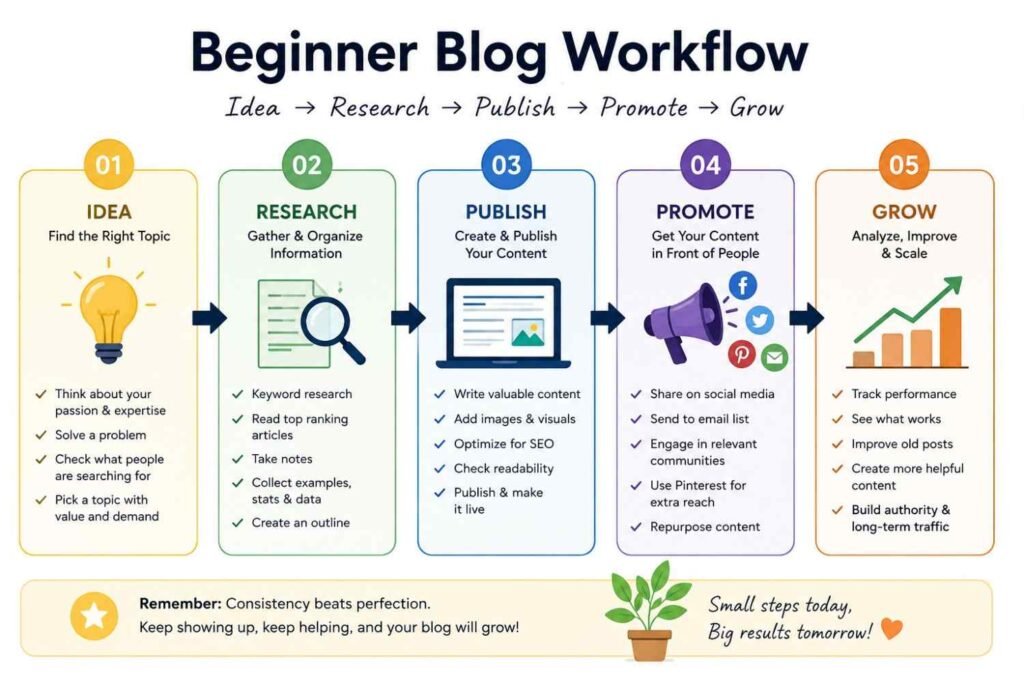
You do not need every blogging tool today. You need the right blogging resources to start and grow a successful blog, step by step.
In 2026, more than 600 million blogs exist worldwide, and around 7.5 million blog posts go live each day. So, your tool stack must help you write better, rank faster, and grow smarter.
| Blogging Stage | Needed Resources | What You Should Do First |
|---|---|---|
| Start | Domain + Hosting + WordPress | Set up your blog home. |
| Write | Google Docs + Grammarly | Write clean first drafts. |
| SEO | Rank Math + Search Console | Help Google find your posts. |
| Design | Canva | Make simple blog images. |
| Analytics | GA4 + Search Console | Track what works. |
| Promotion | Pinterest + Email | Bring readers back. |
| Growth | Ahrefs or Semrush | Use later, not on day one. |
| Monetization | Affiliate + Email + Ads | Earn after traffic starts. |
Start with the basics first: domain, hosting, and WordPress. Without these, your blog has no real home.
Then, write with Google Docs and check simple errors with Grammarly. After that, use Rank Math and Google Search Console to guide your SEO.
Next, design simple images in Canva. You do not need a designer in your first month.
Then, track your blog with GA4 and Search Console. Numbers show which posts bring clicks, traffic, and trust.
After that, promote your posts through Pinterest and email. This protects you from depending only on Google.
Use Ahrefs or Semrush later. These tools help more when you already have posts, keywords, and data.
Finally, monetize with affiliate links, email offers, and ads. The smartest blogging resources to start and grow a successful blog come in stages, not all at once.
Essential Blogging Resources for Starting a Blog
Your first blogging resource is not an SEO tool. It is your blogging platform.
Pick this with care because moving later feels like shifting a shop after customers know the address.
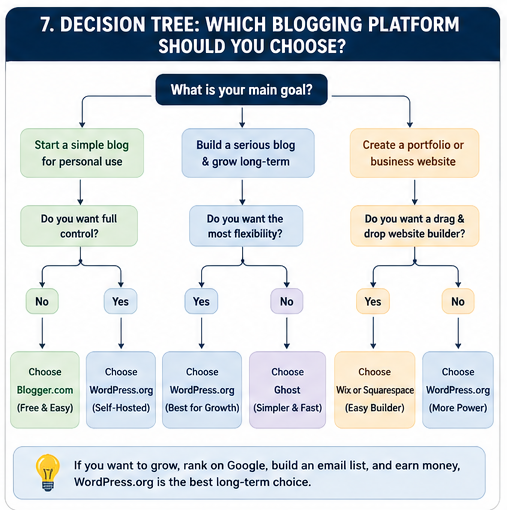
Choose a Blogging Platform
WordPress is still the best choice if you want full control. In July 2026, WordPress powers 41.5% of all websites and 59.2% of known CMS websites, so it is still the strongest long-term blogging platform.
But you may not need WordPress on day one. So, choose based on your time, budget, and skill.
| Platform | Pros | Cons | Pricing | Best For |
|---|---|---|---|---|
| WordPress.org | Best SEO control, plugins, ownership | Needs hosting and setup | Software free; hosting paid | Serious bloggers |
| Blogger | Free and simple | Old design, less control | Free | Hobby blogs |
| Wix | Easy drag-and-drop | Less flexible than WordPress | Paid plans | Small business beginners |
| Squarespace | Clean design | Less plugin freedom | Paid plans | Portfolio-style blogs |
| Ghost | Fast and clean writing setup | Better for newsletters than beginners | Paid hosting often starts around $15/month | Writers and paid newsletters |
| Medium | Built-in audience | You do not fully own the platform | Free; paid options exist | Testing ideas |
If you ask me, WordPress.org is the safest serious choice. Blogger is fine only when you want to practice without spending money.
Wix and Squarespace are good when you hate technical work. But you trade freedom for comfort.
Ghost is clean and fast. Still, I would not give it to a total beginner unless they want a newsletter-first blog.
Medium is useful for testing your voice. But it is not your real home because the audience belongs to Medium.
WordPress or Blogger?
Choose WordPress if you want SEO, income, design control, and long-term growth. Choose Blogger if you only want to write and learn the basics for free.
Here is my honest rule: if your blog is a business, use WordPress. If your blog is a notebook, use Blogger.
Is WordPress Still Worth It?
Yes, WordPress is still worth it for serious bloggers. Its market share has dipped in 2026, but it still has the largest plugin ecosystem and the most freedom for SEO, design, speed, and monetization.
Start simple: buy hosting, install WordPress, add a light theme, and publish your first 10 posts. That is the cleanest path when choosing blogging resources to start and grow a successful blog.
Choose Reliable Hosting
Good hosting is your blog’s rented home. So, choose it before you write your first post.
For the best hosting for blogging, look at four things: budget, speed, support, and ease. Do not buy only because the first-year price looks cheap.
| Hosting | Best for | Budget | Speed | Support | Beginner fit |
|---|---|---|---|---|---|
| Hostinger | New bloggers on a tight budget | Low | Good | 24/7 | Very good |
| Bluehost | WordPress beginners | Low–Medium | Good | 24/7 | Very good |
| SiteGround | Bloggers who want strong support | Medium | Fast | 24/7 human support | Good |
| Cloudways | Growing blogs with traffic | Higher | Very fast | 24/7 | Not for total beginners |
Hostinger is a good first choice when money is tight. Its India plans show low entry pricing and managed WordPress features.
Bluehost is simple for a new WordPress blog. It offers hosting, domain, SSL, and support in one place.
SiteGround costs more, but support is its strong point. It says it hosts over 3 million domains and offers 24/7 human help.
Cloudways is better when your blog grows. Its managed cloud hosting starts from $11/month, so use it when speed matters more than low cost.
My honest rule is simple: start cheap, but not weak. For the best hosting for blogging, pick the host you can manage without calling a developer.
Buy a Domain Name
Your domain name is your blog’s address. Keep it short, clean, and easy to say.
Use Namecheap if you want simple domain buying. It includes free lifetime domain privacy for new domains and transfers.
Use Cloudflare Registrar if you want low renewal cost. Cloudflare says it sells domains at cost with no markup or surprise fees.
A good domain should pass the phone test. You should say it once, and the other person should spell it right.
Avoid these mistakes:
- Do not use long names.
- Do not use hyphens.
- Do not use numbers.
- Do not copy a big brand name.
- Do not choose a name you will hate in one year.
Good example: simpleblogguide.com.
Bad example: best-blogging-tools-4-new-beginners-online.com.
Pick a .com if you can. If your blog is only for India, .in can also work.
Final tip: buy the domain first, then connect it to hosting. This keeps your blog clean, safe, and easy to grow.
Best SEO Resources Every Blogger Needs
The best SEO resources every blogger needs are simple: keyword tools, one SEO plugin, Google Search Console, and basic site health tools. Start with these before you buy any big SEO plan.
Keyword Research Tools
Keyword research tells you what people already search for. So, you do not write blind posts and hope Google finds them.
| Tool | Price | Difficulty | Accuracy | Best For |
|---|---|---|---|---|
| Google Keyword Planner | Free | Easy | Good | Basic keyword ideas |
| Ubersuggest | Free + paid | Easy | Medium | Beginners |
| Ahrefs | From about $29/month | Medium | High | Serious SEO |
| Semrush | From about $117/month | Hard | High | Full SEO work |
| LowFruits | Paid credits/plans | Easy | Good | Low-competition keywords |
Google Keyword Planner is free and gives keyword ideas from Google Ads data. It is good when you need simple topic ideas.
Ubersuggest is beginner-friendly and has keyword ideas, rank tracking, competitor checks, and site audits. Use it when Ahrefs or Semrush feels too costly.
Ahrefs is strong for backlinks, keyword gaps, and competitor research. Use it later, when your blog already has 30 to 50 posts.
Semrush is a full SEO tool for keywords, audits, content, competitors, and AI search visibility. It is powerful, but it can confuse a new blogger.
LowFruits is useful when you want easy keywords from weak Google results. I like it for new blogs because it shows where small sites can still win.
On-Page SEO Plugins
If you use WordPress, install only one SEO plugin. Do not install Rank Math and Yoast together.
Rank Math is my first pick for beginners who want more free features. It helps with titles, meta descriptions, schema, redirects, and basic on-page SEO.
Yoast is better if you want a simple, clean, old-trusted plugin. Its premium plan is about $118.80 per year, billed yearly.
Slim SEO is best if you hate settings. It is light, clean, and good for simple blogs.
Use this rule: choose Rank Math for more control, Yoast for simple guidance, and Slim SEO for a light setup. For a new blog, the free version is enough.
Google Search Console
Install Google Search Console before your first blog post. It is free and shows how Google sees your site.
It shows clicks, impressions, ranking words, indexing issues, and page problems. Without it, you may write for months and never know Google is not indexing your posts.
Many beginners learn this too late. They publish 20 posts, then find that only 5 pages are in Google.
Use it every week: check indexing, search queries, low CTR pages, and pages stuck on page two. This is where real blog growth starts.
Technical SEO Resources
Technical SEO keeps your blog fast, clean, and easy for Google to read. You do not need to become a developer.
Start with caching: use LiteSpeed Cache, WP Rocket, or your host’s cache. A fast page keeps readers from leaving.
Next, compress images with TinyPNG, ShortPixel, or Imagify. Large images are one silent reason new blogs feel slow.
Add schema through Rank Math or Yoast. Schema helps Google understand your article, FAQ, review, or how-to page.
Check broken links once a month. Broken links hurt user trust and waste Google’s crawl time.
Also watch Core Web Vitals in Search Console. If your site is slow on mobile, fix speed before writing 100 more posts.
The short answer: the best SEO resources every blogger needs are not expensive. You need the right tool at the right time, then you need to publish useful posts often.
Best Writing Resources for Bloggers
Good writing tools save your time. So, the best writing resources for bloggers are not the costly ones; they are the ones you use daily.
In 2026, AI is normal in content work. HubSpot says 80% of marketers use AI for content creation, but your real voice still matters most.
Start with Google Docs
Use Google Docs for your first draft. It is free, simple, and easy to share.
I still like it for rough blog drafts. It feels like writing on clean paper, not inside a heavy tool.
Use Notion for Blog Planning
Use Notion to store ideas, keywords, outlines, and publish dates. It works well when your blog has many topics.
For example: keep one table for “ideas,” one for “drafting,” and one for “published.” This gives you a simple blog writing system.
Use Grammarly and Hemingway for Editing
Grammarly helps you catch spelling and grammar mistakes. Hemingway helps you cut long and hard lines.
Use both after writing, not before. First write like a human; then clean it like an editor.
Use ChatGPT and Claude Carefully
ChatGPT and Claude are useful for research, outlines, angles, titles, and content gaps. But do not let them write your full blog without your own thinking.
My strong view is simple: AI can help your hand move faster, but it cannot replace your eyes, story, testing, and taste.
Simple AI + Human Blogging Workflow
Use this flow for every serious blog post:
| Step | Tool | What You Do |
|---|---|---|
| Research | Google, forums, AI | Find real questions |
| Outline | ChatGPT or Claude | Build a clear structure |
| Draft | Google Docs | Write in your own voice |
| Edit | Grammarly, Hemingway | Fix weak lines |
| SEO | Rank Math, Search Console | Add search intent |
| Publish | WordPress | Update after results |
Real Use Case
Suppose you write a post on “free SEO tools for bloggers.” First, collect reader questions from Google, Reddit, and YouTube comments.
Next, ask AI to group those questions. Then write your own answers from testing the tools yourself.
Quick Key Points
- Google Docs is best for simple writing.
- Notion is best for planning.
- Grammarly is best for clean grammar.
- Hemingway is best for short lines.
- ChatGPT and Claude are best for ideas, not blind copy.
- Your personal examples make the post worth reading.
The best writing resources for bloggers help you write faster, but they should not make your blog sound fake. Use tools like helpers, not as your brain.
Best Graphic Design Resources for Bloggers
Focus keyphrase: graphic design resources for bloggers
You need simple graphic design resources for bloggers because plain text feels dry. A good image can make your blog post easier to read, share, and remember.
In 2025, Canva reported that creative assets can improve memory recall by 74%. So, yes: blog images matter.
Canva: Best for Fast Blog Images
Use Canva for featured images, blog banners, Pinterest pins, and simple charts. I like it because you can make a clean image in 10 minutes, even if you are not a designer.
Start with one brand kit: two fonts, two colors, and one image style. This keeps your blog looking like one real brand.
Adobe Express: Best Canva Alternative
Use Adobe Express when you want quick social graphics, thumbnails, and branded posts. It feels simple, and it works well for clean blog visuals.
My rule is simple: use Canva first, then try Adobe Express only if you like Adobe’s templates more.
Unsplash and Pexels: Best Free Images for Blogs
Use Unsplash and Pexels for free blog photos. Pexels says its photos and videos are free to use, and attribution is not required.
Still, do not use the same “laptop and coffee” photo everyone uses. Search deeper: use words like “Indian workspace,” “small shop owner,” or “home desk evening.”
TinyPNG: Best for Image Compression
Use TinyPNG before uploading images to your blog. It compresses WebP, PNG, JPEG, and AVIF files, so your pages can load faster.
This small step matters because heavy images slow your site. Slow pages make readers leave.
Icons: Best for Clean Blog Design
Use icons for checklists, steps, pros, cons, and comparison boxes. But keep one icon style, or your post will look messy.
Good places to find icons are Canva icons, Font Awesome, and Google Material Symbols. Use them only where they explain something faster than words.
Pinterest Pin Design: Best for Blog Traffic
Make one Pinterest pin for each blog post. Use a tall design, a clear title, and one strong image.
Do not make the pin too fancy. A simple title like “Best Free Blogging Tools for Beginners” works better than a clever line nobody searches.
Quick Tool Table
| Need | Best Resource | Use It For |
|---|---|---|
| Blog banners | Canva | Featured images |
| Fast templates | Adobe Express | Social graphics |
| Free photos | Unsplash, Pexels | Blog images |
| Smaller files | TinyPNG | Image compression |
| Simple visuals | Icons | Steps and lists |
| Blog promotion | Pinterest pins | More clicks |
Short Blogger Rule
Create the image in Canva or Adobe Express. Pick the photo from Unsplash or Pexels.
Then compress it with TinyPNG before upload. These graphic design resources for bloggers are enough for a beginner blog.
Best Productivity Resources for Bloggers
Your blogging productivity resources should help you do one simple thing: move every idea from your head to a live blog post.
Do not start with five apps. Start with one clean workflow.
Simple Blog Workflow
Use this blogging workflow every week:
| Step | What You Do | Best Tool |
|---|---|---|
| Ideas | Save blog topics | Notion |
| Research | Add keywords and notes | Notion |
| Draft | Write the post | Google Docs |
| Edit | Fix weak lines | Google Docs |
| Publish | Upload to WordPress | WordPress |
| Promote | Share and track | Trello / ClickUp |
Notion: Best for Blog Ideas
Use Notion as your blog brain. Keep your topic ideas, keyword notes, outlines, and internal links in one place.
It works well for solo bloggers because it feels like a notebook. Asana also lists Notion as strong for content documentation in 2026.
Trello: Best for Simple Tracking
Use Trello if you like cards and boards. Make lists like: Ideas, Research, Draft, Edit, Publish, Promote.
Then move each blog post card step by step. This gives you a clear editorial calendar without stress.
ClickUp: Best for Serious Bloggers
Use ClickUp when your blog becomes bigger. It helps when you manage writers, deadlines, SEO tasks, and content updates.
But do not use it on day one if you feel lost. Trello is easier for a beginner.
Google Calendar: Best for Publishing Dates
Use Google Calendar for your publish days. Pick two fixed days each week, then protect those writing hours.
A content calendar helps you plan, organize, schedule, and track work from idea to publication.
My Simple Rule
Your editorial calendar should show only six stages: Ideas, Research, Draft, Edit, Publish, Promote.
Keep it boring. Boring systems help you publish more.
Key Points
- Use Notion for ideas and notes.
- Use Trello for a simple blog board.
- Use ClickUp when your blog grows.
- Use Google Calendar for writing time.
- Follow one workflow every week.
The best blogging productivity resources are not fancy tools. They are the tools you open daily and actually use.
Best Blog Promotion Resources
Blog promotion resources help you bring people to your blog after you publish. These blogging resources to start and grow a successful blog matter because good posts need readers, not silence.
Pinterest is not just a social app; it is a search tool for ideas. People go there to plan food, travel, fashion, money, home, parenting, and blogging topics.
Pinterest says it has 631 million monthly active users, and 96% of top searches are unbranded. That means new bloggers can still get seen without a famous name.
Use Pinterest like this:
- Make 2–3 pins for each blog post.
- Use clear titles on the image.
- Add your blog keyword in the pin title.
- Link each pin to the correct post.
- Test simple designs in Canva.
Facebook Groups
Facebook Groups work well when you help first. Do not enter a group and drop links like a lazy marketer.
Use groups to answer real questions. Then share your blog only when it truly solves the problem.
Good use case: join a gardening group if your blog is about balcony gardening in India. Answer one question daily, then share your post when someone asks for a full guide.
LinkedIn is best for business, career, finance, SaaS, marketing, HR, freelancing, and personal brand blogs. If your blog teaches skills, LinkedIn can bring serious readers.
Post one short lesson from your blog. Then add a soft line: “I wrote the full guide on my blog.”
X
X is good for fast thoughts, hot takes, and short lessons. It is not the safest long-term traffic source, but it helps you test ideas fast.
Use X to share hooks, small tips, and strong opinions. If people react, turn that idea into a full blog post.
Email Marketing
Email is the blog promotion resource I would start early. Search traffic can rise and fall, but your email list belongs closer to you.
This matters more now because AI search can reduce clicks to websites. Ahrefs reported that organic CTR on searches with Google AI Overviews fell from 1.76% in June 2024 to 0.61% in September 2025.
Start with simple tools:
| Tool | Best For |
|---|---|
| MailerLite | Beginners and low budget |
| Kit | Creators and bloggers |
| Beehiiv | Newsletter-first blogs |
| Buffer | Scheduling social posts |
Litmus says email can return about $36 for every $1 spent. That is why serious bloggers build email early, not after traffic comes.
Start simple: add one signup form, offer one free checklist, and send one useful email each week. These blogging resources to start and grow a successful blog work best when you use them daily, not once.
Best Analytics Resources for Bloggers
Your blogging analytics resources tell you one clear thing: what is working and what is wasting your time.
So, before you buy more blogging tools, set up these three free tools first.
1. Google Analytics 4
Use Google Analytics 4 to see what people do after they land on your blog.
It shows page views, time on page, bounce rate, traffic sources, and conversions.
In GA4, bounce rate means sessions that were not engaged; Google says it is the opposite of engagement rate.
Track these numbers:
- Time on page: Are people reading?
- Bounce rate: Are they leaving too fast?
- Conversions: Are they joining your email list?
- Top pages: Which posts bring value?
2. Google Search Console
Use Google Search Console to see how your blog performs on Google.
It shows clicks, impressions, CTR, and search position.
Here is the simple meaning:
| Metric | What it means |
|---|---|
| Clicks | People clicked your blog |
| Impressions | Google showed your page |
| CTR | Clicks divided by impressions |
| Position | Your average Google rank |
My rule is simple: if impressions grow but clicks stay low, fix your title and meta description.
3. Microsoft Clarity
Use Microsoft Clarity when numbers are not enough.
It shows heatmaps and session recordings, so you can watch how readers move on your blog.
This helps you find small problems fast: dead buttons, weak intro, bad layout, or ignored call-to-action.
What Should You Track First?
Do not track 50 things.
Track these six every week:
- Clicks
- Impressions
- CTR
- Bounce rate
- Time on page
- Conversions
Start with Google Search Console, then add GA4, then add Clarity.
These blogging analytics resources help you grow a successful blog with proof, not guesswork.
Best Monetization Resources
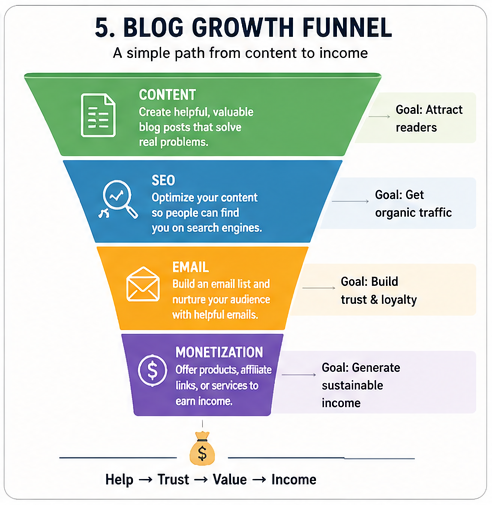
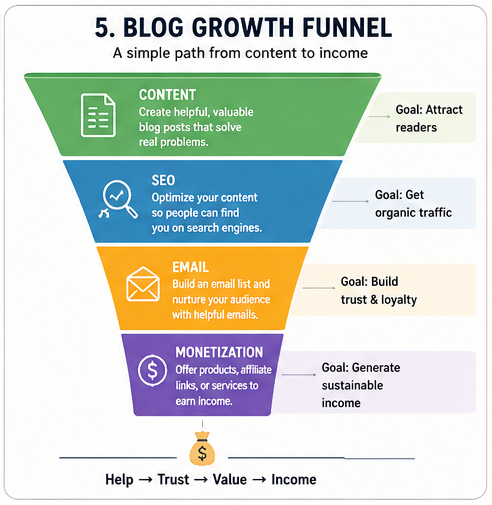
Blog monetization resources help you turn trust into income. But first, build traffic and an email list.
Best Order to Monetize Your Blog
Follow this order: traffic first, email second, affiliate links third, digital products fourth, and display ads last.
| Stage | Best Resource | Why It Works |
|---|---|---|
| 1 | Traffic | You need readers first |
| 2 | Email list | You keep your audience |
| 3 | Affiliate marketing | You earn from useful products |
| 4 | Digital products | You sell your own value |
| 5 | Display ads | You earn from page views |
Affiliate Marketing
Affiliate marketing is the easiest first money path for many bloggers. You recommend a tool, course, book, or product; then you earn when someone buys.
Start with products you already use. For example, Amazon India pays up to 10% in some categories as of July 2026.
Display Ads
Display ads pay you for views, clicks, or impressions. But ads need traffic before they feel worth it.
Do not add ads on day one. Mediavine Journey now allows smaller sites to apply from around 1,000 monthly sessions, which makes ads more beginner-friendly in 2026.
Digital Products
Digital products give you more control. You can sell ebooks, templates, checklists, mini-courses, or paid guides.
For example, a food blogger can sell a meal plan. A DevOps blogger can sell a Jenkins pipeline template.
Email Funnel
Your email list is your safest monetization resource. Google traffic can drop, but your email list stays with you.
Use MailerLite, Kit, or Beehiiv to collect emails. Kit says creators can use its network to recommend each other and grow email lists together.
When Should You Monetize?
Start affiliate links once you publish useful review or tutorial posts. Start digital products when readers ask the same question again and again.
Start ads only after steady traffic. In simple words: monetize after you help people, not before.
Quick Takeaway
Use affiliate marketing first because it is simple. Then build an email funnel, create digital products, and add display ads when traffic grows.
The best blogging monetization resources are not the loudest tools. They are the tools that match your traffic, trust, and reader need.
Free vs Paid Blogging Resources
Free vs paid blogging resources can both help you start and grow a successful blog.
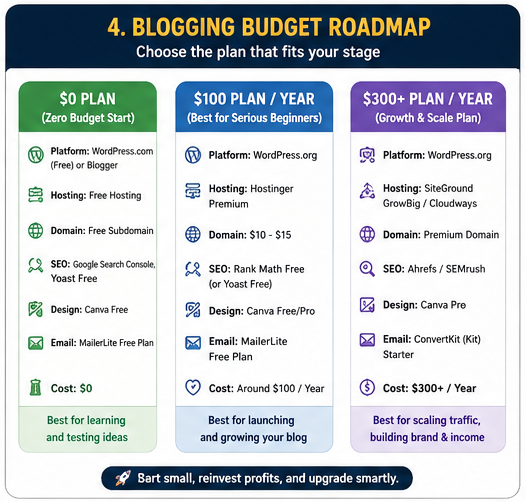
But here is the truth: free tools are enough when you are learning, and paid tools help when your blog starts moving.
Free vs Paid Blogging Tools Comparison
| Free Blogging Resource | Paid Blogging Resource | Use It For |
|---|---|---|
| Canva Free | Canva Pro | Blog images, pins, thumbnails |
| Google Search Console | Ahrefs | SEO, keywords, backlinks |
| Grammarly Free | Grammarly Pro / Superhuman | Grammar, tone, writing checks |
| Google Docs | Notion AI | Drafts, notes, content planning |
Best Budget Choice
Start with free tools first.
Use Google Docs for writing, Canva Free for images, Google Search Console for SEO, and Grammarly Free for basic checks.
This setup costs $0.
For a new blogger, that is not cheap thinking; that is smart thinking.
Best Value Choice
Upgrade only when one tool saves time every week.
For example, Canva Pro helps when you make many Pinterest pins, featured images, or social posts.
Ahrefs starts at $29 per month for its Starter plan in 2026, so buy it only when you already publish content and need better keyword data.
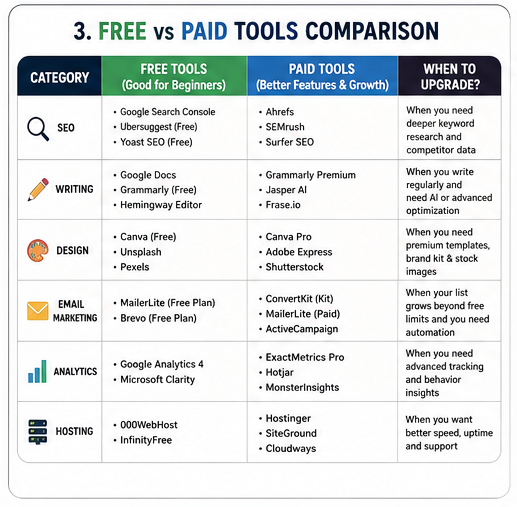
Best Upgrade Path
Follow this simple path: write first, track next, then upgrade.
Month 1: use free blogging tools and publish 8 to 12 useful posts.
Month 2 or 3: upgrade Canva if design slows you down.
Month 4 or later: try Ahrefs, Semrush, or another SEO tool when you need deeper keyword research.
My Honest Advice
Do not buy paid blogging resources to feel serious.
Buy them only when they remove a real blogging problem.
The best blogging resources to start and grow a successful blog are not always paid.
They are the tools you use every week without confusion.
Blogging Resources You DON’T Need Immediately
Not all blogging resources are needed on day one. Some tools look smart, but they only help after you have posts, traffic, and data.
I learned this the hard way with one new blogger. He bought tools first, then had no content to use them on.
Premium SEO Software
You do not need Ahrefs, Semrush, or advanced SEO tools in your first month. Start with Google Search Console, Google Keyword Planner, and one free SEO plugin.
Paid SEO tools make sense later: when you have at least 30–50 blog posts. Before that, they give more reports than real action.
Expensive Blogging Courses
A good course can help you. But a costly course cannot save a weak niche, poor writing, or lazy publishing.
First, learn by doing: pick a niche, write 10 posts, check Search Console, and improve. Then buy a course only when you know your exact problem.
Automation Tools
Do not automate a blog that has no system yet. Automation only speeds up what already works.
Use a simple content calendar first. After that, add automation for email, social posts, or affiliate tracking.
Heatmaps and Advanced Tracking
Heatmaps are useful, but not in the beginning. You need real visitors before you study clicks and scrolls.
Use Google Analytics 4 and Search Console first. Add Microsoft Clarity or heatmaps later, when your blog gets steady traffic.
Premium Themes
A premium theme will not make a weak blog successful. A clean, fast, free theme is enough at the start.
Choose speed over beauty. Readers want answers first, design second.
Too Many Plugins
Plugins feel helpful, but too many can slow your blog. A slow blog can hurt user experience and SEO.
Start with only the basics:
- SEO plugin
- Cache plugin
- Security plugin
- Backup plugin
- Image compression plugin
Quick Decision Table
| Resource | Buy Now? | Buy Later When |
|---|---|---|
| Premium SEO tools | No | You publish 30–50 posts |
| Expensive courses | No | You know your exact gap |
| Automation tools | No | You repeat the same task weekly |
| Heatmaps | No | You get steady traffic |
| Premium themes | Not needed | Design limits growth |
| Extra plugins | Avoid | One clear need appears |
Key Takeaway
Buy tools when they solve a real problem. Do not buy them because another blogger uses them.
The best blogging resources at the start are simple: writing, SEO basics, speed, tracking, and consistency. Everything else can wait.
Common Beginner Mistakes
Many beginners collect blogging resources before they publish one post. That feels smart, but it often slows your blog growth.
1. Buying Tools Before Publishing
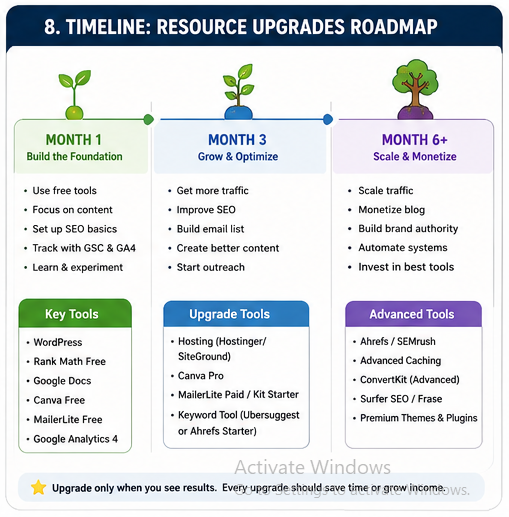
Do not buy every blogging tool on day one. First, publish 5 to 10 useful posts.
Start with free tools: Google Docs, Canva Free, Google Search Console, and Rank Math Free. Then upgrade only when a real problem appears.
2. Ignoring Google Search Console
This is a big mistake. Google Search Console helps you see clicks, search queries, indexing issues, and page problems.
Google says Search Console helps you monitor and fix your site’s presence in Google Search. So, add it before your first post goes live.
3. Changing Themes Again and Again
A new theme will not save a weak blog. Clear content beats fancy design.
Pick one clean, fast theme. Then keep it for at least 6 months.
4. Publishing Without Keyword Research
Do not write only what you like. Write what people search for.
Use one main keyword, one reader problem, and one clear answer. This makes your blog post easier to rank and easier to read.
5. Not Building an Email List
Google traffic can rise and fall. Your email list stays with you.
Start simple: add one signup form and offer one useful free checklist. You do not need a big funnel on day one.
6. Using Too Many Plugins
Too many plugins can slow your site. They can also break things.
Use only what you need: SEO, cache, security, backup, forms, and image compression. Remove the rest.
7. Writing Without Search Intent
Search intent means the real reason behind a search. A reader may want a guide, list, review, price, or comparison.
Before you write, ask: “What does this person want after reading?” Then give that answer fast.
Quick Fix Table
| Mistake | Better Action |
|---|---|
| Buying tools early | Publish first |
| No Search Console | Set it up today |
| Changing themes | Keep one clean theme |
| No keyword research | Check search demand |
| No email list | Add one signup form |
| Too many plugins | Keep only essentials |
| No search intent | Match the reader’s goal |
Key Takeaway
The best blogging resources to start and grow a successful blog are not the most expensive tools. They are the tools you use at the right time.
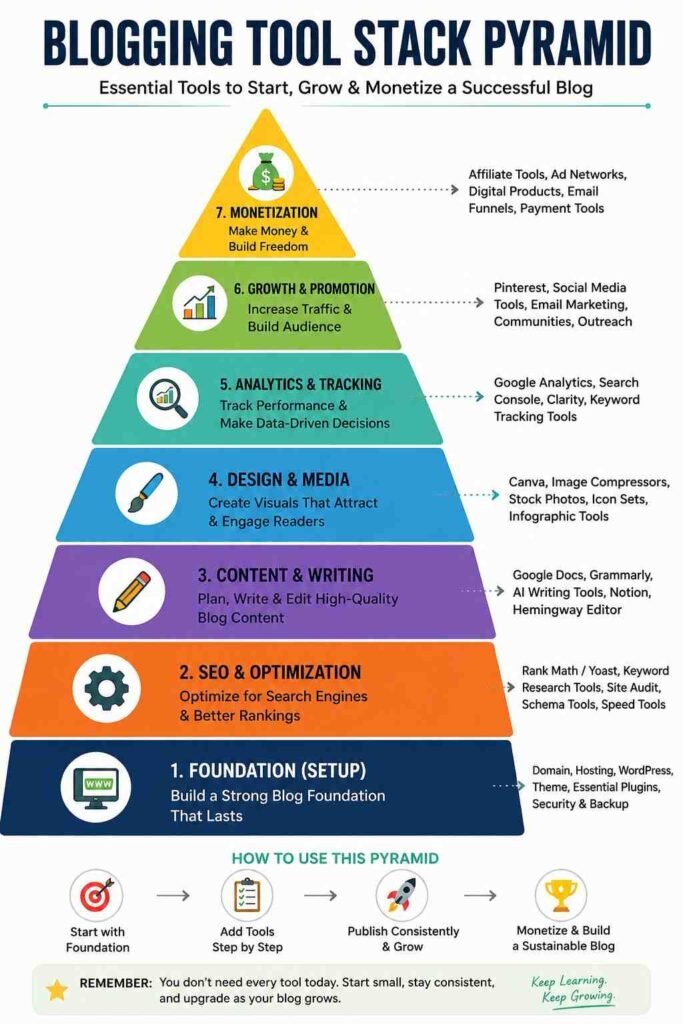
My Recommended Blogging Stack: Real Beginner Setup
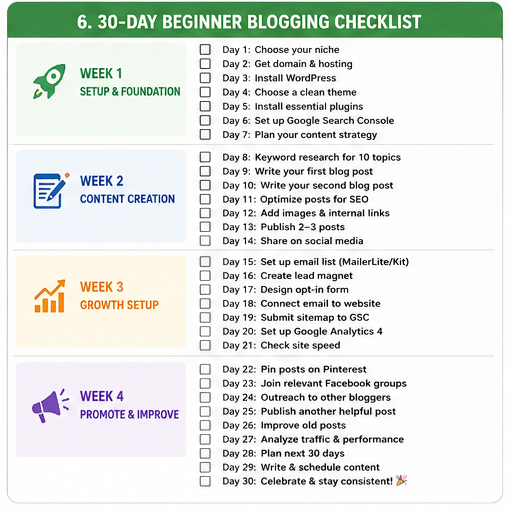
If you want blogging resources to start and grow a successful blog, do not buy every tool today. Start with a small stack, then upgrade only when your blog shows real signs of growth.
Budget Under $100/year: Start Lean
This setup is best for your first 3 to 6 months. Your goal is simple: publish, index, track, and learn.
| Need | Tool |
|---|---|
| Blog platform | WordPress |
| SEO | Rank Math Free |
| Writing | Google Docs |
| Design | Canva Free |
| Tracking | Google Search Console + GA4 |
| MailerLite Free | |
| Image size | TinyPNG |
Use cheap shared hosting first. Then connect WordPress and install only the basic plugins.
Use Google Search Console from day one. It shows search clicks, impressions, and indexing issues.
Use MailerLite only to collect early readers. Its free plan now includes 2,500 emails per month, so use it carefully.
Budget Under $300/year: Grow Smarter
Move to this stack when you publish 25 to 40 good posts. At this stage, guessing keywords becomes costly.
Add Ahrefs Starter for keyword checks and competitor research. Ahrefs lists its Starter plan at $29 per month.
Add Canva Pro only when images slow you down. Do not buy it just to feel professional.
Use Kit when email becomes serious. Kit is the new name for ConvertKit, and it focuses on creators, newsletters, and email growth.
Move to Cloudways when your site gets slow or traffic grows. Cloudways says its managed cloud hosting starts at $11 per month.
Advanced Stack: Use Only After Proof
This stack is not for a new blogger. Use it when your blog earns money or gets steady traffic.
- Semrush: best for deep SEO and competitor tracking.
- Surfer SEO: useful for content optimization.
- Adobe tools: good for serious brand design.
- Premium hosting: needed when speed affects income.
My strong opinion is simple: premium tools do not save a weak blog. Strong topics, clear writing, and steady publishing save it first.
So choose blogging resources to start and grow a successful blog in stages. Buy the next tool only when it removes a real problem.
Frequently Asked Questions
Do I need paid SEO tools?
No, you do not need paid SEO tools on day one. Start with free blogging resources to start and grow a successful blog: Google Search Console, Google Analytics, and a free SEO plugin.
Paid tools like Ahrefs or Semrush help later. First, publish useful posts and learn what people search for.
Can I start blogging free?
Yes, you can start blogging free. But free platforms give you less control.
Use free tools for writing, images, and basic SEO. Buy a domain and hosting when you treat your blog like a real asset.
Is WordPress still best?
Yes, WordPress is still the safest choice for most serious bloggers. It gives you control over design, SEO, plugins, and monetization.
Blogger and Medium are simple. But WordPress gives you more room to grow.
Can AI replace blogging?
No, AI cannot replace real blogging. AI can help with ideas, outlines, and editing.
But readers trust real stories, tests, examples, and clear opinions. HubSpot says brands need a strong point of view in 2026 because AI content is everywhere.
Which blogging resource is most important?
The most important resource is not a tool. It is a clear content plan.
After that, use these basics:
- WordPress for your blog
- Google Search Console for SEO
- Google Docs for writing
- Canva for images
- MailerLite or Kit for email
How much should beginners spend?
A serious beginner can start with around $50 to $150 per year. That usually covers a domain and basic hosting.
Do not buy every shiny tool. Spend first on hosting, then upgrade tools only when traffic grows.
Should I buy Ahrefs first?
No, do not buy Ahrefs first. Ahrefs is powerful, but it can confuse a new blogger.
Use Google Search Console first. Also, remember this: Ahrefs says only 1.74% of new pages reach Google’s top 10 within one year for at least one keyword.
How long before I see traffic?
Most new blogs need 3 to 6 months to see early signs. Real growth often takes 9 to 12 months.
So, do not judge your blog after ten posts. Judge it after 30 to 50 helpful posts.
What blogging tool is overrated?
Expensive SEO software is overrated for beginners. Premium themes are also overrated.
The best blogging resources to start and grow a successful blog are the ones you use every week: writing tools, SEO basics, email, and analytics.
Conclusion
You do not need 50 blogging resources to start and grow a successful blog. You need the right tools: one by one, in the right order.
First, set up your blog. Then write useful posts, check SEO, track results, and grow your email list.
Keep this simple stack:
- Platform: WordPress
- SEO: Google Search Console
- Writing: Google Docs
- Design: Canva
- Growth: Email list
- Tracking: Google Analytics
Do not wait for the perfect tool. Publish your first helpful post, improve the next one, and keep learning from real readers.
That is how serious bloggers grow. Start small, stay steady, and use blogging resources to start and grow a successful blog with clear action.


Leave a Reply