Keyword cannibalization in SEO happens when two or more pages on your site target the same search intent. As a result, your pages may compete with each other instead of helping one strong page rank higher.
For example: you publish “how to start a blog” and “how to begin blogging,” but both pages answer the same question. Google may struggle to decide which page is the best match, especially when the content is very similar.
This can split your internal links, backlinks, clicks, and ranking signals across several pages. So, one clear and useful page may often work better than many overlapping pages.
Key point: Keyword cannibalization becomes a problem when similar pages compete for the same search intent; find them, merge overlapping content, redirect weak duplicates, or give each page a clear purpose.
Why Keyword Cannibalization Hurts Your SEO
Keyword cannibalization can hurt your SEO when two or more pages target the same keyword and the same search intent. Instead of building one strong page, you make your own pages compete for the same Google search.
Your Page Authority Gets Split
Think of backlinks and internal links as votes for a page: you want those votes pointing to your best page. When several similar pages earn separate links, your SEO signals may spread across different URLs.
For example, you may have /start-a-blog/ and /how-to-start-blogging/ covering almost the same search need. One complete page may have a better chance to build strong topical relevance than two weak competing pages.
Google May Choose the Wrong Page
Google tries to find the page that best answers a search. When your pages look very similar, Google may choose a different URL than the one you want to rank.
You may also see URLs switch positions for the same search query over time. This can make your organic rankings less stable and harder to improve.
You May Lose Clicks and Conversions
The wrong page may rank even when another page gives users a better answer. As a result, people may skip your result, leave the page, or miss your main offer.
Similar Pages Can Waste Crawling
Googlebot must crawl URLs to find and update your content. Too many duplicate or low-value URLs can make crawling less efficient, especially on very large websites.
Key Point
Do not create several pages just to target small keyword variations. Give each page a clear search intent, and build one strong primary page for each main topic to reduce keyword cannibalization and strengthen your SEO.
How to Identify Keyword Cannibalization
You can spot keyword cannibalization by checking which pages rank for the same search term. However, do not panic just because two URLs appear for one keyword.
Check Google Search Console
Open Google Search Console and go to Performance > Search results. Click Queries, choose your target keyword, then open the Pages tab.
Look for two or more URLs getting impressions and clicks for the same query. Next, check if those pages answer the same search intent or keep swapping ranking positions.
Search Your Own Site on Google
Use this simple Google search:
site:yourdomain.com "target keyword"
This shows indexed pages linked to that topic. For example, if three blog posts all teach “how to start a blog,” read them side by side and check for content overlap.
Use an SEO Tool
Tools like Semrush can make the check faster. Its Cannibalization Report finds cases where several pages rank for the same tracked keyword.
How to Fix and Prevent It
First, decide which page best answers the search query. Then make that page your main page for the topic.
- Merge similar posts into one stronger guide.
- Use a 301 redirect when you remove an old duplicate page.
- Rewrite pages when each one should target a different search intent.
- Add clear internal links to your main page.
- Map one main topic and search intent to each page before you publish.
The key is simple: fix keyword cannibalization only when your pages truly compete. Two useful pages ranking for one keyword can sometimes be a win, not a problem.
How to Fix and Prevent Keyword Cannibalization
To fix keyword cannibalization, first decide which page should rank for the main search term. Think of your pages like road signs: two signs should not send Google to two different pages for the same answer.
Consolidate and Redirect Weak Pages
Find the strongest page by checking rankings, backlinks, clicks, and leads. Move useful content from weaker pages into that page, then use a 301 redirect to send old URLs to the main page.
Do not delete useful pages without a plan. A clean redirect keeps link value, helps users reach the right page, and reduces keyword overlap.
Reoptimize Pages With Different Search Intent
Sometimes two pages look similar but answer different questions. In that case, keep both pages and give each one a clear keyword, title, heading, and search intent.
For example, one page can target “how to start a blog,” while another targets “best blogging platforms.” This small change helps Google understand which page should rank for each query.
Use Canonical Tags When Needed
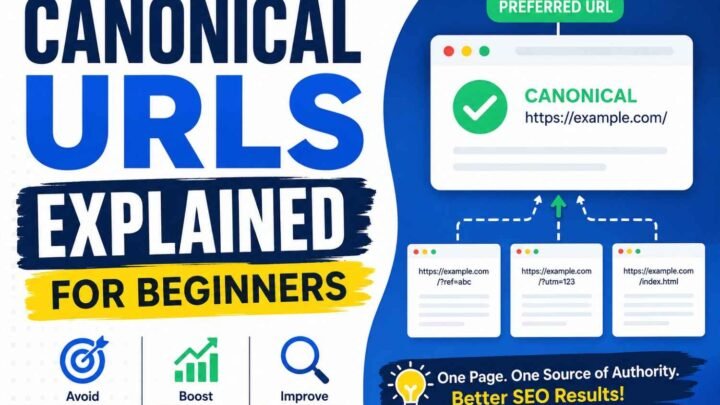
You may need similar pages for products, filters, locations, or business needs. Add a rel=”canonical” tag to show search engines which URL is the main version.
Build a Keyword Map Before Publishing
Create a simple keyword map with one main keyword and one search intent for each URL. I strongly recommend doing this before you write, because prevention takes less work than fixing ten competing pages later.
Check Google Search Console often for two URLs getting impressions for the same query. That simple habit can help you spot and fix keyword cannibalization before rankings, clicks, and conversions start to fall.


Leave a Reply